1. Introduzzjoni
This manual provides detailed instructions for the installation, operation, and maintenance of your new Generic Android Car Stereo. This unit is designed specifically for Peugeot 2008 models manufactured between 2013 and 2020, featuring a 10-inch IPS touchscreen, Android OS, and support for wireless CarPlay and Android Auto.
Il-karatteristiċi ewlenin jinkludu:
- Integrated Wireless CarPlay and Android Auto for seamless smartphone connectivity.
- 10-inch IPS HD Touchscreen with 1280*720 resolution for a clear visual experience.
- Android OS with 2GB RAM and 32GB ROM for efficient performance.
- Steering Wheel Control (SWC) compatibility for safe operation.
- Built-in GPS navigation and WiFi connectivity.
- FM/RDS Radio and Bluetooth 5.0 for audio streaming and hands-free calls.
- Support for AHD backup camera and various audio/video formats.
2. X'hemm fil-Kaxxa
Jekk jogħġbok ivverifika li l-komponenti kollha huma preżenti qabel tibda l-installazzjoni:
- 10 inch touch screen unit
- Plug and play power harness
- Ċinga RCA
- Reverse Harness
- Antenna tal-GPS
3. Setup u Installazzjoni
Installation of the car stereo requires basic automotive electrical knowledge. If you are unsure, professional installation is recommended. This unit is designed for a plug-and-play installation for Peugeot 2008 (2013-2020) models.
3.1 Passi ta' Qabel l-Installazzjoni
- Skonnettja l-batterija: Qabel tibda, skonnettja t-terminal negattiv tal-batterija tal-vettura tiegħek biex tevita xorts elettriċi.
- Neħħi l-Unità l-Qadima: Carefully remove the existing car stereo and trim panels from your dashboard. Refer to your vehicle's service manual for specific instructions.
3.2 Konnessjoni tal-Unità
- Ċinturin tal-Enerġija: Connect the provided plug-and-play power harness to the vehicle's wiring harness. Ensure all connections are secure.
- RCA and Reverse Harness: Connect the RCA harness for audio/video output and the reverse harness for the backup camera (if applicable).
- Antenna tal-GPS: Immonta l-antenna tal-GPS f'post b'dawl ċar view of the sky, typically on the dashboard or under the windshield, ensuring it is securely attached.
- Konnessjonijiet oħra: Connect any additional accessories such as USB cables, external microphones, or subwoofer outputs as needed.
3.3 Immuntar tal-Unità
- Carefully slide the new Android Car Stereo into the dashboard opening.
- Secure the unit using the appropriate mounting brackets and screws.
- Erġa' installa l-pannelli tat-trim kollha u kun żgur li huma mqiegħda sew.
3.4 Wara l-Installazzjoni
- Erġa' qabbad il-batterija tal-vettura.
- Turn on the ignition and power on the car stereo.
- Perform initial setup and test all functions (radio, audio, GPS, Bluetooth, CarPlay/Android Auto, SWC, reverse camera).
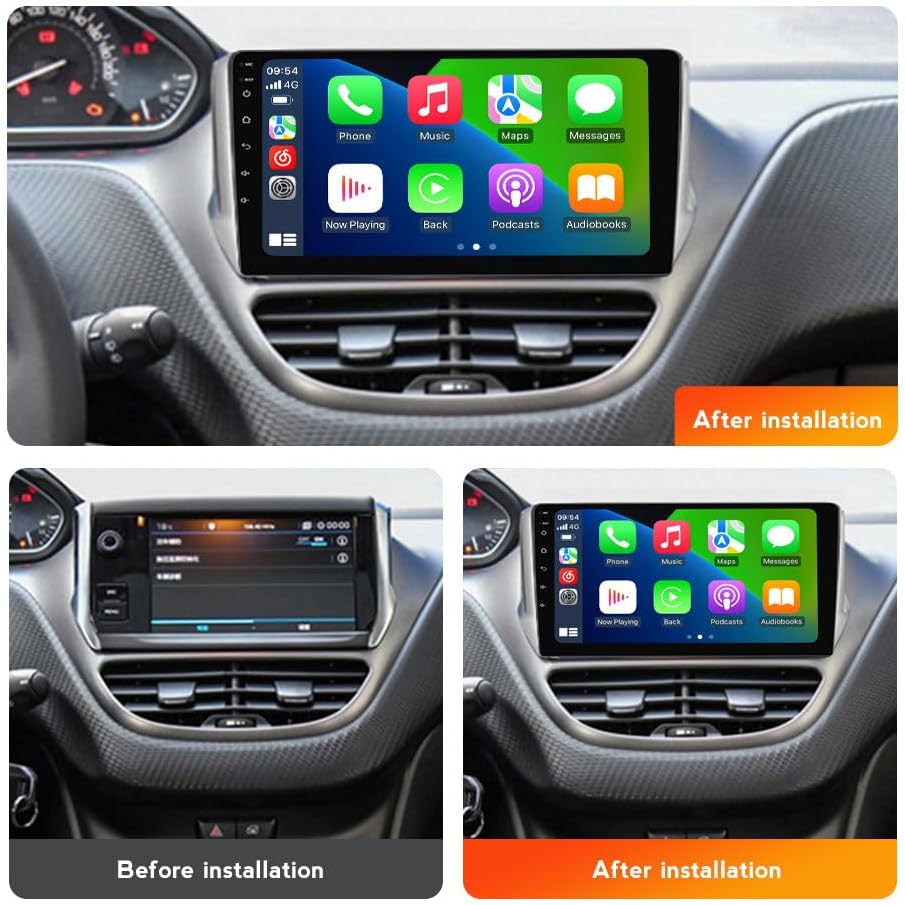
Image: Comparison of the dashboard before and after the installation of the Android Car Stereo, showing the integrated 10-inch display.
4. Istruzzjonijiet Operattivi
4.1 Mixgħul/Mitfi u Navigazzjoni Bażika
Press the power button (usually located on the front panel) to turn the unit on or off. The touchscreen interface allows for intuitive navigation through menus and applications. Swipe, tap, and pinch gestures are supported.
4.2 CarPlay mingħajr fili u Android Auto
This unit supports both wireless and wired CarPlay and Android Auto. Once connected, you can access navigation, make calls, send messages, and enjoy music directly from your smartphone interface on the car stereo display.
- Għal Konnessjoni Wireless: Ensure Bluetooth and Wi-Fi are enabled on your smartphone. On the car stereo, open the CarPlay/Android Auto application. Follow the on-screen prompts to pair your phone via Bluetooth first, then confirm the Wi-Fi connection.
- Għal Konnessjoni bil-wajer: Connect your smartphone to the car stereo's USB port using a certified USB cable. The system should automatically detect and launch CarPlay or Android Auto.
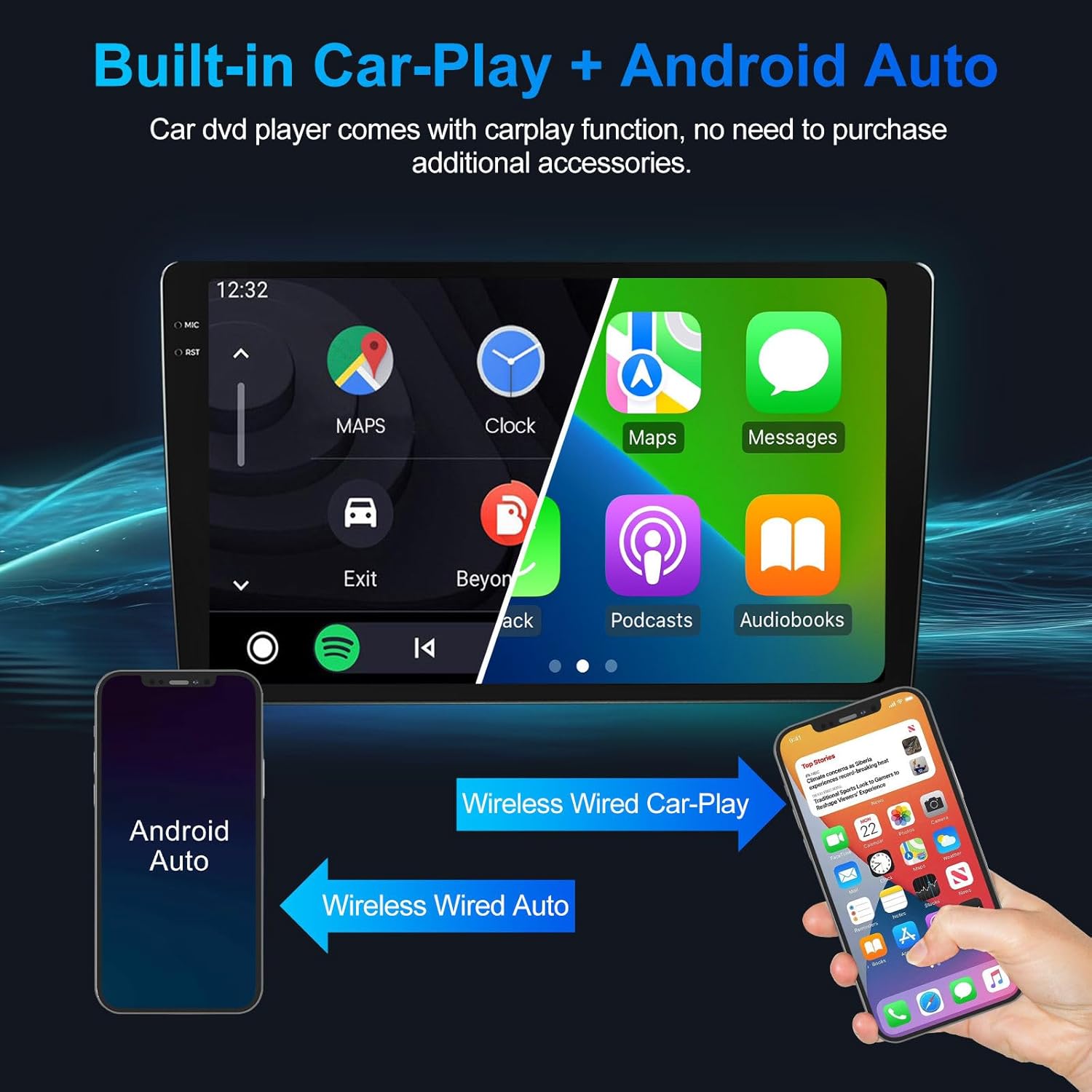
Image: The car stereo display showing the integrated CarPlay and Android Auto interfaces, with options for navigation, music, and communication.
4.3 Bluetooth & FM Radio
The unit features Bluetooth 5.0 for hands-free calling and audio streaming, and an FM/RDS radio tuner.
- Tqabbil Bluetooth: Go to the Bluetooth settings on the car stereo. Enable Bluetooth on your phone and search for the car stereo's device name. Select it to pair. Once paired, you can make/receive calls and stream audio.
- Radju FM: Open the Radio application. Use the on-screen controls to scan for stations, save presets, or manually tune to a frequency. RDS (Radio Data System) provides station information where available.

Image: The car stereo display showing the FM radio interface with frequency display and options for station selection, alongside an icon indicating Bluetooth connectivity.
4.4 Navigazzjoni GPS u WiFi
The built-in GPS module and WiFi connectivity allow for real-time navigation and access to online services.
- Navigazzjoni GPS: Open the Navigation application. The unit supports various map applications. Ensure the GPS antenna is properly installed for accurate positioning.
- Konnessjoni WiFi: Go to Settings > Network & Internet > Wi-Fi. Connect to an available Wi-Fi network (e.g., your phone's hotspot) to access online maps, download apps, or browse the internet.

Image: The car stereo display showing a GPS navigation map with real-time traffic conditions and icons for various supported navigation applications like Waze, Navitel, iGO, Sygic, Yandex, and Google Maps.
4.5 Kontroll tal-Istering Wheel (SWC)
After correct wiring during installation, you can use your vehicle's steering wheel controls to manage the car stereo, such as adjusting volume, changing tracks, and answering calls. This enhances driving safety by keeping your hands on the wheel.

Image: The car stereo display showing a music playback screen, with an inset image highlighting the steering wheel controls used to operate the unit.
4.6 Wara View Appoġġ għall-Kamera
The unit supports AHD backup cameras. When the vehicle is shifted into reverse, the display will automatically switch to the camera feed, providing a clear view of the area behind your vehicle and displaying parking lines for assistance.
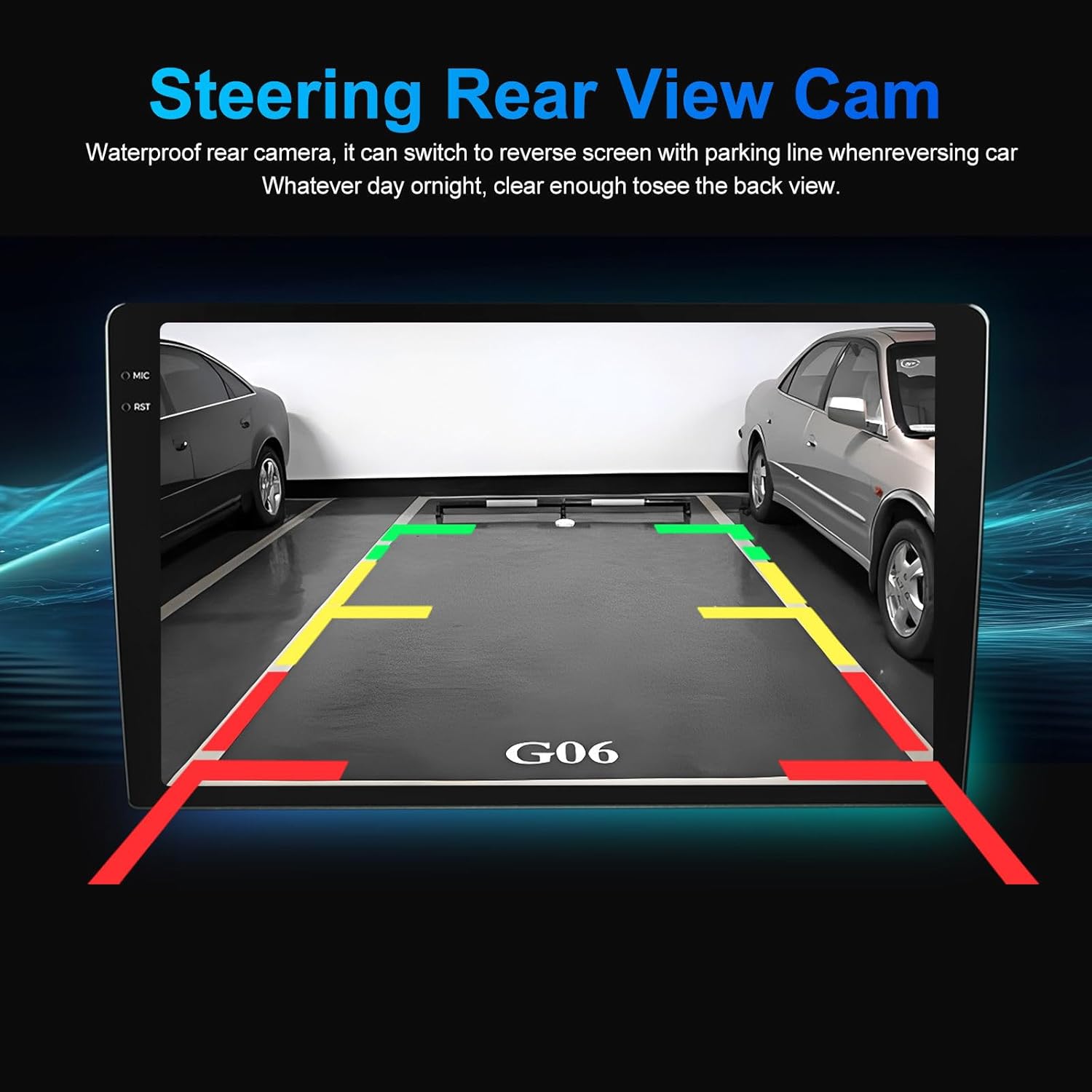
Image: The car stereo display showing the view from a rear camera, complete with dynamic parking guidelines to assist with reversing.
5. Manutenzjoni
- Tindif tal-Iskrin: Uża drapp artab u mingħajr suf iddisinjat speċifikament għal skrins elettroniċi. Tużax prodotti tat-tindif jew solventi li joborxu.
- Aġġornamenti tas-Software: Iċċekkja perjodikament għal aġġornamenti tas-softwer permezz tas-settings tas-sistema jew tal-manifattur websit biex jiżgura prestazzjoni ottimali u aċċess għal karatteristiċi ġodda.
- Kura Ġenerali: Evita li tesponi l-unità għal temperaturi estremi, dawl tax-xemx dirett għal perjodi twal, jew umdità eċċessiva.
6 Issolvi l-problemi
| Problema | Kawża Possibbli | Soluzzjoni |
|---|---|---|
| Ebda Qawwa | Konnessjoni tal-enerġija maħlula, fjus maħruq, problema bil-batterija tal-vettura. | Check power harness connections. Inspect vehicle fuses. Ensure battery is charged. |
| Ebda Ħoss | Volum baxx wisq, mute attivat, problema bil-wajers tal-ispiker, sors awdjo mhux korrett. | Increase volume. Check mute setting. Verify speaker connections. Select correct audio source. |
| Sinjal tal-GPS Mitluf/Mhux Preċiż | GPS antenna obstructed or improperly installed, poor satellite reception. | Kun żgur li l-antenna tal-GPS għandha viżibilità ċara view tas-sema. Iċċekkja l-konnessjoni tal-antenna. Mexxi lejn żona miftuħa. |
| CarPlay/Android Auto Mhux Qed Jikkonnettja | Bluetooth/Wi-Fi off, incorrect pairing, faulty USB cable, phone software issue. | Ensure phone's Bluetooth/Wi-Fi is on. Re-pair device. Try a different USB cable. Restart phone and stereo. |
| Kontrolli tal-Istering Wheel Mhux Jaħdmu | Incorrect wiring, SWC settings not configured. | Verify SWC wiring. Access stereo settings to configure SWC mapping. |
7. Speċifikazzjonijiet
| Karatteristika | Dettall |
|---|---|
| Brand | Ġeneriċi |
| Isem tal-Mudell | PE03M150CP |
| Sistema Operattiva | Android |
| Daqs tal-Iskrin | 10 Pulzier |
| Tip ta 'Wiri | LCD, IPS HD Touchscreen |
| Riżoluzzjoni | 1280 * 720 |
| Proċessur | 4-qalba |
| RAM | 2GB |
| Ħażna Interna (ROM) | 32GB |
| Konnettività | Bluetooth 5.0, Wi-Fi, USB, Ethernet |
| Navigazzjoni | Built-in GPS, Worldwide Map Type |
| Integrazzjoni tal-Karozza | Wireless CarPlay, Wireless Android Auto, Steering Wheel Control (SWC) |
| Modalità tal-Ħruġ tal-Awdjo | Stereo |
| Formati Awdjo Appoġġjati | APE, FLAC, WAV, MP3, WMA, eċċ. |
| Formati tal-Vidjo Appoġġjati | MKV, RMVB, AVI, MP4, MDV, eċċ. |
| Komponenti Inklużi | 10 inch touch screen, GPS Antenna, RCA Harness, Reverse Harness, plug and play power harness |
| Tip ta' Vettura Kompatibbli | Car, RV, SUV, Truck (specifically Peugeot 2008 2013-2020) |
8. Garanzija u Appoġġ
8.1 Informazzjoni dwar Garanzija
Dan il-prodott jiġi ma 'a 1-Sena Garanzija from the manufacturer, Shuanglongfei. Please retain your proof of purchase for warranty claims.
8.2 Appoġġ għall-Klijent
For technical assistance, troubleshooting, or warranty inquiries, please contact the seller, SLF E-commerce, through the platform where the purchase was made. Provide your order number and a detailed description of the issue for prompt support.


