
Introduzzjoni
Thank you for choosing the Baldr Digital Indoor Thermometer & Hygrometer. This device is designed to provide accurate, real-time measurements of indoor temperature and humidity. It operates efficiently using ambient light, eliminating the need for traditional batteries. This manual will guide you through the setup, operation, and maintenance of your new device.
Karatteristiċi tal-Prodott
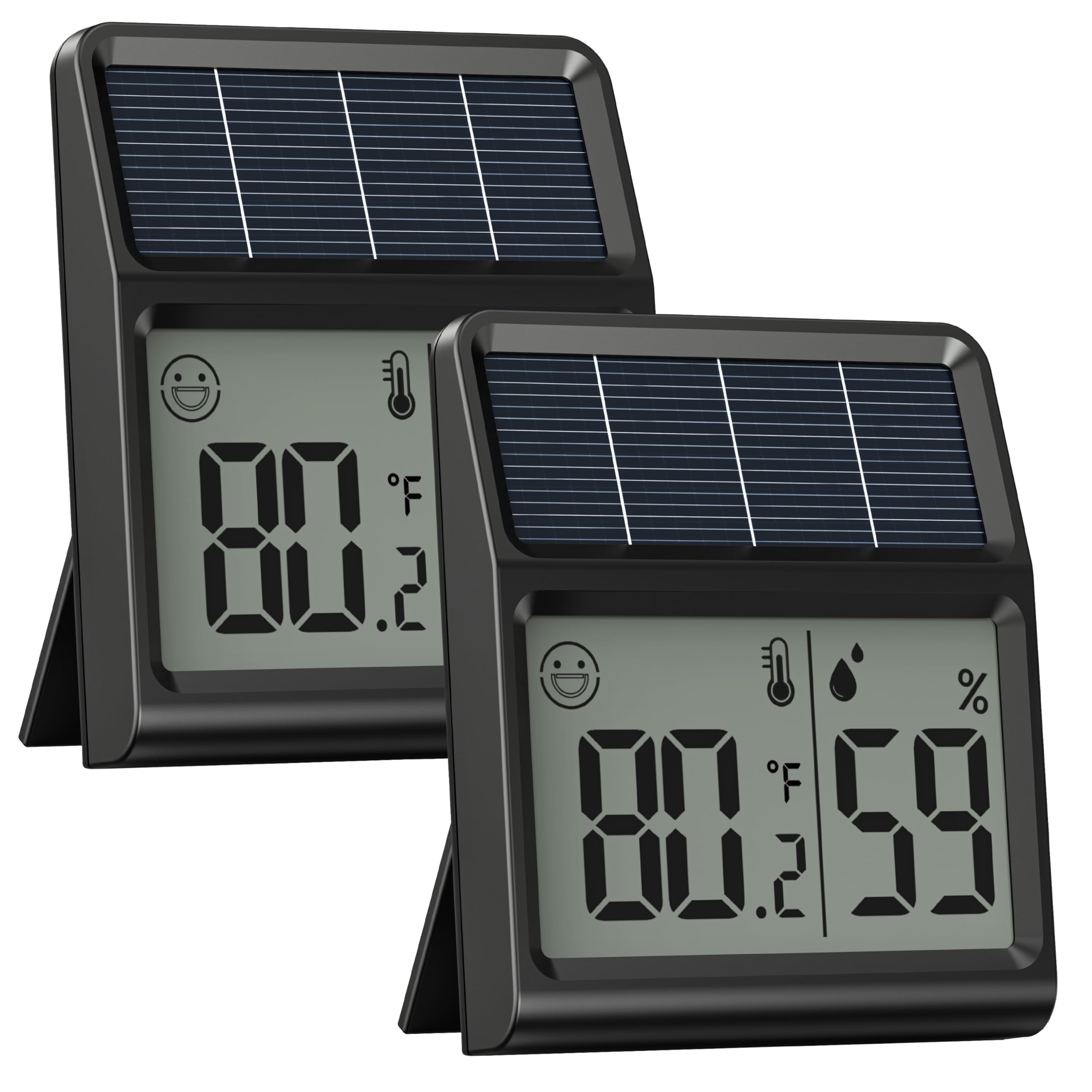
- Operazzjoni li taħdem bl-enerġija solari: The device is powered by solar energy and operates directly from light exposure (e.g., daylight, sunlight, lamplight). It requires a minimum light intensity of approximately 45 Lux to function. This device does not store energy and will not operate in darkness.
- Monitoraġġ preċiż: Provides temperature readings with an accuracy of ±1.8℉/±1℃ (within a 32℉–104℉ range) and humidity readings within ±5% (within a 30%–70% range). Data refreshes every 30 seconds.
- Display LCD ċar: Features a 2.2-inch LCD screen with large digits for easy readability of temperature and humidity.
- Indikatur tal-Kumdità: An intuitive smiley face icon indicates optimal indoor conditions (68℉-79℉ and 30%-70% humidity).
- Easy Unit Switching: A dedicated button allows switching between Celsius (℃) and Fahrenheit (℉).
- Poġġiment versatili: Can be placed on a desktop using its integrated stand or mounted on walls/refrigerators with the included double-sided tape.
Setup
- Spakkja l-Apparat: Carefully remove the thermometer/hygrometer from its packaging.
- Agħżel Post: Select a location that receives sufficient ambient light. The device requires light exposure to operate. Avoid placing it in dark areas or where light is consistently below 45 Lux.
- L-Ewwel Tixgħil: Once exposed to adequate light, the device will automatically power on and display the current temperature and humidity. No manual power button is required.
- Għażliet ta' Pjazzament:
- Desktop: Extend the integrated stand on the back of the device to place it on any flat surface.
- Wall/Refrigerator Mounting: Use the provided double-sided tape to attach the device to a clean, dry surface. Alternatively, utilize the hanging hole on the back for free hanging.

Istruzzjonijiet Operattivi
- Qari tal-Wiri: The large LCD screen continuously shows the current temperature and relative humidity. The temperature is typically displayed in the upper portion, and humidity in the lower portion.
- Qlib ta' Unitajiet tat-Temperatura: Locate the ℉/℃ switch button on the back of the device. Press this button to toggle between Fahrenheit (℉) and Celsius (℃) temperature units.
- Understanding the Comfort Icon: A smiley face icon will appear on the display when the indoor environment is within the optimal comfort range (temperature between 68℉-79℉ and humidity between 30%-70%). This indicates a balanced and comfortable atmosphere.

Manutenzjoni
- Tindif: Imsaħ l-apparat b'ċarruta ratba u niexfa. Tużax prodotti tat-tindif li joborxu jew tgħaddasx l-apparat fl-ilma.
- Espożizzjoni għad-dawl: Ensure the solar panel on the top of the device is kept clean and unobstructed to maintain continuous operation.
- Ħażna: If storing the device for an extended period, ensure it is kept in a well-lit area or periodically exposed to light to prevent the internal capacitor from fully discharging.
Issolvi l-problemi
- Problem: Device display is blank or not turning on.
- Soluzzjoni: The device is light-powered and does not have internal battery storage. Ensure it is placed in an area with sufficient ambient light (above 45 Lux). Move it closer to a window or under a light source. The device will not operate in darkness.
- Problem: Readings appear inaccurate.
- Soluzzjoni: Ensure the device is not placed in direct sunlight, near heat sources (e.g., vents, appliances), or in areas with extreme drafts, as these can affect readings. Allow the device to stabilize in its chosen location for at least 30 minutes for accurate readings.
- Problem: Display is difficult to read.
- Soluzzjoni: Iċċekkja l- viewing angle. The LCD display is optimized for direct viewing. Ensure there is adequate light for the display to be visible.
- Problem: Device is unresponsive.
- Soluzzjoni: Locate the 'Reset' button on the back of the device. Use a small, pointed object (like a paperclip) to gently press the reset button. This will restart the device. Ensure it is in a well-lit area after resetting.
Speċifikazzjonijiet
| Brand | Baldr |
| Mudell | B0FPQ9QNDD |
| Sors tal-Enerġija | Solar (Light Powered, no rechargeable batteries) |
| Firxa tat-Temperatura | 14℉ - 122℉ (-9.9℃ - 50℃) |
| Preċiżjoni tat-Temperatura | ±1.8℉ / ±1℃ |
| Medda ta 'Umdità | 1% - 99% RH |
| Eżattezza Umdità | ±5% (30%-70% range) |
| Riffriskar Rata | Kull 30 sekondi |
| Dimensjonijiet | Madwar 2.2 x 2.6 pulzieri (55 x 65 mm) |
| Piż tal-oġġett | 0.08 Kilogrammi |
| Komponenti Inklużi | Digital Thermometer, Double-sided tape |
Garanzija u Appoġġ
Baldr is committed to providing quality products and customer satisfaction. If you encounter any issues with your Digital Indoor Thermometer & Hygrometer, please do not hesitate to contact our customer service team. We aim to provide hassle-free solutions within 24 hours on working days.
For support, please refer to the contact information provided with your purchase or visit the official Baldr websit.