
Ulefone RugKing Pad Pro
Ulefone RugKing Pad Pro Android 16 Rugged Tablet User Manual
Model: RugKing Pad Pro | Brand: Ulefone
1. Introduzzjoni
This manual provides essential instructions for setting up, operating, and maintaining your Ulefone RugKing Pad Pro rugged tablet. Please read this manual thoroughly before using the device to ensure proper function and longevity.
2. Kontenut tal-Pakkett
Ivverifika li l-oġġetti kollha huma preżenti fil-pakkett tal-prodott tiegħek:
- Ulefone RugKing Pad Pro Tablet x 1
- AC Charger (100~240V) x 1
- Type-C Data Cable (100 cm) x 1
- Protective Film (Pre-installed) x 1
- Metal Pry Opener x 1
- Portable Strap x 1
- Viti x 2
- Multilingual User Manual x 1
- Charging Instruction Card x 1
- Safety Warning Declaration x 1

Figure 2.1: Contents of the Ulefone RugKing Pad Pro package.
3. Prodott Aktarview
The Ulefone RugKing Pad Pro is a rugged tablet designed for durability and performance. Familiarize yourself with its physical components.
3.1 Komponenti Fiżiċi
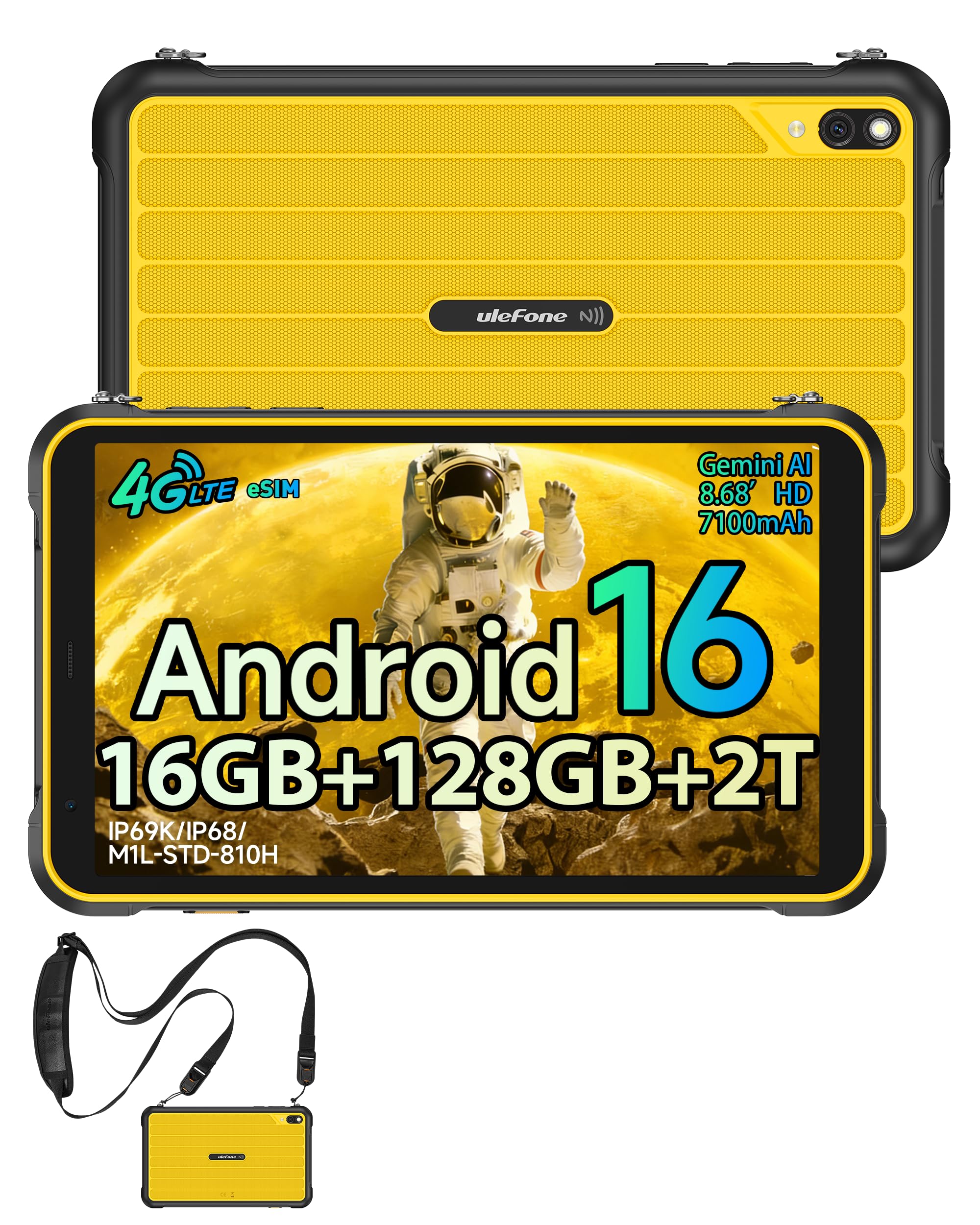
Figura 3.1: Quddiem view of the Ulefone RugKing Pad Pro.

Figura 3.2: Ġenb view with buttons and ports.
- Wiri: 8.68-inch, 90Hz refresh rate, Corning Gorilla Glass.
- Buttuna tal-Qawwa: Located on the side, used to power on/off or wake/sleep the device.
- Buttuni tal-Volum: Aġġusta l-livelli tal-awdjo.
- Port USB tat-Tip Ċ: Għall-iċċarġjar u t-trasferiment tad-dejta.
- Gradilji tal-Ispeaker: Kelliema stereo doppji għall-ħruġ tal-awdjo.
- Kamera: Kamera ta' wara ta' 16MP, kamera ta' quddiem ta' 8MP.
- Flashlight: Integrated 133 lumen Super Torch.
- Slott tal-Karta SIM/MicroSD: Supports dual SIM and up to 2TB microSD expansion.
- Konnettur ta' Espansjoni uSmart: For compatible peripherals like endoscopes.
- Jack tal-headphones ta' 3.5mm: Għal aċċessorji tal-awdjo.
4. Setup
4.1 Qawwa Inizjali
- Agħfas u żomm il- Buttuna tal-Qawwa until the Ulefone logo appears.
- Segwi l-istruzzjonijiet fuq l-iskrin biex tagħżel il-lingwa u r-reġjun tiegħek, u tikkonnettja ma' netwerk Wi-Fi.
- Idħol bil-kont tal-Google tiegħek jew oħloq wieħed ġdid biex taċċessa l-Google Play Store u servizzi oħra.
4.2 Konfigurazzjoni tal-Karta SIM u l-eSIM
The RugKing Pad Pro supports dual physical SIM cards and eSIM functionality for 4G LTE connectivity.

Figure 4.1: Triple card slot for SIM and MicroSD.
4.2.1 Physical SIM Card Installation
- Sib it-trej tal-kard SIM fuq il-ġenb tat-tablet.
- Use the provided metal pry opener to eject the tray.
- Place your Nano-SIM cards into the designated slots.
- Erġa’ daħħal it-trej fil-pillola bir-reqqa.
4.2.2 Attivazzjoni tal-eSIM
To activate eSIM, navigate to Settings > Netwerk u internet > SIMs and follow the instructions to add a new mobile plan. You will typically need a QR code or activation code from your network provider.

Figure 4.2: eSIM connectivity feature.
5. Istruzzjonijiet Operattivi
5.1 Sistema Operattiva Android 16
The RugKing Pad Pro runs on Android 16, offering a dynamic and fluid user interface with enhanced security and usability features. Enjoy desktop-like window views for multitasking and smarter notification management.

Figura 5.1: L-interfaċċja tal-utent ta' Android 16.
5.2 Wirja u Interazzjoni
The 8.68-inch display with a 90Hz refresh rate provides smooth navigation and streaming. With 860 nits peak brightness, the screen is readable even in bright sunlight. Corning Gorilla Glass offers enhanced scratch resistance.

Figure 5.2: Display features including 90Hz refresh rate and Gorilla Glass.
5.2.1 Modalità tal-Ingwanti
For use in cold environments or industrial settings, enable Glove Mode in settings to allow touch input while wearing gloves. Note that some leather gloves may not be compatible due to material differences.

Figure 5.3: Tablet operation with gloves enabled.
5.3 Camera and Flashlight
The tablet features a 16MP rear camera for clear photos and document scanning, and an 8MP front camera for video calls. The integrated 133 lumen Super Torch provides bright illumination in low-light conditions.

Figure 5.4: Camera and Super Torch features.
5.4 Konnettività u Navigazzjoni
- 4G LTE: Stay connected with dual SIM or eSIM.
- NFC: Supports Google Pay and other NFC functions for identification and authentication.
- GPS: Integrated GPS, GLONASS, BeiDou, and Galileo for accurate navigation.
- Wi-Fi: Supports 802.11b/g/n standards.
- Bluetooth: Għall-konnessjoni ta' aċċessorji mingħajr fili.

Figure 5.5: NFC enabled device for various applications.

Figure 5.6: GPS navigation in a vehicle.
5.5 Karatteristiċi Speċjali
- Ċavetta tad-dwana: Assign specific functions to a programmable key for quick access.
- Face ID: Iftaħ it-tagħmir tiegħek billi tuża r-rikonoxximent tal-wiċċ.
- Radju FM: Listen to FM radio without headphones.
- Konnettur ta' Espansjoni uSmart: Connect compatible external peripherals such as endoscopes (uSmart E01, E02) or digital microscopes (uSmart C01).

Figure 5.7: uSmart expansion connector and peripherals.
6. Karatteristiċi ta' Durabilità
The RugKing Pad Pro is built to withstand extreme conditions, certified with IP68, IP69K, and MIL-STD-810H standards.
- IP68: Dustproof and resistant to continuous immersion in water up to 2 meters for 30 minutes.
- IP69K: Protected against high-pressure, high-temperature jet sprays.
- MIL-STD-810H: Military-grade standard ensuring reliable resistance to shocks, vibrations, and extreme temperatures.

Figure 6.1: Rugged design and certifications.

Figure 6.2: Dust, water, and drop resistance tests.
7. Ġestjoni tal-batterija
The RugKing Pad Pro is equipped with a 7100 mAh battery, offering extended usage. It supports 492 hours of standby time or 10 hours of video playback on a single charge.
7.1 Iċċarġjar
- Iċċarġjar Standard: Connect the provided Type-C cable and AC charger to the tablet.
- Iċċarġjar tal-Pogo Pin: The tablet is compatible with Pogo Pin charging docks (sold separately) for convenient charging.
- Iċċarġjar bil-maqlub (OTG): Use the tablet as a power bank to charge other devices via an OTG cable (sold separately).

Figure 7.1: Battery capacity and charging methods.
8. Ħażna u Prestazzjoni
Powered by an Unisoc T7250 Octa-core processor, the RugKing Pad Pro handles complex applications and demanding tasks efficiently. It comes with 16GB RAM (8GB physical + 8GB virtual) and 128GB internal storage, expandable up to 2TB via microSD card.

Figure 8.1: Octa-core processor for uninterrupted flow.

Figure 8.2: Memory and storage specifications.
*MicroSD card is sold separately for storage expansion. Dynamic RAM activation is user-configurable in Settings.
9. Manutenzjoni
9.1 Tindif tal-Apparat
- Uża drapp artab u mingħajr suf biex tnaddaf l-iskrin u l-qafas.
- Għal ħmieġ iebes, neħħi ftitampLaħlaħ id-drapp bl-ilma. Evita kimiċi ħarxa jew materjali li joborxu.
- Ensure all port covers are securely closed before cleaning with liquids to maintain water resistance.
9.2 Aġġornamenti tas-Software
Regularly check for software updates to ensure optimal performance, security, and access to new features. Navigate to Settings > Sistema > Aġġornament tas-sistema biex tiċċekkja u tinstalla aġġornamenti disponibbli.
9.3 Ġestjoni tal-Ħażna
Perjodikament mill-ġdidview maħżun tiegħek files and applications. Delete unnecessary data to free up space and maintain device speed. Utilize the microSD card slot for large media files.
10 Issolvi l-problemi
| Problema | Soluzzjoni |
|---|---|
| L-apparat ma jixgħelx. | Kun żgur li l-batterija hija ċċarġjata. Qabbad il-ċarġer u stenna ftit minuti qabel ma tipprova tixgħelha mill-ġdid. |
| L-iskrin ma jirrispondix. | Perform a forced restart by holding the Power button for 10-15 seconds. If the issue persists, ensure Glove Mode is not causing interference if not needed. |
| Ma tistax tikkonnettja mal-Wi-Fi. | Check if Wi-Fi is enabled in settings. Restart your router and the tablet. Verify the Wi-Fi password. |
| SIM card ma misjubax. | Ensure the SIM card is correctly inserted into the tray. Restart the tablet. Check if the SIM card is active with your carrier. |
| Il-batterija tiskula malajr. | Reduce screen brightness, close unused apps, disable unnecessary connectivity features (Bluetooth, GPS, Wi-Fi) when not in use. Check for background app activity. |
11. Speċifikazzjonijiet
| Karatteristika | Dettall |
|---|---|
| Isem tal-Mudell | Ulefone RugKing Pad Pro |
| Sistema Operattiva | Android 16 |
| Proċessur | Unisoc T7250 Octa-core |
| RAM | 16 GB (8 GB physical + 8 GB virtual) |
| Ħażna Interna | 128 GB |
| Ħażna espansibbli | Sa 2 TB permezz ta' microSD |
| Daqs tal-Wiri | 8.68 pulzieri |
| Riżoluzzjoni tal-Wiri | 1400x800 pixel (HD+) |
| Riffriskar Rata | 90 Hz |
| Protezzjoni tal-Wiri | Corning Gorilla Glass |
| Kamera ta' wara | 16 MP |
| Kamera ta' Quddiem | 8 MP |
| Reġistrazzjoni tal-Vidjo | FHD 1080p |
| Kapaċità tal-batterija | 7100 mAh (Lithium Polymer) |
| Ħajja tal-Batterija (Medja) | 13 Days (standby), 10 Hours (video playback) |
| Konnettività | 4G LTE (Dual SIM, eSIM), Wi-Fi (802.11b/g/n), Bluetooth, NFC |
| Navigazzjoni | GPS, GLONASS, BeiDou, Galileo |
| Klassifikazzjonijiet tad-Durabilità | IP68, IP69K, MIL-STD-810H |
| Karatteristiċi tas-Sigurtà | Face ID |
| Dimensjonijiet (T x W x H) | 20 x 10 x 1 ċm |
| Piż | 450 Gramm |
12. Garanzija u Appoġġ
12.1 Informazzjoni dwar Garanzija
The Ulefone RugKing Pad Pro comes with a Garanzija ta' 2 snin mill-manifatturDin il-garanzija tkopri difetti fil-materjali u fix-xogħol taħt użu normali. Jekk jogħġbok żomm il-prova tax-xiri tiegħek għal talbiet ta' garanzija.


Figure 12.1: Ulefone brand and 2-year warranty indication.
12.2 Appoġġ għall-Klijent
For technical assistance, warranty claims, or further inquiries, please contact Ulefone customer support. A service center is available in Europe.
- Refer to the official Ulefone websit għad-dettalji tal-kuntatt.
- Consult the "Multilingual User Manual" included in your package for additional information.
- The tablet includes a "Service Center 2.0" application for intelligent support.
Ask a question about this manual
Ask about setup, troubleshooting, compatibility, parts, safety, or missing instructions. Manuals+ will review the question and use this page’s manual context to help answer it.