
1. Introduzzjoni
This manual provides essential information for setting up, operating, and maintaining your ASUS TUF Gaming A18 laptop. Please read this manual thoroughly before using your device to ensure proper function and longevity.
2. Kontenut tal-Pakkett
Ivverifika li l-oġġetti kollha huma preżenti fil-pakkett tiegħek:
- ASUS TUF Gaming A18 Laptop
- Adapter AC
- Korda tal-Enerġija
- Manwal għall-Utent (dan id-dokument)
3. Prodott Aktarview
Familiarize yourself with the main components and ports of your ASUS TUF Gaming A18 laptop.

Figura 1: Quddiem view of the ASUS TUF Gaming A18 laptop with the screen open, showcasinit-tastiera u d-displej.

Figura 2: Angolat view of the ASUS TUF Gaming A18 laptop, highlighting the screen and keyboard layout.
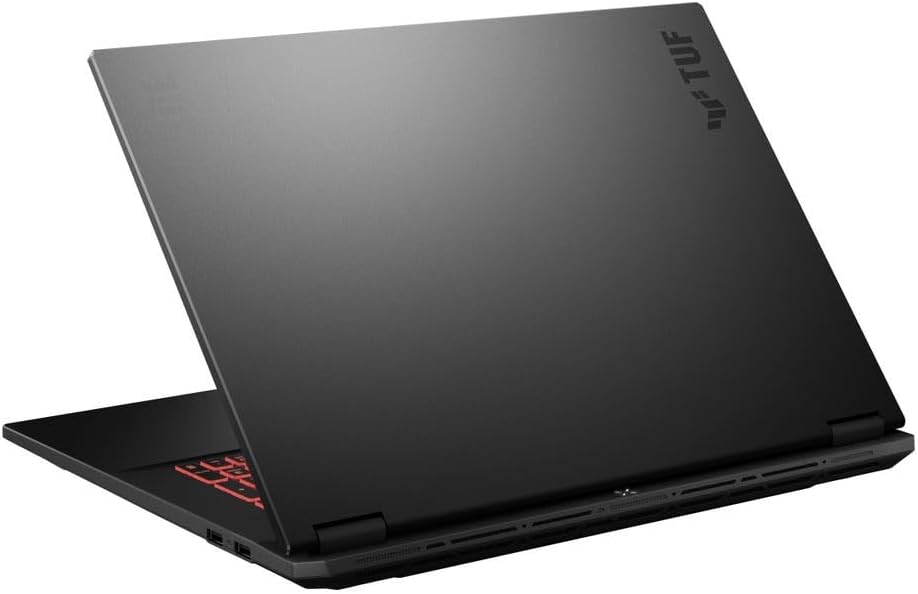
Figura 3: Wara view of the ASUS TUF Gaming A18 laptop with the lid closed, showing the chassis design.
Portijiet u Konnetturi

Figure 4: Left side of the laptop showing the power input, Ethernet port, HDMI, USB-C ports, and audio jack.

Figure 5: Right side of the laptop showing additional USB-A ports.
- USB Type-C (DisplayPort support): 1 port
- USB 3.2 Gen 2 Type-C (Power Delivery / DisplayPort / G-Sync / 10Gbps support): 1 port
- USB 3.2 Gen 2 Type-A (10Gbps support): 2 portijiet
- USB 2.0 Tip-A: 1 port
- HDMI V2.1: 1 port
- LAN RJ-45: 1 port
- Jack tal-Headphone/Mikrofonu Combo: 1 port
4. Gwida ta' Setup
4.1 Qawwa Inizjali
- Qabbad l-AC Adapter: Plug the AC adapter into the laptop's power input port and then into a power outlet. Ensure the power indicator light illuminates.
- Iftaħ il-Wiri: Carefully lift the laptop display to your desired viewangolu tal-ing.
- Qawwa Mixgħul: Press the power button, typically located above the keyboard or on the side. The power indicator will light up, and the system will begin to boot.
- Konfigurazzjoni Inizjali tal-Windows: Segwi l-istruzzjonijiet fuq l-iskrin biex tlesti s-setup tal-Windows 11 Home, inkluż l-għażla tal-lingwa, il-konnessjoni tan-netwerk, u l-ħolqien tal-kont tal-utent.
4.2 Konnessjoni tal-Periferali
Tista' tqabbad diversi apparati esterni mal-laptop tiegħek:
- Wirjiet Esterni: Use the HDMI 2.1 port or a USB Type-C port with DisplayPort support to connect external monitors.
- Apparat USB: Connect mice, keyboards, external storage, or other USB accessories to the available USB-A or USB-C ports.
- Konnessjoni tan-Netwerk: For a wired internet connection, plug an Ethernet cable into the RJ-45 LAN port. For wireless, connect via Wi-Fi 6E through Windows settings.
- Apparat Awdjo: Connect headphones or external speakers to the Headphone/Microphone Combo Jack.
5. Istruzzjonijiet Operattivi
5.1 Tastiera u Touchpad
- Tastiera backlit: The laptop features a Fullsize Single-Zone RGB Backlit Keyboard. Adjust brightness and effects through the ASUS Armoury Crate software or dedicated function keys.
- Tastiera numerika: Uża t-tastiera numerika integrata għal dħul effiċjenti tad-dejta.
- Touchpad: The precision touchpad supports multi-touch gestures for navigation. Refer to Windows settings for customization.
5.2 Karatteristiċi tal-Wiri
- Rata ta' Aġġornar ta' 144Hz: The 18-inch WUXGA (1920x1200) display operates at a 144Hz refresh rate for smooth visuals, especially in gaming.
- G-Sync Support: NVIDIA G-Sync technology synchronizes the display's refresh rate with the GPU's frame rate to eliminate screen tearing and minimize stuttering. Ensure G-Sync is enabled in NVIDIA Control Panel for compatible applications.
- Kisi kontra d-dija: The display features an anti-glare coating to reduce reflections and improve visibility in various lighting conditions.
5.3 Ġestjoni tal-Enerġija
- Ħajja tal-batterija: The laptop is equipped with a 90 Wh Lithium-Ion Battery, providing up to 6 hours of average usage.
- Iċċarġjar: Always use the provided 240 W AC Adapter for optimal charging and performance.
- Modi ta' enerġija: Adjust power settings in Windows or through ASUS Armoury Crate to optimize performance or battery life.
6. Manutenzjoni u Kura
- Tindif tal-Display: Uża drapp artab u mingħajr suf iddisinjat speċifikament għall-elettronika.ampen it slightly with water or a screen cleaner solution. Avoid harsh chemicals.
- Tindif tat-Tastiera u x-Chassis: Uża pinzell artab jew arja kkompressata biex tneħħi t-trab u l-fdalijiet. Imsaħ l-uċuħ b'pinzell ħafif.amp, drapp artab.
- Kura tal-batterija: To prolong battery life, avoid frequently discharging the battery completely. Store the laptop in a cool, dry place if not used for extended periods.
- Ventilazzjoni: Ensure the laptop's ventilation openings are not obstructed to prevent overheating. Use the laptop on a hard, flat surface.
- Aġġornamenti tas-Software: Regularly update your operating system, drivers, and ASUS software to ensure optimal performance and security.
7 Issolvi l-problemi
7.1 Kwistjonijiet Komuni u Soluzzjonijiet
| Ħruġ | Kawża Possibbli | Soluzzjoni |
|---|---|---|
| Il-laptop ma jixgħelx | No power, discharged battery, faulty adapter | Ensure AC adapter is securely connected and power outlet is functional. Charge the battery for at least 30 minutes before attempting to power on again. |
| Id-displej huwa vojt jew iswed | Sleep mode, external display connected, display driver issue | Agħfas kwalunkwe tast jew iċċaqlaq il-maws biex tqum mill-irqad. Skonnettja l-wirjiet esterni. Ipprova agħfas Fn + F7 (or equivalent display toggle key) to cycle display outputs. Restart the laptop. |
| Kwistjonijiet ta 'konnessjoni Wi-Fi | Wi-Fi diżattivat, problema bir-router, problema bis-sewwieq | Ensure Wi-Fi is enabled in Windows settings. Restart your router. Update Wi-Fi drivers. |
| Prestazzjoni bil-mod | Too many applications running, low disk space, overheating | Close unnecessary applications. Free up disk space. Ensure proper ventilation and clean vents. Check for malware. |
For more advanced troubleshooting or persistent issues, please contact ASUS customer support.
8. Speċifikazzjonijiet
| Karatteristika | Dettall |
|---|---|
| Brand | ASUS |
| Isem tal-Mudell | TUF Gaming A18 |
| Numru tal-Mudell | FAUM |
| Daqs tal-Iskrin | 18 Pulzier |
| Riżoluzzjoni | 1920 x 1200 (WUXGA) |
| Riffriskar Rata | 144 Hz |
| Teknoloġija tal-Wiri | IPS, Anti-Glare Coating, G-Sync |
| Mudell tas-CPU | AMD Ryzen 7 260 (8 Cores, 16 Threads, up to 5.1 GHz) |
| Koproċessur tal-Grafika | NVIDIA GeForce RTX 5060 (8 GB GDDR7 Dedicated) |
| Daqs tal-Memorja RAM Installata | 64 GB DDR5 SDRAM (5600 MHz) |
| Daqs tal-Hard Disk | SSD NVMe M.2 ta' 8 TB |
| Sistema Operattiva | Windows 11 Home |
| Konnettività bla fili | Realtek Wi-Fi 6E (802.11ax), Bluetooth 5.3 |
| Portijiet | 1x USB Type-C (DisplayPort), 1x USB 3.2 Gen 2 Type-C (PD/DP/G-Sync/10Gbps), 2x USB 3.2 Gen 2 Type-A, 1x USB 2.0 Type-A, 1x HDMI V2.1, 1x RJ-45 LAN, 1x Headphone/Microphone Combo Jack |
| Tastiera | Fullsize Single-Zone RGB Backlit Keyboard with Numpad |
| Webcam | 1080p + IR Camera |
| Batterija | 90 Wh Lithium-Ion, up to 6 hours average usage |
| Adapter AC | 240 W |
| Dimensjonijiet (L x W x H) | 15.71" x 11.14" x 1.05" |
| Piż | 5.73 lbs |
| Kulur | Jaeger Gray |
| UPC | 757129107980 |
| ASIN | B0G6Y6SRPR |
9. Garanzija u Appoġġ
Your ASUS TUF Gaming A18 laptop comes with a manufacturer's warranty. For detailed warranty terms and conditions, please refer to the warranty card included in your product packaging or visit the official ASUS support websit.
For technical support, driver downloads, and frequently asked questions, please visit the official ASUS support websit: www.asus.com/support