
1. Introduzzjoni
Thank you for choosing the Cooler Master ELITE Gold 1000W Power Supply Unit. This manual provides essential information for the safe and efficient installation, operation, and maintenance of your new power supply. The ELITE Gold 1000W is designed for daily gaming and PC building enthusiasts, fully supporting the latest ATX 3.1 standard and offering flexible compatibility with RTX 50 series GPUs and future upgrades.
2. Informazzjoni dwar is-Sigurtà
Please read and understand all safety instructions before installing or operating this product. Failure to do so may result in personal injury or damage to the product or connected devices.
- Periklu ta' Xokk Elettriku: Tiftaħx l-unità tal-provvista tal-enerġija casing. Volum għolitages are present inside, even when the unit is turned off. There are no user-serviceable parts inside.
- L-ert kif suppost: Ensure the power supply is properly grounded using the provided power cord.
- Ventilazzjoni: Do not block any ventilation openings of the power supply. Ensure adequate airflow around the unit to prevent overheating.
- Umdità: Tesponix il-provvista tal-enerġija għall-ilma jew għal umdità eċċessiva.
- Sors tal-Enerġija: Connect the power supply only to a power source with the correct voltage and frequency as indicated on the unit's label.
- Ġestjoni tal-Kejbil: Route cables carefully to avoid pinching or damage.
- Temperatura: Operate the power supply within the specified temperature range (up to 40°C high-load environments).
3. Kontenut tal-Pakkett
Ivverifika li l-oġġetti kollha huma preżenti fil-pakkett tiegħek:
- Cooler Master ELITE Gold 1000W Power Supply Unit
- Modular Cable Set (including 12+4 Pin, ATX24 Pin, EPS 4+4 Pin, EPS 8 Pin, SATA + Peripheral 4 Pin connectors)
- AC Power Cord (A/JP cord)
- Viti tal-Immuntar
- Manwal għall-Utent
4. Setup u Installazzjoni
Follow these steps to install your Cooler Master ELITE Gold 1000W Power Supply Unit:
- Ipprepara s-Sistema Tiegħek:
Before installation, ensure your computer is completely powered off and unplugged from the wall outlet. Discharge any residual power by pressing the power button a few times.
- Install the PSU into the PC Case:
Position the ELITE Gold 1000W PSU into the designated power supply bay in your PC case. The compact design (under 150mm) facilitates easy installation in various PC cases. Secure the PSU with the provided mounting screws.

Image: The Cooler Master ELITE Gold 1000W Power Supply Unit installed within a computer chassis, viewed from above, highlighting its compact form factor and top-mounted fan grill.
- Qabbad il-Kejbils Modulari:
The ELITE Gold 1000W features a full modular design. Connect only the necessary cables to the power supply unit first. Refer to the labels on the PSU for correct connector types (e.g., 10P MB, 18P MB, 8P PCI-E/CPU, 12V-2x6, 6P SATA/HDD).

Immaġni: Dettaljata view of the Cooler Master ELITE Gold 1000W Power Supply Unit's modular cable interface, clearly showing labeled ports for various component connections such as motherboard, CPU, PCIe, and SATA/HDD.

Image: The Cooler Master ELITE Gold 1000W Power Supply Unit with its full suite of modular cables securely connected and neatly routed, demonstrating the full modular design.
- Qabbad mal-Komponenti:
- Motherboard: Qabbad il-kejbil ATX ta' 24-pin mal-motherboard tiegħek.
- CPU: Connect the 4+4 pin or 8-pin EPS cable(s) to your motherboard's CPU power connector(s).
- Karta tal-Grafika (GPU): Connect the appropriate PCIe power cables (e.g., 8-pin, 12+4 pin for ATX 3.1/PCIe Gen 5.1) to your graphics card(s). This unit is optimized for RTX 50 series GPUs.
- Apparati tal-Ħżin: Qabbad il-kejbils tal-enerġija SATA mal-SSDs, HDDs, u d-drajvs ottiċi tiegħek.
- Periferali: Connect peripheral 4-pin cables to any other devices requiring power.
- Qabbad l-Enerġija AC:
Connect the provided AC power cord to the power supply unit and then to a grounded wall outlet. Ensure the power switch on the PSU is in the OFF position before connecting to the wall outlet.
5. Istruzzjonijiet Operattivi
After successful installation, follow these steps to operate your system:
- Qawwa Mixgħul:
Flip the power switch on the back of the power supply unit to the ON (I) position.
- Bidu tas-Sistema:
Press the power button on your computer case to start your system. The ELITE Gold 1000W will provide stable and efficient power, thanks to its 80 Plus Gold certification and quiet, long-life rifle bearing fan.
- Itfi:
To power off your system, shut down your operating system normally. For complete power disconnection, flip the power switch on the back of the power supply unit to the OFF (O) position and unplug the AC power cord.
6. Manutenzjoni
Proper maintenance ensures the longevity and optimal performance of your power supply unit.
- Tindif tat-Trab: Naddaf it-trab mill-fann u l-gradilji tal-ventilazzjoni tal-provvista tal-enerġija perjodikament bl-użu ta' arja kkompressata. Kun żgur li s-sistema tkun mitfija u skonnettjata qabel ma tnaddafha.
- Ventilazzjoni: Ensure that the PC case has adequate airflow and that the power supply's fan intake and exhaust are not obstructed.
- Spezzjoni tal-Cable: Regularly check all modular cables for any signs of wear, fraying, or damage. Replace damaged cables immediately.
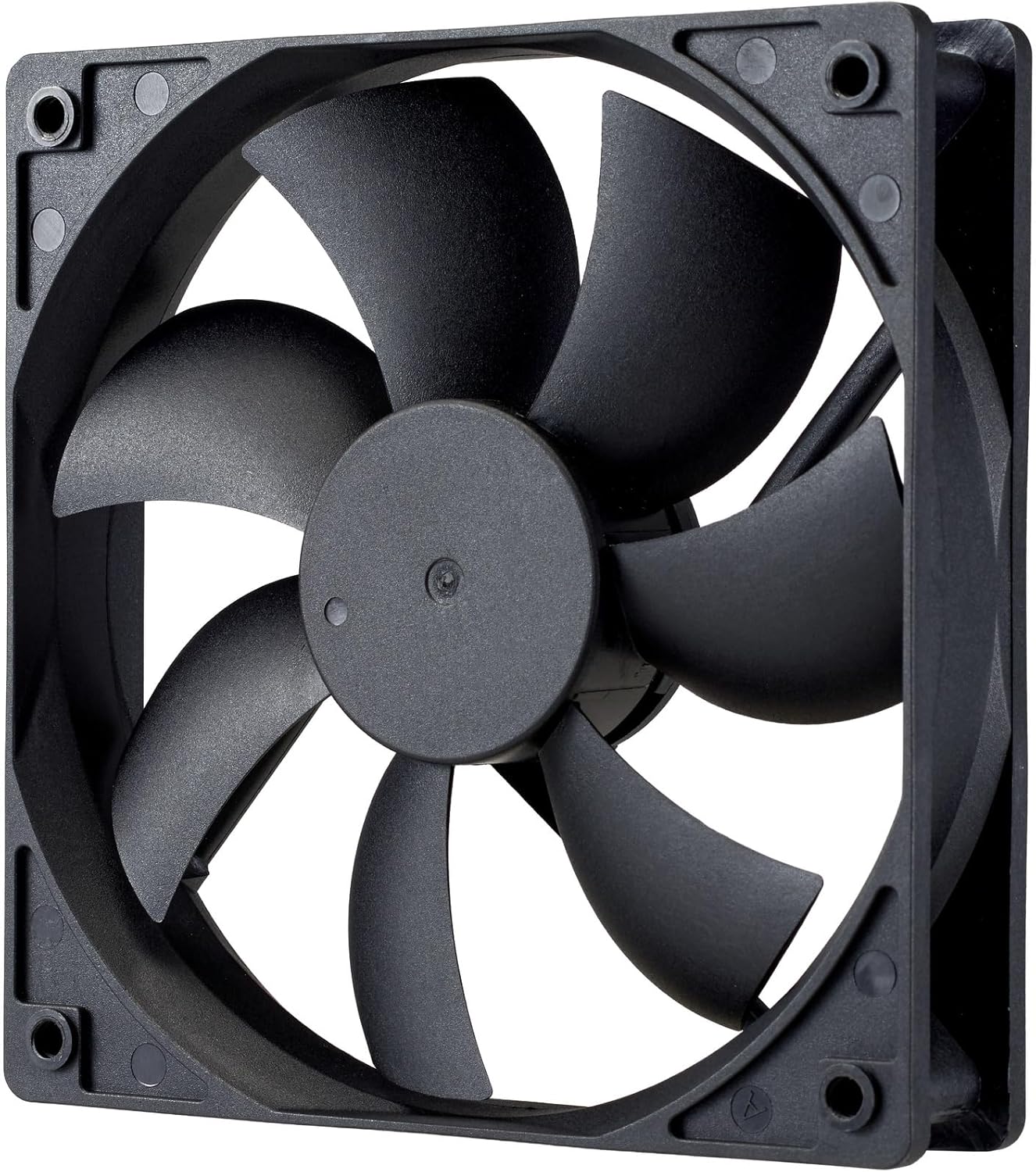
Immaġni: Close-up view of the power supply's cooling fan, featuring five blades designed for efficient airflow and quiet operation.
7 Issolvi l-problemi
If you encounter issues with your power supply, refer to the following troubleshooting steps:
- Ebda Qawwa:
- Kun żgur li l-korda tal-enerġija AC hija konnessa sew kemm mal-provvista tal-enerġija kif ukoll mas-sokit tal-ħajt.
- Verify that the power switch on the back of the PSU is in the ON (I) position.
- Check all modular cables (24-pin ATX, EPS, PCIe) are firmly seated in both the PSU and the respective components.
- Ittestja s-sokit tal-ħajt b'apparat ieħor biex tiżgura li jaħdem.
- Instabbiltà tas-Sistema/Għeluq każwali:
- Żgura ventilazzjoni adegwata fil-kaxxa tal-PC tiegħek biex tevita li tissaħħan iżżejjed.
- Ivverifika li r-rekwiżiti tal-enerġija tas-sistema tiegħek ma jaqbżux il-kapaċità ta' 1000W tal-PSU.
- Iċċekkja għal xi konnessjonijiet tal-kejbil maħlula.
- Ħsejjes mhux tas-soltu:
- A quiet rifle bearing fan is designed for minimal noise. If you hear unusual grinding or rattling, ensure no cables are obstructing the fan.
- If the noise persists, contact Cooler Master support.
If these steps do not resolve the issue, please contact Cooler Master customer support for further assistance.
8. Speċifikazzjonijiet
Detailed technical specifications for the Cooler Master ELITE Gold 1000W Power Supply Unit:
| Isem tal-Mudell | ELITE Gold |
| Numru tal-Mudell tal-Manifattur | MPX-A005-AFAG-BJP |
| Brand | Cooler Master |
| Output Wattage | 1000 Watts |
| Ċertifikazzjoni 80 PLUS | Deheb |
| Verżjoni ATX | ATX 3.1 |
| Verżjoni PCIe | PCIe Gen 5.1 |
| Fattur tal-Formola | ATX |
| Disinn tal-Qawwa | Modulari Sħiħ |
| Tipi ta' Konnettur | 12+4 Pin, ATX24 Pin, EPS 4+4 Pin, EPS 8 Pin, SATA + Peripheral 4 Pin |
| Numru ta 'Fannijiet | 1 (Rifle Bearing Fan) |
| Vol Input Massimutage | 240 Volts (AC) |
| Input Minimu Voltage | 100 Volts (AC) |
| Dimensjonijiet tal-Prodott (L x W x H) | 14 x 15 x 8.6 ċm |
| Piż tal-Prodott | 2230 gramma |
| Temperatura operattiva | Sa 40°C |

Immaġni: Fuq view of the Cooler Master ELITE Gold 1000W Power Supply Unit, showcasing its branding and honeycomb-patterned ventilation.

Image: The official 80 PLUS GOLD certification logo, indicating high power efficiency.
9. Garanzija u Appoġġ
The Cooler Master ELITE Gold 1000W Power Supply Unit comes with a garanzija ta 'sena mid-data tax-xiri. Din il-garanzija tkopri difetti fil-materjali u l-abbilità taħt użu normali.
Għal appoġġ tekniku, talbiet ta' garanzija, jew aktar assistenza, jekk jogħġbok żur is-sit uffiċjali ta' Cooler Master website or contact your local Cooler Master distributor. Please have your product model number (MPX-A005-AFAG-BJP) and proof of purchase ready when contacting support.