
1. Introduzzjoni
The KONNWEI MAXOBD OBD2 Scanner is a professional diagnostic tool designed to read and clear diagnostic trouble codes (DTCs) from your vehicle's engine control unit (ECU). It provides access to various vehicle systems, allowing users to monitor live data, perform I/M readiness tests, and retrieve vehicle information. This manual provides detailed instructions for the proper use and maintenance of your MAXOBD scanner.
2. Informazzjoni dwar is-Sigurtà
Before operating the MAXOBD OBD2 Scanner, please read and understand all safety messages and instructions in this manual. Failure to do so may result in personal injury or damage to the vehicle or the scanner.
- Dejjem wettaq l-ittestjar tal-karozzi f'ambjent sigur.
- Ilbes protezzjoni għall-għajnejn li tissodisfa l-istandards ANSI.
- Żomm il-ħwejjeġ, ix-xagħar, l-idejn, l-għodda, it-tagħmir tat-test, eċċ., 'il bogħod mill-partijiet kollha tal-magna li jiċċaqalqu jew jaħarqu.
- Tħaddem il-vettura f'żona tax-xogħol b'ventilazzjoni tajba; il-gassijiet tal-egżost huma velenużi.
- Poġġi t-trażmissjoni f'PARK (għal trażmissjoni awtomatika) jew NEWTRALI (għal trażmissjoni manwali) u kun żgur li l-brejk tal-ipparkjar ikun imqabbad.
- Keep a fire extinguisher suitable for gasoline/electrical fires nearby.
- Tqabbadx jew skonnettja l-ebda tagħmir tat-test waqt li l-ignition tkun mixgħula jew il-magna tkun qed taħdem.
3. Prodott Aktarview
The MAXOBD scanner features a clear display and intuitive button layout for easy navigation and operation. It connects directly to your vehicle's OBD-II port to retrieve diagnostic information.
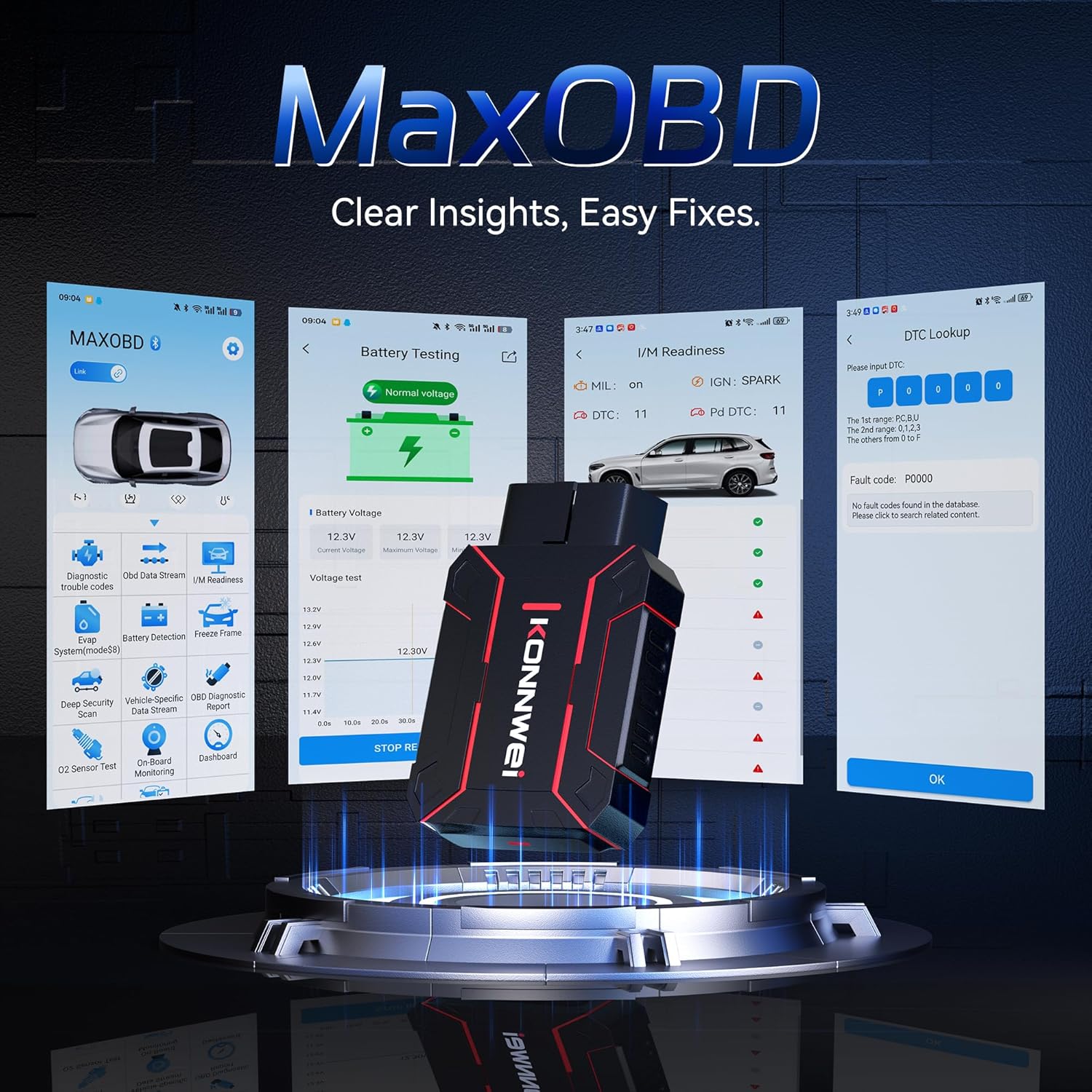
Image: The KONNWEI MAXOBD OBD2 Scanner device, illustrating its physical form and various diagnostic screen interfaces such as battery testing, I/M readiness, and DTC lookup.
Komponenti Ewlenin:
- Konnettur OBD-II: Connects to the vehicle's Data Link Connector (DLC).
- Display LCD: Juri r-riżultati tat-test u l-għażliet tal-menù.
- Buttuni tan-Navigazzjoni: Użat biex tiskrollja fil-menus u tagħżel l-għażliet.
- Enter/Exit Buttons: Confirm selections or return to previous screens.
4. Setup
Follow these steps to set up your MAXOBD OBD2 Scanner:
- Sib il-Port OBD-II tal-Vettura: Il-Konnettur tad-Data Link (DLC) ta' 16-il pin ġeneralment ikun jinsab taħt id-dashboard fuq in-naħa tas-sewwieq tal-vettura. Irreferi għall-manwal tas-servizz tal-vettura tiegħek għall-post eżatt jekk ma tistax issibu.
- Qabbad l-Iskaner: Plug the MAXOBD scanner's OBD-II connector firmly into the vehicle's DLC. Ensure a secure connection.
- Qawwa Mixgħul: Once connected, the scanner will automatically power on. If it does not, turn the vehicle's ignition to the 'ON' position (engine off).
5. Istruzzjonijiet Operattivi
The MAXOBD scanner offers various diagnostic functions. Use the navigation buttons to move through menus and the Enter button to select options.

Image: A visual representation of a vehicle highlighting various systems (Engine, ABS, SAS, SRS, DPF, TPMS) that the MAXOBD scanner can perform a full system scan on.
Funzjonijiet tal-Menu Prinċipali:
- Aqra Kodiċijiet: Retrieves Diagnostic Trouble Codes (DTCs) from the vehicle's ECU. These codes indicate specific issues detected by the vehicle's onboard diagnostic system.
- Ħassar Kodiċijiet: Clears all DTCs from the vehicle's ECU and turns off the Malfunction Indicator Lamp (MIL). Ensure the underlying issue is resolved before clearing codes.
- Lest I / M: Jivverifika l-istatus tas-sistemi ta' monitoraġġ relatati mal-emissjonijiet biex jiddetermina jekk humiex lesti għal test tal-emissjonijiet.
- Fluss tad-Dejta: Displays real-time operational parameters from the vehicle's sensors and components. This can include engine RPM, vehicle speed, oxygen sensor readings, and more.
- Iffriżar qafas: Captures a snapshot of sensor data at the moment a DTC was set. This data can help identify the conditions under which a fault occurred.
- Test tas-Sensor O2: Retrieves O2 sensor monitoring test results for the most recently completed tests from the vehicle's onboard computer.
- Test tal-Monitor Abbord: Jikseb riżultati għal komponenti u sistemi tal-powertrain relatati mal-emissjonijiet li mhumiex immonitorjati kontinwament.
- Test tas-Sistema EVAP: Jibda test tat-tnixxija għas-Sistema ta' Kontroll tal-Emissjonijiet Evaporattivi tal-vettura.
- Informazzjoni tal-Vettura: Juri n-numru ta' identifikazzjoni tal-vettura (VIN), l-ID tal-kalibrazzjoni (CALID), u n-numru ta' verifika tal-kalibrazzjoni (CVN).
Performing a Diagnostic Scan:
- Connect the scanner to the vehicle's DLC and turn the ignition to 'ON'.
- From the main menu, select 'Read Codes' and press Enter.
- The scanner will communicate with the vehicle and display any detected DTCs.
- Use the navigation buttons to scroll through the codes and their descriptions.
- To clear codes, return to the main menu, select 'Erase Codes', and confirm.
6. Manutenzjoni
Proper maintenance ensures the longevity and reliable operation of your MAXOBD scanner.
- Tindif: Uża artab, damp drapp biex tnaddaf il-barra tal-iskaner. Tużax prodotti tat-tindif jew solventi li joborxu.
- Ħażna: Store the scanner in a dry, clean environment away from extreme temperatures and direct sunlight. Keep it in its original packaging or a protective case when not in use.
- Aġġornamenti tas-Software: Iċċekkja perjodikament l-uffiċjal tal-KONNWEI website for available software updates to ensure your scanner has the latest vehicle compatibility and features. Follow the instructions provided on the website for updating the device.
7 Issolvi l-problemi
If you encounter issues with your MAXOBD scanner, refer to the following common problems and solutions:
| Problema | Kawża Possibbli | Soluzzjoni |
|---|---|---|
| L-iskaner ma jixgħelx. | Loose connection; vehicle ignition off; faulty OBD-II port. | Ensure the scanner is securely plugged into the DLC. Turn vehicle ignition to 'ON'. Test on another vehicle if possible. |
| Messaġġ "Żball fil-Link" jew "Żball fil-Komunikazzjoni". | Loose connection; vehicle not OBD-II compliant; ignition off; communication protocol issue. | Verify connection. Ensure vehicle is OBD-II compliant (most vehicles 1996 and newer). Turn ignition to 'ON'. Try a different vehicle if available. |
| L-iskrin huwa vojt jew iffriżat. | Software glitch; power interruption. | Disconnect and reconnect the scanner. If the issue persists, contact customer support. |
If the problem persists after attempting these solutions, please contact KONNWEI customer support for further assistance.
8. Speċifikazzjonijiet
- Ditta: KONNWEI
- Mudell: maxobdTM
- Sors tal-Enerġija: Battery Powered (via OBD-II port)
- Sistema Operattiva: Linux
- Daqs tal-iskrin: 2.8 Pulzier
- Tip ta' Tajbin għall-Karozzi: Universal Fit (for OBD-II compliant vehicles)
- Dimensjonijiet tal-pakkett: 10.04 x 7.28 x 2.76 pulzieri
9. Garanzija u Appoġġ
KONNWEI products are designed for reliability and performance. For warranty information, please refer to the documentation included with your purchase or visit the official KONNWEI website. For technical support, troubleshooting assistance, or any other inquiries, please contact KONNWEI customer service through their official channels.
KONNWEI Official Websit: Visit the KONNWEI Store on Amazon