
1. Informazzjoni Importanti dwar is-Sigurtà
Please read and understand all safety instructions before using this device. Failure to follow these instructions may result in laser radiation exposure, electric shock, fire, or serious injury.
- Radjazzjoni tal-Lejżer: This device emits Class 2 laser radiation. Do not stare into the laser beam. Avoid direct eye exposure.
- Tfal: Żomm l-apparat fejn ma jintlaħaqx mit-tfal.
- Ambjent Operattiv: Tħaddimx l-apparat f'atmosferi splussivi, bħal fil-preżenza ta' likwidi, gassijiet jew trab fjammabbli.
- Modifiki: Do not attempt to modify or disassemble the device. Unauthorized modifications may result in hazardous radiation exposure.
- Sigurtà tal-batterija: Use only specified battery types. Ensure correct polarity when installing batteries. Remove batteries if the device will not be used for an extended period.
2. Prodott Aktarview
The YOUTHINK 60m High Accuracy Portable Distance Meter is a compact and durable tool designed for precise distance measurements in various applications, including engineering, construction, and woodworking. Its user-friendly design ensures efficient and accurate operation.

Image: The YOUTHINK 60m Distance Meter actively measuring a distance on a floor, with the red laser line clearly visible. The device's display shows measurement readings.
Karatteristiċi ewlenin:
- Disinn kompatt: Portable and easy to store, includes a lanyard for convenient carrying.
- Kwalità Premium: Durable plastic construction for reliable handheld use.
- Allinjament Preċiż: Features two liquid levels for accurate vertical and horizontal alignment.
- Adjustable Reference Point: Measurements can be taken from the front or back of the tool.
- Operazzjoni sempliċi: Automatic device and switch for fast and easy accurate measurement.
- Applikazzjoni wiesgħa: Suitable for indoor and outdoor construction projects with adjustable modes.
3. Kontenut tal-Pakkett
Ivverifika li l-oġġetti kollha huma preżenti fil-pakkett:
- 1 x YOUTHINK Distance Meter (60m)
- 1 x Lanyard
- 1 x Manwal ta 'Istruzzjoni
4. Speċifikazzjonijiet
| Karatteristika | Speċifikazzjoni |
|---|---|
| Tip ta' Oġġett | Meter tad-Distanza |
| Materjal | Plastik |
| Daqs tal-Prodott | Madwar 110 x 50 x 25mm / 4.3 x 2 x 1 pulzieri |
| Piż Gross | Appross. 160g / 5.6oz |
| Batterija (Mhux Inkluża) | 2 x AAA |
| Tul tal-mewġ | 620-690nm |
| Device Automatic Switch Off | 180 Sekondi |
| Laser Automatic Switch Off | 30 Sekondi |
| Skop ta' Applikazzjoni | Engineering, Construction, Woodworking |
| Temperatura operattiva | 0 sa +40°C |
| Temperatura tal-Ħażna | -20 sa +65°C |
5. Setup
5.1 Installazzjoni tal-batterija
The device requires two AAA batteries (not included) for operation.
- Sib l-għatu tal-kompartiment tal-batterija fuq wara tal-apparat.
- Żerżaq jew erfa' l-għatu biex tiftaħ il-kompartiment.
- Daħħal żewġ batteriji AAA, waqt li tiżgura l-polarità korretta (+/-) kif indikat ġewwa l-kompartiment.
- Agħlaq l-għatu tal-kompartiment tal-batterija sew.

Image: The back of the YOUTHINK Distance Meter with the battery compartment open, showing the slots for two AAA batteries.
5.2 Tixgħel/Jitfi
To power on the device, long press the power button (usually marked with a triangle or power symbol). The display will illuminate. To power off, long press the power button again, or the device will automatically shut off after 180 seconds of inactivity (laser after 30 seconds).
6. Istruzzjonijiet Operattivi
The YOUTHINK Distance Meter is designed for straightforward operation. Familiarize yourself with the buttons and display before use.
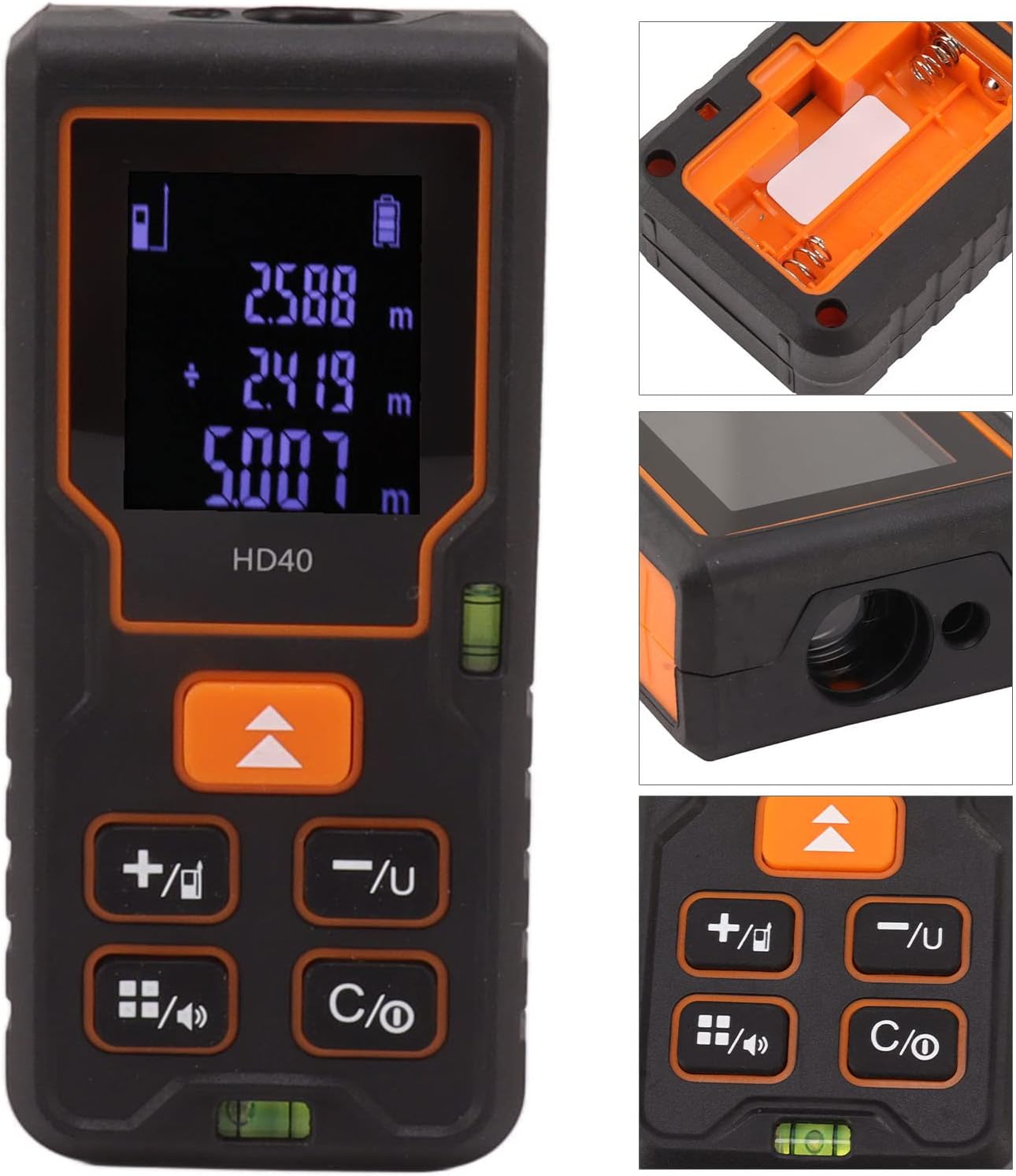
Immaġni: Dettaljata view of the YOUTHINK Distance Meter's display, showing measurement readings, and its control buttons. Insets show the battery compartment and laser emitter.
6.1 Kejl Bażiku tad-Distanza
- Kun żgur li l-apparat ikun mixgħul.
- Point the laser emitter towards the target object.
- Press the measurement button (often the same as the power button or a dedicated 'MEAS' button). The laser will activate, and the measurement will appear on the display.
- The device will automatically hold the measurement on the screen.
6.2 Aġġustament tal-Punt ta' Referenza
The device allows you to choose the measurement reference point:
- Referenza ta' Quddiem: Measurements are taken from the front edge of the device.
- Rear Reference: Measurements are taken from the back edge of the device.
Use the dedicated reference point button (often indicated by an arrow pointing up or down) to toggle between these modes. The current reference point is usually indicated on the display.
6.3 Modi ta' Kejl
The device supports various measurement functions. Use the mode button (often indicated by a square icon or 'FUNC') to cycle through available modes.

Image: The YOUTHINK Distance Meter alongside diagrams illustrating its capabilities for single distance, area, volume, and Pythagorean theorem measurements.
- Kejl tad-Distanza Uniku: Kejl standard minn punt għal punt.
- Kejl taż-Żona: Measure two sides (length and width), and the device calculates the area.
- Kejl tal-Volum: Measure three sides (length, width, and height), and the device calculates the volume.
- Kejl Pitagoriku: Used for indirect measurements, such as height, by measuring two or three sides of a right-angled triangle. Follow the on-screen prompts for each step.
6.4 Konverżjoni tal-Unità
The device may support different units of measurement (e.g., meters, feet, inches). Use the unit button (often marked 'UNIT' or with a unit symbol) to switch between units.
7. Manutenzjoni
Proper maintenance ensures the longevity and accuracy of your distance meter.
- Tindif: Uża artab, damp cloth to clean the device. Do not use abrasive cleaners or solvents. Pay special attention to keeping the laser lens clean and free of dust.
- Ħażna: Store the device in a cool, dry place, away from direct sunlight and extreme temperatures. If storing for extended periods, remove the batteries to prevent leakage.
- Evita l-Impatt: Protect the device from drops and impacts, which can affect its accuracy and functionality.
8 Issolvi l-problemi
If you encounter issues with your YOUTHINK Distance Meter, refer to the following common problems and solutions:
| Problema | Kawża Possibbli | Soluzzjoni |
|---|---|---|
| L-apparat ma jixgħelx | Batteriji mejta jew installati ħażin | Iċċekkja l-polarità tal-batterija, ibdel b'batteriji AAA ġodda. |
| Qari mhux eżatt | Dirty laser lens, unstable surface, incorrect reference point | Clean the laser lens. Ensure the device is stable. Verify the correct reference point is selected. |
| Laser does not activate | Device error, low battery | Restart the device. Replace batteries. If problem persists, contact support. |
| Id-displej huwa vojt jew jitteptep | Low battery, device malfunction | Ibdel il-batteriji. Jekk il-problema tippersisti, ikkuntattja l-appoġġ. |
9. Garanzija u Appoġġ
Specific warranty information for this product is not provided in the available data. Please refer to the warranty card included with your purchase or contact the retailer/manufacturer directly for details regarding warranty coverage and support.
For technical assistance or inquiries, please contact YOUTHINK customer support through their official webis-sit jew l-informazzjoni ta' kuntatt ipprovduta mad-dokumentazzjoni tal-prodott tiegħek.