
1. Introduzzjoni
The Yahboom Rider-Pi is an advanced two-wheeled self-balancing robot designed for Python programming and AI vision recognition. Equipped with a Raspberry Pi Compute Module 5 (CM5), it offers comprehensive performance upgrades and supports various intelligent interactions. This manual provides essential information for setting up, operating, and maintaining your Rider-Pi robot.

Figure 1: Yahboom Rider-Pi CM5 Self-Balancing Robot and its packaging.
2. X'hemm fil-Kaxxa
Carefully unpack your Rider-Pi robot and ensure all components are present. The package includes:
- Rider-Pi wheel-legged robot (Assembled)
- Karta TF
- Kejbil tad-dejta tat-Tip C
- Type-C USB hub
- Micro to HDMI data cable

Figure 2: Included components of the Rider-Pi package.
Video 1: Unboxing the Rider-Pi robot, showing all included accessories and the pre-assembled robot.
3. Prodott Aktarview & Karatteristiċi
The Rider-Pi robot is a versatile platform for AI and robotics education, featuring a unique two-wheeled legged structure that combines the mobility of wheeled robots with the obstacle-crossing ability of legged robots.
Karatteristiċi ewlenin:
- Raspberry Pi CM5 Module: Built-in AI module supporting Python programming.
- AI Visual Recognition: Supports gesture control, human body movement imitation, face/color object tracking, and recognition.
- Interazzjoni bil-vuċi: Dual MEMS digital microphones and speakers, equipped with OpenRouter for image recognition, voice recognition, and natural language processing.
- Self-Balancing: Built-in IMU sensor for real-time posture adjustment and stable omnidirectional movement across various terrains.
- Kostruzzjoni Durabbli: Made of ABS material for toughness and impact resistance, with a carbon fiber bracket for sturdiness and lightweight design. The back cover is aviation aluminum for abrasion resistance.
- Dynamic Expressions: 2.0-inch IPS display with 35 dynamic expressions and support for custom expressions.
- Cross-Platform Control: Dual APP support (WiFi with image transmission and Bluetooth) for iOS and Android devices.

Figura 3: Aktarview of the upgraded Raspberry Pi CM5 module integrated into the Rider-Pi.

Figure 4: Detailed product structure and components of the Rider-Pi robot.

Figure 5: The robot's 2.0-inch IPS display showing dynamic expressions.
4. Setup
The Rider-Pi robot comes pre-assembled. Follow these steps to power it on and begin operation:
- Qawwa Mixgħul: Locate the power switch on the robot and turn it on.
- L-Ibbutjar Inizjali: The robot's screen will display the 'Luwu Dynamics' logo.
- Agħżel il-Modalità: On the screen, you can choose between 'Remote Control Mode (RC)' or 'Try Demos'. Use the robot's physical buttons to navigate and select.
- Explore Demos: If you select 'Try Demos', you will enter an interface with various sample programs (31 in total) including ChatGPT, Q&A, Speech, and AI visual interaction functions.

Figure 6: Robot screen displaying mode selection after power-on.
5. Operazzjoni
The Rider-Pi can be controlled through its pre-installed GUI programs or via a smartphone application.
5.1. Funzjonijiet Bażiċi
The robot supports several basic functions directly from its interface:
- Audio recording and playback
- Reġistrazzjoni u daqq tal-vidjo
- Kontroll tad-dawl RGB
- Posture angle acquisition
- Qari tal-istatus tal-batterija
- Kontroll tal-moviment

Figure 7: Visual representation of the Rider-Pi's basic functions.
5.2. Kontroll tal-App
The Rider-Pi supports both WiFi and Bluetooth APP control for iOS and Android devices. This allows users to control the robot's movements and execute various action groups.
- Kontroll mill-bogħod tal-WiFi: Offers FPV (First-Person View) control with image transmission.
- Kontroll mill-bogħod Bluetooth: Provides direct control over robot actions.

Figure 8: Cross-platform remote control options via smartphone apps.
Video 2: Demonstrates the Rider-Pi robot's two-wheeled legged movement and self-balancing capabilities.
5.3. Movement and Stability
The unique linkage wheel-legged structure allows the Rider-Pi to achieve stable and omnidirectional movement, easily coping with various terrain obstacles.
- Self-Balancing: The robot can immediately return to a balanced status if picked up and placed back on the ground.
- Moviment Omnidirezzjonali: Capable of moving forward, backward, rotating, and adjusting altitude.
- Qsim ta' Ostakli: Designed to navigate slopes and steps with stability.

Figure 9: The Rider-Pi robot demonstrating stable movement on an incline.
6. AI Visual Interaction & Programming
The Rider-Pi leverages its CM5 module, 5MP camera, and dual MEMS microphones to provide rich AI capabilities.
6.1. Multimodal AI Applications
The robot integrates Large Language Models, Voice Large Models, and Vision Large Models to understand environmental information and interact intelligently.
- Voice Q&A: Ask questions and receive spoken answers.
- Kontroll tal-Vuċi: Command the robot using voice (e.g., "Lulu, forward," "Lulu, lift rotate").
- Scene Understanding: Describe objects and scenarios within its field of view.
- Embodied Intelligence: Perform actions based on visual recognition (e.g., move forward if a red ball is seen).
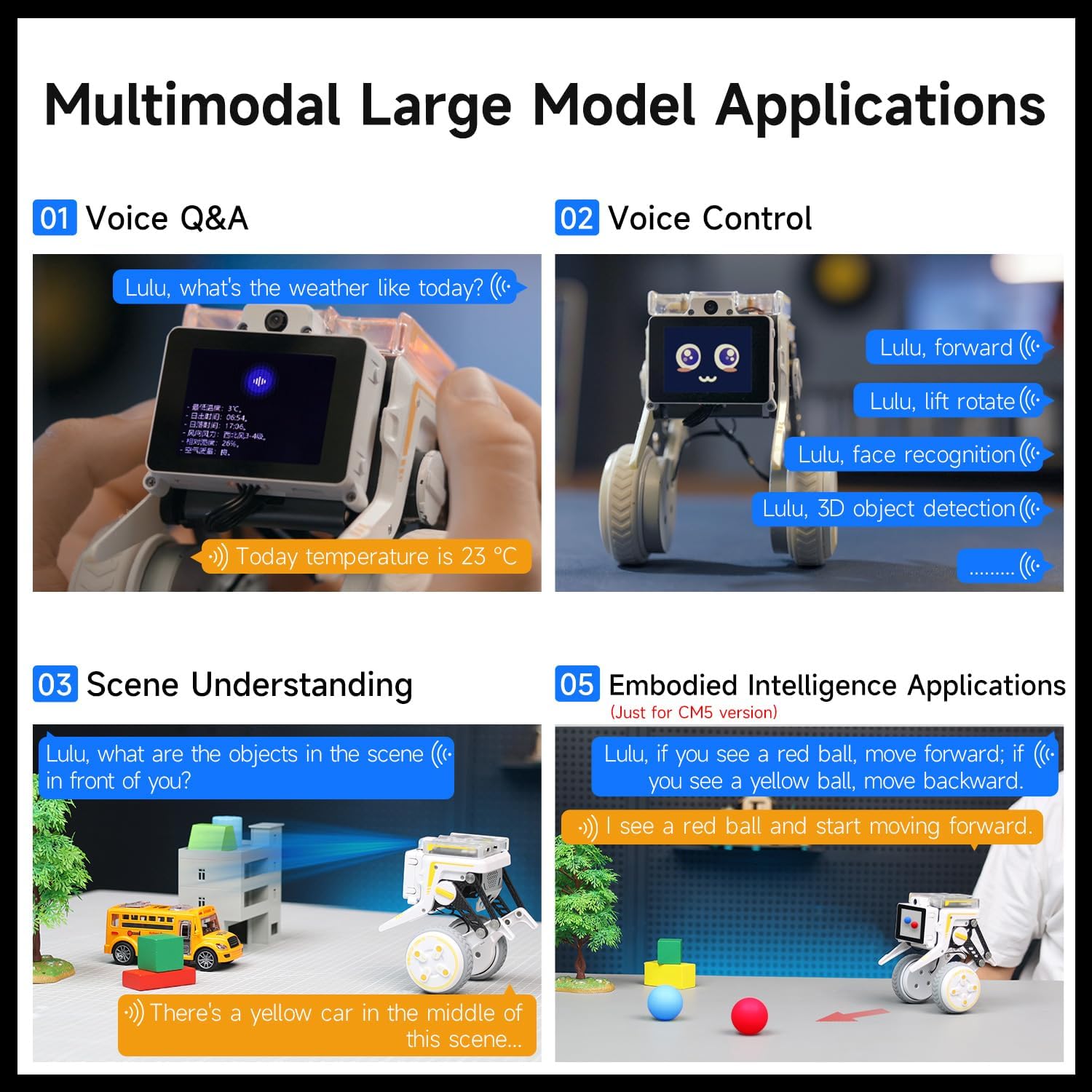
Figura 10: Eżamples of multimodal AI applications.
6.2. AI Visual Recognition Functions
The 5MP camera enables a wide range of visual recognition tasks:
- Kontroll tal-palm
- Human skeleton recognition
- Face tracking and detection
- Color tracking/following
- QR code motion control
- Face mask detection
- Gesture following and control
- 3D object recognition
- Rikonoxximent tal-pjanċa tal-liċenzja

Figure 11: Various AI visual interaction functions of the Rider-Pi.
6.3. Python Programming
The Rider-Pi supports Python programming and comes with pre-installed GUI programs offering over 30 functions. Sample codes, motion control protocols, and Python interfaces are provided to facilitate development for both beginners and experienced DIY developers.

Figure 12: The Rider-Pi robot being programmed via a laptop.
7. Speċifikazzjonijiet
| Karatteristika | Dettall |
|---|---|
| Isem tal-Prodott | Rider-Pi wheel-legged robot |
| Bord ta' Kontroll Prinċipali | RPi CM5 (2GB RAM) + ESP32 |
| Wiri | 2.0-inch IPS, 320x240 |
| Lingwa tal-Programmazzjoni | Python |
| Mikrofonu | Dual MEMS digital microphone |
| Speaker | 8Ω 2W Speaker |
| Kamera | 5MP OV5647 |
| Batterija | 18500 2S 1400mAh battery |
| Ħin tax-Xogħol tal-batterija | 1 siegħa |
| Bil-mutur Hub | 8.4V brushless hub motor * 2 |
| Servo | Serial bus metal servo * 2 |
| Materjal | Aviation aluminum back cover, ABS body, carbon fiber bracket |
| Kontroll mill-bogħod | BT remote control, WiFi remote control [iOS/Android] |
| Metodu ta' Komunikazzjoni | LAN TCP communication, BT communication |
| Karta SD | 64GB |
| Piż | 560g |
| Dimensions (Squatting) | 115 * 115 * 125mm |
| Dimensions (Standing) | 115 * 115 * 158mm |

Figure 13: Technical specifications and dimensions of the Rider-Pi robot.
8. Manutenzjoni
To ensure the longevity and optimal performance of your Rider-Pi robot, follow these maintenance guidelines:
- Tindif: Use a soft, dry cloth to clean the robot's exterior. Avoid using harsh chemicals or abrasive materials.
- Kura tal-batterija: Charge the battery fully before first use. For long-term storage, charge the battery to about 50-60% and store in a cool, dry place. Avoid overcharging or completely draining the battery.
- Aġġornamenti tas-Software: Regularly check the official Yahboom website or community forums for firmware and software updates to ensure your robot has the latest features and bug fixes.
- Ħażna: Store the robot in a safe, dry environment away from direct sunlight, extreme temperatures, and moisture.
9 Issolvi l-problemi
If you encounter issues with your Rider-Pi robot, refer to the following common troubleshooting steps:
- Ir-Robot ma jixgħelx: Ensure the battery is fully charged and correctly installed. Check the power switch is in the 'ON' position.
- Unstable Movement/Balancing Issues: Verify that the robot is on a flat, stable surface. If the issue persists, check for any physical obstructions in the wheels or linkage.
- Problemi ta' Konnessjoni tal-App: Ensure Bluetooth or WiFi is enabled on your smartphone and the robot. Restart both the robot and the app. Make sure the app is up to date.
- AI Feature Malfunction: Check your network connection if using features that require internet access. Ensure the camera lens is clean and unobstructed. Restart the specific AI program or the robot.
- Żbalji fl-Ipprogrammar: Double-check your Python code for syntax errors. Refer to the official tutorials and sample codes for guidance.
For more detailed troubleshooting or persistent issues, please contact Yahboom technical support.
10. Garanzija u Appoġġ
The Yahboom Rider-Pi robot comes with a 90-day warranty against manufacturer defectsJekk jogħġbok żomm il-prova tax-xiri tiegħek għal talbiet ta' garanzija.
Riżorsi Addizzjonali:
For comprehensive tutorials, sample codes, and further support, please visit the official Yahboom study page:
Yahboom Rider-Pi Tutorial Link
This resource includes detailed information on:
- Gwida Quick Start
- Basic Control Course
- AI Visual Recognition Course
- AI Large Model Applications
- Video Practical Tutorials

Figure 14: Screenshot of the Yahboom Rider-Pi tutorial websit.
If you encounter problems during use, please contact Yahboom customer service or technical support directly for assistance.