
1. Introduzzjoni
This manual provides essential information for setting up, operating, maintaining, and troubleshooting your Lenovo ThinkPad E16 Business Laptop. Please read this manual thoroughly to ensure proper usage and to maximize the performance and longevity of your device.

Figure 1.1: Lenovo ThinkPad E16 Business Laptop
2. Setup
2.1 Żpakkjar u Spezzjoni Inizjali
Carefully remove all components from the packaging. Verify that all items listed in the 'What's in the Box' section are present and undamaged. If any items are missing or damaged, contact your vendor immediately.
2.2 Konnessjoni mal-Enerġija
- Connect the power adapter to the laptop's USB-C power port.
- Ipplaggja l-adapter tal-enerġija fi żbokk elettriku ertjat.
- Ħalli l-batterija tiċċarġja għal mill-inqas 30 minuta qabel l-ewwel użu, jew sakemm l-indikatur tal-batterija juri ċarġ suffiċjenti.
2.3 Initial Boot-Up and Windows 11 Pro Setup
Press the power button to turn on your laptop. Follow the on-screen instructions to complete the Windows 11 Pro setup, including language selection, network connection, and user account creation.
2.4 Konnessjoni tal-Periferali
Your ThinkPad E16 offers various ports for connecting external devices:
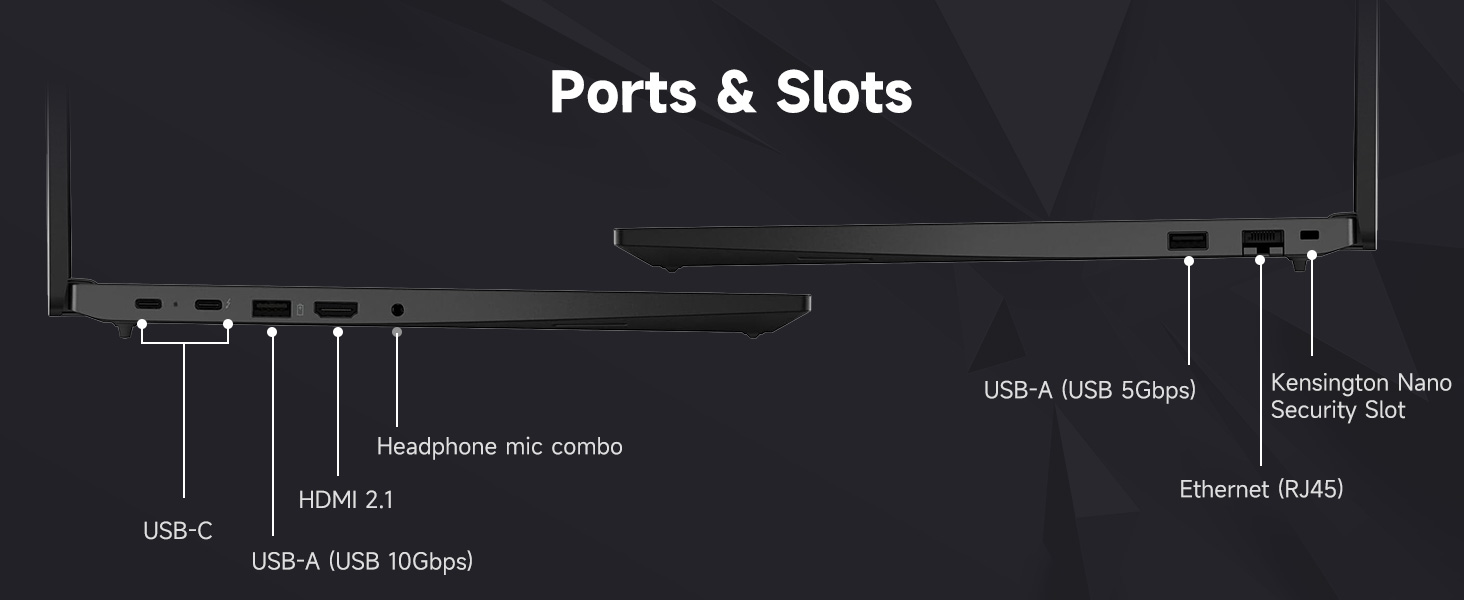
Figura 2.1: Portijiet u Slots tal-Laptop
- USB-A (USB 5Gbps, USB 10Gbps): Connect USB devices such as the bundled wireless mouse receiver, external hard drives, or printers.
- USB-C (USB 5Gbps, PD / DP 1.4, USB 10Gbps, PD / DP 1.4): For power delivery, data transfer, and display output.
- Ethernet (RJ45): Għal konnessjoni ta' netwerk bil-fili.
- HDMI 2.1: Qabbad ma' monitor estern jew TV.
- Headphone / mic combo (3.5mm): Għad-dħul/ħruġ tal-awdjo.
- Kensington Nano Security Slot: Għal qfil ta' sigurtà fiżika.
2.5 Wi-Fi 6 Connection
During Windows setup, you will be prompted to connect to a Wi-Fi network. Select your network and enter the password. Your laptop supports Wi-Fi 6 for fast and reliable wireless connectivity.
2.6 Konfigurazzjoni tal-Qarrej tal-Marki tas-Swaba'
To enhance security, set up the integrated fingerprint reader through Windows Hello in your system settings. This allows for quick and secure login.
2.7 Bundled Accessories
Your laptop includes an A-DATA UC310 64GB USB Flash Drive and a Thunderobot ML101 Wireless Mouse. The USB drive provides additional storage and data transfer capabilities. The wireless mouse connects via a USB nano receiver for convenient navigation.

Figure 2.2: A-DATA UC310 64GB USB Flash Drive
3. It-Tħaddim tal-Laptop Tiegħek
3.1 Tastiera u Apparati ta' Input
The ThinkPad E16 features a backlit keyboard for comfortable typing in various lighting conditions. Utilize the TrackPoint Quick Menu and Tap-to-Select features for efficient navigation. The larger touchpad also enhances user interaction.

Figure 3.1: Keyboard and Touchpad Features
3.2 Karatteristiċi tal-Wiri
The 16-inch FHD+ (1920x1200) IPS anti-glare touchscreen display offers clear visuals. Its 16:10 aspect ratio provides more vertical screen space, beneficial for productivity. The 300-nit brightness and TÜV Low Blue Light certification contribute to reduced eye strain during extended use.

Figura 3.2: Speċifikazzjonijiet tad-Displej
3.3 Awdjo u Viżwali
Experience Harman- and Dolby-optimized audio for enhanced sound quality. The AI-based noise cancellation feature improves clarity during video conferences and multimedia consumption.

Figure 3.3: Audiovisual Experience
3.4 Prestazzjoni
Powered by the AMD Ryzen 7 7735U processor with 8 cores and 16 threads, the laptop delivers responsive performance for everyday productivity, multitasking, and business workflows. The 32GB DDR5 RAM ensures smooth operation across multiple applications, and the 1TB PCIe NVMe M.2 Solid State Drive provides fast boot-up times and quick data access.

Figure 3.4: AMD Ryzen 7 Processor
4. Manutenzjoni
4.1 Tindif tal-Laptop Tiegħek
- Uża drapp ratba u mingħajr ħelu dampNaddaf bl-ilma jew b'prodott tat-tindif tal-iskrin biex tnaddaf id-displej.
- Imsaħ it-tastiera u x-chassis b'moxx ħafifamp drapp. Evita umdità eċċessiva.
- Tużax kimiċi ħarxa, solventi, jew prodotti tat-tindif li joborxu.
4.2 Aġġornamenti tas-Software
Iċċekkja u installa regolarment aġġornamenti tas-sistema operattiva (Windows Update) u aġġornamenti tas-sewwieqa (Lenovo Vantage jew Appoġġ Lenovo website) to ensure optimal performance and security.
4.3 Kura tal-Batterija
- Evita li tiċċarġja l-batterija kompletament ta' spiss.
- Aħżen il-laptop f'post frisk u niexef meta ma jkunx qed jintuża għal perjodi twal.
- For optimal battery health, avoid continuous charging at 100% for long durations.
4.4 Karatteristiċi tas-Sigurtà
The ThinkPad E16 incorporates several security features to protect your data:
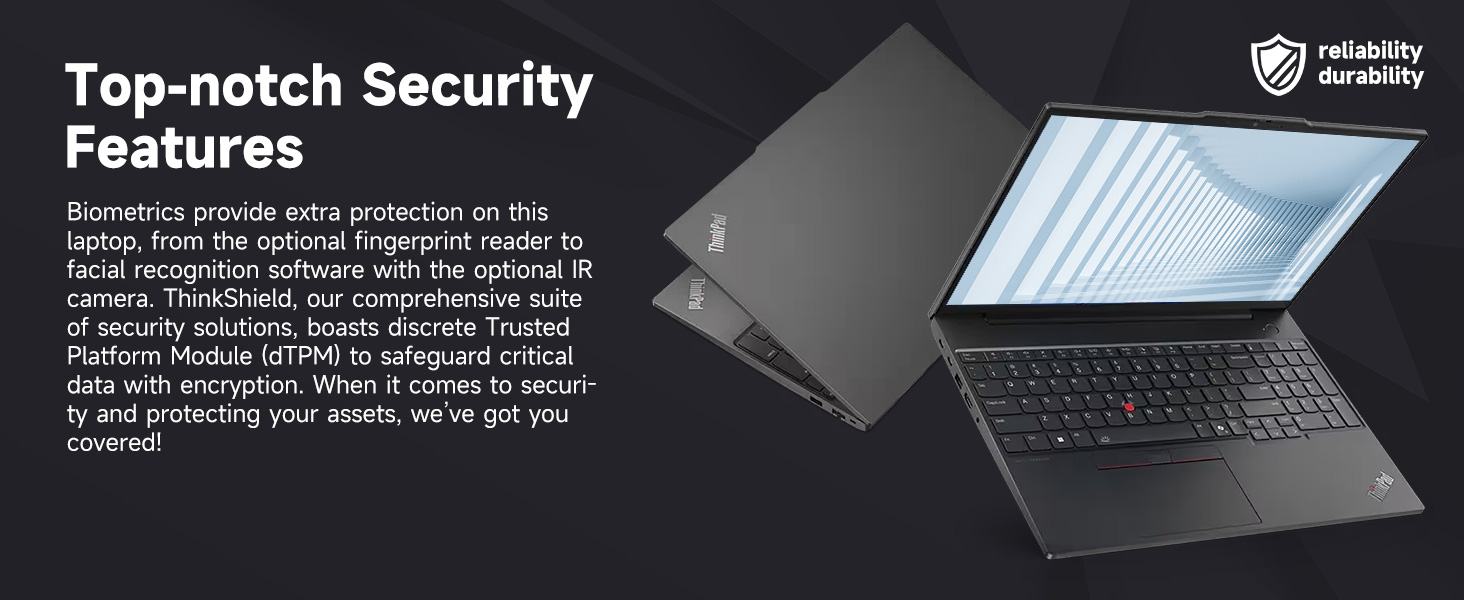
Figure 4.1: Top-notch Security Features
- ThinkShield Security Suite: Sett komprensiv ta' soluzzjonijiet ta' sigurtà.
- Qarrej tal-marki tas-swaba': Għall-awtentikazzjoni bijometrika.
- dTPM (Discrete Trusted Platform Module): Safeguards critical data with encryption.
- WebXater tal-Privatezza tal-kamera: Physically blocks the webcam for privacy.
5 Issolvi l-problemi
This section addresses common issues you might encounter with your ThinkPad E16. For more detailed troubleshooting, refer to the Lenovo support websit.
5.1 Kwistjonijiet tal-Enerġija
- Il-laptop ma jixgħelx: Kun żgur li l-adapter tal-enerġija huwa konness sew u li s-sokit jaħdem sew. Iċċekkja l-livell tal-iċċarġjar tal-batterija.
- Il-batterija mhix qed tiċċarġja: Verify the power adapter is working. Try a different outlet.
5.2 Kwistjonijiet tal-Wiri
- No display or blank screen: Connect an external monitor to check if the issue is with the laptop's display. Adjust brightness settings.
- Skrin li jteptep: Aġġorna s-sewwieqa tal-grafika. Iċċekkja l-konnessjonijiet tal-kejbil tad-displej jekk qed tuża monitor estern.
5.3 Kwistjonijiet ta' Konnettività
- Il-Wi-Fi mhux qed jikkonnettja: Ensure Wi-Fi is enabled. Restart your router and laptop. Re-enter Wi-Fi password.
- Apparati USB mhux rikonoxxuti: Ipprova port USB differenti. Aġġorna d-drajvers tal-USB.
5.4 Kwistjonijiet ta' Prestazzjoni
- Prestazzjoni bil-mod: Agħlaq l-applikazzjonijiet mhux meħtieġa. Iċċekkja għal proċessi fl-isfond. Kun żgur li hemm biżżejjed spazju għall-ħażna.
- Is-sħana żejda: Kun żgur li l-ventijiet tal-ventilazzjoni huma ċari. Uża l-laptop fuq wiċċ iebes u ċatt.
6. Speċifikazzjonijiet
| Karatteristika | Speċifikazzjoni |
|---|---|
| Brand | Lenovo |
| Isem tal-Mudell | ThinkPad E16 |
| Proċessur | AMD Ryzen 7 7735U (8 Qlub, 16-il Ħjut, sa 4.75 GHz) |
| Grafika | Grafika AMD Radeon (Integrata) |
| RAM | 32GB DDR5 RAM (5600 MHz) |
| Ħażna | SSD ta' 1TB PCIe NVMe M.2 |
| Wiri | 16-inch FHD+ (1920x1200) IPS Touchscreen, Anti-glare, 16:10 aspect ratio, 300nit, TÜV Low Blue Light certified, 60 Hz Refresh Rate |
| Sistema Operattiva | Windows 11 Pro |
| Konnettività | Wi-Fi 6 (802.11ax), Ethernet (RJ45) |
| Portijiet | 2x USB-A (5Gbps, 10Gbps), 2x USB-C (5Gbps, 10Gbps, PD/DP 1.4), 1x HDMI 2.1, 1x Headphone/Mic Combo, 1x Kensington Nano Security Slot |
| Karatteristiċi Speċjali | Backlit Keyboard, Fingerprint Reader, Numeric Keypad, HD 720p RGB Webkamera b'xater tal-privatezza |
| Kulur | Iswed |
| Dimensions (L x W x Thickness) | 12.32" x 8.63" x 0.71" |
7. Garanzija u Appoġġ
7.1 Informazzjoni dwar Garanzija
Your Lenovo ThinkPad E16 comes with a 1-year manufacturer's warranty. Additionally, for upgraded RAM/SSD components, a 1-year warranty is provided by PCOnline US. Please retain your proof of purchase for warranty claims.
7.2 Appoġġ Tekniku
Għal assistenza teknika, downloads ta' sewwieqa, jew aktar soluzzjonijiet għal problemi, jekk jogħġbok żur is-sit uffiċjali tal-Appoġġ Lenovo website or contact their customer service. For issues related to the upgraded components, contact PCOnline US support.