
Introduzzjoni
This manual provides detailed instructions for the Saitake Wireless Arcade Fight Stick Joystick. It covers product features, setup, operation, connection methods, and troubleshooting to ensure optimal performance across various platforms including PC, Android, iOS, Nintendo Switch, PS3, and PS4.
Prodott Overview
Vidjo: Overview of the Saitake Arcade Fight Stick, showcasing its design, joystick, buttons, and key features.
Karatteristiċi Ewlenin
- Kompatibilità Multi-Pjattaforma: Compatible with Windows PC, Android, iOS, Nintendo Switch 1/2, PS3, and PS4.
- Three Connection Methods: Supports Bluetooth, 2.4GHz wireless (with included receiver), and wired (Type-C) connections.
- Integrated Display Screen: A 1.9-inch functional display screen shows function options, volume, lighting effects, brightness, and language settings.
- Jack tal-headphones ta' 3.5mm: For audio output and communication.
- Funzjoni TURBO: Equipped with standard turbo and upgraded auto turbo modes for rapid input execution.
- Makro Funzjoni: Customize button mappings and create macro commands with up to 18 keystrokes, including trigger timestamps.
- Joystick ta' Preċiżjoni Għolja: Features an adjustable RGB light ring with 4 modes and 7 colors.
- Baxx-Profile Red Switches: Buttons utilize low-profile red switches for light pressure and quick response.
- Disinn Ergonomiku: Designed for comfortable and extended gaming sessions.
Product Layout and Button Functions
Familiarize yourself with the layout and functions of the arcade fight stick's buttons and controls.

Image: Detailed diagram of the Saitake Arcade Fight Stick showing the location and labels of all buttons and features.
- A: Għażla tal-Menu
- B: Joystick Function Option
- C: Joystick
- D: Wiri tal-Iskrin
- E: Buttuna Turbo
- F: Buttuna AGĦŻEL
- G: Buttuna START
- H: Buttuna HOME
- I: Għażla ta' Konnessjoni
- J: Touch Panel (for PS4 platform)
- K: Earphone & Microphone Option
- L: LSB Button
- M: RSB Button
- N: Buttuna LB
- O: Buttuna LT
- P: Socket tal-Earphone
- Q: MACRO Button
- R: Buttuna
- S: Buttuna X
- T: Buttuna B
- U: Buttuna Y
- V: Buttuna RT
- W: Buttuna RB
Setup u Konnessjoni
Iċċarġjar tal-Apparat
The arcade stick has a built-in 1000mAh rechargeable lithium battery. Connect the included USB Type-C cable to the device and a power source (e.g., computer USB port, USB wall adapter) to charge. The display screen will indicate charging status.
Metodi ta' Konnessjoni
The Saitake Arcade Fight Stick supports three primary connection methods:

Image: Visual representation of the Bluetooth switch, 2.4G receiver, and Type-C wired connection port.
- Konnessjoni Bluetooth:
- Ensure the arcade stick is powered on and in Bluetooth pairing mode (refer to the display screen for status).
- On your device (Android, iOS, Switch, PS3, PS4, PC with Bluetooth), search for available Bluetooth devices.
- Select "Saitake Arcade Stick" to pair.
- Konnessjoni bla fili 2.4GHz:
- Locate the 2.4GHz receiver in the hidden compartment on the back of the arcade stick.
- Plug the 2.4GHz receiver into a USB port on your PC, Switch dock, or PS3/PS4 console.
- The arcade stick should automatically connect to the receiver.
- Konnessjoni bil-fili:
- Connect the USB Type-C cable from the arcade stick to a USB port on your PC, Switch dock, or PS3/PS4 console.
- The device will automatically detect the wired connection.
Kompatibilità Multi-Pjattaforma
The Saitake Arcade Fight Stick is designed for broad compatibility. The image below illustrates the supported systems.

Image: Icons representing Android, iOS, PC, Nintendo Switch, PS3, and PS4, indicating multi-system support.
Istruzzjonijiet Operattivi
Użu Ġenerali
Once connected, the arcade stick functions as a standard controller for compatible games. Use the joystick for directional input and the action buttons for in-game commands. The 1.9-inch display screen provides real-time information and allows for various adjustments.
Funzjoni TURBO
The TURBO function allows for rapid, repeated input of a button press. This can be useful in games requiring fast button mashing.
- Standard Turbo: Agħfas il- TURBO button and the desired action button simultaneously to activate. The button will now rapidly repeat its input when held down.
- Auto Turbo: Some modes may offer an auto-turbo feature where the button repeats without needing to be held. Refer to the on-screen display for specific settings.
- Aġġusta tal-Veloċità: The display screen and encoder allow for adjusting the turbo speed settings.
- Diżattivazzjoni tat-Turbo: Agħfas il- TURBO button and the action button again to deactivate.
Funzjoni Makro
The MACRO function allows you to record a sequence of up to 18 keystrokes and assign them to a single button for complex command execution.
- Reġistrazzjoni ta' Makro:
- Agħfas il- MAKRO button to enter recording mode. The display screen will indicate recording status.
- Perform the desired sequence of button presses and joystick movements.
- Agħfas il- MAKRO buttuna għal darb'oħra biex tieqaf tirrekordja.
- Assign the recorded macro to a specific button by pressing that button.
- Executing a Macro: Press the assigned button to execute the recorded sequence.
- Tneħħija ta' Makro: Refer to the display screen options or the full manual for instructions on clearing recorded macros.

Image: Visual explanation of the Turbo and Macro functions, highlighting their benefits for efficient gaming.
Display Screen and Audio Jack
- 1.9-inch Functional Display Screen: Use the encoder and buttons near the screen to navigate menus and adjust settings such as volume, lighting effects, brightness, and language. The screen also provides status updates.
- Jack tal-headphones ta' 3.5mm: Located on the side of the unit, this jack allows you to connect headphones or a headset for in-game audio and voice chat (if supported by the connected platform).
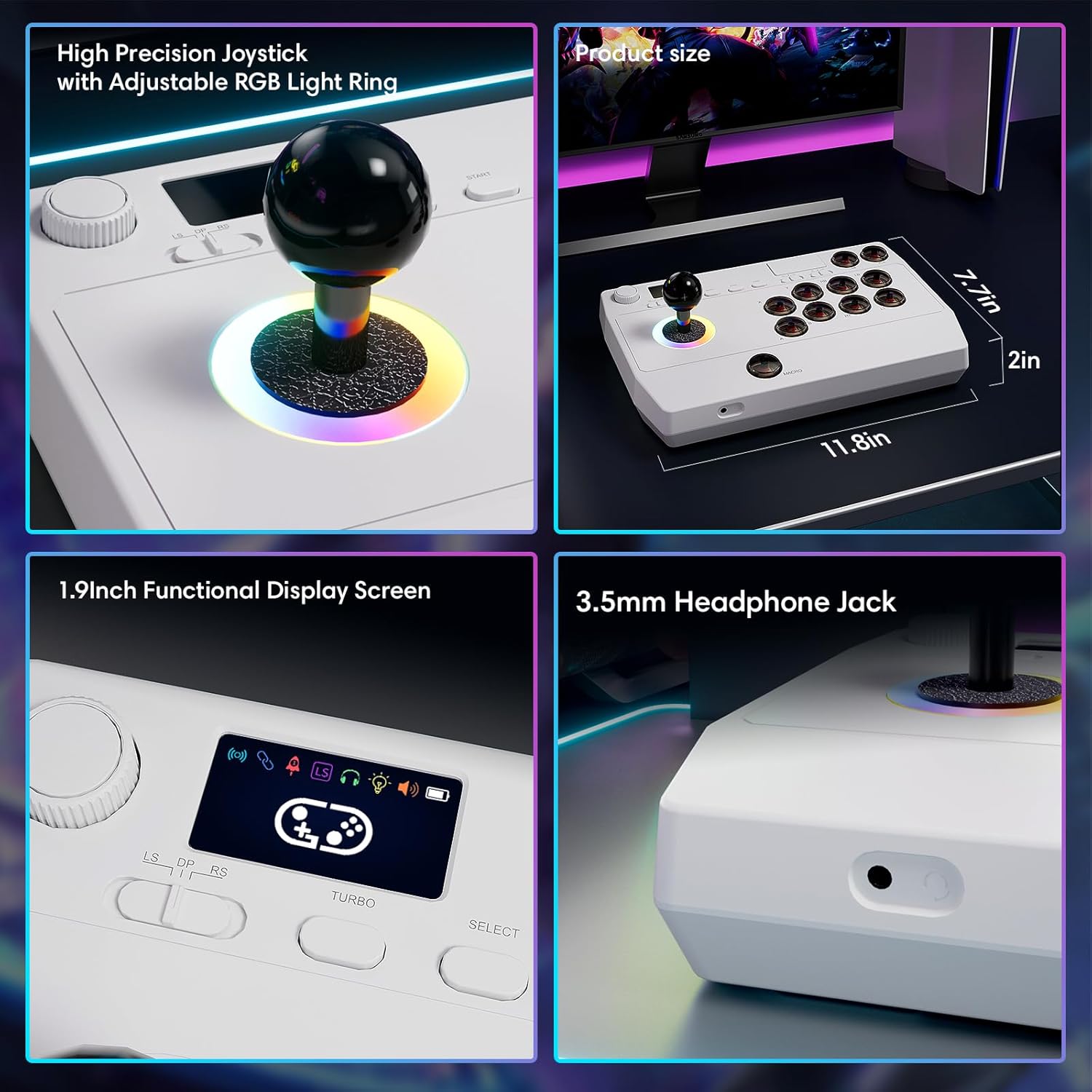
Immaġni: Close-up views of the high-precision joystick with RGB lighting, the 1.9-inch functional display screen, and the 3.5mm headphone jack.
Manutenzjoni
- Żomm l-apparat nadif billi timsaħ b'ċarruta ratba u niexfa.
- Evita li tesponi l-apparat għal temperaturi estremi, umdità, jew dawl tax-xemx dirett.
- Tippruvax tiżżarma l-apparat, għax dan jista' jannulla l-garanzija.
- Store the 2.4GHz receiver in its designated compartment when not in use to prevent loss.
Issolvi l-problemi
- L-apparat ma jixgħelx:
- Kun żgur li l-apparat huwa ċċarġjat kompletament. Qabbad ma' sors ta' enerġija billi tuża l-kejbil USB tat-Tip Ċ.
- Cannot connect wirelessly:
- For Bluetooth, ensure the device is in pairing mode and your host device's Bluetooth is enabled.
- For 2.4GHz, ensure the receiver is securely plugged into a USB port and the arcade stick is in 2.4GHz mode.
- Try restarting both the arcade stick and the host device.
- Buttons or joystick are unresponsive:
- Ensure the device is properly connected (wired or wireless).
- Test the device on a different game or platform to rule out software issues.
- Check for any physical obstructions or damage to the buttons or joystick.
- Audio issues with 3.5mm jack:
- Ensure headphones are fully plugged in.
- Check the volume settings on both the arcade stick's display and the host device.
- Ittestja b'par ta' headphones differenti.
Speċifikazzjonijiet
| Isem tal-Mudell | stick arcade |
| Brand | Saitake |
| Apparati Kompatibbli | Android, iOS, Nintendo Switch 1/2, PC, PlayStation 3/4 |
| Tip ta' Kontrollur | Joystick |
| Teknoloġija tal-Konnettività | Bluetooth, USB (2.4GHz wireless, Wired Type-C) |
| Karatteristiċi Addizzjonali | Ergonomic, Headphone Jack, Portable, Wireless, 1.9-inch Display Screen, TURBO Function, Macro Function, RGB Lighting |
| Pjattaforma tal-Ħardwer | Desktop, Gaming Console, Laptop, Smartphone, Tablet, Television |
| Sors tal-Enerġija | Battery Powered (Built-in 1000mAh Lithium Battery) |
| Dimensjonijiet tal-oġġett | 11.61 x 0.71 x 7.68 pulzieri |
| Kulur | Abjad |
Garanzija u Appoġġ
The Saitake Wireless Arcade Fight Stick Joystick comes with a garanzija ta 'sena mid-data tax-xiri.
For technical support, troubleshooting assistance, or warranty claims, please contact Saitake customer service through their official webis-sit jew il-bejjiegħ bl-imnut minn fejn inxtara l-prodott. Jekk jogħġbok żomm l-irċevuta tax-xiri tiegħek u l-informazzjoni dwar il-mudell tal-prodott lesti.