1. Prodott Aktarview
This manual provides instructions for the Generic replacement remote control designed for use with Britz BZ-T7500, BZ-T7600, and BZ-T7700 Micro Stereo Sound HI-FI Systems. This remote is a dedicated replacement and may not replicate all functions of the original remote control.
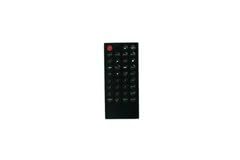
Figura 1: Quddiem view of the Generic replacement remote control. This image displays the overall design and button layout of the remote.
2. Setup
The Generic replacement remote control requires no programming or complex setup. Simply install the batteries to begin operation.
2.1 Installazzjoni tal-batterija
- Sib il-kompartiment tal-batterija fuq wara tal-kontroll remot.
- Żerżaq l-għatu tal-kompartiment tal-batterija 'l isfel jew fid-direzzjoni indikata minn vleġġa biex tiftaħu.
- Insert new batteries (typically AAA, not included) according to the polarity indicators (+ and -) inside the compartment.
- Agħlaq l-għatu tal-kompartiment tal-batterija billi tiżżerżaqha lura f'postu sakemm tikklikkja sew.
Nota: Ensure batteries are inserted correctly to prevent damage to the remote control.
3. Istruzzjonijiet Operattivi
To operate your Britz Micro Stereo Sound HI-FI System, point the remote control directly at the system's infrared receiver and press the desired function button.
- Buttuna tal-Qawwa: Ixgħel jew jitfi s-sistema.
- Kontroll tal-Volum: Jaġġusta l-livell tal-ħruġ tal-awdjo.
- Track/Channel Selection: Navigates through tracks, radio stations, or input sources.
- Kontrolli tal-daqq: Play, Pause, Stop, Fast Forward, Rewind (if applicable to your system).
Importanti: As a replacement remote, some advanced or specific functions of your original remote may not be available or may operate differently. This is not indicative of a defect.
4. Manutenzjoni
4.1 Tindif
Biex tnaddaf il-kontroll remot, uża drapp artab u niexef. Għal ħmieġ iebes, nixxef bil-mod.ampLaħlaħ id-drapp bl-ilma. Evita li tuża kimiċi ħarxa, prodotti tat-tindif li joborxu, jew umdità eċċessiva, għax dawn jistgħu jagħmlu ħsara lill-wiċċ jew lill-komponenti interni tar-remote.
4.2 Sostituzzjoni tal-batterija
Replace batteries when the remote's response becomes sluggish or stops working. Always replace all batteries at the same time with new ones of the same type. Do not mix old and new batteries or different battery types.
4.3 Ħażna
When storing the remote for extended periods, remove the batteries to prevent leakage, which can cause damage. Store in a cool, dry place away from direct sunlight and extreme temperatures.
5 Issolvi l-problemi
| Problema | Kawża Possibbli | Soluzzjoni |
|---|---|---|
| Ir-remote mhux qed jirrispondi. | Dead or incorrectly installed batteries. Obstruction between remote and system. Remote too far from system. | Replace batteries, ensuring correct polarity. Remove any obstructions. Move closer to the system. |
| Xi funzjonijiet ma jaħdmux. | This is a replacement remote; not all original functions are supported. | Confirm if the function is expected to work with a replacement remote. If you have the original remote's part number or your unit's model, providing this information to the seller may help clarify compatibility. |
| Ir-remote jaħdem b'mod intermittenti. | Low battery power. Weak signal. | Replace batteries. Ensure a clear line of sight to the system. |
6. Speċifikazzjonijiet
- Ditta: Ġeneriċi
- Apparati Kompatibbli: Britz BZ-T7500, BZ-T7600, BZ-T7700 Micro Stereo Sound HI-FI System
- Materjal: ABS/Plastik
- Karatteristika Speċjali: Digital Display (if applicable to the specific remote model)
- Kulur: Black or White (color may vary as per availability)
- Numru Massimu ta' Apparat Appoġġjat: 2
- ASIN: B0FYN1XZR3
7. Garanzija u Appoġġ
Warranty information for this Generic replacement remote control is not provided in this manual. For details regarding warranty coverage or technical support, please contact the seller or retailer from whom the product was purchased.
For specific inquiries about compatibility or functionality, it is recommended to provide your original remote's part number or your unit's model number to the support team.


