
Introduzzjoni
Welcome to the user manual for your new Lenovo LOQ 15IRX10 Gaming Laptop. This guide provides essential information for setting up, operating, maintaining, and troubleshooting your device. The Lenovo LOQ 15IRX10 is a high-performance gaming laptop featuring a 15.6" FHD IPS 144Hz display, a 13th Generation Intel Core i7-13650HX processor, NVIDIA GeForce RTX 5050 graphics, 24GB DDR5 RAM, and a 1TB NVMe M.2 SSD, running on Windows 11 Home.
Please read this manual thoroughly to ensure proper use and to maximize the lifespan and performance of your laptop.
X'hemm fil-Kaxxa
Upon unboxing your Lenovo LOQ 15IRX10 Gaming Laptop, please verify that all the following items are included:
- Lenovo LOQ 15IRX10 Gaming Laptop
- Adapter AC 245W
- Drive tal-USB MST ta' 32GB
- Quick Start Guide (if applicable, not explicitly listed but common)
Jekk xi oġġetti huma nieqsa jew bil-ħsara, jekk jogħġbok ikkuntattja lill-bejjiegħ tiegħek jew lill-appoġġ ta' Lenovo immedjatament.
Setup
1. L-Ewwel Tixgħel u l-Iċċarġjar
Before first use, it is recommended to fully charge your laptop's battery.
- Qabbad l-adapter tal-AC ta' 245W mal-port tad-dħul tal-enerġija fuq il-laptop tiegħek.
- Ipplaggja l-AC adapter fi żbokk tad-dawl.
- Agħfas il-buttuna tal-qawwa biex tixgħel il-laptop.

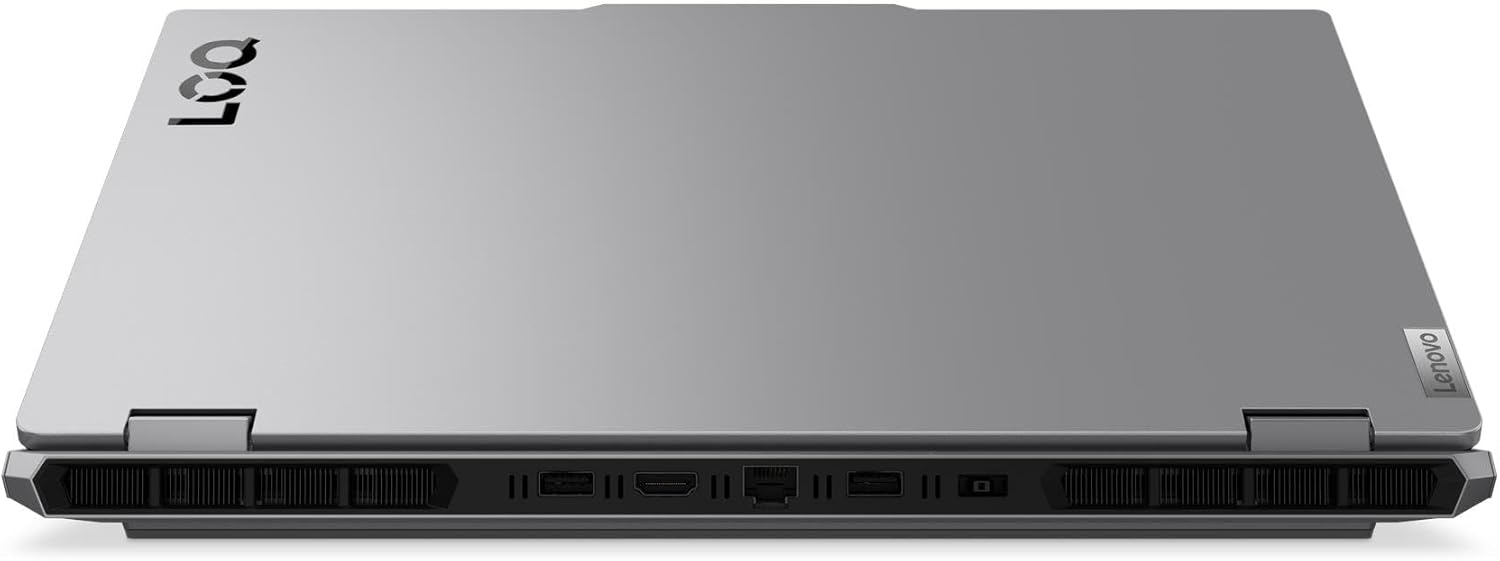
Immaġni: Wara view of the Lenovo LOQ 15IRX10 laptop showing the power input and other ports.
2. Konfigurazzjoni tad-Dar tal-Windows 11
Follow the on-screen instructions to complete the initial setup of Windows 11 Home. This includes selecting your region, language, connecting to a network, and creating a user account.
3. Konnessjoni ma 'Netwerk
Your laptop supports Wi-Fi 6 and Gigabit Ethernet.
- Wi-Fi: During Windows setup or later, click the Wi-Fi icon in the taskbar, select your network, and enter the password.
- Ethernet: Qabbad kejbil Ethernet mir-router jew il-modem tiegħek mal-port RJ-45 fuq il-laptop.
Immaġni: Wara view of the laptop highlighting the RJ-45 Ethernet port.
4. Konnessjoni Periferali
Connect external devices such as a mouse, keyboard, or external display.
- Apparat USB: Use the USB 3.2 Gen 1 Type-A ports or the USB 3.2 Gen 2 Type-C port.
- Display Estern: Connect an external monitor using the HDMI v2.1 port or the USB 3.2 Gen 2 Type-C port (which supports DisplayPort).
- Apparat Awdjo: Use the Headphone/Microphone Combo Jack for headsets.
Immaġni: In-naħa tax-xellug view of the laptop showing USB-C, USB-A, and audio jack ports.
Immaġni: Wara view of the laptop highlighting the HDMI port.
Tħaddim tal-Laptop
Tastiera u Touchpad
Your Lenovo LOQ 15IRX10 features a full-size keyboard with a numeric keypad and white backlighting for comfortable typing in various lighting conditions. The touchpad supports multi-touch gestures for intuitive navigation.

Immaġni: Minn fuq għal isfel view of the laptop showing the keyboard and touchpad.
Wiri
The 15.6-inch Full HD (1920 x 1080) IPS Anti-Glare display offers a 144Hz refresh rate for smooth visuals, especially during gaming. Adjust brightness using the function keys (Fn + F5/F6) or through Windows display settings.
Awdjo
The laptop is equipped with stereo speakers (2W x2) optimized with Nahimic Audio for an immersive sound experience. Adjust volume using the function keys (Fn + F1/F2/F3) or Windows sound settings.
Ġestjoni tal-batterija
The 4-cell, 60 Wh battery provides up to 6 hours of average usage. For optimal battery life:
- Keep the AC adapter connected during intensive tasks like gaming.
- Utilize Windows power saving modes when not gaming.
- Evita temperaturi estremi.
The laptop supports Super Rapid Charge, allowing it to charge from 0% to 30% in approximately 10 minutes.
Manutenzjoni
Tindif tal-Laptop Tiegħek
- Skrin: Uża ċarruta ratba u mingħajr ħelu dampLaħlaħ bl-ilma jew b'tindif tal-iskrin. Tisprejjax likwidu direttament fuq l-iskrin.
- Tastiera u Chassis: Uża drapp artab u niexef. Għal ħmieġ iebes, neħħi ftit drapp.amp Jista' jintuża drapp b'soluzzjoni ta' sapun ħafif, biex tiżgura li l-ebda likwidu ma jidħol fil-fetħiet.
- Ventijiet: Periodically clean dust from the cooling vents using compressed air to ensure proper airflow and prevent overheating.
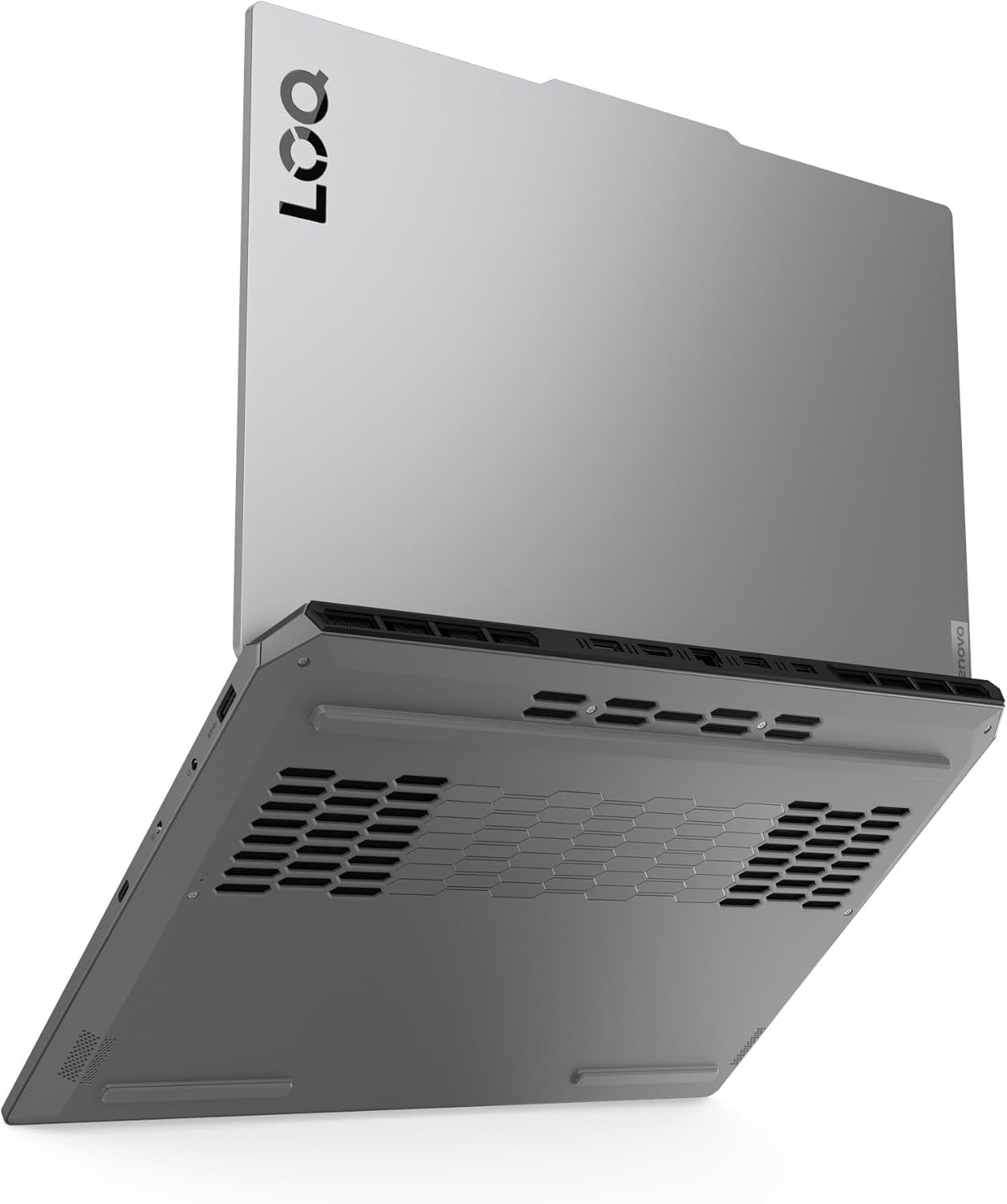
Immaġni: Taħt view of the laptop, illustrating the ventilation grilles for cooling.
Aġġornamenti tas-Software
Regularly update your operating system, drivers, and applications to ensure optimal performance, security, and compatibility.
- Aġġornamenti tal-Windows: Mur fuq Settings > Aġġornament tal-Windows.
- Aġġornamenti tas-sewwieq: Check the official Lenovo support website for the latest drivers for your model. NVIDIA graphics drivers should be updated regularly through GeForce Experience or NVIDIA's websit.
Ġestjoni tal-Ħażna
Periodically manage your 1TB NVMe M.2 SSD to maintain performance.
- Ħassar bla bżonn files u applikazzjonijiet.
- Use Windows Disk Cleanup or Storage Sense to free up space.
- Consider backing up important data to an external drive or cloud storage.
Issolvi l-problemi
Din it-taqsima tindirizza kwistjonijiet komuni li tista' tiltaqa' magħhom. Għal problemi aktar kumplessi, irreferi għas-servizz ta' appoġġ ta' Lenovo. websit jew ikkuntattja l-appoġġ tekniku.
Bla Enerġija / Laptop Mhux Mixgħul
- Kun żgur li l-adapter tal-AC huwa konness sew kemm mal-laptop kif ukoll ma' sokit tal-enerġija li jaħdem.
- Ivverifika li s-sokit tal-enerġija jaħdem billi tqabbad apparat ieħor.
- Jekk il-batterija tkun ixxotta kompletament, ħalliha tiċċarġja għal mill-inqas 30 minuta qabel ma tipprova tixgħelha.
Kwistjonijiet tal-Wiri
- Skrin vojt: Ensure the laptop is powered on. Try connecting an external monitor to check if the issue is with the laptop's display or the graphics output.
- Riżoluzzjoni/Rata ta' Aġġornament Mhux Korretta: Adjust display settings in Windows (Settings > Sistema > Wiri). Ensure graphics drivers are up to date.
Problemi ta' Konnettività tan-Netwerk
- Wi-Fi: Check if Wi-Fi is enabled in Windows settings. Restart your router/modem. Ensure you are connecting to the correct network with the right password.
- Ethernet: Verify the Ethernet cable is properly connected. Check network adapter settings in Windows.
Dahar tat-Tastiera
The Lenovo LOQ 15IRX10 features a white backlit keyboard. If the backlight is not working, ensure it is enabled using the dedicated function key (often Fn + Spacebar or a specific F-key, refer to your keyboard's icons). This model does not support multi-color (RGB) backlighting.
Speċifikazzjonijiet
Detailed technical specifications for the Lenovo LOQ 15IRX10 Gaming Laptop:
| Karatteristika | Speċifikazzjoni |
|---|---|
| Isem tal-Mudell | LOQ 15IRX10 |
| Proċessur | 13th Gen Intel Core i7-13650HX (14-Core, up to 4.9 GHz) |
| Grafika | NVIDIA GeForce RTX 5050 8GB GDDR6 |
| Wiri | 15.6" FHD (1920 x 1080) IPS Anti-Glare, 144Hz, 300 nits, 100% sRGB, G-SYNC |
| RAM | 24GB DDR5 4800 MHz |
| Ħażna | SSD NVMe M.2 ta' 1TB |
| Sistema Operattiva | Windows 11 Home |
| Tastiera | Fullsize Backlit Keyboard with Numpad (White Backlight) |
| Webcam | 5.0MP with E Shutter |
| Awdjo | Stereo speakers, 2W x2, optimized with Nahimic Audio |
| Konnettività bla fili | Realtek RTL8852BE Wi-Fi 6 (2x2), Bluetooth 5.2 |
| Portijiet |
|
| Batterija | 4 Cell 60 Wh (Up to 6 hours average usage) |
| Adapter tal-Enerġija | Adapter AC 245W |
| Dimensjonijiet (L x W x H) | 14.17" x 10.19" x 0.94" (360mm x 259mm x 23.9mm) |
| Piż | 5.29 lbs (2.4 kg) |
| Kulur | Luna Griża |
Garanzija u Appoġġ
Your Lenovo LOQ 15IRX10 Gaming Laptop comes with a standard manufacturer's warranty. For specific warranty terms and conditions, please refer to the warranty documentation included with your product or visit the official Lenovo support websit.
Appoġġ Tekniku
Għal assistenza teknika, downloads ta' sewwieqa, jew aktar informazzjoni, jekk jogħġbok żur is-sit uffiċjali tal-Appoġġ Lenovo websit: support.lenovo.com. You will need your laptop's serial number, which can usually be found on a sticker on the bottom of the device or within the system information in Windows.
Pjanijiet ta 'Protezzjoni
Extended protection plans may be available for purchase to cover your device beyond the standard warranty period. These plans often include accidental damage protection and extended service. Please check with your retailer or Lenovo for available options.
- Pjan ta' Protezzjoni ta' Sentejn
- Pjan ta' Protezzjoni ta' Sentejn
- Complete Protect (għażla ta' kontijiet ta' kull xahar)