
1. Introduzzjoni
The RUIZHI Bluetooth 6.0 USB Adapter provides advanced Bluetooth connectivity for your PC, laptop, or desktop computer. This adapter offers enhanced speed, stability, and range, allowing you to connect multiple Bluetooth-enabled devices simultaneously. It is designed for ease of use with plug-and-play functionality on most modern Windows operating systems.

Image 1.1: The RUIZHI Bluetooth 6.0 USB Adapter, emphasizing its capabilities for faster speeds and greater stability. It supports Bluetooth 6.0 for optimal performance.
Il-karatteristiċi ewlenin jinkludu:
- Teknoloġija Bluetooth 6.0: Delivers up to 3 Mbps data transfer speed with extremely low energy consumption. It is backward compatible with Bluetooth versions 5.4, 5.3, and 5.1.
- Antenna Aġġustabbli: A 360-degree rotating antenna ensures optimal signal alignment, stable connections, and reduced interference.
- Konnessjoni b'ħafna punti: Connect up to 5 devices simultaneously, such as mice, keyboards, and headphones. Note that only one audio output is supported at a time.
- Medda Estiża: Offers an outdoor range of up to 200 meters and an indoor range of approximately 10-20 meters due to its ampsinjal lified.
- Broad Protocol Support: Compatible with A2DP, HSP, AVRCP, HD, SBC, AAC, DID, and IOP protocols for wide device compatibility.

Image 1.2: Visual representation of the adapter's core features, including Bluetooth 6.0, Bluetooth Low Energy (BLE), 20-meter indoor long range, dual antenna design, and plug-and-play functionality.
2. Istruzzjonijiet ta' Setup
Follow these steps to install and begin using your RUIZHI Bluetooth 6.0 USB Adapter.
2.1 Rekwiżiti tas-Sistema
- Operating System: Windows 11, Windows 10, Windows 8.1, Windows 7.
- Available USB Port (USB 2.0 or USB 3.0 recommended).
2.2 Installazzjoni
- Daħħal l-Adapter: Plug the RUIZHI Bluetooth 6.0 USB Adapter into an available USB port on your PC, laptop, or desktop computer.
- Aġġustament tal-Antenna: Adjust the antenna to an upright position or angle it for optimal signal reception. The antenna can rotate 360 degrees.
- Driver Installation (Windows 7 only):
- For Windows 11, 10, and 8.1, the adapter is plug-and-play and typically requires no driver installation. The system will automatically recognize and install the necessary drivers.
- For Windows 7, a driver installation is required. Please download the appropriate driver from the manufacturer's webis-sit jew il-link ipprovdut: https://bit.ly/3GHevXY. Follow the on-screen instructions to complete the driver installation.
- Verifika: Once installed, the Bluetooth icon should appear in your system tray (usually in the bottom right corner of your screen). This indicates the adapter is ready for use.

Image 2.1: The Bluetooth adapter connected to a laptop, illustrating its plug-and-play compatibility with Windows 11, 10, and 8.1. A specific note for Windows 7 users regarding driver download is also shown.
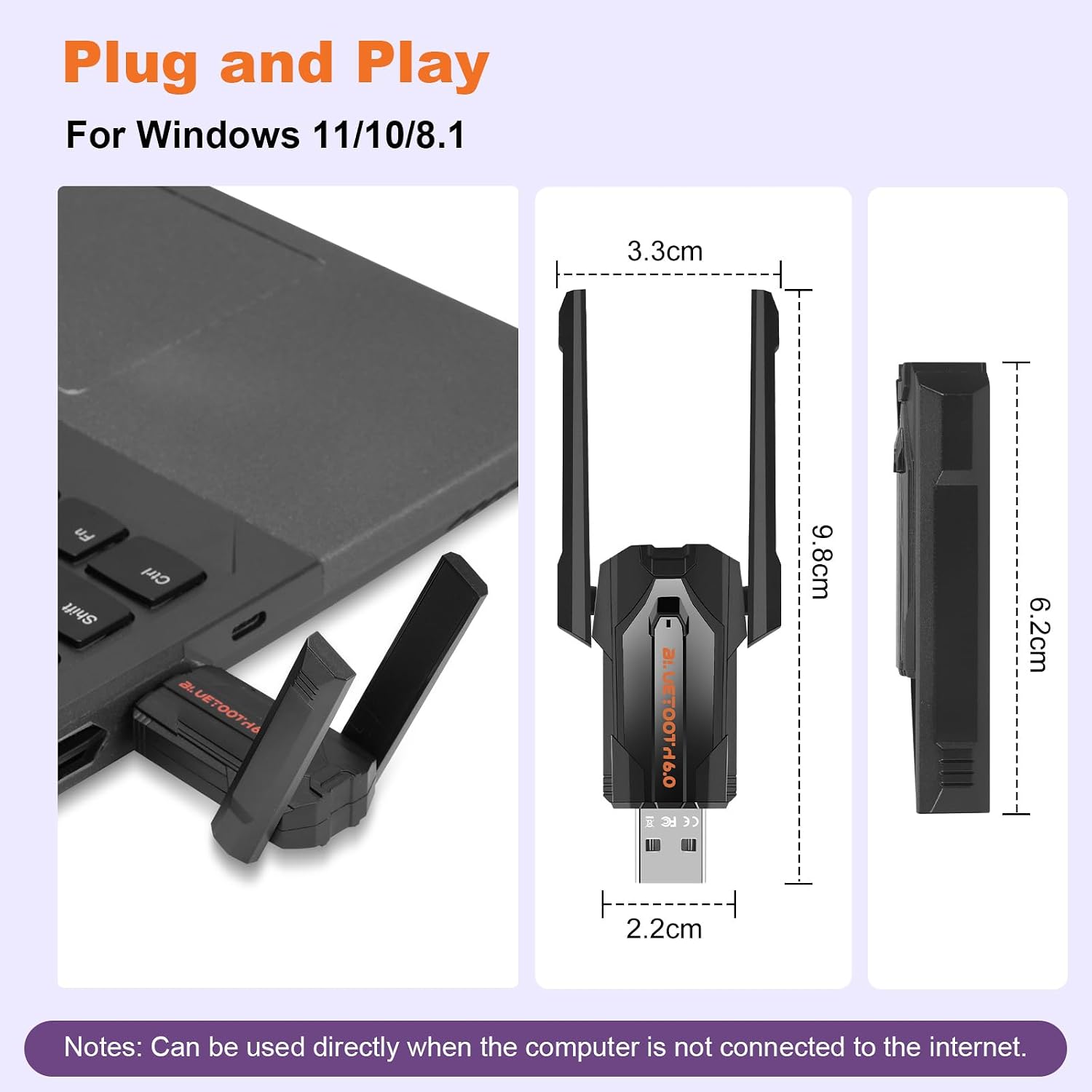
Image 2.2: Detailed dimensions of the RUIZHI Bluetooth 6.0 USB Adapter, showing its compact size and the adjustable antenna. The adapter measures 3.3cm in width, 9.8cm in height (with antenna extended), and 2.2cm for the USB connector width.
3. Istruzzjonijiet Operattivi
Once the adapter is installed, you can connect your Bluetooth devices.
3.1 Konnessjoni ta' Apparati Bluetooth
- Ippermetti Bluetooth: Ensure Bluetooth is enabled on your computer. You can usually find this in the Windows Settings (Settings > Devices > Bluetooth & other devices).
- Pair a Device: Click "Add Bluetooth or other device" and select "Bluetooth." Put your Bluetooth device (e.g., mouse, keyboard, headset, gamepad, printer, speaker) into pairing mode.
- Agħżel Apparat: Your computer will scan for nearby Bluetooth devices. Select your device from the list and follow any on-screen prompts to complete the pairing process.
- Konferma: Once paired, your device will be listed as connected, and you can begin using it.
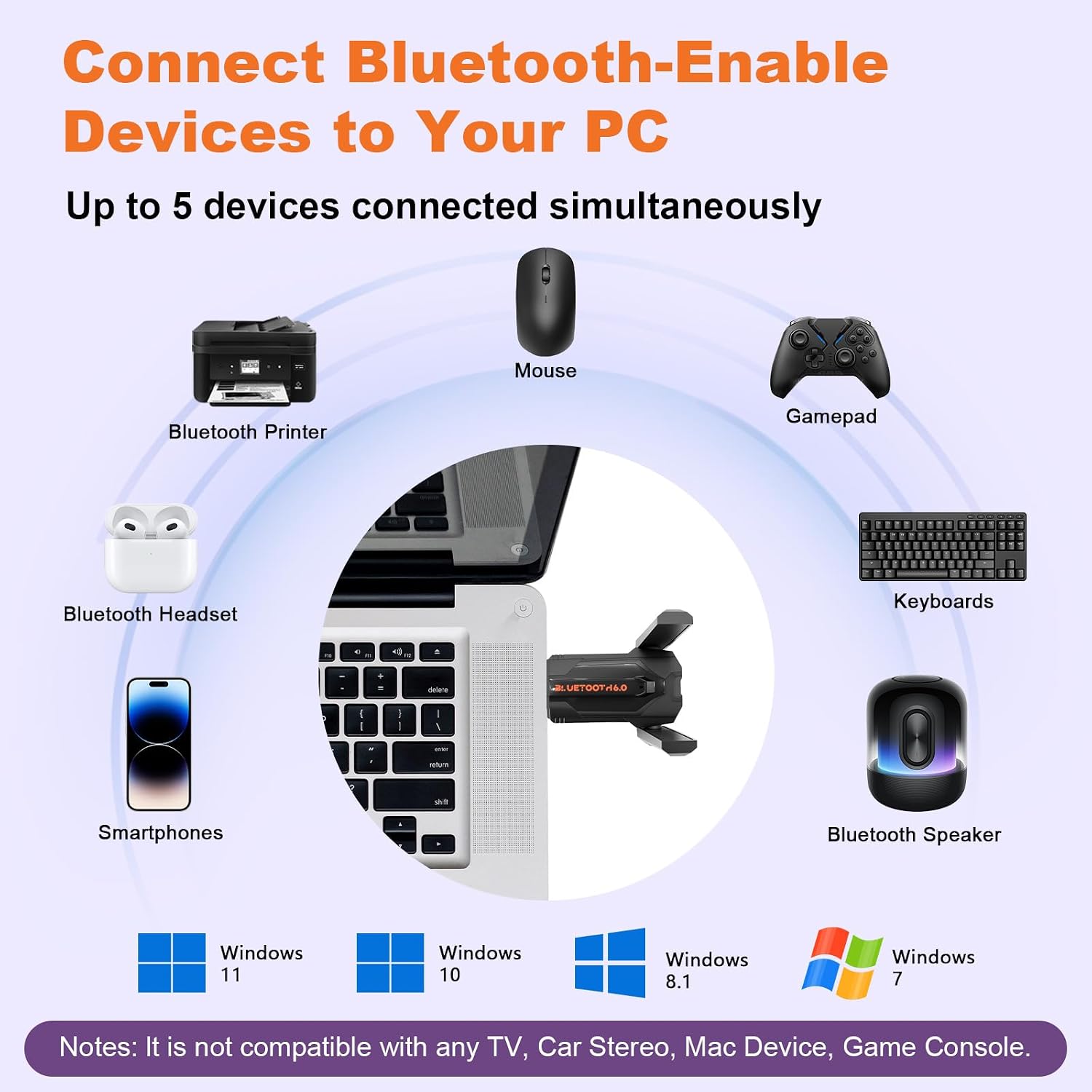
Image 3.1: Illustration of the adapter's ability to connect up to five Bluetooth-enabled devices simultaneously to your PC, including various peripherals and audio devices. It also confirms compatibility with Windows 11, 10, 8.1, and 7.
3.2 Antenna Adjustment for Optimal Signal
The adapter features a 360-degree rotating antenna. For the best signal strength and stability, especially when experiencing interference or connecting to devices at a distance, adjust the antenna's orientation. Experiment with different angles to find the optimal position for your environment.

Image 3.2: Visual guide demonstrating the 360-degree adjustable antenna, which allows users to optimize signal alignment for greater coverage and stability.
3.3 Xenarji ta' Użu
The RUIZHI Bluetooth 6.0 USB Adapter enhances various computing experiences:
- File Trasferiment: Quickly and mutually transfer files bejn il-PC tiegħek u apparati oħra Bluetooth.
- Streaming tal-Awdjo: Enjoy high-fidelity (HiFi) music and high-definition (HD) calling with Bluetooth headsets.
- Logħob: Experience smooth gaming with wireless controllers and headsets on your PC.
- Produttività: Connect wireless keyboards, mice, and other peripherals for a clutter-free workspace.

Image 3.3: A collage illustrating various applications of the Bluetooth 6.0 adapter, such as fast file transfers, high-quality audio for music and calls, seamless PC gaming, and improved work efficiency with wireless peripherals.
4. Manutenzjoni
The RUIZHI Bluetooth 6.0 USB Adapter is designed for durability and requires minimal maintenance.
- Tindif: Use a soft, dry cloth to gently wipe the adapter if it becomes dusty. Avoid using liquid cleaners or abrasive materials.
- Ħażna: Meta ma tkunx qed tużah għal perjodi twal, aħżen l-adapter f'post frisk u niexef 'il bogħod mix-xemx diretta u minn temperaturi estremi.
- Immaniġġjar: Avoid dropping the adapter or subjecting it to strong impacts, as this may damage internal components.
5 Issolvi l-problemi
If you encounter issues with your RUIZHI Bluetooth 6.0 USB Adapter, refer to the following common solutions:
5.1 Adapter Not Recognized / Not Working
- Iċċekkja l-Port tal-USB: Ipprova daħħal l-adapter f'port USB differenti fuq il-kompjuter tiegħek.
- Ibda mill-ġdid il-Kompjuter: Sempliċi bidu mill-ġdid spiss jista' jsolvi problemi ta' rikonoxximent.
- Driver Installation (Windows 7): Ensure the correct driver is installed for Windows 7. Refer to Section 2.2.
- Maniġer tal-Apparat: Open Device Manager (search in Windows) and check for any unknown devices or devices with yellow exclamation marks. If found, try updating the driver or reinstalling the adapter.
5.2 Unable to Pair Devices
- Modalità ta' Tqabbil tal-Apparat: Ensure your Bluetooth device is in pairing mode. Refer to your device's manual for specific instructions.
- Prossimità: Make sure the Bluetooth device is within close range of the adapter during pairing.
- Interferenza: Itlaq minn apparati oħra mingħajr fili (routers tal-Wi-Fi, telefowns mingħajr fili) li jistgħu jikkawżaw interferenza.
- Erġa' ibda s-Servizz Bluetooth: In Windows Services (search for "Services"), find "Bluetooth Support Service," right-click, and select "Restart."
5.3 Poor Connection / Limited Range
- Pożizzjoni tal-antenna: Adjust the adapter's 360-degree rotating antenna to optimize signal reception. Refer to Section 3.2.
- Ostruzzjonijiet: Walls, furniture, and other physical obstructions can significantly reduce Bluetooth range. Try to minimize these between the adapter and your device.
- Interferenza: High electromagnetic interference from other electronics can affect signal quality.
- Batterija tal-Apparat: Ensure your connected Bluetooth device has sufficient battery charge.
5.4 Audio Latency (Delay)
- While Bluetooth 6.0 offers improved performance, some latency can occur, especially with certain audio codecs or when multiple devices are connected.
- Reduce Connected Devices: Disconnect other Bluetooth devices if you are experiencing significant audio latency.
- Check Audio Codec: Ensure your audio device and software are using efficient audio codecs.
6. Speċifikazzjonijiet
Detailed technical specifications for the RUIZHI Bluetooth 6.0 USB Adapter:
| Karatteristika | Speċifikazzjoni |
|---|---|
| Brand | RUIZHI |
| Numru tal-Mudell | Adapter Bluetooth 6.0 |
| Interface tal-Ħardwer | Bluetooth, USB 2.0, USB 3.0 |
| Kulur | Iswed |
| Apparati Kompatibbli | Desktop, Laptop, Mouse, Tablet |
| Protokoll tal-Kollegament tad-Data | Bluetooth, USB |
| Rata ta' Trasferiment tad-Data | 3 Megabit Kull Sekonda (Mbps) |
| Verżjoni Bluetooth | Bluetooth 6.0 (backward compatible with 5.4/5.3/5.1) |
| Firxa (Barra) | Sa 200 metri |
| Firxa (ta' ġewwa) | Madwar 10-20 metri |
| Piż tal-oġġett | 0.02 Kilogrammi |
| Protokolli Appoġġjati | A2DP, HSP, AVRCP, HD, SBC, AAC, DID, IOP |

Image 6.1: A comparison table detailing the advantages of Bluetooth 6.0+ EDR technology over older versions like Bluetooth 5.3/5.4, including faster response, better anti-interference, increased range, and higher sound quality.
7. Garanzija u Appoġġ
For warranty information and technical support, please refer to the product packaging or contact the retailer where the RUIZHI Bluetooth 6.0 USB Adapter was purchased. Keep your proof of purchase for warranty claims.