
1. Setup
1.1 Tneħħija tal-kaxxa u l-kontenut tal-pakkett
Carefully remove all items from the packaging. Ensure all components are present before proceeding with installation.
- Televiżjoni Roku Select Series 55" 4K
- Stands u viti
- Kontroll mill-bogħod
- Manwal għall-Utent

Figure 1: Contents of the Roku Select Series 55-inch TV package.
1.2 Installazzjoni Fiżika
The Roku Select Series TV can be installed using the included stands for table mounting or by using a compatible VESA wall mount (200 x 100 mm, sold separately).
Table Mount Installation:
- Poġġi l-iskrin tat-TV 'l isfel fuq wiċċ artab u nadif biex tevita l-grif.
- Attach the two TV stands to the designated slots on the bottom of the TV using the provided screws. Ensure they are securely fastened.
- Erfa’ t-TV bir-reqqa u poġġih fuq wiċċ stabbli u livellat.
Installazzjoni tal-Immonta fuq il-ħajt:
For wall mounting, refer to the instructions provided with your VESA 200 x 100 mm compatible wall mount kit. Ensure the wall can support the weight of the television (approximately 20.1 pounds without stand).

Figure 2: TV dimensions and package contents overview.
1.3 Konnessjoni tal-Periferali
The TV features multiple ports for connecting external devices. Refer to the back panel diagram for port locations.

Figure 3: Rear panel connections including HDMI, USB, and network ports.
- HDMI Ports (3 total): Connect gaming consoles, Blu-ray players, soundbars, or other HDMI-enabled devices.
- USB Port (1 total): Qabbad apparati tal-ħażna USB għad-daqq tal-midja.
- Port Ethernet (LAN): Għal konnessjoni tal-internet bil-fili.
- Input tal-Antenna/Kejbil: Qabbad antenna għal xandiriet bl-ajru jew konnessjoni tat-TV bil-kejbil.
- Optical (S/PDIF) Output: Għal ħruġ awdjo diġitali għal sistema tal-ħoss.
1.4 L-Ewwel Tixgħel u l-Konnessjoni man-Netwerk
- Qabbad il-korda tad-dawl mat-TV u żbokk tad-dawl.
- Agħfas il-buttuna tal-qawwa fuq il-kontroll remot biex tixgħel it-TV.
- Follow the on-screen instructions to complete the initial setup, including language selection (English, Spanish, French, Portuguese are supported).
- Select your preferred network connection:
- Wi-Fi: Agħżel in-netwerk Wi-Fi tiegħek mil-lista u daħħal il-password.
- Ethernet: If an Ethernet cable is connected, the TV will automatically attempt to establish a wired connection.
- The TV will guide you through linking to a Roku account, which is necessary to access streaming channels and features.
2. Istruzzjonijiet Operattivi
2.1 Funzjonijiet ta' Kontroll mill-bogħod
The included voice remote provides intuitive control over your TV. It operates via Bluetooth, eliminating the need for direct line-of-sight.

Figure 4: Roku Voice Remote layout and key functions.
- Buttuna tal-Qawwa: Ixgħel jew jitfi t-TV.
- Tastiera Direzzjonali (buttuna OK fiċ-ċentru): Jinnaviga l-menus u jagħżel l-oġġetti.
- Volum 'il fuq/Niżżel: Jaġġusta l-volum tat-TV.
- Buttuna Mute: Jismute jew jattiva l-awdjo tat-TV.
- Buttuna tal-Vuċi: Jattiva t-tfittxija u l-kontroll bil-vuċi.
- Replay Instant: Jaqbeż lura ftit sekondi fil-plejbek tal-vidjo.
- Buttuna tat-TV Live: Accesses the live TV channel guide.
- Buttuni ta' Tnedija Mgħaġġla: Dedicated buttons for popular streaming apps (e.g., Netflix, Disney+, Apple TV, Prime Video). These can be customized for your favorite apps.
- Sib il-Mewt Mitluf: If the remote is misplaced, use the Roku mobile app to activate an audible alert from the remote.
2.2 Home Screen Navigation and Streaming
The Roku home screen provides quick access to all your streaming channels, inputs, and settings.
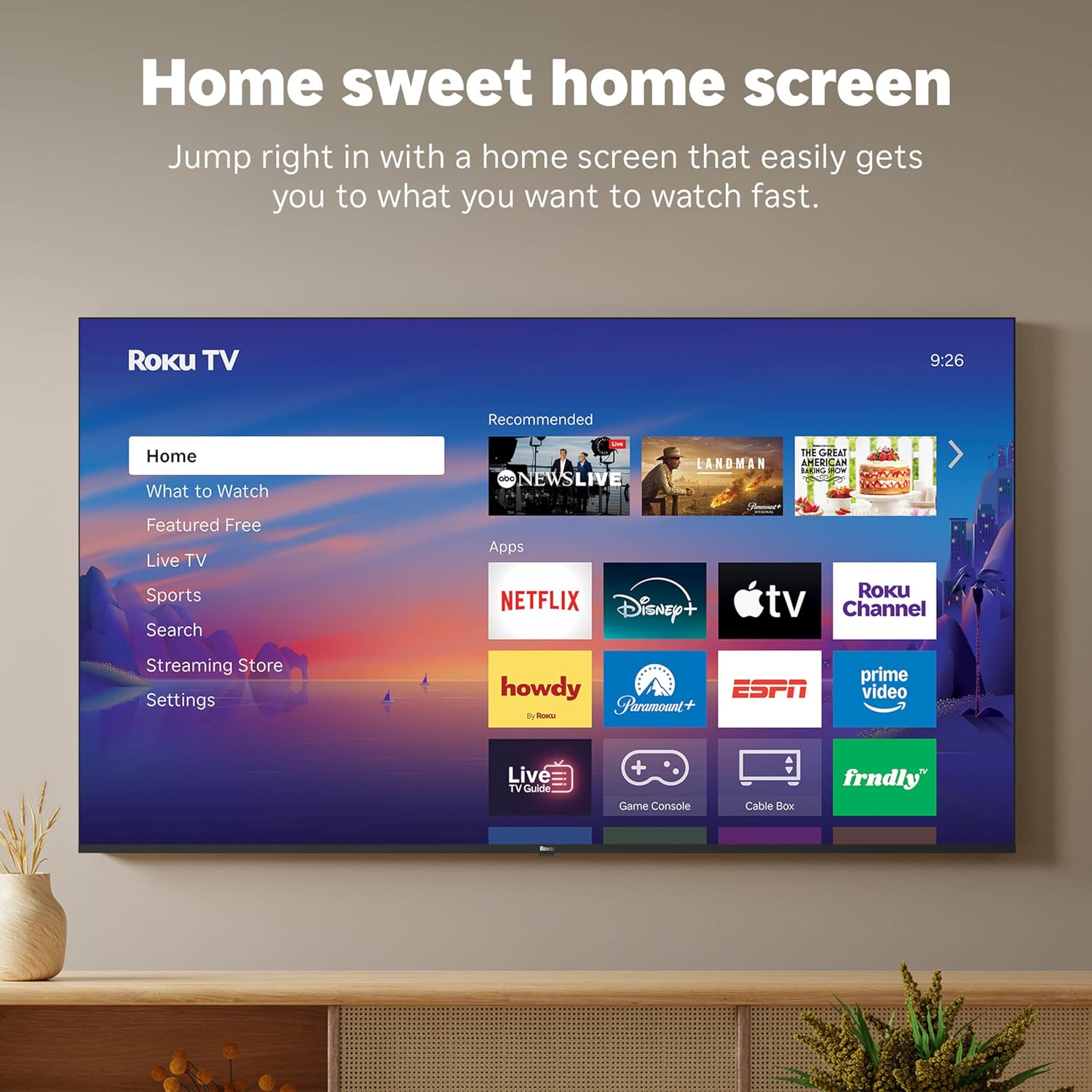
Figure 5: The Roku TV home screen interface.
- Use the directional pad on your remote to navigate through the menu options on the left side of the screen (Home, What to Watch, Live TV, Sports, Search, Streaming Store, Settings).
- Select an app icon from the main grid to launch your desired streaming service.
- The TV's fast Wi-Fi and optimized app launch ensure quick access to entertainment.
2.3 Issettjar tal-Immaġni u l-Ħoss
The Roku Select Series TV offers advanced picture and sound technologies for an enhanced viewing esperjenza.
- Wiri QLED 4K: Provides sharp 4K resolution and accurate colors.
- Appoġġ HDR10: Enhances contrast and color depth for compatible content.
- Stampa Intelliġenti tar-Roku: Automatically optimizes incoming TV signals and selects the appropriate picture mode for content.
- Dolby Audio: Delivers clear speech and enhanced sound quality through the integrated 2.1 channel speakers (20 Watts maximum output power).
- Modalità tal-Headphones Bluetooth: Qabbad il-headphones Bluetooth għal smigħ privat mingħajr ma tfixkel lil ħaddieħor.
2.4 Kontroll tal-Vuċi u Integrazzjoni tad-Dar Intelliġenti
Control your TV and integrate it into your smart home ecosystem.

Figure 6: Roku TV's smart home compatibility.
- Roku Voice: Use the voice button on your remote to search for content, launch apps, or control playback.
- Kompatibilità tal-Assistent Intelliġenti: The TV is compatible with Siri, Alexa, and Google Assistant for voice control through external smart devices.
- Apple AirPlay: Share videos, photos, music, and more from your Apple devices directly to your TV.
2.5 Live TV Access
Access live television channels directly from the home screen.

Figure 7: Live TV channel guide interface.
- Connect an antenna to the TV's Antenna/Cable input.
- Use the 'Live TV' option on the home screen or the dedicated button on the remote to access the channel guide.
- The TV supports ATSC tuner type for digital broadcasts.
3. Manutenzjoni
3.1 Tindif tat-TV
- Dejjem aqla’ t-TV qabel ma tnaddaf.
- Uża drapp artab, niexef u mingħajr suf biex timsaħ bil-mod l-iskrin u l-kabinett.
- Għal marki iebsa, ħassar bil-modampLaħlaħ id-drapp bl-ilma jew b'deterġent tal-iskrin ħafif u mhux abrażiv. Tisprejjax id-deterġent direttament fuq l-iskrin.
- Evita li tuża kimiċi ħarxa, pads li joborxu, jew solventi għax jistgħu jagħmlu ħsara lill-finitura tat-TV.
3.2 Aġġornamenti tas-Software
The Roku TV receives automatic software updates to provide new features and improvements. Ensure your TV is connected to the internet to receive these updates.
4 Issolvi l-problemi
If you encounter issues with your Roku TV, consider the following basic troubleshooting steps:
- Ebda Qawwa: Kun żgur li l-korda tal-enerġija hija pplaggjata sew kemm fit-TV kif ukoll f'sokit elettriku li jaħdem. Ipprova sokit differenti.
- Ebda Stampa/Ħoss: Ivverifika li s-sors tad-dħul korrett intgħażel. Iċċekkja l-konnessjonijiet tal-kejbil kollha (HDMI, antenna, eċċ.) għal laxkezza.
- Remote Mhux Jirrispondi: Replace the AAA batteries in the remote control. Ensure there are no obstructions between the remote and the TV (though Bluetooth reduces this issue). Re-pair the remote if necessary (refer to Roku support documentation).
- Kwistjonijiet ta' Konnessjoni man-Netwerk: Mur fuq Settings > Netwerk > Iċċekkja l-konnessjoni to diagnose network problems. Restart your router and modem.
- L-App Mhux Qed Tiċċarġja/Tiġġarraf: Try restarting the app. If the issue persists, remove the app and reinstall it from the Streaming Store.
- Kwalità Fqira tal-Istampa: Check your internet speed for streaming content. For broadcast TV, adjust your antenna. Ensure the TV's picture settings are appropriate for the content being viewed.
For more detailed troubleshooting or persistent issues, visit the Roku support website or consult the full User Manual PDF available online.
5. Speċifikazzjonijiet
| Karatteristika | Dettall |
|---|---|
| Isem tal-Mudell | Roku 55" Select Series 4K |
| Numru tal-Mudell | 55R5D5 |
| Daqs tal-Iskrin | 55 Pulzier |
| Teknoloġija tal-Wiri | 4K UHD, LED, QLED |
| Riżoluzzjoni | 4K (3840 x 2160) |
| Riffriskar Rata | 60 Hz |
| Format HDR Appoġġjat | HDR10, HDR10+, HLG |
| Picture Quality Enhancement | 4K, Roku Smart Picture |
| Qawwa tal-Ħruġ Awdjo | 20 Watts |
| Integrated Surround Sound | Dolby Awdjo |
| Teknoloġija tal-Konnettività | Bluetooth, Ethernet, USB C, Wi-Fi |
| Portijiet HDMI | 3 |
| Portijiet USB | 1 |
| Sistema Operattiva | Roku OS |
| Kontroll tal-Vuċi | Roku Voice, Siri, Alexa, Google Assistant |
| Mirror tal-iskrin | AirPlay 2, Miracast |
| Dimensjonijiet tal-Prodott (P x W x H) | 12.7"D x 48.3"W x 30.5"H |
| Piż tal-oġġett | 20.5 Liri |
| Standard tal-Immuntar VESA | 200 x 100 mm |
| Konsum tal-Enerġija | 160 watt |
| UPC | 829610009322 |
6. Garanzija u Appoġġ
6.1 Garanzija Limitata
Roku warrants the hardware of this device against defects in materials and workmanship under normal use for a period of sena (1). from the date of purchase (“Warranty Period”), provided it is used in accordance with the provided documentation.
If Roku determines that the device’s hardware is defective during the Warranty Period, Roku’s sole obligation, and your exclusive remedy, will be to either repair or replace the unit with either a new or rebuilt device, at its option.
Important information about warranty returns and replacements is available on the Roku support site.
6.2 Ritorni tal-Prodott
You may return a device for any reason, subject to the terms of the applicable return policy:
- Within thirty (30) days from the date of purchase from Roku.
- Within the applicable return period if purchased from an authorized reseller or distributor.
Additional details regarding product returns can be found on the Roku support site.
6.3 Appoġġ Addizzjonali
For further assistance, including detailed guides and FAQs, please refer to the official Roku support website. A downloadable PDF version of the User Manual is also available for reference: Manwal għall-Utent (PDF).