
1. Introduzzjoni
The llano S850 Wireless HDMI Transmitter and Receiver provides a convenient solution for wirelessly extending or mirroring your device's screen to a larger display. This device supports Ultra 4K decode input and 1080P@60Hz output, utilizing dual-band 5G+2.4G technology for stable and smooth transmission. It offers plug-and-play functionality, eliminating the need for complex setups, Wi-Fi, apps, or Bluetooth for primary operation.
2. X'hemm fil-Kaxxa
- 1 x llano S850 Wireless HDMI Transmitter (TX)
- 1 x llano S850 Wireless HDMI Receiver (RX)
- 1 x Kejbil ta' Estensjoni HDMI
- 1 x USB Power Cable (for Receiver)
- 1 x Manwal għall-Utent
3. Karatteristiċi tal-prodott
- Dual Connection Modes: Supports traditional Transmitter/Receiver mode for automatic connection and a Receiver-only mode for direct mirroring from compatible devices.
- Plug and Play: No need for messy cables, Wi-Fi, apps, Bluetooth, or complicated setup. Connects in seconds.
- Ultra HD Quality: Dual-band chip (5G + 2.4G) supports 1080P@60Hz Ultra HD output for a clear visual experience.
- Extended Wireless Transmission: Up to 165 ft (50M) transmission distance with strong and stable signal, even through obstacles.
- Iċċarġja waqt l-użu: The Type-C charging port on the transmitter allows charging of smartphones and laptops while mirroring.
- Mirroring and Extended Display: Easily mirror or extend your screen from laptops, cameras, or TV set-top boxes to HDTVs, projectors, or monitors.
- Disinn portabbli: Lightweight (48.9 grams) with a patented metallic plastic finish and included strap for easy portability.
4. Setup u Installazzjoni
4.1 Connection Method 1: Transmitter + Receiver (Plug & Play)
- Step 1: Power the Receiver (RX).
Connect the Receiver (RX) to a 5V adapter or a USB port on your monitor/TV using the provided USB power cable.

Image: The llano S850 Receiver (RX) is plugged into a TV's HDMI port and powered via a USB cable connected to the TV's USB port.
- Step 2: Connect the Receiver (RX) to Display.
Plug the Receiver (RX) into an HDMI input port on your monitor, TV, or projector. If needed, use the provided HDMI extension cable.

Image: A hand plugging the llano S850 Receiver into an HDMI port on the back of a television.
- Step 3: Connect the Transmitter (TX) to Source Device.
Plug the Transmitter (TX) into the USB-C port of your phone, tablet, or laptop. The indicator light on the TX will flash, then become solid when connected.
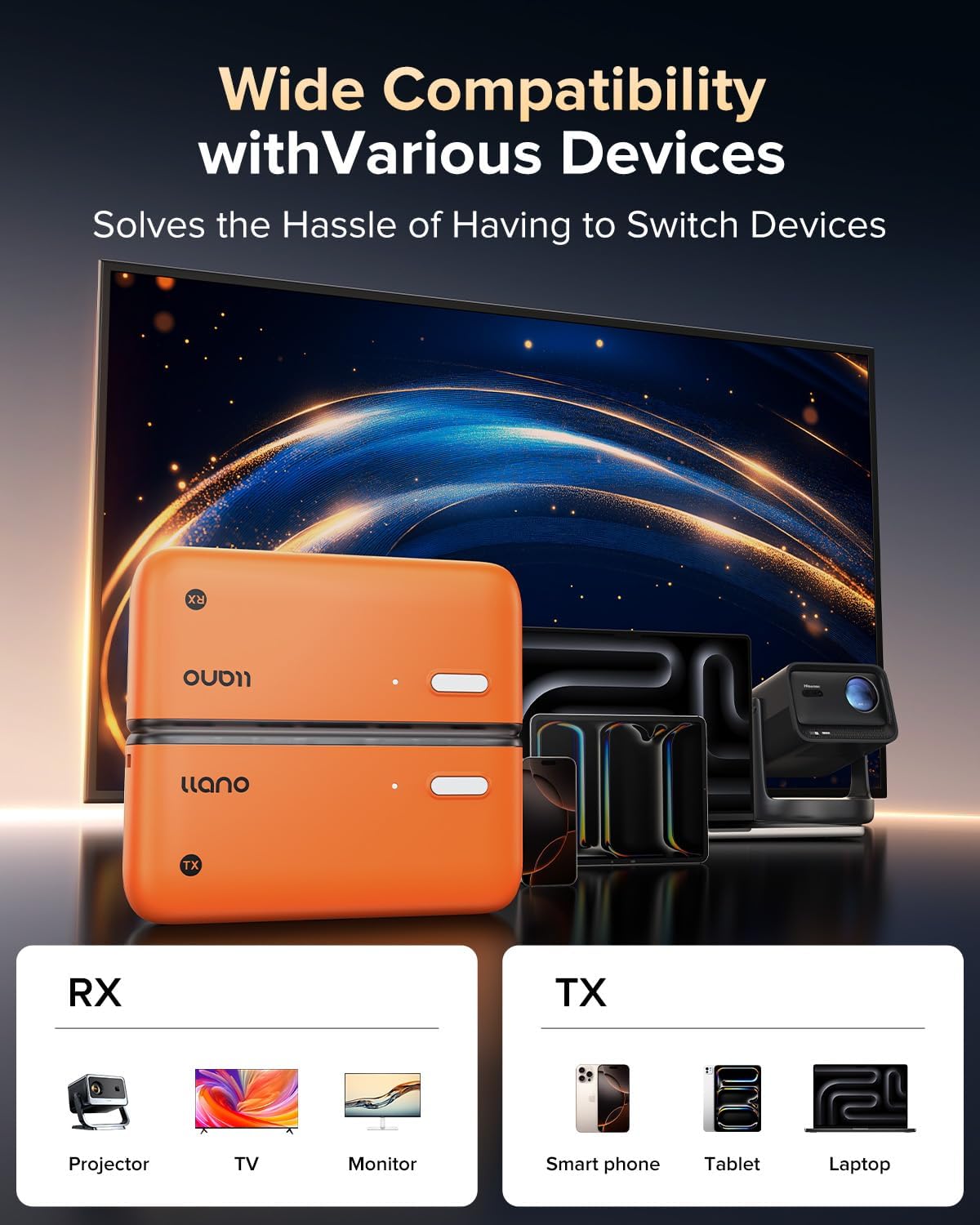
Image: The llano S850 Transmitter (TX) is plugged into the USB-C port of a laptop.
- Step 4: Automatic Connection.
The Transmitter and Receiver will automatically pair within 5-10 seconds. Your device's screen will then be mirrored to the display.
Video: A demonstration of connecting the llano S850 Wireless HDMI Transmitter and Receiver, showing the automatic pairing process and screen mirroring from a tablet to a large TV.
4.2 Connection Method 2: Receiver Only (Wireless Mirroring)
This method is for devices that support native screen mirroring (e.g., Apple AirPlay, Android Wireless Projection) and do not require the Transmitter (TX).
- Step 1: Power and Connect the Receiver (RX).
Connect the Receiver (RX) to your display's HDMI port and provide power via USB, as described in Method 1, Step 1 and 2.
- Step 2: Switch Display Input.
Switch your display's input to the HDMI port where the Receiver is connected. You will see the llano S850 startup screen.
- Step 3: Initiate Screen Mirroring from your Device.
- Telefon Android: Pull down the notification bar, click the "Wireless Projection" icon, and select "LLANO-S850".
- Telefon tat-tuffieħ: Click the floating circle, swipe down the menu, select "Screen Mirroring", find "LLANO-S850", and enter the "Pin code" displayed on the TV (e.g., "1538").
- AppleMac: Click the floating circle, swipe down the menu, select "Screen Mirroring", find "LLANO-S850", and enter the "Pin code" displayed on the TV (e.g., "1538").
- Windows 10 above: Press "Windows key + K", select the device, and find "LLANO-S850".

Image: Visual guide for connecting the llano S850 Receiver in wireless mirroring mode for Android, Apple iPhone, Apple Mac, and Windows devices.
4.3 Kompatibilità
The llano S850 is compatible with a wide range of devices. Ensure your device has a USB-C port that supports DisplayPort Alternate Mode (DP Alt Mode) for transmitter functionality.
- Transmitter (TX) Compatible Devices: Smartphones (iPhone 15/16/17 Series, Samsung Galaxy S/Note/Z Series, Motorola Edge/Razr/Moto G), Tablets (iPad Pro/Air/Mini 6, Surface Pro/Go/Book), Laptops (MacBook Pro/Air, Dell XPS, Lenovo ThinkPad).
- Receiver (RX) Compatible Displays: Monitors, TVs, Projectors with HDMI input.

Image: A diagram illustrating the compatibility of the llano S850 Transmitter and Receiver with various devices like smartphones, tablets, laptops, monitors, TVs, and projectors.
5. Istruzzjonijiet Operattivi
5.1 Użu Bażiku
- Once connected, the content from your source device will automatically appear on the connected display.
- To pause or resume casting in Transmitter/Receiver mode, press the button on the Transmitter (TX).
- To switch between landscape and portrait mode on the display (when mirroring a phone/tablet), press the button on the Receiver (RX).
Video: A short demonstration of the llano S850 Wireless HDMI Transmitter and Receiver in action, showing quick setup and screen mirroring.
5.2 Modi ta' Wiri (għal Laptops/PCs)
When using a laptop or PC, you can choose between two display modes:
- Copy Mode (Duplicate): The external display shows the exact same content as your laptop screen.
- Modalità Estiża: The external display acts as an extension of your laptop screen, providing more desktop space.

Image: A visual comparison of Copy Mode and Extended Mode when using the llano S850 to connect a laptop to an external monitor.
5.3 Iċċarġjar Waqt l-Użu
The Transmitter (TX) features a Type-C charging port. If your source device (e.g., smartphone, laptop) is low on power or unable to power the TX, you can connect an external 5V/2A power adapter to the TX's Type-C port to charge your device while mirroring.

Image: The llano S850 Transmitter connected to a Type-C phone, with a note indicating it supports charging for Type-C phones but not tablets or laptops.
6 Issolvi l-problemi
- Ebda Sinjal/Skrin Iswed:
- Ensure both Transmitter (TX) and Receiver (RX) are properly powered.
- Verify that the HDMI cable is securely connected to the Receiver and the display.
- Check that the display input is set to the correct HDMI port.
- Confirm your source device's USB-C port supports DisplayPort Alternate Mode (for TX connection).
- Ipprova erġa' ibda kemm l-apparat tas-sors kif ukoll id-displej.
- Intermittent Connection/Lagging:
- Naqqas id-distanza bejn it-Trasmettitur u r-Riċevitur.
- Remove any obstacles (walls, large furniture) between the devices.
- Kun żgur li m'hemm l-ebda Wi-Fi qawwi jew sorsi oħra ta' interferenza mingħajr fili fil-qrib.
- Check if the source device is adequately powered.
- Product Heating Up:
- It is normal for the product to generate some heat during use. This does not indicate a malfunction.
- Ensure adequate ventilation around the devices.
- Cannot Mirror Streaming Apps (Netflix, Hulu, etc.):
- Some streaming services may have content protection (HDCP) that prevents mirroring to external displays. This is a limitation of the content provider, not the llano S850.
7. Speċifikazzjonijiet
| Brand | llano |
| Numru tal-Mudell | S850 |
| Teknoloġija tal-Konnettività | HDMI |
| Teknoloġija bla fili | 5G, 2.4G |
| Riżoluzzjoni tal-Ħruġ tal-Vidjo | 1080P@60Hz (Ultra 4K Decode Input) |
| Kodifikazzjoni tal-vidjo | H.264, H.265/HEVC |
| Distanza tat-Trażmissjoni | Sa 165 pied (50M) |
| Portijiet HDMI totali | 2 (1 on RX, 1 on TX for pass-through/power) |
| Modalità tal-Ħruġ tal-Awdjo | Jdawru |
| Piż tal-oġġett | 180 Gramm |
| Kulur | Oranġjo |
8. Manutenzjoni
- Żomm l-apparat nadif u ħieles mit-trab. Uża drapp artab u niexef għat-tindif.
- Evita li tesponi l-apparat għal temperaturi estremi, umdità, jew dawl tax-xemx dirett.
- Tippruvax iżarma jew isewwi l-apparat lilek innifsek. Ikkuntattja l-appoġġ tal-klijent għall-assistenza.
- Aħżen l-apparat f'post frisk u niexef meta ma jkunx qed jintuża.
9. Garanzija u Appoġġ
llano provides a 24-month warranty coverage for the S850 Wireless HDMI Transmitter and Receiver. This includes:
- 7-Days Hassle-Free Returns: For any reason.
- 15-Days Free Replacement: For defective products.
- 18-Months Quality Issue Replacement: For manufacturing defects.
- Appoġġ għall-Klijent 24/7: For any inquiries or assistance.
For warranty claims or technical support, please refer to the contact information provided in your product packaging or visit the official llano websit.