
1. Introduzzjoni
Thank you for choosing the Keenso Front Rear Dash Cam. This device is designed to provide reliable video recording of your journeys, offering enhanced safety and security for your vehicle. This manual will guide you through the installation, operation, and maintenance of your dash cam to ensure optimal performance.
2. Informazzjoni dwar is-Sigurtà
- Tħaddimx id-dash cam waqt is-sewqan. Aġġusta s-settings biss meta l-vettura tkun ipparkjata b'mod sigur.
- Ensure the dash cam is securely mounted and does not obstruct your view tat-triq jew jinterferixxu mal-kontrolli tal-vettura.
- Evita li tesponi l-apparat għal temperaturi estremi, dawl tax-xemx dirett għal perjodi twal, jew umdità eċċessiva.
- Use only the provided car charger and data cable to prevent damage to the device.
- Do not attempt to disassemble or repair the dash cam yourself. Contact customer support for assistance.
- Agħmel backup regolarment ta' vidjows importanti files biex jipprevjenu t-telf.
3. Kontenut tal-Pakkett
Ivverifika li l-oġġetti kollha huma preżenti fil-pakkett tiegħek:
- 1 x Keenso Car DVR Unit
- 1 x Ċarġer tal-Karozza
- 1 x Manwal tal-Utent (dan id-dokument)
- 1 x Kejbil tad-Data (USB)
- 2 x Mounts (for installation)
- 1 x Double Sided Tape
- 1 x Magic Base
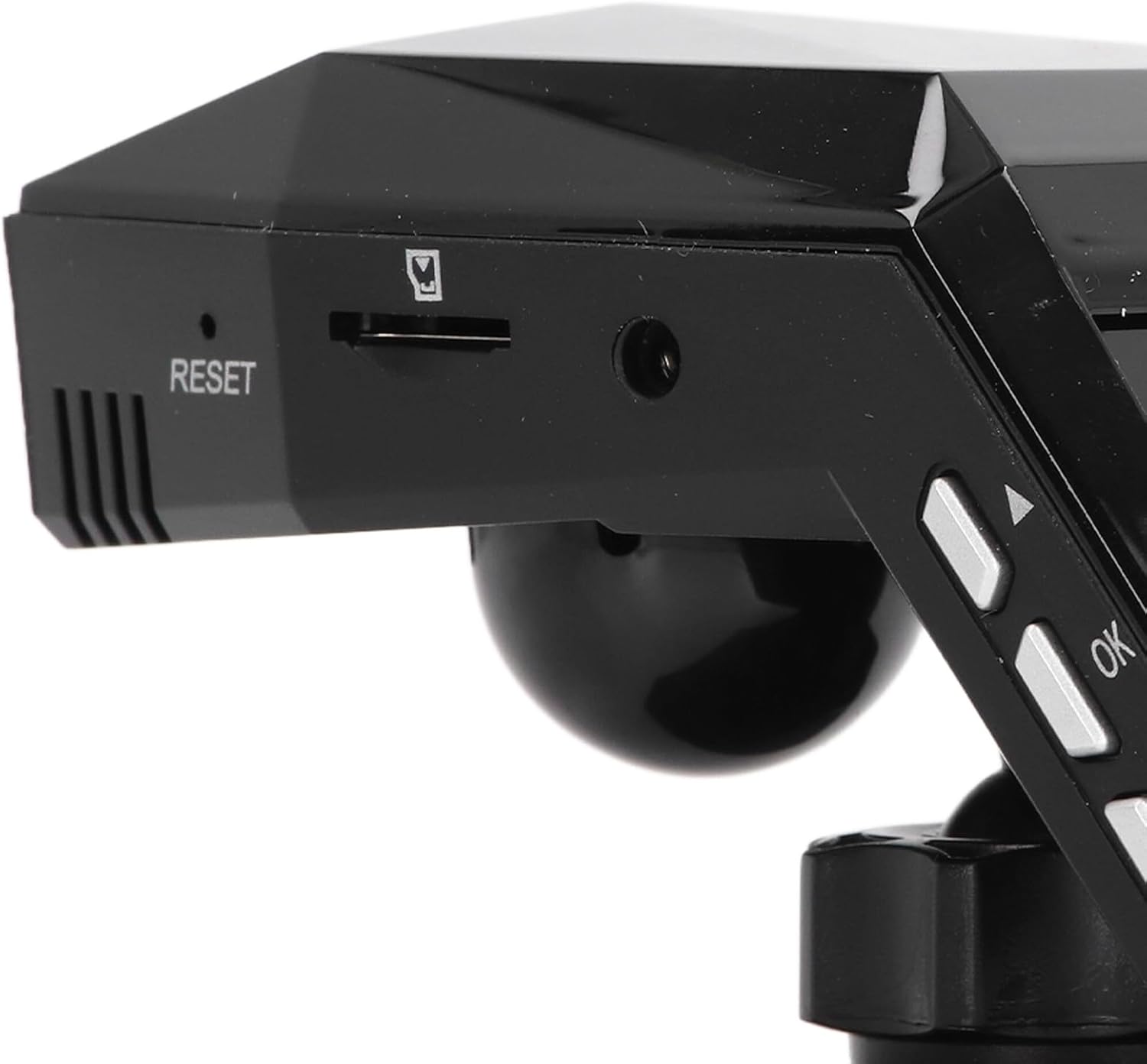
Figura 3.1: All components included in the Keenso Dash Cam package.
4. Karatteristiċi tal-prodott
The Keenso Front Rear Dash Cam offers a range of features for reliable vehicle monitoring:
- Materjal ta' kwalità għolja: Constructed from durable ABS material for long-lasting performance.
- Batterija tal-litju inkorporata: Features a 180mAh lithium-ion battery for continuous recording even when external power is interrupted.
- Wirja faċli għall-utent: Equipped with a 2.0-inch screen (960x240 resolution) for easy viewing and management of recordings.
- Enhanced Parking Safety: Motion detection feature automatically records movement around your parked vehicle.
- Reġistrazzjoni Loop: Automatically overwrites older, non-protected files when the memory card is full, ensuring continuous recording without manual deletion.
- Viżjoni bil-lejl infrared: Professional configuration of 4 infrared night lights combined with WDR technology enhances night recording clarity.
- Supercapacitors: Designed to operate reliably in temperatures ranging from -10℃ to 70℃.
- Kamera b'Riżoluzzjoni Għolja: 10MP image sensor with a 170-degree wide-angle lens, covering multiple lanes.

Figura 4.1: In-naħa ta' quddiem view of the dash cam, highlighting the display screen and control buttons.
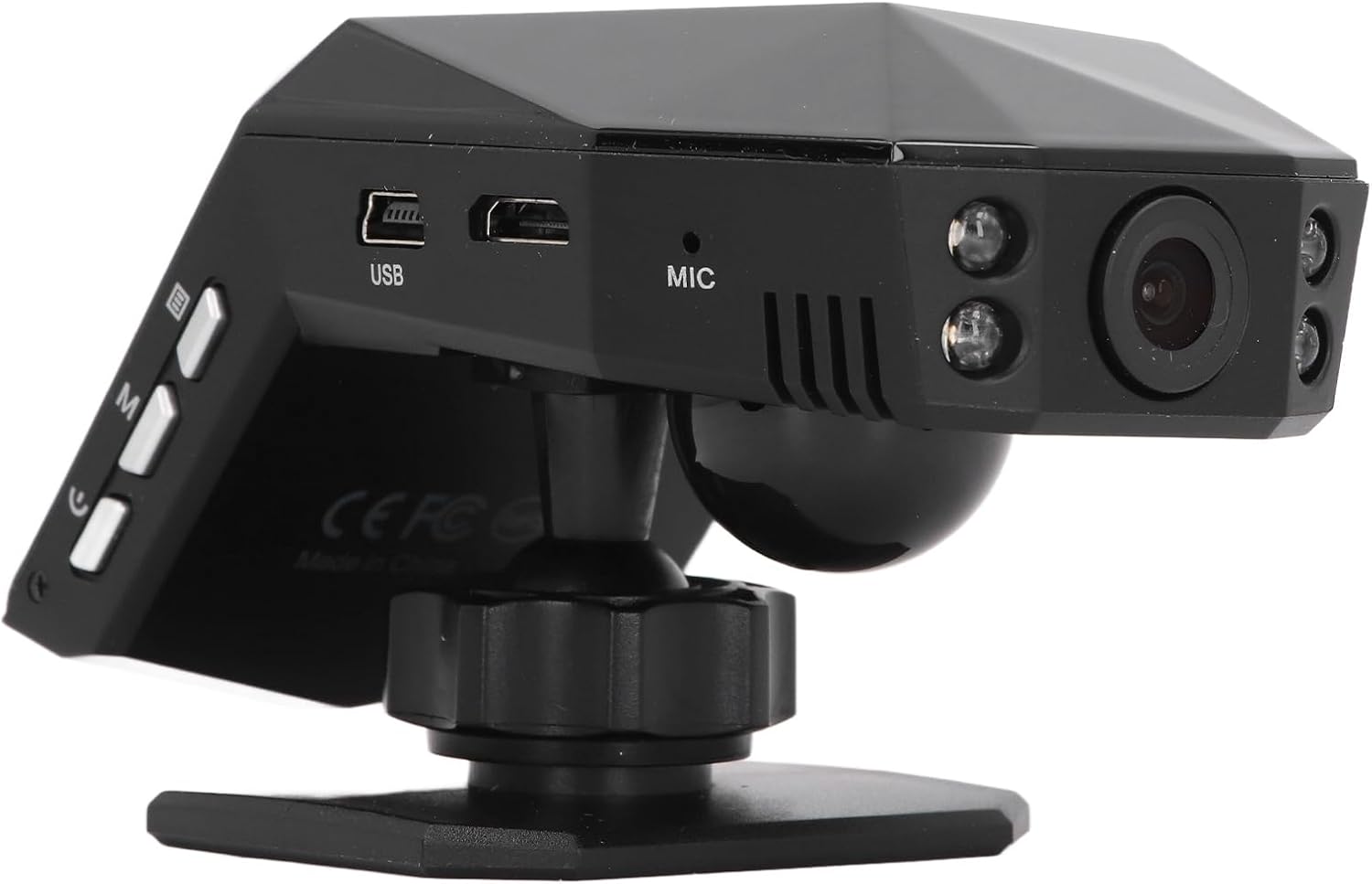
Figura 4.2: Wara view of the dash cam, showing the camera lens and four infrared night vision lights.
5. Setup
5.1 Inserting the Micro Memory Card
- Kun żgur li l-kamera tad-daxxbord tkun mitfija.
- Locate the Micro Memory Card slot on the side of the device.
- Gently insert a Micro Memory Card (up to 32GB, not included) into the slot until it clicks into place.
- Biex tneħħiha, imbotta l-karta bil-mod 'il ġewwa sakemm tikklikkja, imbagħad itlaqha biex toħroġha.

Figura 5.1: Ġenb view showing the Micro Memory Card slot and Reset button.
5.2 Immuntar tad-Dash Cam
- Agħżel post fuq il-windskrin tiegħek li ma jostakolax il-vista tiegħek. view, tipikament wara n-naħa ta' waraview mera.
- Clean the windshield surface thoroughly.
- Attach the magic base to the chosen location using the double-sided tape. Ensure it is firmly secured.
- Connect the dash cam to one of the provided mounts.
- Attach the mount with the dash cam to the magic base. Adjust the camera angle for optimal road coverage.
5.3 Qawwa tal-Konnessjoni
- Daħħal il-ċarġer tal-karozza fis-sokit tal-lajter tas-sigaretti tal-vettura tiegħek.
- Connect the other end of the car charger cable to the USB port on the dash cam.
- Route the cable neatly along the windshield trim to avoid interference with driving.
- Id-dash cam tipikament tixgħel awtomatikament meta l-vettura tibda u tintefa meta l-magna tintefa.
6. Istruzzjonijiet Operattivi
6.1 Operazzjoni Bażika
- Power On/Off: The device powers on automatically when connected to vehicle power and off when power is cut. You can also manually power on/off using the power button.
- Reġistrazzjoni: Once powered on, the dash cam will automatically begin continuous loop recording. A recording indicator will be visible on the screen.
- Navigazzjoni fil-menu: Use the 'M' button to access the menu and the up/down arrow buttons to navigate. The 'OK' button confirms selections.
6.2 Loop Recording
The dash cam features intelligent loop recording. When the Micro Memory Card reaches its capacity, the system will automatically delete the oldest unprotected video filebiex jagħmlu spazju għal reġistrazzjonijiet ġodda. Dan jiżgura reġistrazzjoni kontinwa mingħajr intervent manwali.
6.3 Monitoraġġ tal-Parkeġġ 24 Siegħa
To activate 24-hour parking monitoring, ensure the feature is enabled in the settings. When the car encounters a collision while parked, the dash cam will automatically start recording for approximately one minute. For continuous monitoring when the car is off, a voltage reducing cable (purchased separately) is required.
6.4 Sejbien tal-Moviment
If enabled in the settings, the motion detection feature will automatically activate and begin recording if a significant object enters the camera's monitoring range while the vehicle is parked. It is recommended to turn off motion detection when driving to avoid unnecessary recordings.
6.5 ViewReġistrazzjonijiet
Tista' view recorded videos directly on the 2.0-inch display screen. Navigate to the playback mode in the menu to browse and play files. Alternatively, remove the Micro Memory Card and insert it into a computer to view files.
7. Manutenzjoni
- Tindif: Use a soft, dry cloth to clean the dash cam's lens and screen. Do not use abrasive cleaners or solvents.
- Kard tal-memorja: Format the Micro Memory Card regularly (e.g., once a month) within the dash cam's settings to maintain optimal performance and prevent data corruption.
- Aġġornamenti tas-Software: Iċċekkja l-manifattur webŻur is-sit perjodikament għal kwalunkwe aġġornament tal-firmware disponibbli. Segwi l-istruzzjonijiet ipprovduti bl-aġġornament bir-reqqa.
- Ħażna: Meta ma tkunx qed tużaha għal perjodi twal, aħżen id-dash cam f'post frisk u niexef 'il bogħod mix-xemx diretta.
8 Issolvi l-problemi
| Problema | Kawża Possibbli | Soluzzjoni |
|---|---|---|
| Id-dash cam ma tixgħelx. | No power supply; faulty car charger; depleted internal battery. | Check car charger connection and vehicle's power outlet. Ensure the car charger is functional. Charge the internal battery. |
| Ir-reġistrazzjoni tieqaf ħesrem. | Memory card full; memory card error; power interruption. | Format the memory card. Replace the memory card if errors persist. Check power connection. |
| Il-kwalità tal-vidjow hija fqira. | Lenti maħmuġa; film protettiv fuq il-lenti; settings tar-riżoluzzjoni mhux korretti. | Clean the lens. Remove any protective film. Adjust video resolution settings to 1080P. |
| Id-dash cam tiffriża jew tiġġarraf. | Software error; memory card issue. | Press the RESET button (refer to Figure 5.1). Format or replace the memory card. |
| Il-monitoraġġ tal-parkeġġ mhux qed jaħdem. | Feature not enabled; no voltage reducing cable for continuous power. | Enable parking monitoring in settings. Consider installing a voltage reducing cable for 24/7 monitoring. |
9. Speċifikazzjonijiet
| Karatteristika | Speċifikazzjoni |
|---|---|
| Materjal tal-Prodott | ABS |
| Riżoluzzjoni tal-vidjo | 1920x1080P/30fps |
| Riżoluzzjoni tal-Immaġni | 10MP |
| Tip ta 'batterija | Batterija tal-jone tal-litju |
| Kapaċità tal-batterija | 180mAh |
| Daqs tal-iskrin tal-wiri | 2.0 Pulzier |
| Riżoluzzjoni tal-iskrin tal-wiri | 960x240 |
| Supported Micro Memory Card | Sa 32GB (mhux inkluż) |
| Temperatura operattiva | -10℃ sa 70℃ |
| Dimensjonijiet tal-Prodott (P x W x H) | 5.91" x 4.72" x 3.54" |
10. Garanzija u Appoġġ
This Keenso product is covered by a manufacturer warranty for 90 days from the date of purchase. This warranty covers defects in materials and workmanship under normal use.
For technical support, warranty claims, or any questions regarding your Keenso Front Rear Dash Cam, please contact your retailer or visit the official Keenso websit għal informazzjoni dwar is-servizz tal-konsumatur.