
1. Introduzzjoni
Grazzi tax-xiriasing the ThermoPro TP210B Wireless Refrigerator/Freezer Thermometer. This device is designed to help you monitor the temperature of your refrigerator and freezer wirelessly, ensuring your food is stored at optimal temperatures. With a strong 500ft/150m wireless range and customizable alarms, you can easily keep track of temperature fluctuations.
2. Kontenut tal-Pakkett
- 1 x Unità Riċevitur
- 1 x Unità Trasmettitur
- 2 x AAA Batteries (for Receiver)
- 1 x USB Charging Cable (for Transmitter)
- 1 x Manwal għall-Utent
3. Karatteristiċi ewlenin
- Medda Bla Fili Estiża: Up to 500ft/150m using advanced RF technology for stable connection.
- Pre-Paired for Immediate Use: No complex setup required; units are pre-paired from the factory.
- Firxa Wiesgħa ta' Kejl: Accurate readings within ±0.9°F across -40°F to 158°F (-40°C to 70°C).
- Smart Temperature Alerts: Customizable high/low temperature limits with audio-visual alarms.
- Easy-to-Read Backlit Display: Shows fridge and freezer readings, Max/Min records, and low-battery status.
- Considerate Power Design: Receiver uses AAA batteries, transmitter features a rechargeable lithium battery.
- Għażliet ta' Pjazzament Flessibbli: Receiver has hook, stand, or magnet; transmitter has clip or stand.
4. Setup
4.1. Receiver Battery Installation
- Open the battery compartment on the back of the receiver unit.
- Daħħal 2 batteriji AAA, waqt li tiżgura l-polarità korretta (+/-).
- Agħlaq il-kompartiment tal-batterija sew.
Note: The receiver requires 2 AAA batteries, which are included in the package.
4.2. Transmitter Charging
- Locate the charging port on the transmitter unit.
- Connect the provided USB charging cable to the transmitter and a standard USB power source (e.g., wall adapter, computer USB port).
- Allow the transmitter to charge fully before first use. The charging indicator will change when fully charged.
Note: The transmitter uses a rechargeable lithium battery designed for low-temperature environments.
4.3. Initial Pairing (Pre-Paired)
The ThermoPro TP210B units are pre-paired at the factory. Simply power on both the receiver and transmitter, and they should automatically connect. If connection issues occur, refer to the Troubleshooting section.
4.4 Tqegħid
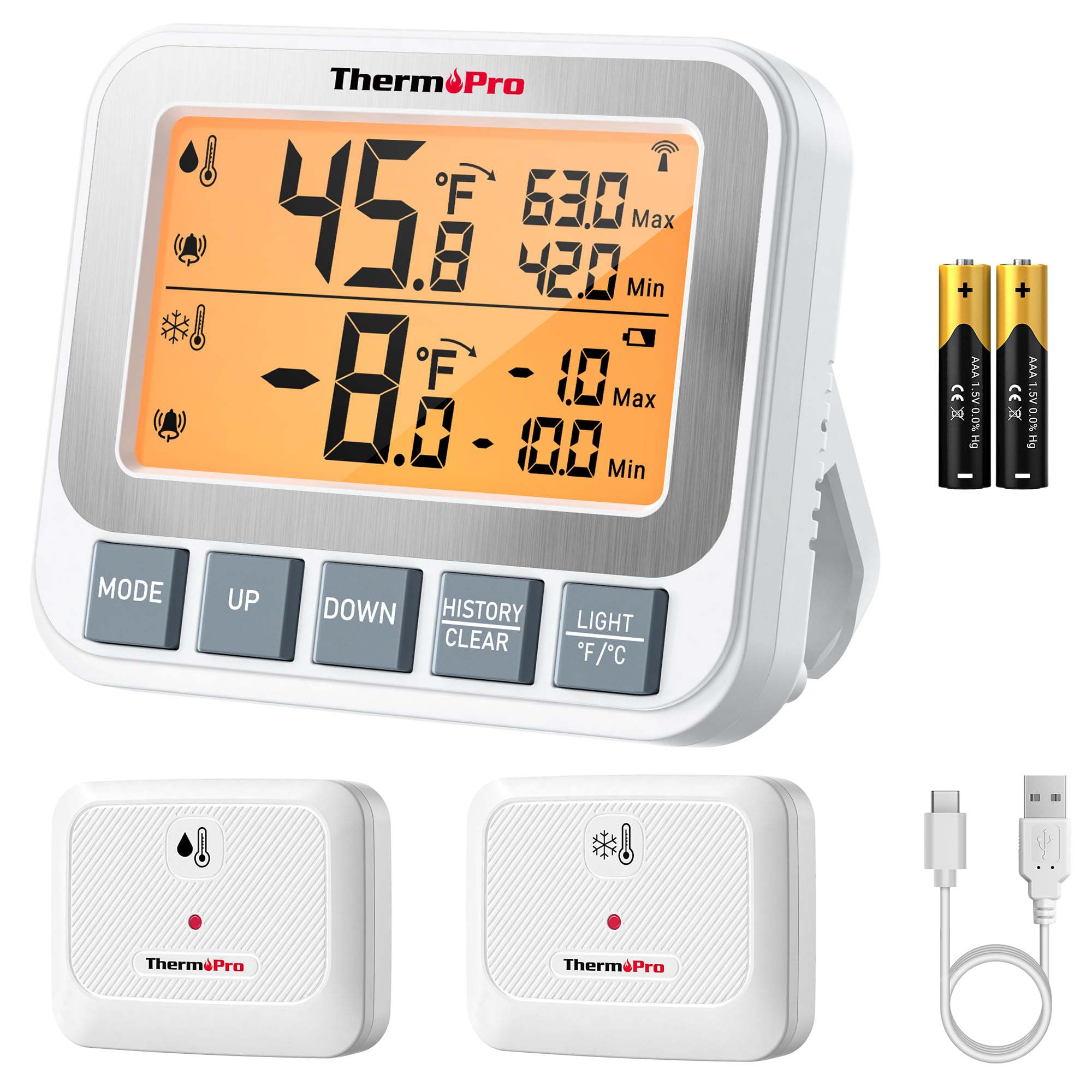
Image: ThermoPro TP210B Receiver and Transmitter. The receiver displays temperatures, while the transmitter sends data from inside the appliance.
Poġġiment tar-riċevitur:
- Use the integrated stand to place it on a countertop.
- Utilize the magnetic back to attach it to a metallic surface.
- Hang it using the hook on the back.
- Place the receiver in a location where you can easily view the display and hear alarms, within the 500ft/150m range of the transmitter.
Pożizzjonament tat-Trasmettitur:
- Place the transmitter inside your refrigerator or freezer.
- Use the integrated clip to attach it to a shelf or rack.
- Ensure the transmitter is not obstructed by large items that could block the wireless signal.
5. Istruzzjonijiet Operattivi
5.1. Power On/Off
- Agħfas il- QAWWA button on both the receiver and transmitter to turn them on or off.
5.2. Qari tat-Temperaturi
- The receiver's backlit LCD display will show the current temperature from the transmitter.
- The display typically shows both the current temperature and the all-time Max/Min records.
5.3. Issettjar tal-Allarmi tat-Temperatura
The TP210B allows you to set custom high and low temperature limits for alerts.
- Agħfas il- TWISSIJA button on the receiver. The high limit will flash.
- Uża l- UP or 'L isfel buttons to adjust the high temperature limit.
- Agħfas TWISSIJA again to confirm the high limit and move to the low limit setting.
- Uża l- UP or 'L isfel buttons to adjust the low temperature limit.
- Agħfas TWISSIJA a third time to confirm the low limit and exit alarm setting mode.
When the temperature exceeds the set range, the receiver will emit an audio-visual alarm.
5.4. Max/Min Temperature Records
- The receiver automatically records the maximum and minimum temperatures detected since the last reset.
- Agħfas il- MAX/MIN button to cycle through current, maximum, and minimum temperature readings.
- To reset the Max/Min records, press and hold the MAX/MIN buttuna għal 3 sekondi filwaqt li viewing the Max/Min display.
5.5. Dawl ta' wara
- The receiver features a bright backlit display for easy reading in low-light conditions.
- The backlight will activate automatically when a button is pressed and will turn off after a short period of inactivity to conserve battery.
6. Manutenzjoni
6.1. Tindif
- Imsaħ l-unitajiet bir-reklamaramp drapp. Tgħaddasx fl-ilma.
- Tużax tindif jew solventi li joborxu.
6.2. Battery Replacement (Receiver)
- When the low battery indicator appears on the receiver display, replace the 2 AAA batteries.
- Ensure proper polarity when inserting new batteries.
6.3. Transmitter Charging
- Recharge the transmitter's lithium battery when the low battery indicator appears.
- Uża l-kejbil tal-iċċarġjar USB ipprovdut.
6.4. Ħażna
- If storing the device for an extended period, remove the AAA batteries from the receiver.
- Aħżen f'post niexef 'il bogħod minn temperaturi estremi.
7 Issolvi l-problemi
| Problema | Kawża Possibbli | Soluzzjoni |
|---|---|---|
| No temperature reading / "--" displayed | Transmitter not powered on, out of range, or low battery. |
|
| Qari mhux preċiż tat-temperatura | Sensor obstruction, extreme environmental conditions, or sensor malfunction. |
|
| L-allarmi ma jdoqqux | Alarm limits not set correctly or alarm function disabled. |
|
| Transmitter battery drains quickly | Operating in extremely low temperatures or frequent signal transmission. |
|
8. Speċifikazzjonijiet
- Firxa tat-Temperatura: -40°F sa 158°F (-40°C sa 70°C)
- Preċiżjoni tat-Temperatura: ± 0.9 ° F (± 0.5 ° C)
- Medda bla fili: Sa 500 pied (150m) fl-arja aperta
- Frekwenza tat-Trażmissjoni: 433 MHz
- Qawwa tar-riċevitur: 2 x batteriji AAA (inklużi)
- Qawwa tat-Trasmettitur: Rechargeable Lithium battery (included, with USB charging cable)
- Wiri: LCD backlit
- Dimensjonijiet (Riċevitur): Approximately 4.33 inches (length)
- Piż (Oġġett): Madwar 11.2 uqija
9. Garanzija u Appoġġ
ThermoPro provides a warranty for this product against defects in materials and workmanship. For detailed warranty information, product registration, or technical support, please visit the official ThermoPro webis-sit jew ikkuntattja lis-servizz tal-klijenti tagħhom direttament.
Uffiċjali Websit: www.thermopro.com
Appoġġ għall-Klijent: Refer to the contact information provided on the ThermoPro webis-sit jew l-imballaġġ tal-prodott.