
Prodott Overview
This Medcursor Rechargeable Heated Eye Mask is designed to provide soothing warmth and relaxation for your eyes, helping to alleviate eye strain, dryness, and fatigue. It features a high-capacity battery for cordless use, multiple heat settings, and a washable cover for hygiene.
Karatteristiċi Ewlenin
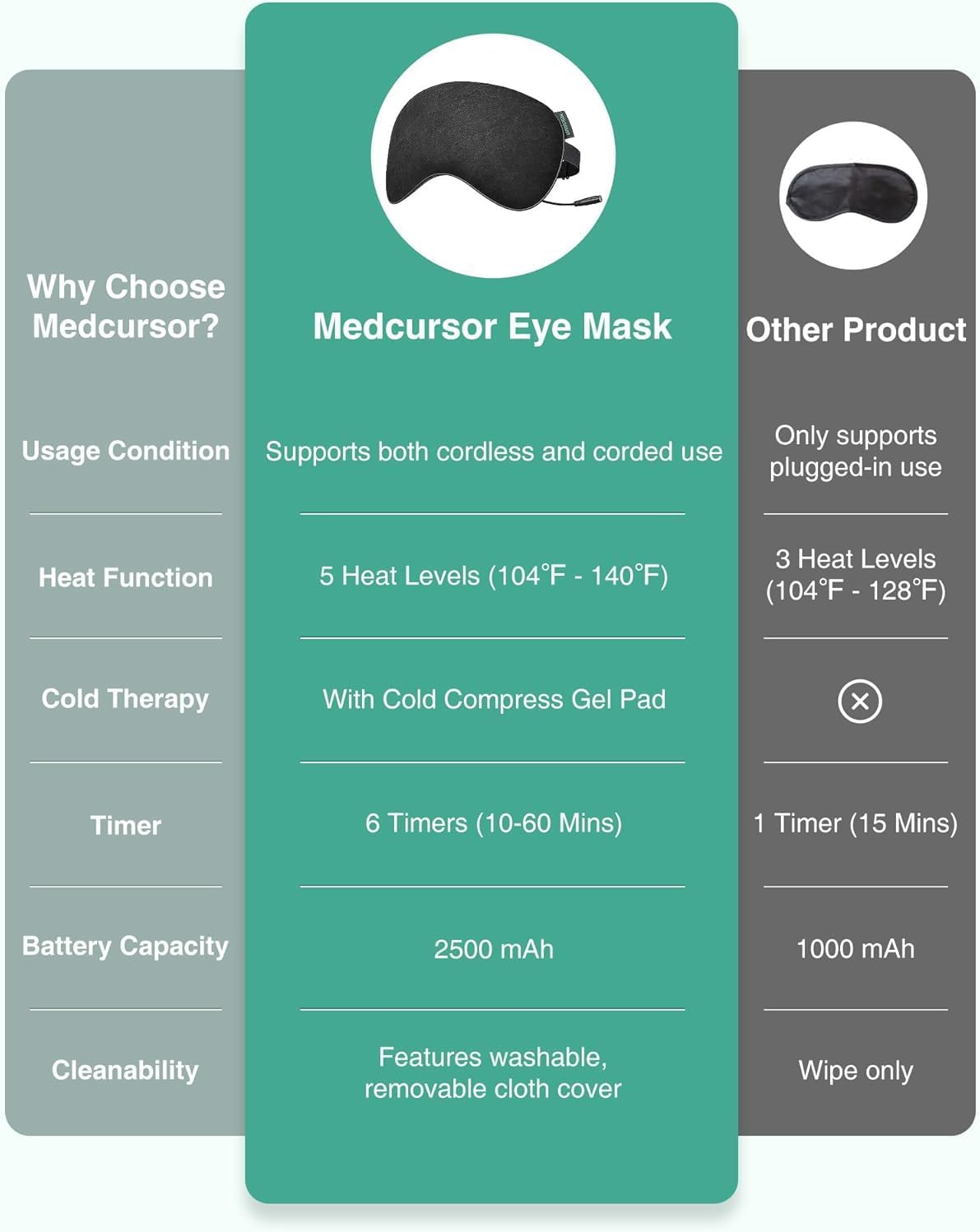
- Użu Doppju: Operates both cordlessly and with a wired connection for continuous use.
- 2500mAh Batterija ta 'Kapaċità Għolja: Provides 150 to 390 minutes of use on a full charge, ideal for travel or daily routines.
- 5 Livelli ta' Sħana: Adjustable temperature settings from 104°F to 140°F for personalized comfort.
- Kuxxinett tat-tkessiħ: Includes a cooling pad for refreshing cold therapy to alleviate puffiness.
- 6 tajmers: Adjustable duration settings (10, 20, 30, 40, 50, 60 minutes) with automatic shut-off.
- Effective Light Blocking: Wide design and U-shaped nasal design ensure complete darkness for uninterrupted rest.
- Comfortable & Washable: Made from breathable material with an adjustable strap and a detachable, washable cloth cover.
Istruzzjonijiet Importanti dwar is-Sigurtà
- Always remove the detachable fabric cover before washing or using the heated function.
- Dan il-prodott huwa maħsub għall-użu mill-adulti biss.
- Żomm fejn ma jintlaħaqx mit-tfal.
- Do not use if you have difficulty breathing or removing the mask by yourself.
Ċaħda Legali: Dikjarazzjonijiet dwar supplimenti tad-dieta ma ġewx evalwati mill-FDA u mhumiex maħsuba biex jiddijanjostikaw, jittrattaw, ifejqu jew jipprevjenu kwalunkwe marda jew kundizzjoni tas-saħħa.
Kontenut tal-Pakkett
Ivverifika li l-oġġetti kollha huma preżenti fil-pakkett tiegħek:
- Medcursor Heated Eye Mask
- Detachable Washable Cover
- Kuxxinett tat-tkessiħ
- Kejbil tal-Iċċarġjar tat-Tip C
- Manwal għall-Utent
The image displays the Medcursor Heated Eye Mask, its Type-C charging cable, and a small storage pouch, illustrating the main components included in the package.
Setup
Charging the Eye Mask
Before first use, fully charge the eye mask. Connect the provided Type-C cable to the mask's charging port and to a compatible USB power source (e.g., laptop, power bank, or wall adapter).

A close-up image shows the eye mask's Type-C port connected to a charging cable, illustrating how to power the device.
Attaching the Washable Cover and Adjustable Strap
The eye mask comes with a detachable, washable cover. Ensure it is properly fitted over the heating element. The adjustable strap allows for a comfortable and secure fit for various head sizes.

This image illustrates the process of removing or attaching the washable cover and adjusting the elastic strap for a personalized fit.
Istruzzjonijiet Operattivi
Tixgħel/Jitfi
Long press the power button on the controller to turn the mask on or off.
L-aġġustament tal-Livelli tas-Sħana
The mask offers 5 heat settings (104°F to 140°F). Short press the heat button on the controller to cycle through the available temperature options. It is recommended to start with the lowest setting and gradually increase to your preferred comfort level.

An image displays the controller with its display showing "HOT" and three bars, indicating a medium heat setting.
L-issettjar tat-Timer
Choose from 6 adjustable timer settings (10, 20, 30, 40, 50, or 60 minutes). Short press the timer button on the controller to select your desired duration. The mask will automatically shut off after the set time.

The controller's display shows "MIN" and "15", illustrating the timer function set for 15 minutes.
Using the Cooling Pad
For cold therapy, insert the cooling pad (provided) between the eye mask and its cover. Chill the pad in a refrigerator before use for a refreshing sensation. No controller connection is required for cold therapy.

A person is shown relaxing with the eye mask, demonstrating the use of the cooling pad for a refreshing experience.
Manutenzjoni
Ħasil tal-Qoxra
The fabric cover is detachable and washable. Unzip the cover, remove the internal heating element, and hand wash or machine wash the cover on a gentle cycle with mild detergent. Air dry completely before reassembling.
Storing the Eye Mask
Store the eye mask in a cool, dry place away from direct sunlight. Ensure it is completely dry before storage.
This image shows how to detach the fabric cover from the eye mask for cleaning.
Speċifikazzjonijiet tal-Prodott
| Karatteristika | Dettall |
|---|---|
| Dimensjonijiet tal-Pakkett | 8.66 x 4.45 x 1.54 pulzieri; 11.68-il uqija |
| Numru tal-Mudell tal-Oġġett | MD-EM03-B |
| Batteriji | 1 Batteriji tal-Lithium Polymer meħtieġa. (inkluż) |
| Manifattur | Medkursur |
| Brand | Medkursur |
| Kulur | Iswed |
| Materjal | Poliester |
| Karatteristika Speċjali | Ċinga aġġustabbli |
| Firxa ta' Età (Deskrizzjoni) | Adulti |
Soluzzjoni ta' Problemi Komuni
- Il-maskra ma tissaħħanx: Ensure the Type-C cable is securely connected to both the mask and a power source. Check if the power button is long-pressed to turn on and a heat level is selected.
- Il-batterija mhix qed tiċċarġja: Verify the charging cable is correctly inserted and the power source is active. Try a different USB port or wall adapter.
- Skumdità waqt l-użu: Adjust the strap for a looser fit. If the heat is too intense, select a lower heat setting.
Informazzjoni dwar Garanzija u Appoġġ għall-Klijent
For warranty details, product support, or any inquiries, please refer to the contact information provided in the original product packaging or visit the official Medcursor websit.
Visit the Medcursor Store