
1. Prodott Aktarview
The Shimbol CP5 Ultra is a 5-inch Full Touch HD monitor designed to enhance mobile videography and photography for both iPhone and Android users. It provides real-time screen mirroring, touch control, and wireless connectivity, allowing users to utilize their phone's superior rear camera for vlogging, selfies, and live streaming.
- Display Full HD ta' 5 pulzieri: Offers a clear 1080P resolution for precise framing and previewing.
- Real-Time Screen Mirroring with Touch Control: Operate your phone directly from the monitor, including zoom, focus adjustment, and recording initiation.
- Konnettività Wireless b'Doppju Banda: Features 2.4G/5G dual-band technology for ultra-low latency (0.04s) and stable transmission up to 50 meters in open areas.
- Twaħħil manjetiku: Built-in magnet securely attaches to compatible phones. A magnetic ring is included for phones without built-in magnetic support.
- Shutter mill-bogħod Bluetooth: Enables contactless shooting for solo or group photos and videos.
- Ħajja twila tal-batterija: Provides approximately 3.5 hours of continuous use.

2. Gwida ta' Setup
2.1 Il-Ftuħ tal-Kaxxa u l-Iċċarġjar Inizjali
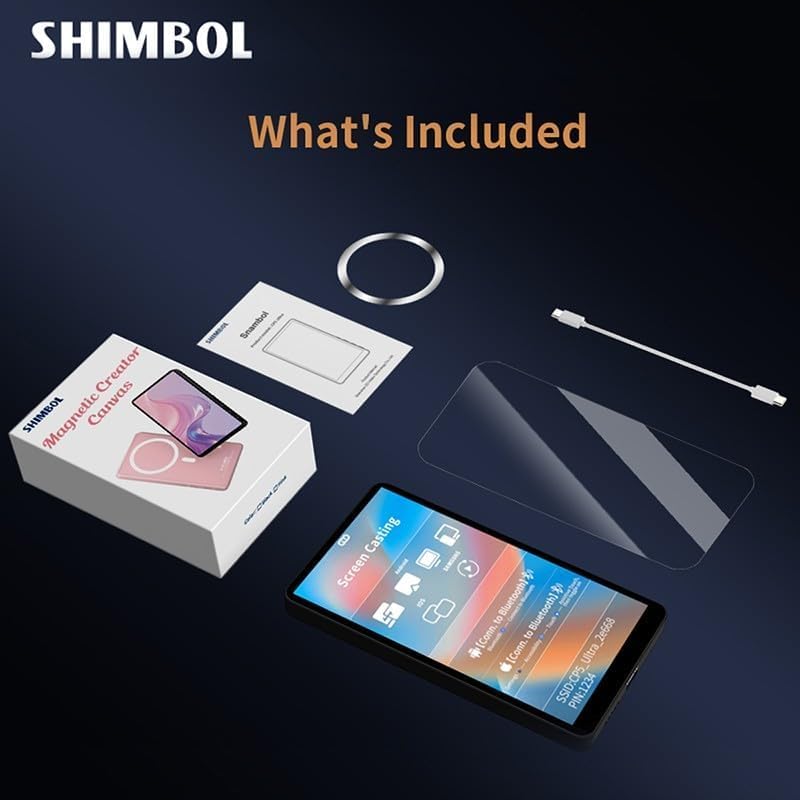
Upon unboxing, ensure all components are present: the CP5 Ultra monitor, a magnetic ring, a USB-C charging cable, and a screen protector. It is recommended to fully charge the device before first use using the provided USB-C cable.
2.2 It-Tixgħel u l-Konnettività
- Qawwa Mixgħul: Press and hold the power button on the side of the CP5 Ultra until the screen illuminates.
- Qabbad mal-Wi-Fi: The monitor will display a QR code and Wi-Fi network details (SSID and password). Use your phone's camera to scan the QR code to join the local network created by the CP5 Ultra.
- Ippermetti l-Iskrin Mirroring: On your iPhone or Android device, swipe down (or up, depending on model) to access the Control Center. Tap the 'Screen Mirroring' icon.
- Agħżel Apparat: From the list of available devices, select the CP5 Ultra's name (e.g., "CP5_Ultra_XXXXXX"). A checkmark will appear next to the device name when mirroring is active.
- Bluetooth Connection (for Touch Control): Go to your phone's Settings > Bluetooth. Find the CP5 Ultra's Bluetooth name (e.g., "CP5_Ultra_XXXXXX") and tap to connect.
- Enable Accessibility (for Touch Control): For full touch control functionality, navigate to your phone's Settings > Accessibility > Zoom, and ensure 'Zoom' is turned on. To exit the zoom mode, double-tap the screen with three fingers.

2.3 Twaħħil Manjetiku
The CP5 Ultra features a built-in magnet for secure attachment to compatible phones (e.g., MagSafe-enabled iPhones). For phones without built-in magnetic support, an adhesive magnetic ring is provided. Attach this ring to the back of your phone or phone case to enable magnetic mounting.

2.4 Recommended App for 4K Shooting
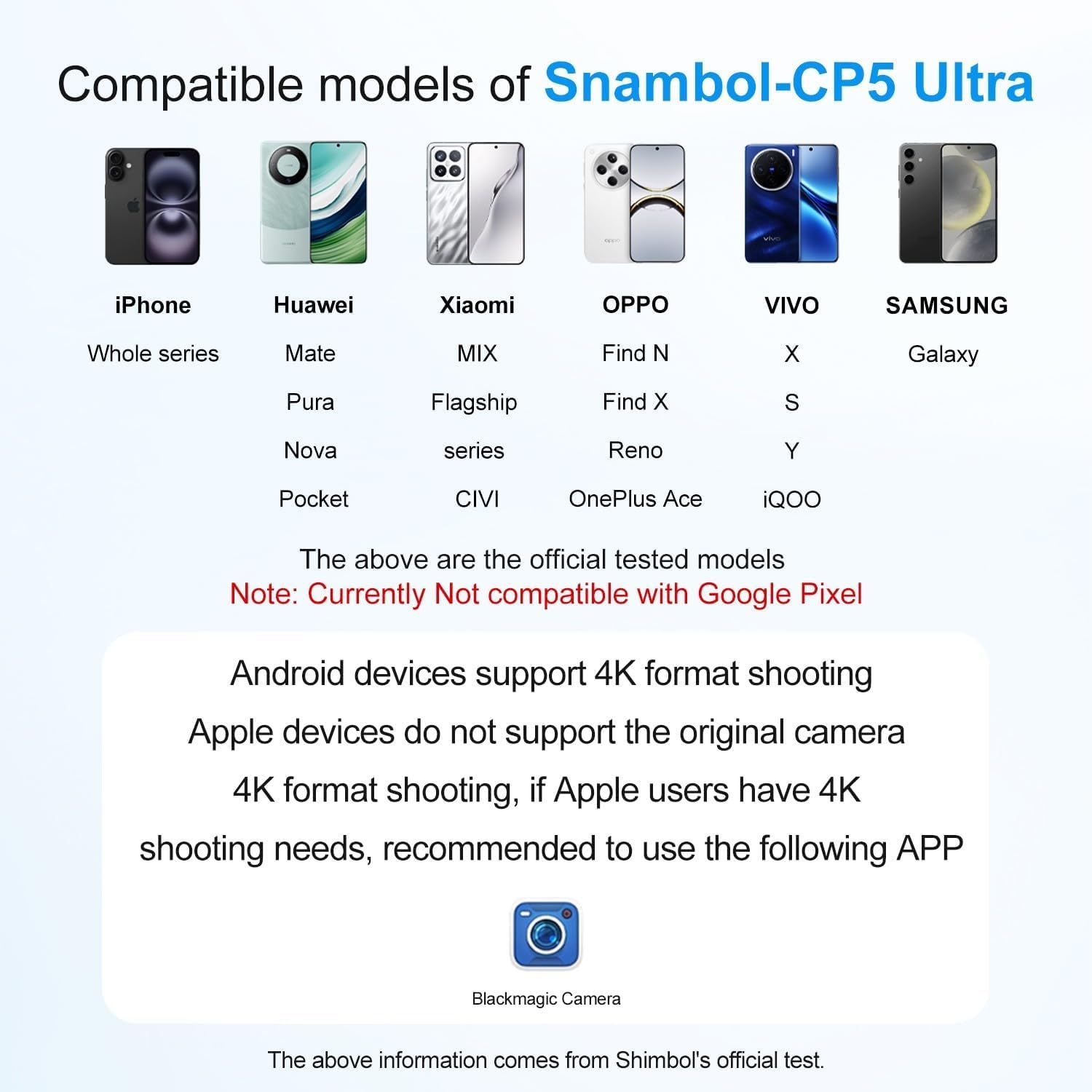
For high-definition 4K shooting without latency, it is recommended to download and use the Blackmagic Camera App with this product.

3. Istruzzjonijiet Operattivi
3.1 Kontrolli Bażiċi
The CP5 Ultra allows direct interaction with your phone's camera interface through its touch screen. This includes:
- Multi-Touch Zoom & Focus: Pinch, swipe, and tap on the monitor screen to precisely control zoom and focus within your phone's camera app.
- Reġistrazzjoni: Tap the record button on the monitor to start or stop video recording.
- Rear Camera Switching: Instantly switch to your phone's rear camera for high-quality selfies and vlogs while viewing yourself on the CP5 Ultra.

3.2 Side Button Functions
The side buttons on the CP5 Ultra provide quick access to essential functions:
- Buttuna ta' Fuq: Capture (takes a photo or starts/stops video recording).
- It-Tieni Buttuna: Mirror (flips the display horizontally, useful for self-recording).
- It-Tielet Buttuna: Zoom-in/Mute (controls zoom level or mutes audio).
- Ir-Raba’ Buttuna: Power/Brightness (short press to adjust brightness, long press to power on/off).
3.3 Bluetooth Remote Shutter
The included Bluetooth remote shutter allows for hands-free photo and video capture. Pair the remote with your phone via Bluetooth settings. Once paired, press the button on the remote to trigger your phone's camera shutter.
3.4 Monitoraġġ tal-Awdjo
The CP5 Ultra features a built-in speaker, allowing you to play back footage with clear audio directly from the monitor without additional gear.

3.5 Connection Tutorial Video
For a visual guide on connecting your Shimbol CP5 Ultra, please refer to the official tutorial video below:
4. Manutenzjoni
To ensure the longevity and optimal performance of your Shimbol CP5 Ultra monitor, follow these maintenance guidelines:
- Tindif: Use a soft, lint-free cloth to clean the screen and body. Avoid abrasive materials or harsh chemicals. For stubborn smudges, lightly dampLaħlaħ id-drapp bl-ilma jew b'soluzzjoni tat-tindif speċifika għall-iskrin.
- Ħażna: Store the monitor in a cool, dry place away from direct sunlight and extreme temperatures. Use the provided screen protector to prevent scratches when not in use.
- Immaniġġjar: Evita li twaqqa' l-apparat jew li tissottomettih għal impatti qawwija. Tippruvax tiżżarma l-unità, għax dan jannulla l-garanzija.
- Espożizzjoni għall-Ilma: L-apparat mhuwiex reżistenti għall-ilma. Evita l-espożizzjoni għall-ilma jew umdità għolja.
5 Issolvi l-problemi
- Ebda Qawwa: Ensure the device is fully charged. Connect it to a power source using the USB-C cable.
- Kwistjonijiet ta' Konnettività:
- Verify that your phone is connected to the CP5 Ultra's local Wi-Fi network.
- Ensure Screen Mirroring is active and the correct device is selected on your phone.
- Check Bluetooth connection for touch control functionality.
- Restart both the CP5 Ultra and your phone.
- Touchscreen ma jirrispondix:
- Ikkonferma li l-konnessjoni Bluetooth hija stabbilita.
- Ensure 'Zoom' is enabled in your phone's Accessibility settings for touch control.
- If the issue persists, try restarting the device and re-establishing connections.
- Lag or Delay in Mirroring:
- Ensure you are within the recommended operating range (up to 50m in open areas).
- Imminimizza l-interferenza minn apparati oħra mingħajr fili.
- For 4K shooting, use the recommended Blackmagic Camera App.
- Magnetic Attachment Not Secure:
- If your phone does not have built-in magnetic support, ensure the included magnetic ring is properly attached to your phone or case.
- Check for any obstructions between the monitor and your phone.
6. Speċifikazzjonijiet
| Karatteristika | Dettall |
|---|---|
| Numru tal-Mudell | CP5 Ultra-Black |
| Daqs tal-Wiri | 5 pulzieri |
| Riżoluzzjoni | 1080P Full HD |
| Konnettività | 2.4G/5G Dual-Band Wireless, Bluetooth |
| Latency | <0.04s |
| Firxa tat-Trażmissjoni | Up to 50m (open areas) |
| Ħajja tal-batterija | Appross. 3.5 sigħat |
| Piż tal-oġġett | 9.5 uqija (0.27 Kilogrammi) |
| Dimensjonijiet tal-Pakkett | 5.75 x 3.54 x 1.42 pulzieri |
| Apparati Kompatibbli | Cellphone, Tablet (iPhone, Huawei, Xiaomi, OPPO, VIVO, Samsung Galaxy series. Not compatible with Google Pixel.) |
7. Garanzija u Appoġġ
For warranty information, product support, or service inquiries, please refer to the official Shimbol webis-sit jew ikkuntattja lis-servizz tal-konsumatur tagħhom direttament. Żomm l-irċevuta tax-xiri tiegħek bħala prova tax-xiri għal kwalunkwe talba ta' garanzija.
Żur il- Shimbol Store on Amazon għal aktar informazzjoni dwar il-prodott u riżorsi ta' appoġġ.