
Introduzzjoni
The Fender Mustang LTX50 is a versatile 50-watt modeling combo amplifier designed for guitarists seeking a wide range of authentic Fender tones and modern features. Equipped with a 12-inch Celestion G12P-80 speaker, it delivers dynamic sound suitable for practice, rehearsal, and performance. This amplifier offers 25 amp models and 25 effects, covering various musical styles from clean to high-gain. Its intuitive color display, onboard tuner, and 100 user preset slots provide easy customization and quick access to your preferred sounds. The Mustang LTX50 also features Bluetooth audio streaming for playing along with tracks and USB-C connectivity for direct recording and monitoring.
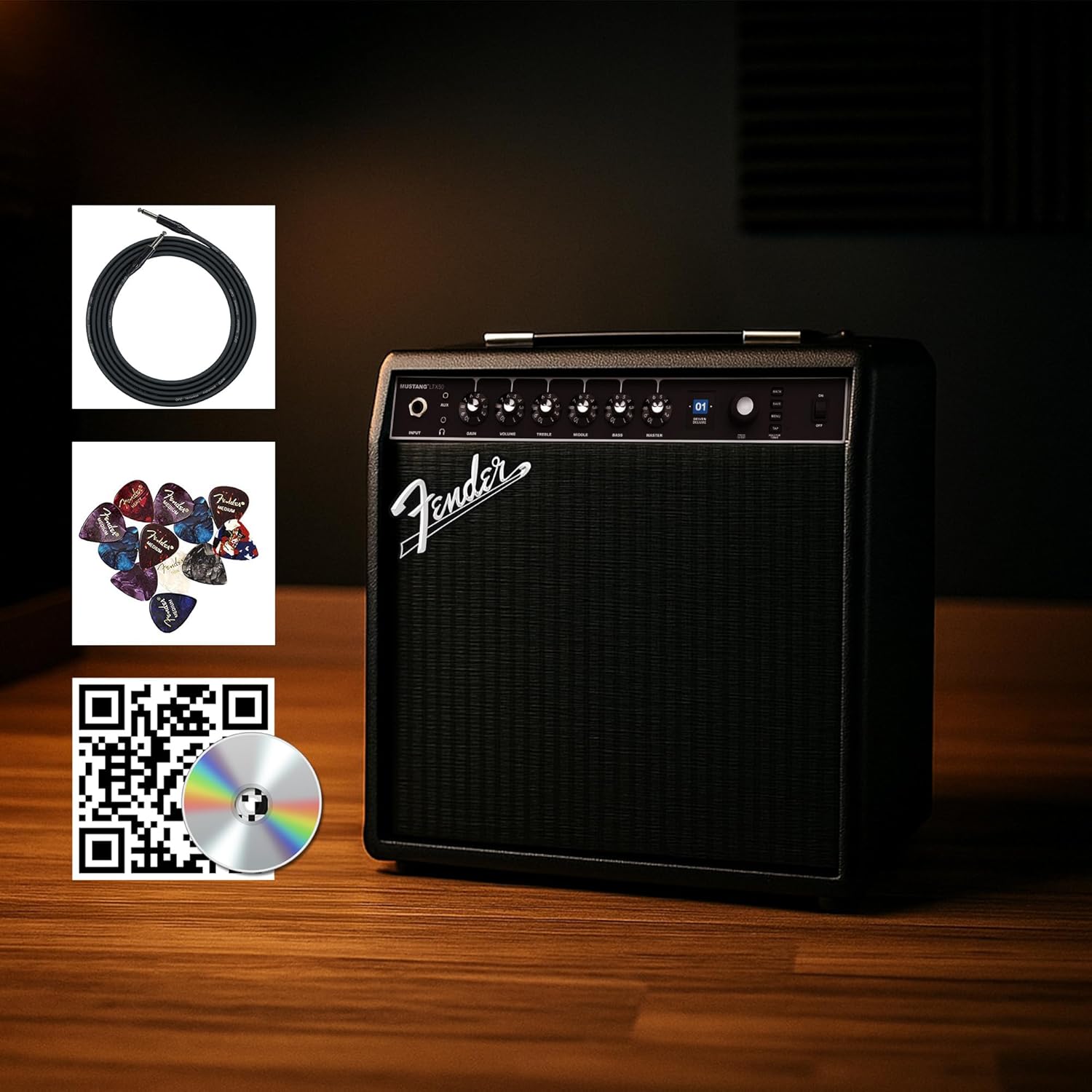
Figure 1: Fender Mustang LTX50 Guitar Combo Amplifier with included accessories.
Setup
1. Unboxing u Spezzjoni Inizjali
- Neħħi bil-galbu amplifier u l-aċċessorji kollha mill-imballaġġ.
- Spezzjona l- amplifier for any signs of damage that may have occurred during shipping.
- Confirm all included items are present: Mustang LTX50 amplifier, power cord, instrument cable, 12-pack guitar picks, and instructional DVD.
2. Qawwa tal-Konnessjoni
- Tiżgura l- ampIs-swiċċ tal-enerġija tal-lifer huwa fil-pożizzjoni OFF.
- Connect the included power cord to the AC input on the rear panel of the ampaktar ħaj.
- Ipplaggja t-tarf l-ieħor tal-korda tad-dawl fi żbokk elettriku ertjat.
3. Qabbad il-Kitarra Tiegħek
- Use the included instrument cable to connect your guitar to the INPUT jack fuq il-pannell ta' quddiem tal- ampaktar ħaj.
4. Kontrolli Bażiċi Overview
Familiarize yourself with the front panel controls before powering on the ampaktar ħaj.
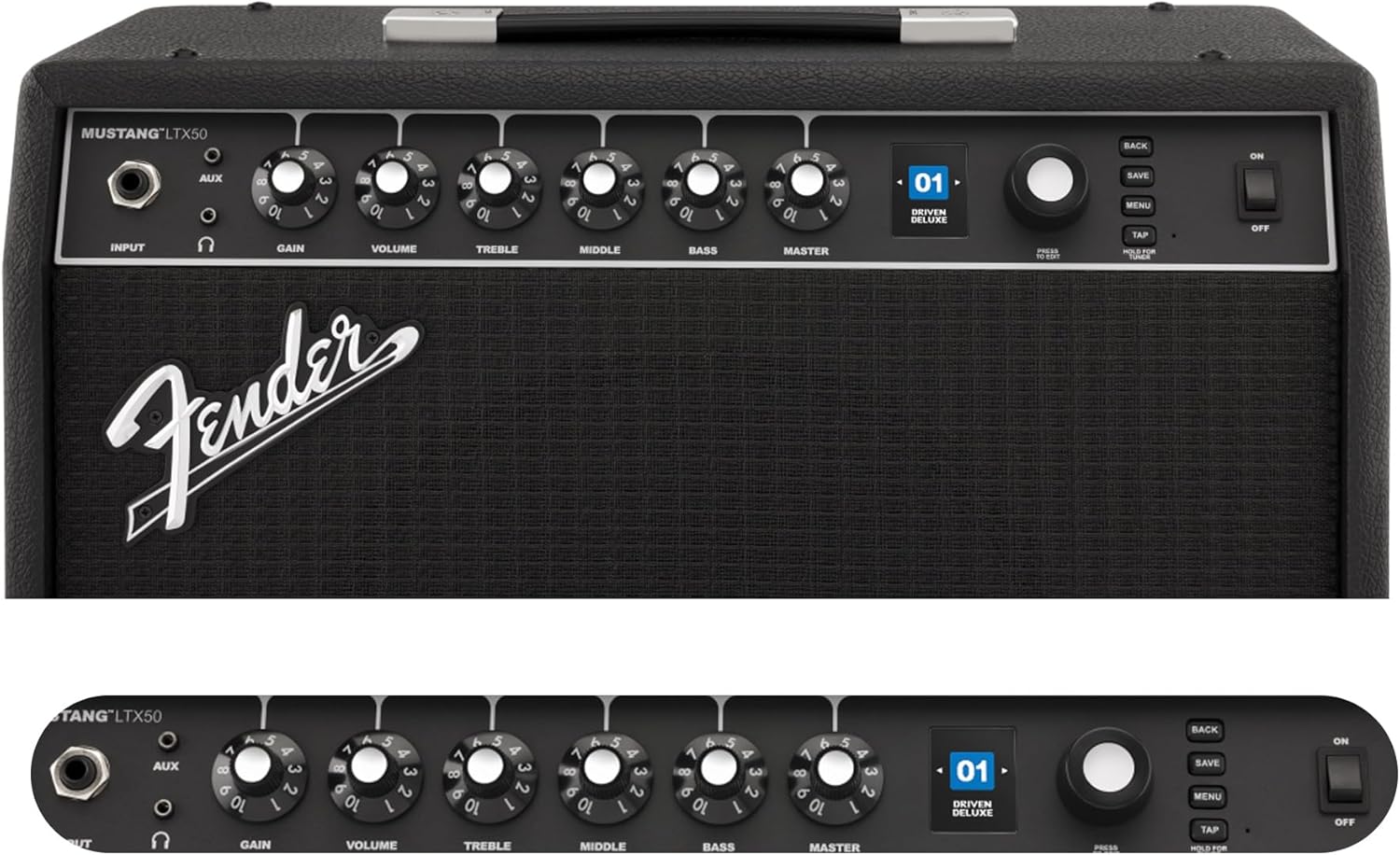
Figure 2: Front Panel Controls of the Mustang LTX50.
Istruzzjonijiet Operattivi
1. Tixgħil / Mitfi
- To power on, ensure all volume controls are set to minimum, then flip the QAWWA aqleb għall-pożizzjoni ON.
- Biex titfi, aqleb il- QAWWA jaqilbu għall-pożizzjoni OFF.
2. Navigating Presets
- Uża l- ENCODER knob (large rotary knob) to scroll through the 100 available presets (70 factory, 30 user).
- Agħfas il- ENCODER knob to select a preset.
- The color LCD displays the current preset number and name.
3. Aġġustament Amp Mudelli u Effetti
- Agħfas il- MENU buttuna biex taċċessa l - ampis-settings tal-lifer.
- Navigate through options like AMP, STOMP, MOD, DELAY, REVERB using the ENCODER.
- Select an option and use the ENCODER to choose different amp models or effects.
- Adjust parameters for each effect using the smaller control knobs (GAIN, VOLUME, TREBLE, MIDDLE, BASS, MASTER) or by selecting parameters on the display.
- Agħfas SAVE to store your customized preset.
4. Using the Built-in Tuner
- Agħfas u żomm il- TAPP button to activate the chromatic tuner.
- Play a single note on your guitar; the display will show the note and indicate if it is sharp, flat, or in tune.
- Press any button or play for a few seconds to exit tuner mode.
5. Fender Tone 3.0 App Control
- Download the Fender Tone 3.0 app from your device's app store (iOS/Android).
- Ippermetti Bluetooth fuq it-tagħmir mobbli tiegħek.
- Fuq il- amplifer, agħfas il-buttuna MENU button, navigate to "Bluetooth," and select "Pair."
- Select "Mustang LTX50" from your device's Bluetooth settings to connect.
- Use the app to wirelessly create, edit, save, and share presets, and to manage your ampsettings tal-lifier.
6. Playing Along with Audio (Bluetooth)
- Once paired via Bluetooth, you can stream audio from your mobile device directly to the ampaktar ħaj.
- Adjust the volume of the streamed audio from your mobile device.
- Alternatively, connect an external audio source to the KAJN IN jack on the front panel using a 3.5mm stereo cable.
7. Recording via USB-C
- Qabbad kejbil USB-C mill- amplifier's USB-C port to your computer (Mac or PC).
- Il- amplifier functions as a bidirectional audio interface, allowing direct recording and monitoring.
- Refer to your Digital Audio Workstation (DAW) software's manual for specific setup instructions.
Manutenzjoni
1. Tindif
- Skonnettja l- amplifier from power before cleaning.
- Uża drapp artab u niexef biex timsaħ l-uċuħ ta' barra.
- Għal ħmieġ iebes, ftit damp Jista' jintuża drapp b'sapun ħafif, segwit minn drapp niexef.
- Evita li tuża prodotti tat-tindif, solventi, jew xama' li joborxu, għax dawn jistgħu jagħmlu ħsara lill-finitura.
2. Ħażna
- Aħżen il- amplifier f'post frisk u niexef 'il bogħod mix-xemx diretta u minn temperaturi estremi.
- Avoid storing in areas with high humidity.
- If storing for extended periods, cover the amplifikatur biex jipproteġih mit-trab.
3. Safety Warnings (Proposition 65)
This product may contain chemicals known to the State of California to cause cancer, birth defects, or other reproductive harm. For more information, visit www.P65Warnings.ca.gov.
Issolvi l-problemi
Ebda Ħoss
- Tiżgura l- amplifier is powered on and the power cord is securely connected.
- Check that your guitar is properly connected to the INPUT jack.
- Ivverifika li l- MASTER volume and individual preset volume controls are not set to zero.
- Test with a different instrument cable and guitar to rule out faulty equipment.
- If using headphones, ensure they are fully plugged into the headphone jack and that the main speaker is not muted.
Storbju Distort jew Mhux Mixtieq
- Check your guitar's volume and tone controls.
- Naqqas il- QIBDA issettjar fuq ampaktar ħaj.
- Ensure your instrument cable is not damaged or poorly shielded.
- Ipprova sokit tal-enerġija differenti biex teskludi interferenza elettrika.
- If using high-gain amp models, some distortion is inherent. Adjust settings accordingly.
Kwistjonijiet ta' Konnettività Bluetooth
- Ensure Bluetooth is enabled on both your mobile device and the ampaktar ħaj.
- Kun żgur li l- amplifier is in pairing mode (refer to "Fender Tone 3.0 App Control" section).
- Mexxi l-apparat mobbli tiegħek eqreb lejn ampaktar ħaj.
- Ipprova neħħi l-akkoppjar u erġa' qabbad l-apparati.
- Erġa' ibda t-tnejn amplifer u l-apparat mobbli tiegħek.
Amplifier Not Responding
- Iċ-ċiklu tal-enerġija amplifier by turning it off, waiting 10 seconds, and turning it back on.
- If the issue persists, a factory reset may be necessary. Consult the Fender support website for instructions on performing a factory reset for the Mustang LTX50.
Speċifikazzjonijiet
| Isem tal-Mudell | MUSTANG LTX50 |
| Numru tal-Mudell | 2311700000 |
| Brand | Fender |
| Ampitwal Tip | Immudellar Diġitali |
| Output ta 'Qawwa | 50 Watts |
| Speaker | 1 x 12" Celestion G12P-80 |
| Amp Mudelli | 25 |
| Effetti | 25 (distortion, overdrive, compression, modulation, reverb, delay, octave, etc.) |
| Presets | 70 factory + 100 user slots |
| Wiri | Color LCD with onboard chromatic tuner |
| Konnettività | Bluetooth audio, USB-C bidirectional audio |
| Outputs | XLR line out, Headphone out |
| Appoġġ għall-App | Fender Tone 3.0 app (iOS/Android) |
| Materjal tal-għeluq | Metall |
| Dimensjonijiet tal-oġġett (D x W x H) | 22.3"D x 19.9"W x 12.3"H |
| Piż tal-oġġett | 26.4 Liri |
| UPC | 840262259088 |

Figure 3: Rear Panel Connections of the Mustang LTX50.
Informazzjoni dwar Garanzija
The Fender Mustang LTX50 Guitar Combo Ampil-lifer huwa kopert minn Garanzija Limitata ta' 2 Snin. This warranty covers defects in materials and workmanship under normal use. For full terms and conditions, please refer to the warranty documentation included with your product or visit the official Fender websit.
Appoġġ
For further assistance, technical support, or service inquiries regarding your Fender Mustang LTX50 amplifier, please visit the official Fender support websit:
You may also find additional resources, FAQs, and software updates on the Fender websit.