
1. Introduzzjoni
The ASUS ROG Strix GS-BE12000 is a high-performance tri-band WiFi 7 router designed for demanding network environments, including gaming, streaming, and smart home integration. This manual provides essential information for setting up, operating, maintaining, and troubleshooting your router to ensure optimal performance and security.

Immaġni: Fuqview of the ASUS ROG Strix GS-BE12000 Router highlighting its design and key features.
2. Kontenut tal-Pakkett
Ivverifika li l-oġġetti kollha huma preżenti fil-pakkett tal-prodott tiegħek:
- ASUS ROG Strix GS-BE12000 Tri-Band Gaming Router
- Adapter tal-Enerġija
- Kejbil RJ-45
- Gwida Quick Start
- Karta ta' Garanzija
3. Setup
Follow these steps for initial setup of your ASUS ROG Strix GS-BE12000 router:
- Qabbad ir-router:
- Connect the power adapter to the router's DC-in port and plug it into a power outlet.
- Connect one end of the provided RJ-45 cable to your modem's LAN port and the other end to the router's 2.5G WAN port.
- Optionally, connect your computer to one of the router's LAN ports using an Ethernet cable for initial configuration.
- Qawwa Mixgħul: Press the power button on the router. Wait for the indicator lights to stabilize, typically indicating a successful connection.
- Konfigurazzjoni Inizjali:
- Iftaħ a web il-browser fuq il-kompjuter jew l-apparat mobbli konness tiegħek.
- Navigate to the router's default IP address (usually
router.asus.comor192.168.1.1). - Follow the on-screen instructions in the Quick Internet Setup wizard to configure your internet connection, Wi-Fi network name (SSID), and password.

Immaġni: Wara view of the router displaying the 2.5G WAN port and multiple 2.5G LAN ports for wired connections.
4. Istruzzjonijiet Operattivi
4.1. Wi-Fi 7 Tri-Band Connectivity
The GS-BE12000 supports Wi-Fi 7 (802.11be) with tri-band operation (2.4 GHz, 5 GHz, and 6 GHz) for maximum throughput and reduced latency. It features 320 MHz channels on the 6 GHz band, Multi-Link Operation (MLO), and 4K-QAM for enhanced performance.

Image: Visual representation of Wi-Fi 7 tri-band capabilities, including 6 GHz, 5 GHz, and 2.4 GHz speeds, MLO, and 4K-QAM.
4.2. Konnettività bil-fili
The router offers a robust wired capacity of up to 20G, featuring one 2.5G WAN port and seven 2.5G LAN ports. This allows for high-speed connections to multiple devices, ideal for gaming consoles, PCs, and network-attached storage (NAS).

Image: Diagram detailing the router's wired ports, including 2.5G WAN, 2.5G LAN, and dedicated gaming ports.
4.3. Game Acceleration and ROG Gaming Network
Utilize the ROG-exclusive Gaming Network for one-tap SSID game acceleration. This feature streamlines advanced network settings to prioritize gaming traffic, ensuring low ping and reduced lag. The Smart Home Master function allows for easy setup of subnetworks for IoT devices and VPNs.

Image: User interface showing options for ROG Exclusive Gaming Network and Smart Home Master for network management.
4.4. AiMesh Compatibility
The GS-BE12000 is AiMesh compatible, allowing you to create a seamless whole-home mesh Wi-Fi system by adding other AiMesh-compatible ASUS routers. This extends coverage and eliminates Wi-Fi dead zones.

Image: Diagram showing how AiMesh extends Wi-Fi coverage throughout a multi-room environment.
5. Manutenzjoni
Regular maintenance ensures the longevity and optimal performance of your router:
- Aġġornamenti tal-Firmware: Regularly check for and install the latest firmware updates via the ASUS Router app or web interface. L-aġġornamenti tal-firmware spiss jinkludu titjib fil-prestazzjoni, irqajja tas-sigurtà, u karatteristiċi ġodda.
- Tindif Fiżiku: Keep the router in a well-ventilated area. Periodically clean dust from the vents and surfaces using a soft, dry cloth. Avoid using liquid cleaners.
- Jibda mill-ġdid: Jekk tesperjenza problemi bin-netwerk, ipprova erġa' ibda r-router billi taqlagħlu mill-plakka tal-elettriku għal 30 sekondi u mbagħad terġa' tqabbdu.
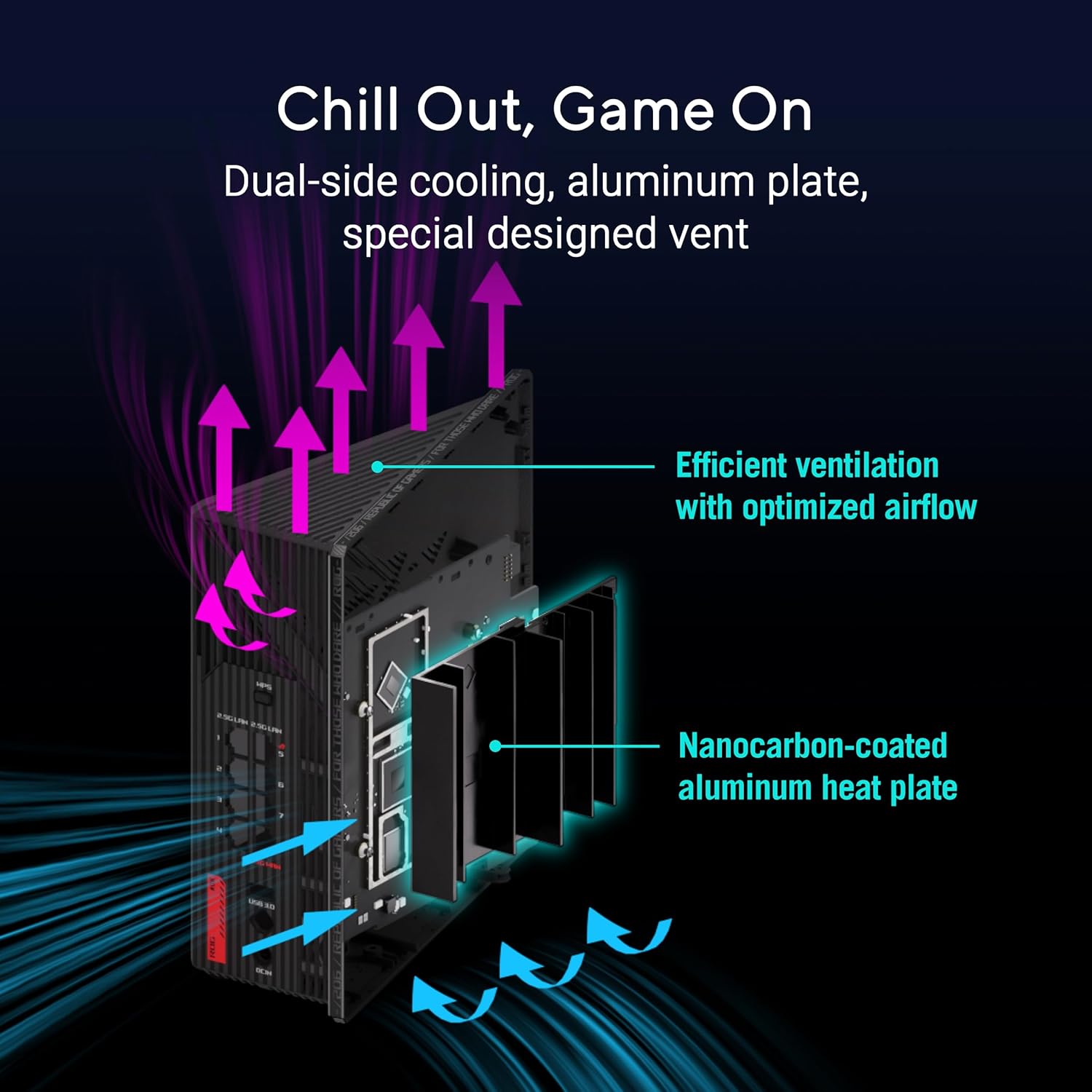
Immaġni: Interna view of the router highlighting its dual-side cooling and nanocarbon-coated aluminum heat plate for efficient heat dissipation.
6 Issolvi l-problemi
If you encounter issues with your router, refer to the following common solutions:
- Ebda Konnessjoni tal-Internet:
- Iċċekkja l-konnessjonijiet tal-kejbil kollha (enerġija, WAN, LAN) biex tiżgura li huma sikuri.
- Ibda mill-ġdid il-modem u r-router tiegħek.
- Ivverifika l-istatus tal-konnessjoni tal-fornitur tas-servizz tal-internet (ISP) tiegħek.
- Veloċità baxxa tal-Wi-Fi:
- Kun żgur li l-apparati tiegħek huma konnessi mal-medda xierqa tal-Wi-Fi (6 GHz jew 5 GHz għal veloċitajiet aktar mgħaġġla).
- Naqqas l-interferenza billi tmexxi r-router 'il bogħod minn apparati elettroniċi oħra.
- Update your router's firmware and device drivers.
- Wi-Fi Drops:
- Check for physical obstructions or distance from the router. Consider using AiMesh nodes for extended coverage.
- Ensure the router is placed centrally in your home.
For more detailed troubleshooting or advanced issues, consult the official ASUS support websit jew ikkuntattja l-appoġġ tal-klijent.
7. Speċifikazzjonijiet
| Karatteristika | Deskrizzjoni |
|---|---|
| Brand | ASUS |
| Isem tal-Mudell | GS-BE12000 |
| Klassi ta' Banda ta' Frekwenza | Tri-Band (2.4 GHz, 5 GHz, 6 GHz) |
| Standard Wireless | WiFi 7 (802.11be), WiFi 6 (802.11ax) |
| Rata ta' Trasferiment tad-Data | Sa 12000 Mbps |
| Wired Capacity | Up to 20G (1x 2.5G WAN, 7x 2.5G LAN) |
| CPU | 2.0GHz Quad-core |
| RAM | 2 GB |
| Antenni | 8 Antenni Interni |
| Kopertura | Sa 3000 pied kwadru. |
| Protokoll ta 'Sigurtà | AiProtection Pro, WPA/WPA2/WPA3 Personal/Enterprise |
| Metodu ta' Kontroll | App, Buttuna tal-Imbottatura |
| Dimensjonijiet (L x W x H) | 8.9"T x 3.5"W x 8.9"Għ |
| Piż tal-oġġett | 2.04 Liri |
8. Garanzija u Appoġġ
The ASUS ROG Strix GS-BE12000 comes with a garanzija ta 'sena from the manufacturer. For warranty claims, technical support, or additional product information, please visit the official ASUS support webis-sit jew l-ASUS Store.
Ħanut tal-ASUS: Żur il-Ħanut tal-ASUS fuq Amazon