
Introduzzjoni
This manual provides essential information for setting up, operating, and maintaining your TCL 32S5K 32-inch HD QLED Google Smart TV. Please read this manual thoroughly before using your television to ensure safe and optimal performance. Keep this manual for future reference.
Informazzjoni dwar is-Sigurtà
Dejjem segwi l-prekawzjonijiet bażiċi ta’ sigurtà meta tuża dan it-televiżjoni biex tnaqqas ir-riskju ta’ nar, xokk elettriku, u korriment. Tesponix it-TV għax-xita jew għall-umdità. Tiftaħx il-kaxxi tat-TV.asing; refer all servicing to qualified personnel. Ensure proper ventilation and avoid placing the TV near heat sources. Use only the power cord and accessories specified by the manufacturer.
Kontenut tal-Pakkett
Ivverifika li l-oġġetti kollha huma preżenti fil-pakkett:
- TCL 32S5K 32-inch HD QLED Google Smart TV
- Kontroll mill-bogħod
- Korda tal-Enerġija
- Stand tat-TV (2 biċċiet) u Viti
- Gwida Quick Start
- Karta ta' Garanzija
Setup
Installazzjoni Fiżika
Installazzjoni tal-istand: Place the TV screen-down on a soft, flat surface. Attach the two stand pieces to the designated slots on the bottom of the TV using the provided screws. Ensure the stand is securely fastened.
Immuntar tal-ħajt: If wall-mounting, ensure you use a VESA-compatible wall mount (not included) and follow the wall mount manufacturer's instructions. Disconnect the power cord before mounting.
Apparat li jgħaqqad
Connect your external devices to the appropriate ports on the TV. Refer to the image below for port locations and types.

Figure 1: Rear and Side Connectivity Ports. This image illustrates the various input and output ports available on the TCL 32S5K Smart TV, including USB 2.0, LAN, Antenna/Cable In, Digital Audio Out (Optical), HDMI 1, HDMI 2, and AV In adapter.
- HDMI Ports (1, 2): Qabbad plejers tal-Blu-ray, consoles tal-logħob, kaxxi tal-kejbil/satellita, jew apparati oħra li jaħdmu bl-HDMI.
- Port USB 2.0: Qabbad apparati tal-ħażna USB għad-daqq tal-midja.
- Port tal-LAN: Qabbad kejbil Ethernet għal konnessjoni tal-internet bil-fili.
- Dħul tal-Antenna/Kejbil: Qabbad antenna jew sinjal tat-TV bil-kejbil.
- Ħruġ tal-Awdjo Diġitali (Ottiku): Connect to an external audio receiver or soundbar for digital audio.
- AV In Adapter: Use the provided adapter to connect older devices with composite video and stereo audio outputs.
L-Inizjali Tixgħel u s-Setup tal-Google TV
After connecting all necessary cables, plug the power cord into an electrical outlet. Press the power button on the remote control or on the TV. Follow the on-screen instructions to complete the initial setup, which includes selecting your language, connecting to a Wi-Fi network, and signing in to your Google account to access Google TV features.
Operazzjoni
Funzjonijiet ta 'Kontroll mill-bogħod
The remote control allows you to navigate the Google TV interface, adjust volume, change channels, access apps, and control playback. Familiarize yourself with the button layout for easy operation.
Interfaċċja tat-TV tal-Google
Google TV organizes your favorite movies, shows, and live TV from across your apps and subscriptions. Use the remote to browse recommendations, search for content, and manage your watch list. Access the Google Play Store to download additional applications.
Karatteristiċi tal-Konnettività
- Wi-Fi: Connects your TV to your home wireless network for internet access and streaming.
- Bluetooth: Pair Bluetooth-enabled devices such as headphones or game controllers for a personalized experience.
- Googlecast (Chromecast built-in): Cast content from your compatible mobile devices or computer directly to your TV screen.
Settings tal-Istampa u tal-Ħoss
Your TCL 32S5K TV features QLED technology, Full HD resolution, HDR10 support, and Dolby Audio for an enhanced viewing and listening experience. Adjust picture modes (e.g., Standard, Vivid, Movie) and sound modes (e.g., Standard, Music, Movie) through the TV settings menu to suit your preferences.

Figure 2: Image Quality Features. This image highlights the key display technologies of the TCL 32S5K Smart TV, including QLED for vibrant colors, FHD (Full High Definition) for clear resolution, and HDR10 for enhanced contrast and brightness.
Manutenzjoni
Tindif tat-TV tiegħek
Always unplug the TV before cleaning. Use a soft, dry cloth to wipe the screen and cabinet. For stubborn marks, lightly dampen the cloth with water or a mild, non-abrasive screen cleaner. Never spray cleaner directly onto the screen or allow liquids to enter the TV's openings.
Aġġornamenti tas-Software
Your Google TV may receive automatic software updates. Ensure your TV is connected to the internet to receive these updates, which can improve performance and add new features. You can also manually check for updates in the TV's settings menu.
Issolvi l-problemi
Jekk tiltaqa' ma' problemi bit-TV tiegħek, irreferi għas-soluzzjonijiet komuni li ġejjin:
- Ebda Qawwa: Iċċekkja jekk il-korda tal-enerġija hijiex imdaħħla sew kemm fit-TV kif ukoll fis-sokit tal-elettriku. Ipprova sokit differenti.
- Ebda Stampa/Stampa Fqira: Ensure all cables are correctly connected. Check the input source. Adjust picture settings. If using an antenna, check signal strength.
- Ebda Ħoss/Ħoss Fqir: Check volume levels and mute settings. Ensure external audio devices are properly connected and selected as the audio output.
- Il-Kontroll mill-bogħod Mhux Jaħdem: Ibdel il-batteriji. Kun żgur li m'hemm l-ebda ostaklu bejn ir-remote u s-senser IR tat-TV.
- Kwistjonijiet ta' Konnessjoni man-Netwerk: Restart your router and modem. Reconnect to the Wi-Fi network in the TV settings. For wired connections, ensure the Ethernet cable is properly connected.
- Google TV Slow/Unresponsive: Restart the TV by unplugging it for a few minutes and plugging it back in. Clear cache for problematic apps in settings.
For persistent issues, consult the TCL support websit jew ikkuntattja lis-servizz tal-konsumatur.
Speċifikazzjonijiet
Below are the technical specifications for the TCL 32S5K Smart TV:
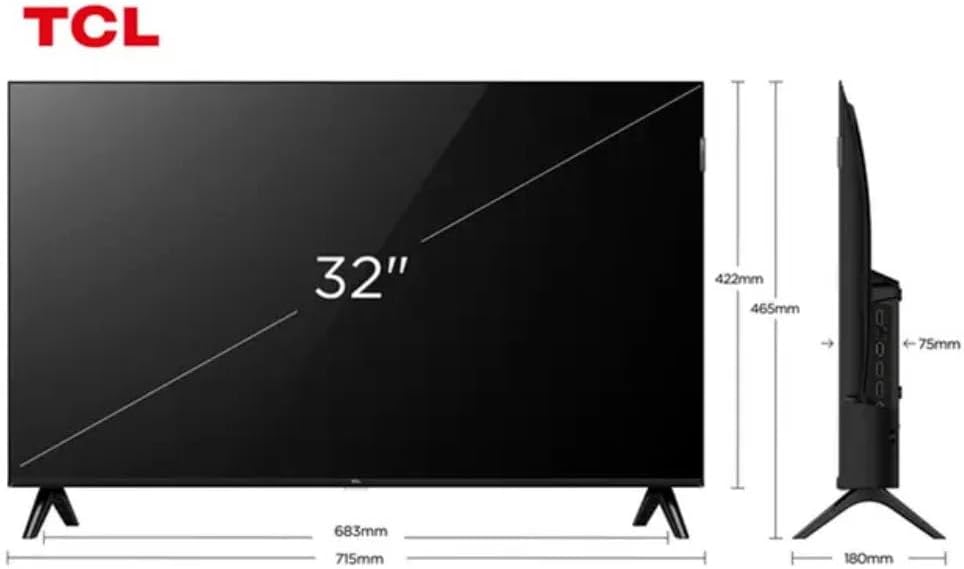
Figure 3: TV Dimensions. This image provides a detailed diagram of the TCL 32S5K Smart TV's physical dimensions, including screen size (32 inches), width (715mm), height (422mm without stand, 465mm with stand), and depth (75mm).
| Karatteristika | Deskrizzjoni |
|---|---|
| Isem tal-Mudell | 32S5K |
| Daqs tal-Iskrin | 32 Pulzier |
| Teknoloġija tal-Wiri | QLED |
| Riżoluzzjoni | 1080p (Full HD) |
| Riffriskar Rata | 60 Hz |
| Konnettività | Bluetooth, Ethernet, HDMI, USB, Wi-Fi |
| Portijiet HDMI totali | 2 |
| Karatteristiċi Speċjali | Integrated Speaker, Google TV, Googlecast Integrated, HDR10, Dolby Audio |
| Dimensjonijiet tal-Prodott (P x W x H) | 7.6P x 71.6L x 42.3A centimeters (approx. 3 x 28.2 x 16.7 inches) |
| Manifattur | TCL |
| Pajjiż ta' Oriġini | Brażil |
Garanzija u Appoġġ
Informazzjoni dwar Garanzija
The TCL 32S5K Smart TV comes with a Garanzija ta' 1 snin mill-manifattur. This warranty covers defects in materials and workmanship under normal use. Please retain your proof of purchase for warranty claims. For specific terms and conditions, refer to the warranty card included in your package or visit the official TCL websit.
Appoġġ għall-Klijent
If you require technical assistance, have questions about your product, or need to initiate a warranty claim, please contact TCL customer support. You can typically find contact information on the TCL official webis-sit jew fid-dokumentazzjoni tal-prodott tiegħek.
Before contacting support, please have your TV model number (32S5K) and serial number ready, along with a detailed description of the issue.