
Introduzzjoni
The HyperX CloudX Flight 2 is a wireless gaming headset designed for use with Xbox consoles and PC, offering both 2.4 GHz wireless and Bluetooth connectivity. This manual provides detailed instructions for setting up, operating, and maintaining your headset to ensure optimal performance and longevity.
Key features include customizable RGB lighting, replaceable ear cup plates, long battery life, and versatile microphone options.
X'hemm fil-Kaxxa
Ivverifika li l-oġġetti kollha huma preżenti fil-pakkett tiegħek:
- HyperX CloudX Flight 2 Wireless Gaming Headset
- Mikrofonu li jinqala'
- Dongle Wireless USB
- Adapter USB-C għal USB-A
- USB-C Charge Cable
- Gwida Quick Start
Prodott Overview
Familiarize yourself with the components and controls of your HyperX CloudX Flight 2 headset.

Immaġni: Fuqview of the HyperX CloudX Flight 2 headset showing the location of the power button, volume wheel, multifunction button, mute button, game/chat mixer, and wireless mode switch.
Kontrolli tal-headset
- Buttuna tal-Qawwa: Jinsab fuq il-earcup tax-xellug. Agħfas u żomm biex tixgħel/titfi.
- Rota tal-Volum: Located on the right earcup. Adjusts overall audio volume.
- Buttuna b'diversi funzjonijiet: Located on the right earcup. Controls media playback and call management in Bluetooth mode.
- Buttuna Mute: Located on the left earcup. Mutes/unmutes the microphone.
- Game/Chat Mixer: Located on the right earcup. Balances game audio and chat volume.
- Swiċċ tal-Modalità Wireless: Located on the USB wireless dongle. Toggles between Xbox and PC modes.
Għażliet tal-Mikrofonu
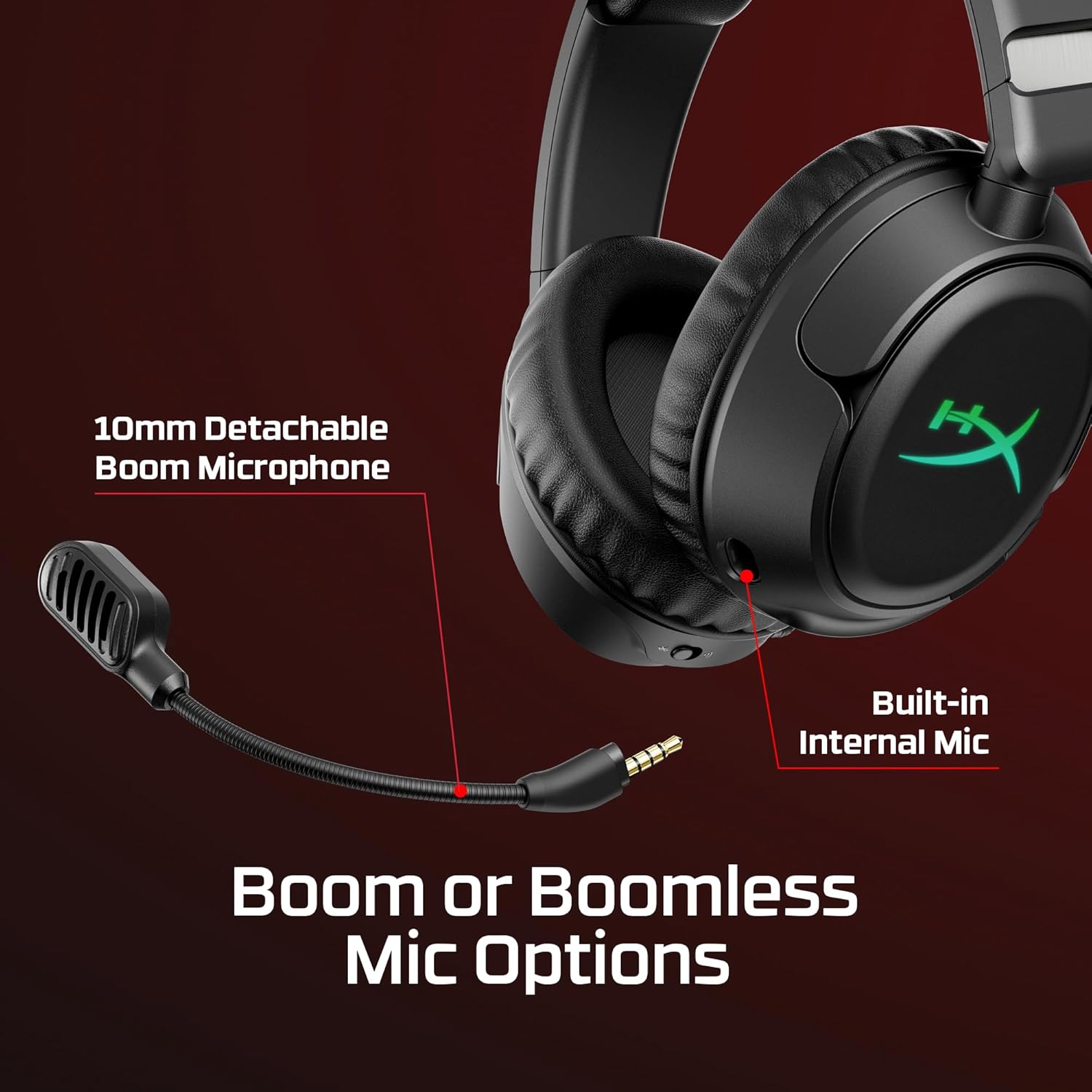
Immaġni: Close-up of the HyperX CloudX Flight 2 headset showing the detachable 10mm boom microphone port and the location of the built-in internal microphone.
The headset features a 10mm detachable boom microphone for clear communication during gaming. An internal microphone is also built into the headset for use when the boom mic is detached, suitable for calls or general use.
Customizable Ear Cup Plates

Immaġni: The HyperX CloudX Flight 2 headset demonstrating the removable magnetic ear cup plates with customizable RGB lighting underneath.
The magnetic ear cup plates can be easily removed and replaced without tools, allowing for customization of the headset's appearance. The full-panel RGB lighting beneath the plates can be configured via HyperX NGENUITY software.
Setup
Iċċarġjar tal-Headset
Before initial use, fully charge the headset. Connect the supplied USB-C charge cable to the headset's USB-C port and the other end to a powered USB-A port (e.g., on your console, PC, or a wall adapter).
A full charge provides up to 100 hours of 2.4 GHz wireless use (with lighting off) or up to 150 hours via Bluetooth (with lighting off). RGB lighting reduces battery life to approximately 23 hours.

Immaġni: Graphic illustrating the extended battery life of the HyperX CloudX Flight 2 headset, showing up to 100 hours via 2.4GHz and 150 hours via Bluetooth with RGB lighting off.
Connecting to Xbox (2.4 GHz Wireless)
- Insert the USB wireless dongle into an available USB port on your Xbox console.
- Ensure the switch on the USB wireless dongle is set to the "Xbox" position.
- Power on your HyperX CloudX Flight 2 headset by pressing and holding the power button.
- The headset and dongle should automatically pair. A solid LED indicator on both devices confirms a successful connection.
Connecting to PC (2.4 GHz Wireless)
- Insert the USB wireless dongle into an available USB port on your PC. If your PC only has USB-C ports, use the provided USB-C to USB-A adapter.
- Ensure the switch on the USB wireless dongle is set to the "PC" position.
- Power on your HyperX CloudX Flight 2 headset.
- The headset and dongle should automatically pair. A solid LED indicator on both devices confirms a successful connection.
- On your PC, navigate to Sound Settings and select "HyperX CloudX Flight 2" as your default playback and recording device.
Konnessjoni permezz tal-Bluetooth
- With the headset powered on, press and hold the multifunction button until the LED indicator flashes blue, indicating pairing mode.
- On your mobile device or other Bluetooth-enabled device, search for Bluetooth devices and select "HyperX CloudX Flight 2".
- Ladarba jkun konness, l-indikatur LED fuq il-headset se jixgħel blu solidu.

Immaġni: The HyperX CloudX Flight 2 headset connected wirelessly to a laptop and a mobile device, illustrating its dual 2.4GHz and Bluetooth connectivity.
It-tħaddim tal-Headset
Audio and Microphone Usage
- Aġġustament tal-Volum: Use the volume wheel on the right earcup to increase or decrease audio output.
- Mute tal-mikrofonu: Press the mute button on the left earcup to toggle microphone mute. The LED on the microphone tip will indicate its status (e.g., red for muted).
- Bilanċ tal-Logħba/Chat: Adjust the game/chat mixer on the right earcup to prioritize game audio or voice chat.
- Detachable Boom Mic: For optimal voice clarity, attach the 10mm boom microphone. When not needed, it can be detached, and the built-in internal mic will activate.
Personalizzazzjoni tad-Dawl RGB
The HyperX CloudX Flight 2 features customizable RGB lighting on the earcups. To personalize lighting effects and save profiles, download and install the HyperX NGENUITY software on your PC. One lighting profile can be saved directly onto the headset.
Iffrankar tal-Enerġija
To conserve battery life, you can turn off the RGB lighting via the HyperX NGENUITY software or through onboard controls if available. The headset will automatically power off after a period of inactivity to save battery.
Manutenzjoni
Proper care ensures the longevity of your HyperX CloudX Flight 2 headset.
- Tindif: Uża drapp artab u niexef biex tnaddaf il-headset. Għall-kuxxinetti tal-widnejn, drapp ħafif.amp Jista' jintuża drapp b'sapun ħafif, iżda kun żgur li jkunu niexfa għalkollox qabel l-użu. Evita kimiċi ħarxa jew materjali li joborxu.
- Ħażna: Aħżen il-headset f'post frisk u niexef 'il bogħod mix-xemx diretta u minn temperaturi estremi.
- Kura tal-batterija: Avoid fully discharging the battery frequently. For long-term storage, charge the headset to about 50% to prolong battery health.
- Partijiet li jinqalgħu: Handle the detachable microphone and ear cup plates with care when attaching or removing them.
Issolvi l-problemi
Jekk tiltaqa' ma' problemi bil-headset tiegħek, irreferi għas-soluzzjonijiet komuni li ġejjin:
Ebda Awdjo / Volum Baxx
- Kun żgur li l-headset huwa mixgħul u ċċarġjat kompletament.
- Iċċekkja r-rota tal-volum fuq il-headset u s-settings tal-awdjo tat-tagħmir tiegħek.
- Verify the correct wireless mode (Xbox/PC) is selected on the USB dongle.
- For PC, confirm "HyperX CloudX Flight 2" is set as the default playback device in sound settings.
- If using Bluetooth, ensure the headset is properly paired and connected to your device.
Mikrofonu Mhux Taħdim
- Check if the microphone is muted using the mute button on the headset.
- Ensure the detachable boom microphone is securely inserted.
- For PC, confirm "HyperX CloudX Flight 2" is set as the default recording device in sound settings.
- Adjust the game/chat mixer to ensure chat volume is not too low.
Kwistjonijiet ta' Konnessjoni
- 2.4 GHz bla fili: Ensure the USB dongle is firmly plugged into your device and the mode switch is correct. Try a different USB port.
- Bluetooth: Ensure the headset is in pairing mode (flashing blue LED) and your device's Bluetooth is enabled. Try unpairing and re-pairing the headset.
- Move closer to the wireless dongle or Bluetooth device to rule out range issues.
Speċifikazzjonijiet
| Brand | HyperX |
| Numru tal-Mudell | B5VC6AA#ABA |
| Kulur | Iswed |
| Tqegħid tal-widnejn | Fuq il-widnejn |
| Fattur tal-Formola | Over-ear; Circumaural; closed back |
| Impedenza | 32 Ohms |
| Teknoloġija tal-Konnettività | Wireless USB 2.4 GHz; Bluetooth 5.3 |
| Medda Bluetooth | 20 Meters |
| Battery Life (2.4 GHz, lighting off) | Sa 100 sigħat |
| Battery Life (Bluetooth, lighting off) | Sa 150 sigħat |
| Battery Life (RGB on) | Sa 23 sigħat |
| Mikrofonu | Detachable 10mm Boom Microphone, Built-in Internal Mic |
| Tip ta' Kontroll | Volume, headset chat/mix, multifunction button, mic mute/mic monitoring, wireless mode switch |
| Piż tal-oġġett | 12.64 uqija |
Garanzija u Appoġġ
The HyperX CloudX Flight 2 Wireless Gaming Headset comes with a Limited 2-Year Warranty from the date of purchase. Please retain your proof of purchase for warranty claims.
For technical support, warranty inquiries, or additional assistance, please visit the official HyperX support webis-sit jew ikkuntattja s-servizz tal-konsumatur tagħhom. Tista' ssib aktar informazzjoni fuq www.hyperx.com/support.
Vidjo Uffiċjali tal-Prodott
Vidjow: Wirja uffiċjali tal-vidjo tal-prodottasing the features and design of the HyperX CloudX Flight 2 Wireless Gaming Headset. This video highlights key functionalities and aesthetic elements.