
Introduzzjoni
Grazzi tax-xiriasing the LG 43QNED70A 43 inch Class 70A Series QNED AI 4K Smart TV. This manual provides essential information for the safe and efficient use of your television. Please read it thoroughly before operating the product and retain it for future reference.
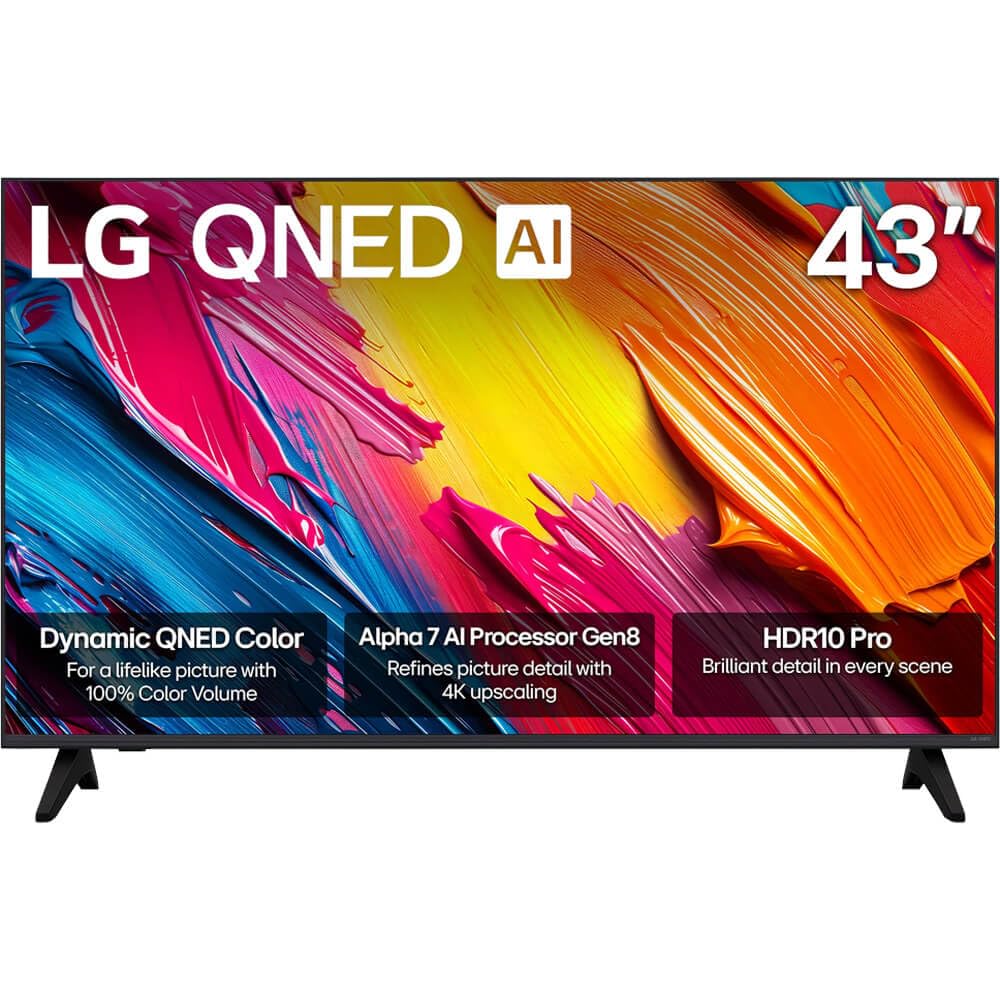
Figura 1: Quddiem view of the LG 43QNED70A Smart TV.
Informazzjoni dwar is-Sigurtà
Before using your TV, please read these safety instructions carefully to prevent damage and ensure safe operation.
- Sors tal-Enerġija: Connect the TV to an AC 100-240V, 50/60Hz power outlet. Do not overload wall outlets.
- Ventilazzjoni: Aċċerta ruħek li jkun hemm ventilazzjoni adegwata madwar it-TV. Timblokkax il-fetħiet tal-ventilazzjoni.
- Ilma u Umdità: Tesponix it-TV għax-xita jew għall-umdità. Tpoġġix oġġetti mimlija b'likwidi fuq it-TV.
- Tindif: Skonnettja t-TV qabel ma tnaddafha. Uża drapp artab u niexef. Evita prodotti tat-tindif likwidi.
- Pjazzament: Poġġi t-TV fuq wiċċ stabbli u livellat. Evita li tpoġġih fid-dawl tax-xemx dirett jew ħdejn sorsi ta’ sħana.
- Tfal: Issorvelja lit-tfal biex tevita li jitilgħu fuq it-TV jew l-istand.
- Servizzi: Tippruvax tagħmel manutenzjoni tat-TV int stess. Irreferi għal kull manutenzjoni f'idejn persunal tas-servizz kwalifikat.
Kontenut tal-Pakkett
Ivverifika li l-oġġetti kollha huma preżenti fil-kaxxa tal-prodott tiegħek:
- LG 43QNED70A 43 inch QNED AI 4K Smart TV
- AI Magic Remote Control
- Korda tal-Enerġija
- Stand tat-TV (2 biċċiet) u Viti
- Manwal għall-Utent (dan id-dokument)
- Batteries for Remote Control (AA or AAA, depending on region)
Setup
1. Physical Setup (Stand Installation or Wall Mounting)
Before installing the TV, ensure the power cord is disconnected. Place the TV face down on a soft cloth or cushion to protect the screen.
Installazzjoni tal-istand:
- Align the two stand pieces with the corresponding slots on the bottom of the TV.
- Waħħal l-istands billi tuża l-viti pprovduti. Kun żgur li huma ssikkati sew.
- Erfa’ t-TV bir-reqqa għal pożizzjoni wieqfa fuq wiċċ stabbli.
Immuntar tal-ħajt:
This TV supports VESA mount standard 200 x 200 mm. Wall mounting requires a compatible wall mount bracket (sold separately) and professional installation. Refer to the wall mount bracket's instructions for proper installation.
2. Konnessjoni ta 'Tagħmir Estern
Your LG 43QNED70A TV provides various ports for connecting external devices such as Blu-ray players, game consoles, soundbars, and USB storage devices.

Figura 2: Wara view tat-TV bil-portijiet tad-dħul.
- Portijiet HDMI: Connect high-definition devices like Blu-ray players or game consoles. This model has 1 HDMI port.
- Portijiet USB: Connect USB storage devices for media playback. This model has 1 USB 3.0 port.
- Input tal-Awdjo (RCA): For connecting older audio devices.
- Port Ethernet: Għal konnessjoni tal-internet bil-fili.
After connecting devices, ensure all cables are securely fastened.
3. L-Ewwel Tixgħel u s-Setup tan-Netwerk
- Qabbad il-korda tal-enerġija mat-TV u mbagħad ma' sokit tal-ħajt.
- Agħfas il-buttuna tal-qawwa fuq il-kontroll remot jew it-TV biex tixgħel.
- Follow the on-screen instructions for the initial setup, which includes language selection, country, and network connection.
- For network setup, you can choose between Wi-Fi or a wired Ethernet connection. Follow the prompts to connect to your home network.
Operazzjoni
1. AI Magic Remote Control Overview
The AI Magic Remote allows for intuitive control of your TV with point-and-click, scrolling, and voice commands.

Figure 3: LG AI Magic Remote Control.

Figure 4: Key features of the AI Magic Remote.
- Buttuna tal-Qawwa: Ixgħel jew jitfi t-TV.
- Buttuna tal-AI: Activates AI features for search and recommendations.
- Scroll Wheel (OK Button): Jinnaviga l-menus u jikkonferma l-għażliet.
- Buttuni Direzzjonali: Moves cursor or navigates menus.
- Buttuna tad-dar: Jaċċessa l- webSkrin tad-dar tat-TV Smart tal-OS.
- Buttuni tal-Volum/Kanal: Jaġġusta l-volum u jibdel il-kanali.
- Streaming Service Buttons: Quick access to popular streaming apps like Netflix, Prime Video, Disney+, and LG Channels.
2. Karatteristiċi tat-TV Intelliġenti (webOS)
Your LG QNED AI 4K Smart TV runs on webOS, providing a user-friendly interface for accessing content and applications.
- AI Search & Recommendations: Use voice commands or the AI button to search for content, get personalized recommendations, and control smart home devices.
- Servizzi ta' Streaming: Access a wide range of popular streaming applications directly from the home screen.
- Kanali LG: Enjoy free access to a variety of streaming channels provided by LG.
3. Issettjar tal-Immaġni u l-Ħoss
Ottimizza tiegħek viewing experience with advanced picture and sound technologies.

Figure 5: Dynamic QNED Color technology for enhanced color reproduction.

Figure 6: The α7 AI Processor Gen8 enhances brightness, sound, and picture detail.

Figure 7: HDR10 Pro delivers a dramatic visual experience by enhancing colors.

Figure 8: 4K Super Upscaling transforms regular content into sharper 4K definition.
- Modalità Stampa: Select from various preset picture modes (e.g., Vivid, Standard, Cinema, Game, Filmmaker Mode) or customize settings like brightness, contrast, and color.
- Modalità tal-Ħoss: Choose sound presets (e.g., Standard, Cinema, Clear Voice) or adjust equalizer settings. The TV also supports immersive sound with LG Soundbars.
- AI Picture Pro / AI Sound Pro: The α7 AI Processor Gen8 automatically optimizes picture and sound based on content and environment.
- Immappjar Dinamiku tat-Toni: Enhances HDR content for optimal brightness and contrast.
Manutenzjoni
1. Cleaning the Screen and Cabinet
Biex iżżomm id-dehra u l-prestazzjoni tat-TV tiegħek:
- Skrin: Imsaħ l-iskrin bil-mod b'ċarruta ratba u niexfa tal-mikrofibra. Għal marki persistenti, imsaħ bil-modampLaħlaħ id-drapp bl-ilma jew b'prodott speċjalizzat għat-tindif tal-iskrin (tisprejjax direttament fuq l-iskrin).
- Kabinett: Wipe the cabinet with a soft, dry cloth. Avoid using abrasive cleaners, waxes, or solvents.
- Dejjem aqla’ t-TV qabel ma tnaddaf.
2. Aġġornamenti tas-Software
LG regularly releases software updates to improve performance and add new features. Ensure your TV is connected to the internet to receive these updates.
- Innaviga lejn Settings > Is-Settings Kollha > Ġenerali > Dwar Dan it-TV > Iċċekkja għal Aġġornamenti.
- Segwi l-istruzzjonijiet fuq l-iskrin biex tniżżel u tinstalla kwalunkwe aġġornament disponibbli.
Issolvi l-problemi
Jekk tiltaqa' ma' problemi bit-TV tiegħek, irreferi għall-problemi u s-soluzzjonijiet komuni li ġejjin:
| Problema | Soluzzjoni Possibbli |
|---|---|
| Bla dawl / it-TV mhux se jixgħel | Check if the power cord is securely plugged into the TV and the wall outlet. Try a different outlet. Ensure the remote control batteries are not depleted. |
| L-ebda stampa, iżda l-ħoss huwa preżenti | Iċċekkja s-sors tad-dħul. Kun żgur li l-apparati esterni huma mixgħula u konnessi b'mod korrett. Ipprova kejbil HDMI differenti. |
| L-ebda ħoss, iżda l-istampa hija preżenti | Check the volume level. Ensure the TV is not muted. Check audio output settings (e.g., internal speakers, external soundbar). |
| Il-kontroll mill-bogħod ma jaħdimx | Replace the batteries. Ensure there are no obstructions between the remote and the TV. Re-pair the AI Magic Remote if necessary (refer to the on-screen guide). |
| Kwalità fqira tal-istampa | Check the input source resolution. Adjust picture settings (brightness, contrast, sharpness). Ensure the antenna/cable connection is secure. |
| Ma tistax tikkonnettja mal-Wi-Fi | Kun żgur li r-router tal-Wi-Fi tiegħek huwa mixgħul u jaħdem. Erġa' daħħal il-password tal-Wi-Fi. Ipprova erġa' ibda t-TV u r-router. |
Jekk il-problema tippersisti wara li tipprova dawn is-soluzzjonijiet, jekk jogħġbok ikkuntattja l-appoġġ għall-klijenti ta' LG.
Speċifikazzjonijiet
Detailed technical specifications for the LG 43QNED70A Smart TV:
| Karatteristika | Speċifikazzjoni |
|---|---|
| Isem tal-Mudell | 43QNED70A |
| Daqs tal-Iskrin | 43 Pulzier |
| Teknoloġija tal-Wiri | QNED |
| Riżoluzzjoni | 4K (3840 x 2160) |
| Riffriskar Rata | 120 Hz |
| Proporzjon ta' l-aspett | 16:9 |
| Proċessur | α7 AI Processor Gen8 |
| Picture Quality Enhancement | Dynamic Tone Mapping, HDR10 Pro |
| Display Backlight Technology | Self-Luminous |
| Servizzi tal-Internet Appoġġjati | Netflix, YouTube, Amazon Prime, etc. |
| Kulur | Iswed |
| Sena Mudell | 2025 |
| Portijiet HDMI totali | 1 |
| Total USB 3.0 Ports | 1 |
| Input Awdjo | USB, RCA |
| Metodu ta' Kontroll | Remote |
| Standard tal-Immuntar VESA | 200 x 200 mm |
| Manifattur | LG |
Garanzija u Appoġġ
Your LG 43QNED70A TV comes with a limited warranty. Please refer to the warranty card included in your package for specific terms and conditions, including coverage duration and limitations.
For technical support, service, or warranty claims, please contact LG Customer Service:
- Websit: Żur l-LG uffiċjali websit għal riżorsi ta' appoġġ, FAQs, u informazzjoni ta' kuntatt. www.lg.com/us/support
- Telefon: Refer to your warranty card or the LG websit għan-numru tat-telefon tas-servizz tal-konsumatur xieraq fir-reġjun tiegħek.
When contacting support, please have your TV's model number (43QNED70A) and serial number ready.