
Introduzzjoni
Thank you for choosing the Surfans F20 Pro Android Hi-Res Music Player. This manual provides essential information for setting up, operating, and maintaining your device. Please read it thoroughly to ensure optimal performance and longevity of your music player.
1. Setup
1.1 Tneħħija tal-kaxxa u l-kontenut tal-pakkett
Carefully unpack your Surfans F20 Pro. Ensure all components are present.
Il-pakkett għandu jkun fih:
- 1 x Surfans F20 Pro Music Player
- (Other accessories like USB cable, protective case, etc., may be included depending on the specific package.)
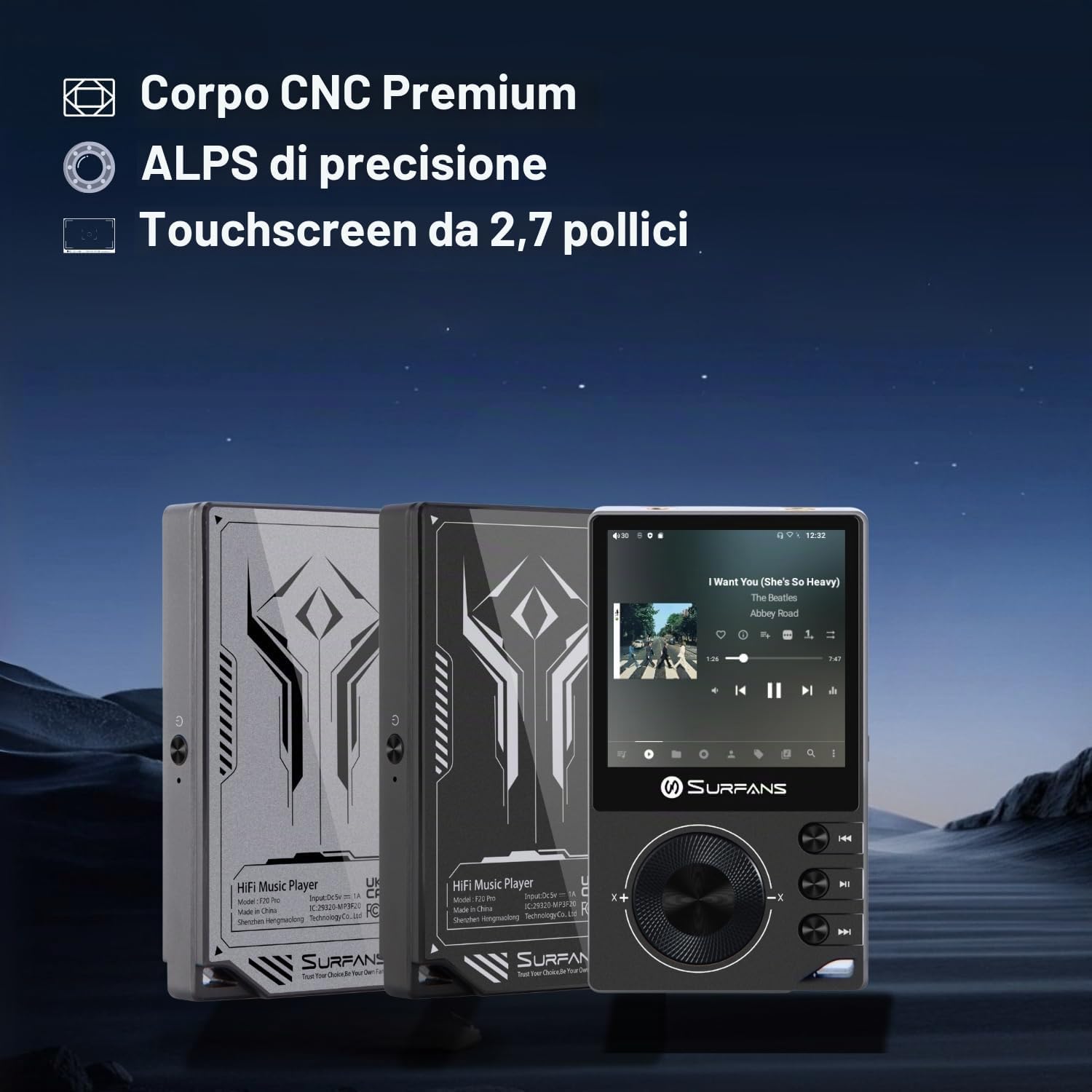
The Surfans F20 Pro features a premium CNC body for durability and aesthetics.
1.2 Iċċarġjar tal-Apparat
Before first use, fully charge the device. Connect the included USB cable to the player's charging port and to a USB power adapter (not included) or a computer's USB port. The charging indicator will show the charging status. A full charge typically takes approximately 3 hours.
The Surfans F20 Pro features a 1450mAh rechargeable battery, providing up to 15 hours of music playback on a full charge.
1.3 Tixgħel/Jitfi
- Biex Tixgħel: Agħfas u żomm il-buttuna tal-Power li tinsab fuq il-ġenb tal-apparat sakemm l-iskrin jixgħel.
- Biex Tifi: Press and hold the Power button until a power-off menu appears on the screen. Select "Power Off" to shut down the device. A short press will turn the screen on/off.
1.4 Konfigurazzjoni Inizjali
Upon first power-on, you may be guided through an initial setup process. This typically includes:
- Għażla tal-Lingwa: Agħżel il-lingwa ppreferuta tiegħek.
- Setup tal-Wi-Fi: Connect to a Wi-Fi network to enable streaming services and software updates. Navigate to Settings > Network & Internet > Wi-Fi.
- Kont Google: Idħol bil-kont Google tiegħek biex taċċessa l-Google Play Store u servizzi oħra ta' Google.
1.5 Espansjoni tal-Ħażna
The Surfans F20 Pro comes with 32GB of internal memory. You can expand the storage up to 1TB using a Micro SD card. Insert the Micro SD card into the designated slot on the device.
2. Istruzzjonijiet Operattivi
2.1 Apparat Fuqview u Navigazzjoni
The F20 Pro features a 2.73-inch touchscreen for primary interaction and physical buttons for quick control.

The Surfans F20 Pro features a touchscreen interface for easy navigation and access to various applications.
- Touchscreen: Tap, swipe, and pinch to navigate menus, select options, and control playback.
- Buttuni Fiżiċi: Use the side buttons for power, volume control, and playback (play/pause, skip tracks). The scroll wheel provides tactile navigation.
2.2 Daqq tal-Mużika
The F20 Pro supports various audio formats including MP3, AAC, FLAC, WAV, and DSD. You can play music stored on the device's internal memory or Micro SD card, or stream from online services.
- Daqq Lokali: Use the pre-installed music player app to browse and play your local audio files.
- Streaming: Install and use streaming applications like Spotify, Apple Music, Tidal, or YouTube from the Google Play Store.
2.3 Konnessjoni ta 'Tagħmir Awdjo
The player offers both wired and wireless audio output options.

The F20 Pro features both 3.5mm single-ended and 4.4mm balanced audio output ports for versatile headphone connectivity.
- Wired Headphones:
- 3.5mm b'tarf wieħed: Connect standard headphones to the 3.5mm port.
- 4.4mm Ibbilanċjat: For enhanced audio quality and power, connect compatible balanced headphones to the 4.4mm port. This port provides 500mW of power.
- Bluetooth Headphones/Speakers:
- The F20 Pro supports Bluetooth 5.0 with LDAC for high-fidelity wireless audio.
- To pair: Go to Settings > Connected devices > Pair new device. Ensure your Bluetooth device is in pairing mode.

The F20 Pro supports Bluetooth 5.0 with LDAC for high-quality wireless audio streaming.
This video demonstrates the process of pairing a Bluetooth device with a music player. The steps shown are generally applicable to the Surfans F20 Pro.
2.4 Konnettività tal-Wi-Fi
The device supports dual-band Wi-Fi (2.4GHz and 5GHz) for fast downloads and smooth streaming.

The Surfans F20 Pro supports dual-band Wi-Fi for reliable internet connection and streaming.
- To connect: Go to Settings > Network & Internet > Wi-Fi. Select your network and enter the password.
- Once connected, you can use pre-installed or downloaded streaming apps.
2.5 Konnessjoni ma 'Kompjuter
You can connect the F20 Pro to a computer via USB to transfer files or use it as a USB DAC.
This video illustrates how to easily connect a music player to a PC for file transfer or other functions. The process is similar for the Surfans F20 Pro.
- Qabbad il-plejer mal-kompjuter tiegħek billi tuża l-kejbil USB.
- On the player, swipe down from the top of the screen to access notifications. Tap on the USB connection notification and select "File transfer" or "USB DAC" mode as needed.
3. Manutenzjoni
3.1 Tindif tal-Apparat
To keep your F20 Pro in optimal condition:
- Use a soft, dry, lint-free cloth to wipe the screen and body.
- Avoid using abrasive cleaners, solvents, or aerosol sprays, which can damage the finish.
- Tesponix l-apparat għal umdità eċċessiva.
3.2 Kura tal-Batterija
Biex timmassimizza l-ħajja u l-prestazzjoni tal-batterija:
- Evita temperaturi estremi.
- Tħallix l-apparat skarikat kompletament għal perjodi twal.
- Għal ħażna fit-tul, iċċarġja l-batterija sa madwar 50% u aħżenha f'post frisk u niexef.
3.3 Aġġornamenti tas-Software
The F20 Pro runs on Android 12. Periodically check for software updates to ensure the best performance and access to new features. Connect to Wi-Fi and go to Settings > System > System update.
4 Issolvi l-problemi
4.1 L-Apparat Ma Jixgħelx
- Kun żgur li l-batterija hija ċċarġjata. Qabbad l-apparat ma' ċarġer għal mill-inqas 30 minuti.
- Try pressing and holding the Power button for 10-15 seconds to force a restart.
4.2 L-ebda Ħruġ tal-Ħoss
- Check headphone connections (3.5mm or 4.4mm). Ensure they are fully inserted.
- Verify volume levels on the device and any connected Bluetooth audio devices.
- Jekk qed tuża l-Bluetooth, kun żgur li l-apparat huwa mqabbad u konness sew.
- Test with different headphones or speakers to rule out a faulty audio accessory.
4.3 Wi-Fi or Bluetooth Connection Issues
- Ensure Wi-Fi or Bluetooth is enabled in the settings.
- Restart the F20 Pro and your router/Bluetooth device.
- Insieh in-netwerk/apparat fis-settings u erġa' pprova tikkonnettja.
- Ensure you are within range of the Wi-Fi network or Bluetooth device.
4.4 Prestazzjoni bil-mod jew Ħsara fl-App
While the F20 Pro has an Octa-Core processor and 3GB RAM, some apps or heavy multitasking might affect performance.
- Agħlaq l-applikazzjonijiet fl-isfond li ma jintużawx.
- Clear app caches (Settings > Apps > [App Name] > Storage & cache > Clear cache).
- Kun żgur li s-softwer tal-apparat huwa aġġornat.
- If issues persist, consider a factory reset (Settings > System > Reset options > Erase all data), but back up your data first.
5. Speċifikazzjonijiet
Below are the key technical specifications for the Surfans F20 Pro Music Player:
| Karatteristika | Dettall |
|---|---|
| Isem tal-Mudell | F20 Pro |
| Brand | Surfani |
| Sistema Operattiva | Android 12 |
| Proċessur | Octa-Core |
| RAM | 3GB |
| Ħażna Interna | 32GB |
| Ħażna espansibbli | Up to 1TB via Micro SD |
| DAC | Dual ESS9018 |
| Appoġġ Awdjo b'Riżoluzzjoni Għolja | DSD512 |
| Konnettività | AUX, Bluetooth 5.0 (LDAC), USB, Dual-Band Wi-Fi (2.4GHz & 5GHz) |
| Daqs tal-Iskrin | 2.73 Pulzier |
| Teknoloġija tal-Iskrin | Touch screen |
| Formati Awdjo Appoġġjati | MP3, AAC, FLAC, WAV, DSD |
| Output Ibbilanċjat | 4.4mm (500mW) |
| Kapaċità tal-batterija | 1450mAh |
| Ħajja tal-batterija | Sa 15 siegħa ta' daqq ta' mużika |

The Surfans F20 Pro features dual ESS9018 DACs for superior audio decoding.

Internal audio architecture showing dual DACs and multi-stage amplifier design for both single-ended and balanced outputs.
6. Garanzija u Appoġġ
For warranty information and technical support, please refer to the documentation provided with your purchase or contact the seller directly. The seller for this product is SurfansAudio.
Żomm il-prova tax-xiri tiegħek għal kwalunkwe talba ta' garanzija.