
1. Introduzzjoni
Thank you for choosing the Redkey E6 Robot Vacuum Cleaner. This manual provides essential information for the safe operation, maintenance, and troubleshooting of your device. Please read it thoroughly before first use and keep it for future reference.
1.1. Prodott Aktarview
The Redkey E6 is designed to provide efficient and systematic cleaning for your home. With powerful suction, intelligent navigation, and convenient control options, it effectively removes pet hair, crumbs, dust, and fine particles from various floor types.
1.2. Informazzjoni dwar is-Sigurtà
- Ensure the robot is fully charged before initial use.
- Tħaddimx ir-robot f'ambjenti mxarrbin jew ħdejn likwidi.
- Żomm kejbils maħlula, purtieri, u oġġetti żgħar 'il bogħod mit-triq tar-robot biex tevita li jitħabblu.
- Issorvelja t-tfal u l-annimali domestiċi meta r-robot ikun qed jaħdem.
- Only use the original charging station and power adapter provided.
2. Kontenut tal-Pakkett
Carefully unpack the box and ensure all items listed below are present and in good condition:
- 1x Redkey E6 Robot Vacuum Cleaner
- 2x Side Brushes (additional pair for replacement)
- 2x Filters (one pre-installed, one spare)
- 1x Dustbin (pre-installed)
- 1x Kontroll mill-bogħod
- 1x Pinzell tat-Tindif
- 1x Stazzjon tal-Iċċarġjar
- 1x Adapter tal-Enerġija
- 1x Manwal għall-Utent
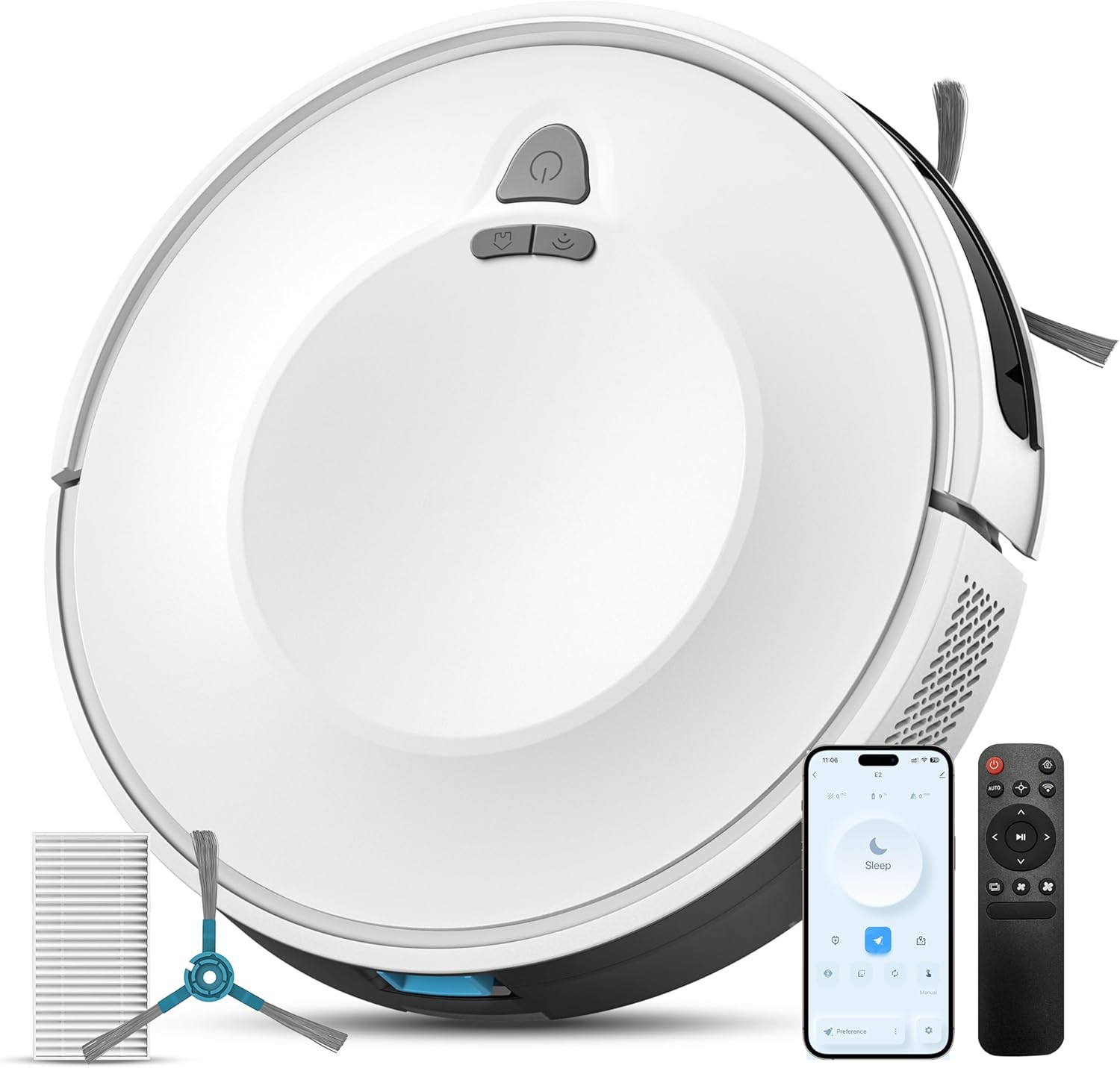
Figura 2.1: The Redkey E6 Robot Vacuum Cleaner with its included accessories, including side brushes, filters, remote control, and charging station.
3. Komponenti tal-Prodott
3.1. Vacuum cleaner robotiku
The robot features a compact design with a main power button, dustbin, side brushes, main roller brush, and various sensors for navigation and obstacle avoidance.
3.2. Dustbin and Filtration System
The 600 ml dustbin is easily accessible for emptying. It integrates a triple HEPA filtration system to capture fine particles and ensure healthier indoor air.

Figura 3.1: Dettaljati view of the robot's underside, showing the main brush, side brushes, floating scraper, and the 600ml dustbin capacity.
4. Setup
4.1. Iċċarġjar tar-Robot
- Poġġi l-istazzjon tal-iċċarġjar ma' ħajt f'żona miftuħa, u kun żgur li ma jkun hemm l-ebda ostaklu f'distanza ta' metru mal-ġnub u żewġ metri 'l quddiem.
- Qabbad l-adapter tal-enerġija mal-istazzjon tal-iċċarġjar u daħħalha f'sokit tal-enerġija.
- Place the robot onto the charging station. Ensure the charging contacts on the robot align with those on the station. The indicator light on the robot will show charging status.
- Ħalli r-robot jiċċarġja kompletament qabel l-ewwel użu tiegħu (madwar 4-5 sigħat).

Figura 4.1: The Redkey E6 robot vacuum automatically returning to its charging station. The robot can operate for up to 140 minutes on a full charge.
4.2. Installazzjoni ta' Xkupilji tal-Ġenb
Gently push the side brushes onto their respective posts on the underside of the robot until they click into place.
4.3. Konnessjoni tal-App (Mhux obbligatorja)
- Download the 'Smart Life' app from your smartphone's app store.
- Irreġistra jew idħol fil-kont tiegħek.
- Follow the in-app instructions to add your Redkey E6 robot vacuum. Ensure your phone is connected to a 2.4GHz Wi-Fi network during setup.
5. Istruzzjonijiet Operattivi
5.1. Starting/Pausing Cleaning
- Fuq ir-Robot: Agħfas il-buttuna tal-qawwa darba biex tibda jew twaqqaf it-tindif.
- Kontroll mill-bogħod: Agħfas il-buttuna 'Ibda/Pawża'.
- App mobbli: Tap the 'Start' or 'Pause' icon.
5.2. Modi ta 'tindif
The Redkey E6 offers various cleaning modes to suit different needs:
- Modalità Żigżag: The robot cleans in an efficient, systematic zigzag pattern, covering the entire area.
- Modalità Xifer: Ir-robot inaddaf tul il-ħitan u t-truf tal-għamara.
- Modalità Spot: Ir-robot inaddaf żona speċifika f'mudell spirali għal tindif ikkonċentrat.
These modes can be selected via the remote control or the mobile app.

Figura 5.1: Illustration of the Redkey E6's intelligent navigation (zigzag mode) and protective sensors, including anti-collision, anti-fall, and anti-stuck technologies, along with various cleaning options like Edge Mode and Spot Mode.
5.3. Bl-użu tal-Kontroll mill-bogħod
The included remote control allows for convenient operation without Wi-Fi. Functions include starting/pausing, selecting cleaning modes, adjusting suction power, and sending the robot back to its charging station.
5.4. Using the Mobile App
The 'Smart Life' app provides advanced control features:
- Skedar: Issettja skedi ta' tindif ta' kuljum jew ta' kull ġimgħa.
- Għażla tal-Modalità: Choose from various cleaning modes.
- Aġġustament tal-Qawwa tal-Ġbid: Control the suction level.
- Monitoraġġ f'ħin reali: View cleaning progress and robot status.
5.5. Kontroll tal-Vuċi
The Redkey E6 is compatible with Google Assistant and Amazon Alexa. Once connected through the 'Smart Life' app, you can use voice commands to start, stop, or send the robot back to its charging station.

Figura 5.2: The Redkey E6 supports smart control via its mobile app, voice commands through Google Assistant and Amazon Alexa, and the included remote control.
6. Manutenzjoni
Manutenzjoni regolari tiżgura prestazzjoni ottimali u testendi l-ħajja tal-vacuum cleaner robot tiegħek.
6.1. Tbattil tal-landa taż-żibel
Empty the dustbin after each cleaning cycle or when the 'dustbin full' indicator appears. Press the release button to remove the dustbin, open it, and discard the contents.
6.2. Tindif tal-Filtri
Tap the HEPA filter to remove loose dirt. Do not wash the HEPA filter with water. The pre-filter can be rinsed with water; ensure it is completely dry before re-installing.
6.3. Tindif tal-Pinzell Prinċipali
Remove the main brush cover and lift out the main brush. Use the included cleaning tool to cut and remove any hair or debris tangled around the brush. Reinstall the brush and cover.

Figura 6.1: The Redkey E6 features a self-cleaning roller brush, ideal for removing hair and deep cleaning carpets. It can also overcome obstacles up to 16mm.
6.4. Tindif ta 'Xkupilji tal-Ġenb
Periodically check side brushes for wear or entanglement. Remove any hair or debris. Replace worn brushes with the spare pair provided.
6.5. Tindif tas-Sensuri u l-Kuntatti tal-Iċċarġjar
Wipe the anti-drop sensors, anti-collision sensors, and charging contacts on both the robot and the charging station with a clean, dry cloth to ensure proper function.
7 Issolvi l-problemi
If you encounter issues with your Redkey E6, please refer to the table below for common problems and solutions.
| Problema | Kawża Possibbli | Soluzzjoni |
|---|---|---|
| Ir-robot ma jibdax | Batterija baxxa; Il-buttuna tal-qawwa mhux ippressata; Ir-robot imwaħħal. | Iċċarġja r-robot; Agħfas il-buttuna tal-qawwa sew; Neħħi l-ostakli. |
| Prestazzjoni fqira tat-tindif | Il-kontenitur tat-trab mimli; Ix-xkupilji mħabbtin; Il-filtru mblukkat. | Empty dustbin; Clean main/side brushes; Clean/replace filter. |
| Ir-robot ma jistax jiċċarġja | Charging contacts dirty; Charging station unplugged; Robot not aligned. | Clean charging contacts; Ensure station is powered; Manually place robot on station. |
| App connection failed | Incorrect Wi-Fi password; Not 2.4GHz network; Robot too far from router. | Ivverifika l-password; Qabbad ma' Wi-Fi ta' 2.4GHz; Mexxi r-robot eqreb lejn ir-router. |
| Robot jaqa’ mit-taraġ | Anti-drop sensors dirty or blocked. | Clean anti-drop sensors thoroughly. |
8. Speċifikazzjonijiet
Technical specifications for the Redkey E6 Robot Vacuum Cleaner:
| Karatteristika | Speċifikazzjoni |
|---|---|
| Brand | Redkey |
| Numru tal-Mudell | E6 |
| Kulur | Abjad |
| Dimensjonijiet tal-Prodott (L x W x H) | 32 x 32 x 7.5 ċm |
| Piż tal-oġġett | 3.8 Kilogrammi |
| Kapaċità ta 'Dustbin | 600 Millilitru |
| Qawwa tal-ġbid | 3800 Pa |
| Tip ta 'batterija | Lithium-ion |
| Ħajja tal-Batterija (Modalità Kwieta) | Sa 140 minuta |
| Abbiltà tat-Tlugħ tal-Ostakli | Sa 16 mm |
| Metodi ta' Kontroll | App, Remote Control, Voice (Alexa/Google Assistant) |
9. Garanzija u Appoġġ
The Redkey E6 Robot Vacuum Cleaner comes with a 12-il xahar garanzija mid-data tax-xiri. Din il-garanzija tkopri difetti fil-manifattura u malfunzjonamenti taħt użu normali.
For warranty claims, technical support, or any questions regarding your product, please contact our customer service. Details can typically be found on the product packaging or the official Redkey websit.
Jekk jogħġbok żomm il-prova tax-xiri tiegħek għall-validazzjoni tal-garanzija.