
1. Introduzzjoni
This manual provides detailed instructions for the safe and efficient use of your Surfans F20 Pro Android Hi-Res Music Player. Please read this manual thoroughly before operating the device and retain it for future reference.
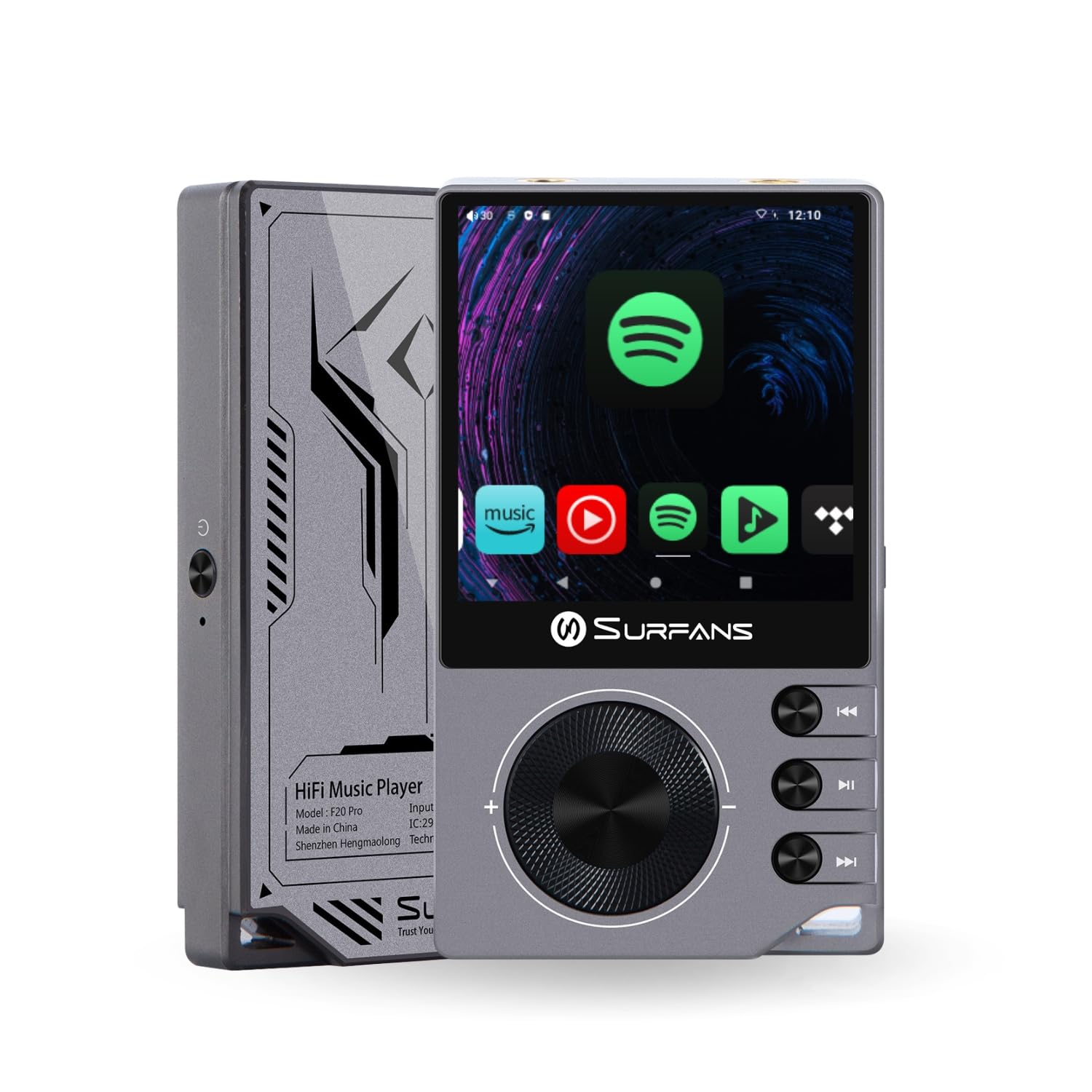
The Surfans F20 Pro Hi-Res Music Player, showcasing its compact design and touchscreen interface.
2. Kontenut tal-Pakkett
Ivverifika li l-oġġetti kollha huma preżenti fil-pakkett:
- Surfans F20 Pro Hi-Res Music Player
- Kejbil USB Type-C
- 32 GB MicroSD Memory Card (pre-installed or separate)
- Kawża Protettiva
- Manwal għall-Utent (dan id-dokument)
3. Device Overview
Familiarize yourself with the physical components and ports of your F20 Pro player.

Quddiem u lura view of the Surfans F20 Pro, highlighting its robust CNC metal chassis and button layout.
3.1. Karatteristiċi ewlenin
- Dual ESS9018Q2M DACs: Għall-ipproċessar tal-awdjo ta' fedeltà għolja.
- Octa-Core Android 12 System: Enables streaming app compatibility and smooth operation.
- 3.5mm Single-Ended & 4.4mm Balanced Outputs: Konnettività versatili tal-headphones.
- Bluetooth 5.0 b'LDAC: High-quality wireless audio transmission.
- Dual-Band Wi-Fi (2.4GHz & 5GHz): For stable internet connectivity.
- Ħażna espansibbli: Supports up to 1TB via MicroSD card.
- Skrin tattili ta' 2.7 pulzieri: Interface tal-utent intuwittiv.
4. Setup
4.1. Iċċarġjar tal-Apparat
Before first use, fully charge the F20 Pro. Connect the included USB Type-C cable to the device's charging port and a compatible USB power adapter (not included) or computer USB port. The charging indicator will show the charging status.
4.2. Daħħal Karta MicroSD
The F20 Pro supports MicroSD cards up to 1TB for expanded storage. Locate the MicroSD card slot on the side of the device. Gently insert the card until it clicks into place. To remove, push the card in again until it springs out.
4.3. L-Ewwel Tixgħil
Press and hold the power button until the screen illuminates. Follow the on-screen prompts to complete the initial setup, including language selection and Wi-Fi connection.
4.4. Konnessjoni mal-Wi-Fi
Innaviga lejn Settings > Netwerk u internet > Wi-Fi. Select your desired network and enter the password if prompted. The F20 Pro supports both 2.4GHz and 5GHz Wi-Fi bands.

The Surfans F20 Pro demonstrating its dual-band Wi-Fi capability for fast and stable connections.
4.5. Tqabbil tal-Bluetooth
To connect Bluetooth headphones or speakers:
- Kun żgur li l-apparat Bluetooth tiegħek jinsab fil-modalità ta' tqabbil.
- On the F20 Pro, go to Settings > Apparati konnessi > Par apparat ġdid.
- Select your device from the list and confirm pairing.

An illustration of the Bluetooth 5.0 chip, indicating support for high-resolution wireless audio codecs like LDAC.
5. It-tħaddim tal-Apparat
5.1. Navigazzjoni Bażika
The F20 Pro features a 2.7-inch touchscreen for navigation. Swipe to scroll, tap to select, and use the physical buttons for quick controls:
- Buttuna tal-Qawwa: Power on/off, screen on/off.
- Rota tal-Volum: Adjusts audio output volume.
- Buttuni tal-Kontroll tal-Daqq: Daqq/Pawża, Trakka li Jmiss, Trakka Preċedenti.
5.2. Daqq tal-mużika
The F20 Pro supports various audio formats including DSD512, 192kHz/24bit, FLAC, WAV, WMA, M4A, MP3, MP2, and AAC.
5.2.1. Lokali Files
Ittrasferixxi l-mużika files to the device's internal storage or MicroSD card via USB connection to a computer. Use the pre-installed music player application to browse and play your library.
5.2.2. Applikazzjonijiet ta' Streaming
The Android 12 operating system allows installation of streaming apps like Spotify, Apple Music, Tidal, or YouTube. Connect to Wi-Fi and download apps from the Google Play Store or other compatible sources.

The Surfans F20 Pro's screen showing various streaming application icons, demonstrating its Android capabilities.
5.3. Headphone Connections
The device offers both single-ended and balanced audio outputs.
- Ħruġ b'tarf wieħed ta' 3.5mm: Standard headphone jack (125mW/32Ω).
- 4.4mm Output Ibbilanċjat: For enhanced audio performance with compatible headphones (500mW/32Ω).

Close-up view of the 3.5mm single-ended and 4.4mm balanced audio output ports on the Surfans F20 Pro.
6. Manutenzjoni
6.1. Tindif
Use a soft, dry, lint-free cloth to clean the device. Avoid using abrasive cleaners or solvents, which may damage the surface.
6.2. Aġġornamenti tas-Software
Periodically check for software updates to ensure optimal performance and access to new features. Updates can typically be found in Settings > Sistema > Aġġornament tas-sistema.
6.3. Kura tal-batterija
Biex ittawwal il-ħajja tal-batterija, evita li tneħħi l-apparat kompletament ta' spiss. Aħżen l-apparat f'post frisk u niexef meta ma tkunx qed tużah għal perjodi twal.

Intern view of battery cells, representing the long-lasting battery capacity of the F20 Pro.
7 Issolvi l-problemi
If you encounter issues with your F20 Pro, refer to the following common problems and solutions:
| Problema | Kawża Possibbli | Soluzzjoni |
|---|---|---|
| L-apparat ma jixgħelx | Batterija baxxa; Ħabta tas-sistema | Charge the device; Press and hold the power button for 10-15 seconds to force restart. |
| Ebda output tal-ħoss | Volume too low; Incorrect output selected; Faulty headphones | Increase volume; Check headphone connection; Test with different headphones. |
| Ma tistax tikkonnettja mal-Wi-Fi | Incorrect password; Out of range; Router issue | Verify password; Move closer to router; Restart router. |
| Slow performance/App crashes | Wisq apps jaħdmu; Ħażna baxxa; Softwer skadut | Close background apps; Free up storage; Check for system updates. |
8. Speċifikazzjonijiet
Detailed technical specifications for the Surfans F20 Pro:
| Karatteristika | Dettall |
|---|---|
| Brand | Surfani |
| Isem tal-Mudell | F20 PRO |
| Ċipep tad-DAC | Dual ESS9018Q2M |
| Op-Amps | Dual OPA1612 |
| Sistema Operattiva | Android 12 |
| RAM | 3GB |
| Ħażna Interna | 32GB |
| Ħażna espansibbli | Sa 1TB permezz ta' kard MicroSD |
| Daqs tal-Iskrin | 2.73 Pulzier |
| Konnettività | Aux, Bluetooth 5.0 (LDAC), USB Type-C, Wi-Fi (2.4GHz & 5GHz) |
| Riżultati Awdjo | 3.5mm Single-Ended (125mW/32Ω), 4.4mm Balanced (500mW/32Ω) |
| Formati Awdjo Appoġġjati | DSD512, 192kHz/24bit, FLAC, WAV, WMA, M4A, MP3, MP2, AAC |
| Kulur | Griż |

An illustration of the dual ESS9018K2M DAC chips, central to the F20 Pro's high-resolution audio capabilities.
9. Informazzjoni dwar Garanzija
The Surfans F20 Pro comes with a 1-Sena Garanzija from the date of purchase. This warranty covers manufacturing defects and workmanship under normal use. It does not cover damage caused by misuse, accidents, unauthorized modifications, or normal wear and tear. Please retain your proof of purchase for warranty claims.
10. Appoġġ għall-Klijent
For further assistance, technical support, or warranty inquiries, please contact Surfans customer service through the official website or your retailer. You may also find additional resources and FAQs online.