
Introduzzjoni
The ASUS RT-BE58 Go is a dual-band WiFi 7 portable travel router designed for versatile connectivity. It offers high-speed wireless performance, advanced security features, and multiple operating modes suitable for various environments, including travel, home, and office use. This manual provides instructions for setting up, operating, and maintaining your device.

Image: The ASUS RT-BE58 Go Portable Travel Router, a compact white device with foldable antennas, shown in a typical product view.
X'hemm fil-Kaxxa
Ivverifika li l-oġġetti kollha huma preżenti fil-pakkett:
- RT-BE58 Go Travel router
- 1M RJ-45 Cable
- Adapter tal-Enerġija
- Gwida Quick Start
- Karta ta' Garanzija
Karatteristiċi tal-Prodott
- Next-Gen WiFi 7 Speeds: Experience blazing-fast dual-band WiFi 7 speeds of up to 3600 Mbps with Multi-Link Operation (MLO) and 4K-QAM for low-latency connections.
- Sigurtà Mtejba: Protect sensitive data with comprehensive VPN features and commercial-grade security. Create a private hotspot over public WiFi (WISP mode) for privacy.
- Kapaċità ta' Hotspot Mobbli: Transform your smartphone or mobile dongle into a powerful, shareable network using 4G LTE and 5G mobile tethering.
- Kunsinna tal-Enerġija USB-C: Power the router anywhere with universal USB-C Power Delivery 18W, using common chargers.
- AiMesh Technology: Create a reliable and extendable AiMesh network for seamless, whole-home coverage with rich security and networking features.
- Ġestjoni Faċli: Set up the router in minutes with a simple 3-step process and manage it via the ASUS Router mobile app. Use Guest Network Pro for functional subnetworks or guest portals.
- Portijiet tal-Konnettività: Includes 1x 1G LAN port, 1x 2.5G WAN port, and 1x USB 3.0 port.
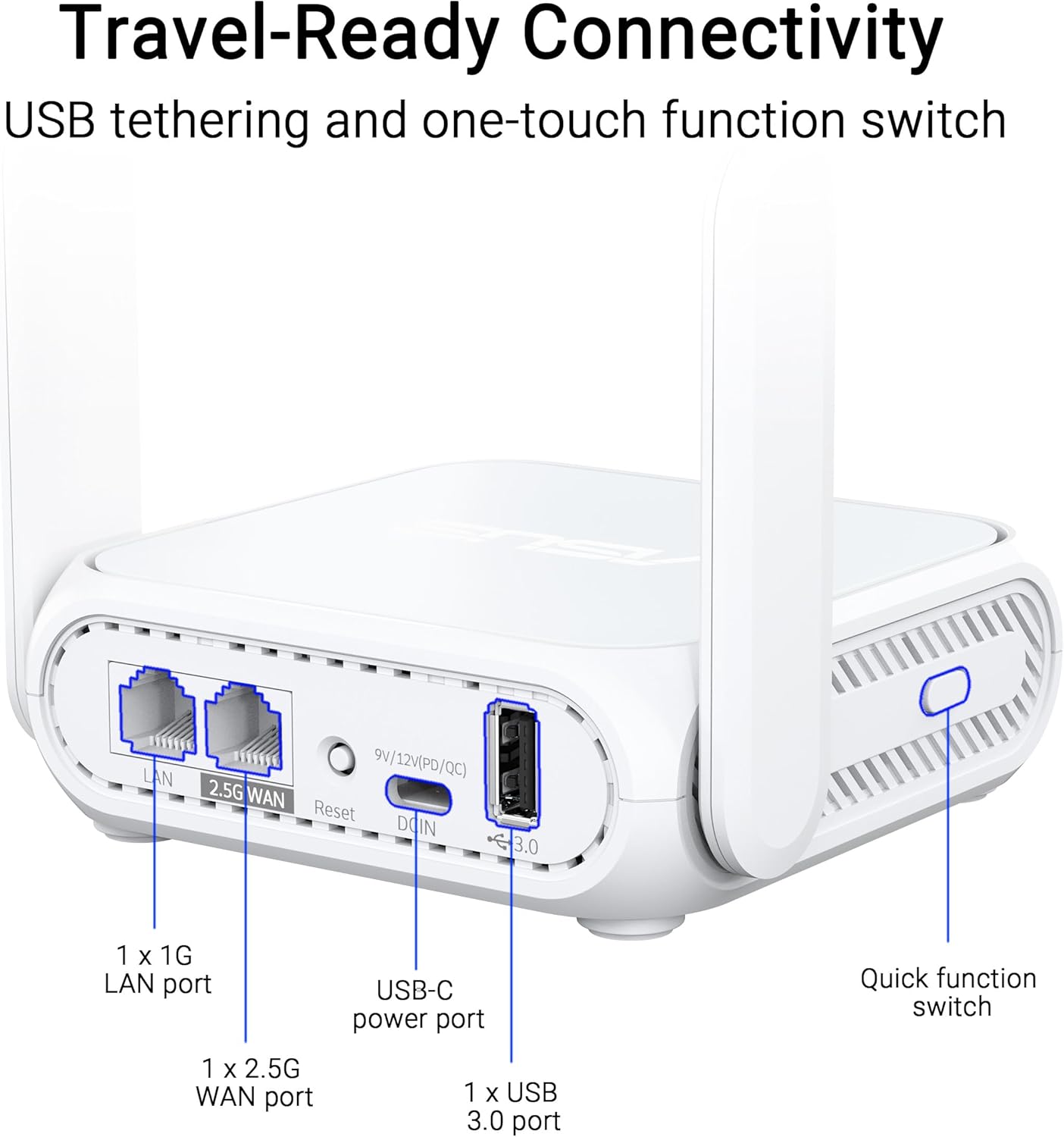
Immaġni: Close-up view of the ASUS RT-BE58 Go router's rear panel, showing the 1G LAN port, 2.5G WAN port, USB-C power port, USB 3.0 port, and the quick function switch.
Setup
Passi ta' Setup Inizjali:
- Qabbad l-Enerġija: Plug the provided power adapter into the USB-C power port on the router and then into a power outlet.
- Qabbad mas-Sors tal-Internet:
- For wired internet: Connect an Ethernet cable from your modem or existing network to the 2.5G WAN port on the RT-BE58 Go.
- For public WiFi (WISP mode): Power on the router. You will configure WISP mode later via the app or web interface.
- For mobile tethering: Connect your smartphone or mobile dongle to the USB 3.0 port.
- Qabbad mar-router:
- Wireless: Fittex għal the default Wi-Fi network name (SSID) printed on the bottom of the router and connect using the default password.
- Wajer: Connect a device (e.g., laptop) to the 1G LAN port using an Ethernet cable.
- Interfaċċja tas-Setup tal-Aċċess: Iftaħ a web browser u naviga għal http://router.asus.com or download the ASUS Router mobile app. Follow the on-screen instructions for initial configuration, including setting up your Wi-Fi name and password.
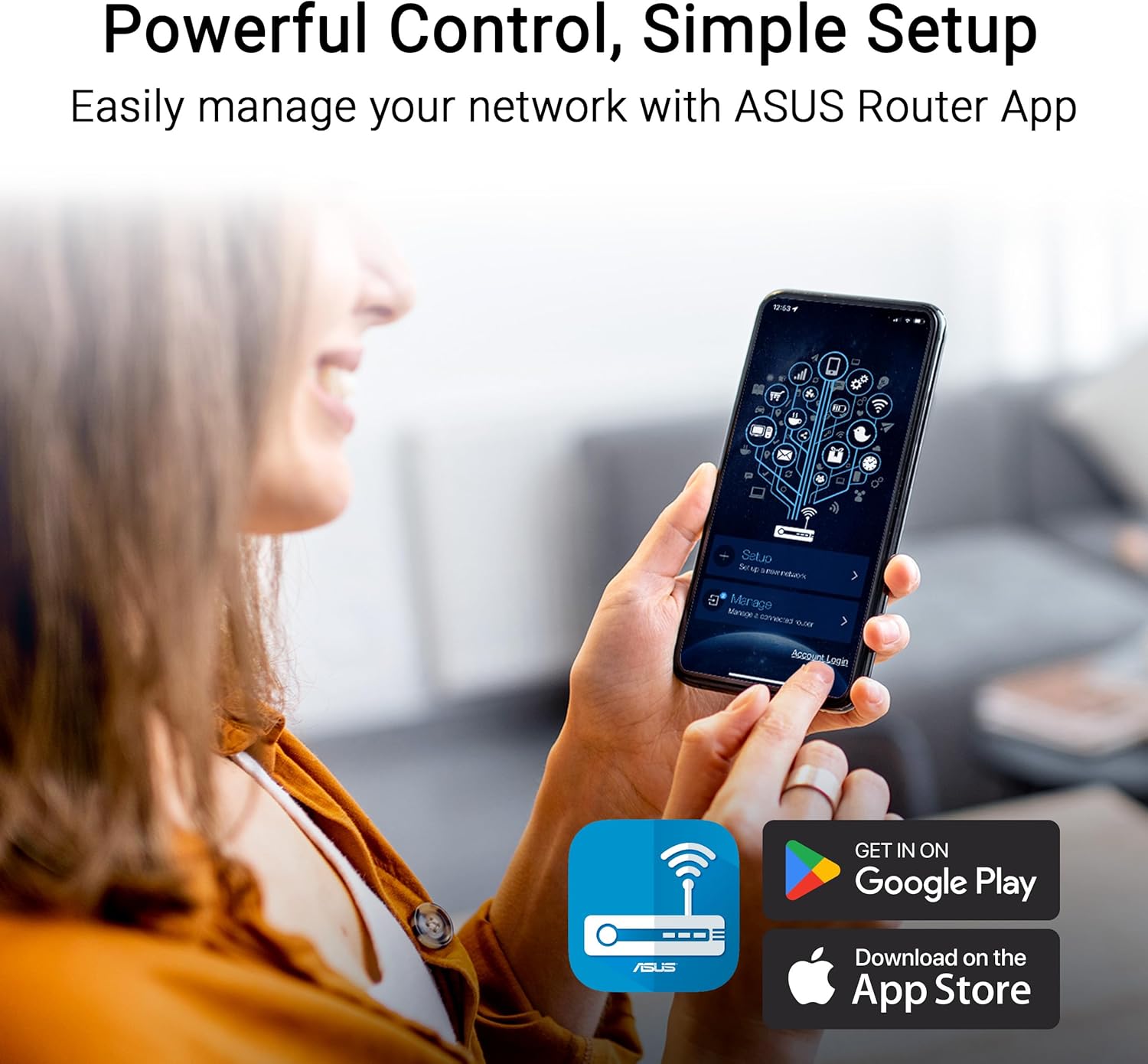
Image: A user interacting with the ASUS Router mobile app on a smartphone, demonstrating the ease of network management and setup.
Modi Operattivi
The RT-BE58 Go supports multiple operating modes to suit different network requirements:
- Modalità tar-Router mingħajr fili: The standard mode where the device acts as your primary Wi-Fi router, connecting to an internet source (modem) and broadcasting a Wi-Fi network.
- AiMesh Node Mode: Integrates into an existing ASUS AiMesh system to extend Wi-Fi coverage.
- Modalità Extender tal-Medda: Testendi l-kopertura ta' netwerk Wi-Fi eżistenti.
- Modalità Punt ta' Aċċess (AP): Connects to a wired network and broadcasts a Wi-Fi signal, converting a wired network into a wireless one.
- Media Bridge Mode: Allows wired devices to connect to a Wi-Fi network.
- Modalità Ripetitur: Repeats an existing Wi-Fi signal to extend its range.
- Public WiFi (WISP) Mode: Connects to a public Wi-Fi network (e.g., hotel, cafe) and creates a private, secure Wi-Fi network for your devices. This mode is ideal for travel security.

Image: A woman serving coffee to a customer using a laptop, illustrating a scenario where Public WiFi (WISP) mode can be used for secure internet access in a public setting.
Ġestjoni tan-Netwerk u Sigurtà
The ASUS RT-BE58 Go provides robust tools for managing your network and ensuring security:
- App ASUS Router: Manage all router settings, monitor network traffic, and control connected devices from your smartphone.
- Guest Network Pro: Create separate subnetworks for guests or IoT devices. This isolates these devices from your main network for enhanced security and control.
- Appoġġ VPN: The router includes comprehensive VPN features, allowing you to establish secure connections. It supports various VPN protocols and can be configured as a VPN client or server.
- Protezzjoni tal-AI: Commercial-grade network security features to protect against online threats.

Image: A screenshot of the ASUS Router app interface showing options for Guest Network Pro, VPN, and other security settings, with various VPN service logos (NordVPN, Surfshark, CyberGhost VPN) displayed.
Setup ta' AiMesh
The RT-BE58 Go can be integrated into an ASUS AiMesh system to create a seamless whole-home Wi-Fi network. This allows you to extend your network coverage and eliminate Wi-Fi dead zones.
Steps to Add as an AiMesh Node:
- Ensure your existing ASUS router supports AiMesh and is running the latest firmware.
- Place the RT-BE58 Go within range of your AiMesh router.
- Power on the RT-BE58 Go.
- Access your main AiMesh router's web l-interfaċċja jew l-app ASUS Router.
- Navigate to the AiMesh section and select "Add AiMesh Node."
- The system will search for available AiMesh nodes. Select the RT-BE58 Go when it appears and follow the prompts to complete the setup.

Image: A diagram illustrating an ASUS AiMesh network, showing the RT-BE58 Go router extending Wi-Fi coverage from a main AiMesh router to cover a larger home area.
Manutenzjoni
Manutenzjoni regolari tiżgura prestazzjoni ottimali u lonġevità tar-router tiegħek:
- Aġġornamenti tal-Firmware: Regularly check for and install the latest firmware updates via the ASUS Router app or web interface. L-aġġornamenti tal-firmware spiss jinkludu titjib fil-prestazzjoni, irqajja tas-sigurtà, u karatteristiċi ġodda.
- Pjazzament: Position the router in an open area, away from obstructions and sources of interference (e.g., microwaves, cordless phones). For optimal signal, avoid placing it inside cabinets or near large metal objects.
- Tindif: Keep the router clean and free of dust. Use a soft, dry cloth to wipe the exterior. Do not use liquid cleaners or aerosols.
- Jibda mill-ġdid: Periodically restart your router (unplug from power for 10 seconds, then plug back in) to refresh its connection and clear any temporary issues.
Issolvi l-problemi
If you encounter issues with your RT-BE58 Go, try the following troubleshooting steps:
- Ebda Konnessjoni tal-Internet:
- Check if your modem or internet source is working correctly.
- Iċċekkja li l-kejbils kollha huma konnessi sew.
- Restart both your modem and the RT-BE58 Go router.
- Check the WAN connection status in the ASUS Router app or web interface.
- Veloċità baxxa tal-Wi-Fi:
- Kun żgur li r-router ikun pożizzjonat b'mod ottimali, 'il bogħod mill-interferenza.
- Iċċekkja għal aġġornamenti tal-firmware.
- Naqqas l-għadd ta' apparati konnessi jew attivitajiet li jużaw ħafna bandwidth.
- Try changing Wi-Fi channels in the router settings to avoid congestion.
- Ma nistax naċċessa s-Settings tar-Router:
- Ensure your device is connected to the router's Wi-Fi or LAN port.
- Ivverifika li qed tuża l-indirizz IP korrett (http://router.asus.com) or the ASUS Router app.
- Neħħi l-cache u l-cookies tal-brawżer tiegħek, jew ipprova brawżer ieħor.
- If you forgot your login credentials, you may need to perform a factory reset (refer to the Quick Start Guide for instructions).
- Wi-Fi Signal Drops Frequently:
- Aġġusta l-pożizzjonijiet tal-antenna.
- Check for physical obstructions.
- Consider adding an AiMesh node if coverage is insufficient.
Speċifikazzjonijiet
| Karatteristika | Dettall |
|---|---|
| Isem tal-Mudell | RT-BE58 GO |
| Standard tan-Netwerk | IEEE 802.11a/b/g, WiFi 4 (802.11n), WiFi 5 (802.11ac), WiFi 6 (802.11ax), WiFi 6E (802.11ax), WiFi 7 (802.11be), IPv4, IPv6 |
| Rata tad-Data | WiFi 7 (2.4GHz): up to 688 Mbps; WiFi 7 (5GHz): up to 2882 Mbps (Total 3600 Mbps) |
| Antenna | External foldable antennas |
| Memorja | DDR4 RAM 1GB; Flash 256MB |
| Portijiet | 1x 1G LAN, 1x 2.5G WAN, 1x USB 3.0, 1x USB-C Power Delivery |
| Modi Operattivi | Wireless router, AiMesh Node, Range Extender, Access Point, Media Bridge, Repeater, Public Wifi Mode |
| Dimensjonijiet | 4.4 x 3.9 x 1.4 pulzieri |
| Piż tal-oġġett | 8 uqija |
| Provvista tal-Enerġija | Kunsinna tal-Enerġija USB-C 18W |
| Karatteristiċi Speċjali | Dual-band WiFi 7, AiMesh, Advanced VPN, Guest Network Pro |
Garanzija u Appoġġ
Garanzija: The ASUS RT-BE58 Go comes with a 3-year manufacturer warranty. Please retain your proof of purchase for warranty claims.
Appoġġ Tekniku: For further assistance, troubleshooting, or detailed product information, please visit the official ASUS support website. You can find drivers, manuals, FAQs, and contact information for technical support there.
Riżorsi onlajn:
- Uffiċjali tal-ASUS Websit: https://www.asus.com
- Appoġġ tal-ASUS: https://www.asus.com/support/