
1. Introduzzjoni
This manual provides detailed instructions for the safe and effective use of your Moukey MPS5 Portable Karaoke Machine. Please read this manual thoroughly before operating the device and retain it for future reference. The MPS5 is a versatile portable speaker system designed for various audio playback needs, including karaoke, music streaming, and public address, featuring wireless microphones and multiple connectivity options.
2. X'hemm fil-Kaxxa
Carefully unpack all items from the box. Ensure all components listed below are present and in good condition.
- Moukey MPS5 Portable Karaoke Machine (1 unit)
- Mikrofoni bla fili (2 unitajiet)
- Kejbil għall-Iċċarġjar tal-USB (unità waħda)
- 3.5mm AUX Cable (1 unit)
- Shoulder Strap (1 unit)
- Manwal għall-Utent (unità waħda)
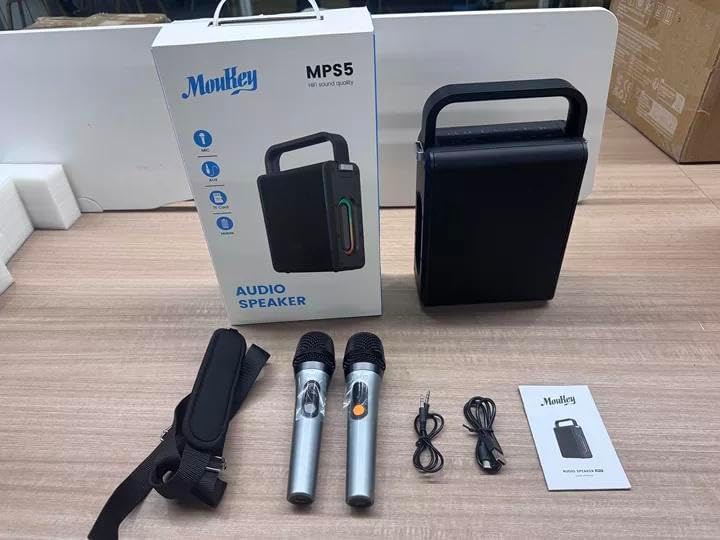
Image: All components included in the Moukey MPS5 package.
3. Prodott Aktarview
The Moukey MPS5 is a compact yet powerful portable karaoke machine. It features a robust design with integrated LED lighting on the sides, enhancing the user experience. A sturdy handle and an included shoulder strap provide convenient portability.
Immaġni: Quddiem view of the Moukey MPS5 speaker.

Immaġni: Ġenb view of the Moukey MPS5, showing the LED lighting.
4. Karatteristiċi ewlenin
- Excellent Sound Output: The MPS5 delivers 200W peak power (RMS 60W) through a 4-inch woofer and two 2-inch tweeters, providing full-range stereo sound with enhanced bass.
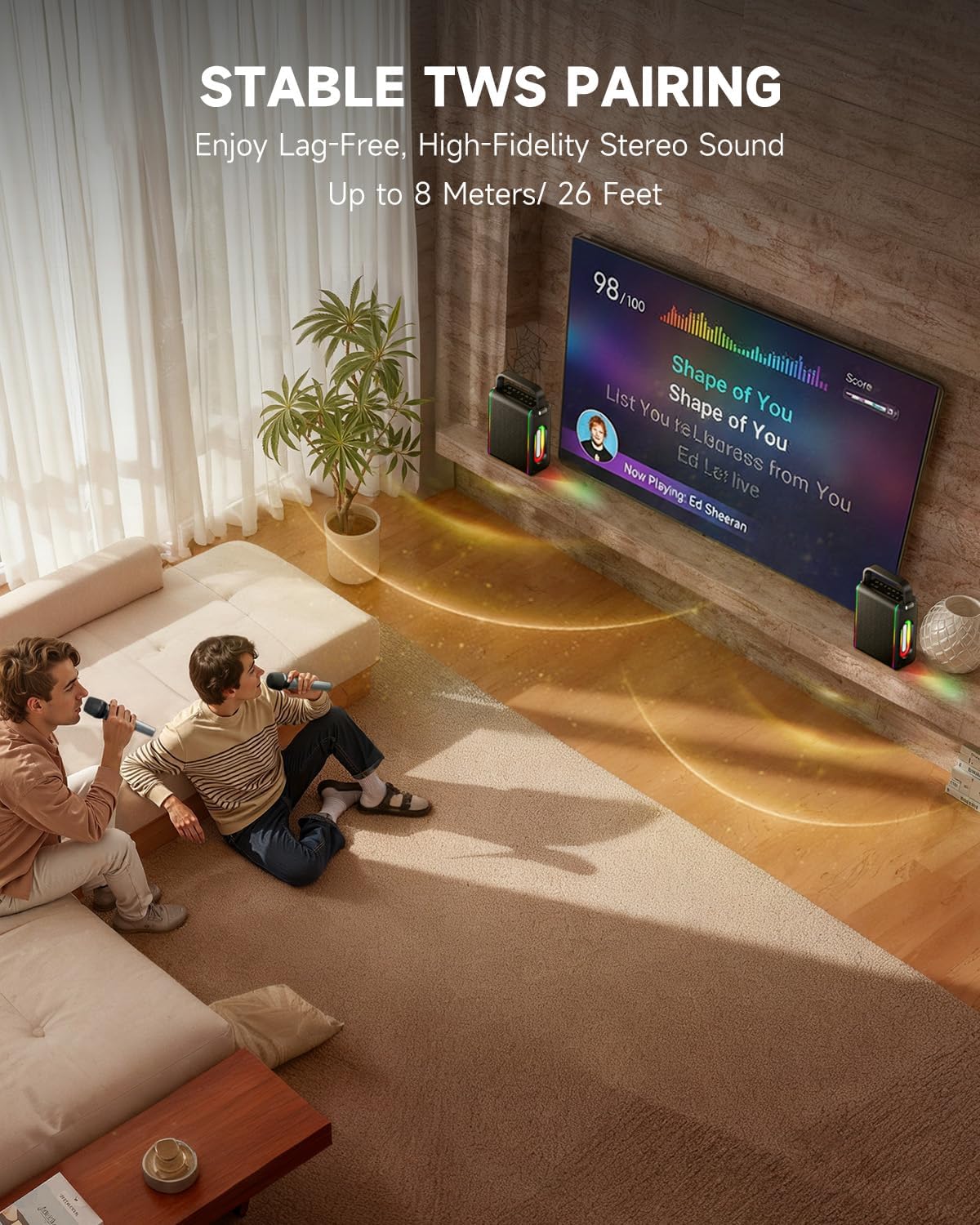
- Powerful Functionality: Supports Bluetooth 5.3 for wireless connection to various devices. Also includes Micro TF card, Flash USB, MP3, and AUX IN playback options. Features stable TWS (True Wireless Stereo) pairing for connecting two MPS5 units for a wider stereo soundstage.
- Ħajja tal-Batterija Ultra-Twila: The rechargeable battery provides up to 8 hours of continuous music playback on a 2-hour charge, suitable for extended use indoors or outdoors.
- Disinn ħafif u portabbli: Weighing only 2kg, the MPS5 is designed for easy transport. It can be carried by hand using the integrated handle or with the included shoulder strap.
- Mikrofoni Doppju Bla Fili: Includes two 2.4Ghz rechargeable microphones with a connection range of up to 60 feet and up to 8 hours of use time per charge (2-3 hours charging time). Features one-tap connectivity for effortless pairing.

Image: Internal speaker components of the MPS5.

Image: MPS5 connected to multiple devices via Bluetooth.

Image: Battery life and charging details for the MPS5.

Image: Demonstrating the portability of the MPS5 with hand and shoulder strap options.

Image: The two wireless microphones for the MPS5.
5. Setup
5.1 Iċċarġjar tal-Ispeaker u l-Mikrofoni
Before first use, fully charge the MPS5 speaker and both wireless microphones.
- Kelliem: Connect the provided USB Type-C cable to the charging port on the speaker and to a compatible USB power adapter (not included). The charging indicator light will show charging status. A full charge takes approximately 2 hours.
- Mikrofoni: Each microphone has a charging port. Connect them to a USB power source using the provided USB cable. Charging time for microphones is 2-3 hours.
5.2 Power On/Off
- To power on the speaker, press and hold the power button (U) on the top panel for 2 seconds.
- To power off, press and hold the power button (U) għal darb'oħra għal 2 sekondi.
5.3 Tqabbil tal-Bluetooth
- Ensure the MPS5 speaker is powered on and in Bluetooth mode (indicated by a blue LED). If not, press the 'M' (Mode) button to switch to Bluetooth mode.
- Fuq l-apparat mobbli tiegħek (smartphone, tablet, eċċ.), attiva l-Bluetooth u fittex apparati disponibbli.
- Select 'Moukey MPS5' from the list of devices to pair. A voice prompt will confirm successful connection.
Tqabbil ta' 5.4 TWS (Stereo Wireless Veru)
To achieve stereo sound, you can pair two Moukey MPS5 speakers together.
- Ensure both MPS5 speakers are powered on and in Bluetooth mode, but not connected to any other device.
- On one of the speakers, double-press the 'M' (Mode) button. The speaker will enter TWS pairing mode.
- Iż-żewġ kelliema jikkonnettjaw ma' xulxin awtomatikament. Se jinstema' messaġġ bil-vuċi biex jikkonferma li t-tqabbil tat-TWS kien b'suċċess.
- Once TWS is established, connect your mobile device to one of the MPS5 speakers via Bluetooth as described in section 5.3. Both speakers will then play audio in stereo.
Vidjo: Agħfas fuqview of the MPS5 Karaoke Machine, demonstrating TWS pairing and other features.
6. Istruzzjonijiet Operattivi
6.1 Kontrolli Fuqview
The top panel of the MPS5 speaker features several buttons for controlling playback, volume, and microphone settings.
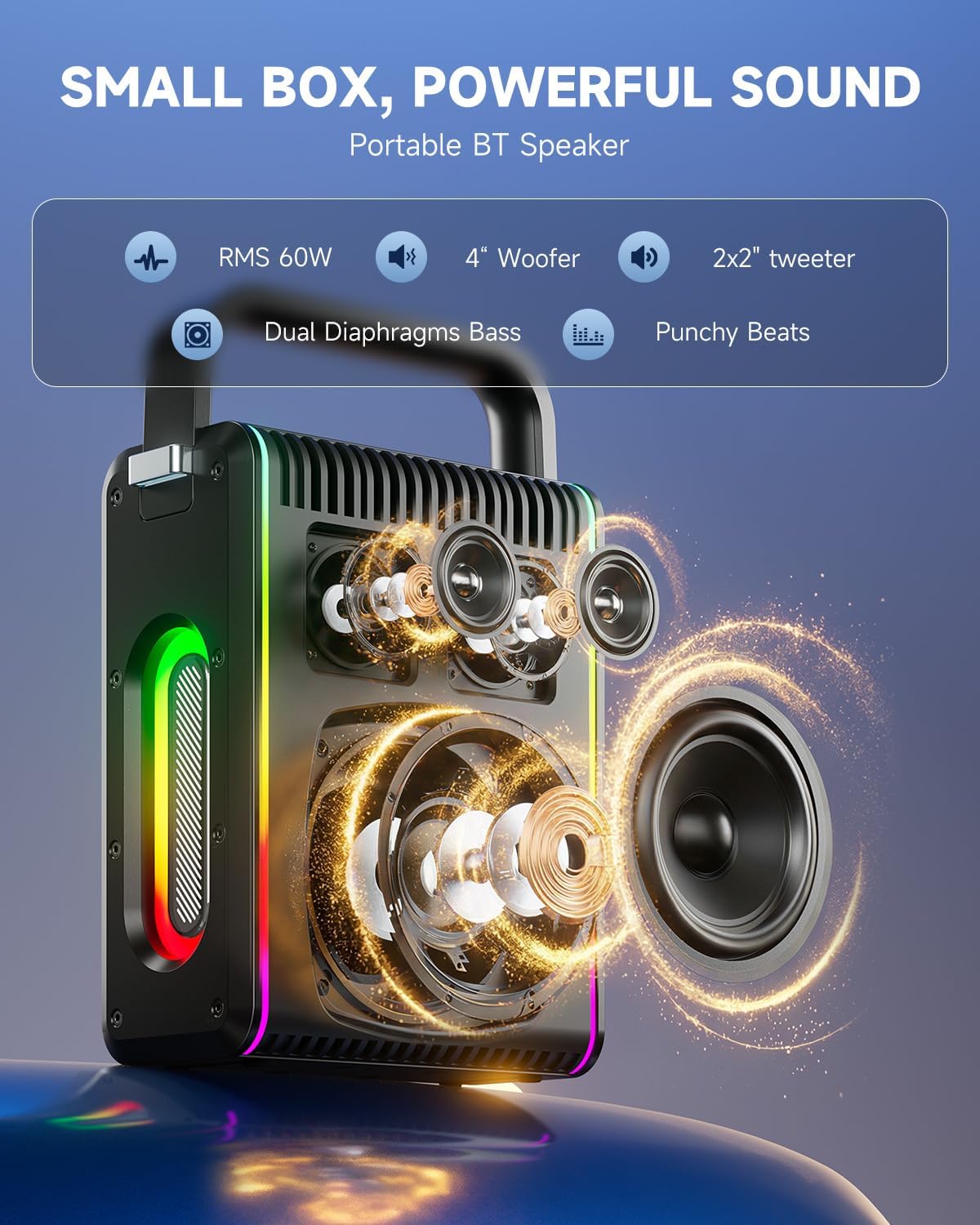
Image: Top control panel of the MPS5.
- Buttuna tal-Qawwa (U): Agħfas u żomm għal 2 sekondi biex tixgħel/itfi.
- Buttuna tal-Modalità (M): Short press to cycle through input modes (Bluetooth, AUX, USB, TF Card). Double-press to initiate TWS pairing.
- Microphone Volume (Mic - / Mic +): Jaġġusta l-volum tal-mikrofoni konnessi.
- Echo Adjustment (R- / R+): Jaġġusta l-effett tal-eku għall-mikrofoni.
- Play/Pawża (▶): Jdoqq jew iwaqqaf it-trakka kurrenti.
- Volum 'l isfel (-): Decreases the main speaker volume.
- Volum 'il fuq (+): Increases the main speaker volume.
- EQ A/E: Short press to switch between EQ modes. Long press to toggle between original sound and accompaniment elimination.
6.2 Użu tal-Mikrofonu
The MPS5 comes with two wireless microphones for karaoke and vocal performances.
- Power On/Off: Press and hold the power button on the microphone to turn it on or off.
- Tqabbil: The microphones are pre-paired with the speaker. If re-pairing is needed, ensure the speaker is on, then power on the microphone. They should connect automatically.
- Microphone Disconnect/Reconnect: Press the dedicated microphone button on the speaker's control panel to quickly disconnect or reconnect the microphones.
6.3 Modi ta' Input tal-Awdjo
In addition to Bluetooth, the MPS5 supports several wired and local storage input options.

Image: Input ports on the MPS5 speaker.
- Input AUX: Connect an external audio device using the 3.5mm AUX cable. Select AUX mode using the 'M' button.
- Daqq USB: Daħħal flash drive USB li fih awdjo MP3 files into the USB port. The speaker will automatically switch to USB mode and begin playback.
- Daqq tal-Karta TF: Insert a Micro TF card containing MP3 audio files fl-islott tal-kard tat-TF. L-ispiker awtomatikament jaqleb għall-modalità tal-kard tat-TF u jibda d-daqq.
6.4 Dawl LED
The MPS5 features dynamic LED lighting on its sides. Use the dedicated LED button (if available, or refer to the 'M' button for light control if combined) to cycle through different light modes or turn them off.
7. Manutenzjoni
- Tindif: Uża drapp artab u niexef biex tnaddaf il-barra tal-ispiker. Tużax prodotti tat-tindif likwidi jew materjali li joborxu.
- Ħażna: Aħżen l-apparat f'post frisk u niexef 'il bogħod mix-xemx diretta u minn temperaturi estremi.
- Kura tal-batterija: Biex ittawwal il-ħajja tal-batterija, evita li tiċċarġja kompletament il-batterija ta' spiss. Iċċarġja l-apparat regolarment, anke jekk ma jkunx qed jintuża għal perjodi twal.
8 Issolvi l-problemi
If you encounter issues with your Moukey MPS5, refer to the following common problems and solutions:
| Problema | Kawża Possibbli | Soluzzjoni |
|---|---|---|
| Ebda qawwa | Il-batterija hija eżawrita. | Iċċarġja l-ispiker billi tuża l-kejbil USB Type-C provdut. |
| L-ebda ħoss mill-kelliem | Il-volum huwa baxx wisq jew immut. Magħżula l-modalità ta' input mhux korretta. | Increase volume using the '+' button. Press 'M' to cycle through input modes. |
| Tqabbil Bluetooth falla | L-ispiker mhux fil-modalità ta' tqabbil. L-apparat huwa 'l bogħod wisq. | Ensure speaker is in Bluetooth mode. Move device closer to speaker. Try restarting both devices. |
| Mikrofonu mhux qed jaħdem | Microphone is off or uncharged. Microphone is disconnected. | Ensure microphone is charged and powered on. Press the microphone button on the speaker to reconnect. |
| It-tqabbil tat-TWS falla | Speakers are already connected to another device. | Kun żgur li ż-żewġ kelliema mhumiex konnessi ma' xi apparat Bluetooth ieħor qabel tibda l-akkoppjar tat-TWS. |
9. Speċifikazzjonijiet
- Ditta: Moukey
- Numru tal-Mudell: MPS5
- Output Wattage: 200 watt (l-ogħla)
- Teknoloġija tal-Konnettività: Bluetooth 5.3
- Input Awdjo: Bluetooth, TF card, USB, MP3, AUX, Wired microphones
- Numru ta' kanali: 2
- Sors tal-Enerġija: Mħaddma bil-batterija
- Tip ta' Konnettur: USB Tip Ċ
- Dimensjonijiet tal-oġġett (L x W x H): 2.36 x 6.3 x 12.2 pulzieri
- Piż tal-oġġett: Madwar 2 kg
- Apparati Kompatibbli: Smartphone, Tablet, Laptop, MP3 Player, Microphone
- Kulur: Black with Silver Accents
10. Garanzija u Appoġġ
The Moukey MPS5 Portable Karaoke Machine comes with a 1-Sena Garanzija mid-data tax-xiri. Din il-garanzija tkopri difetti fil-manifattura u xogħol taħt użu normali. Jekk jogħġbok żomm il-prova tax-xiri tiegħek għal talbiet ta' garanzija.
For technical support, troubleshooting assistance, or warranty inquiries, please contact Moukey customer service through the retailer where the product was purchased or visit the official Moukey websit għal informazzjoni ta' kuntatt.