
1. Introduzzjoni
The AJAZZ AK029 is a high-performance one-handed mechanical gaming keyboard designed for precision and speed. It features a compact 29-key layout, magnetic switches, an 8000Hz polling rate, and 0.01mm RT precision for an ultra-responsive gaming experience. This manual provides detailed instructions for setup, operation, maintenance, and troubleshooting.

Image: The AJAZZ AK029 one-handed gaming keyboard, showcasing its compact design and dimensions (155mm length, 122mm width, 33mm height).

Immaġni: Aktar minnview of the AK029 gaming keyboard, highlighting its sleek design and gaming features.

Image: The AK029 keyboard being used in various scenarios, including gaming, video editing, and 3D modeling, demonstrating its versatility.
2. Setup
Kontenut tal-Pakkett
- AJAZZ AK029 Keyboard Body
- Kejbil USB-C (1.6m)
- Keycap Puller
- Swiċċijiet żejda
- Detachable Carrying Strap
- Manwal għall-Utent

Image: The complete package contents of the AJAZZ AK029, including the keyboard, USB-C cable, keycap puller, spare switches, and user manual.
Tqabbad it-Tastiera
- Qabbad it-tarf USB-C tal-kejbil ipprovdut mal-port USB-C fuq it-tastiera.
- Connect the other end of the USB cable to an available USB port on your computer (Windows or Mac).
- It-tastiera tiġi rikonoxxuta awtomatikament mis-sistema operattiva tiegħek.
3. Istruzzjonijiet Operattivi
Funzjonijiet Ewlenin u Tqassim
The AK029 features a 29-key layout optimized for gaming and productivity. Many keys have secondary functions accessible via the Fn ċavetta.
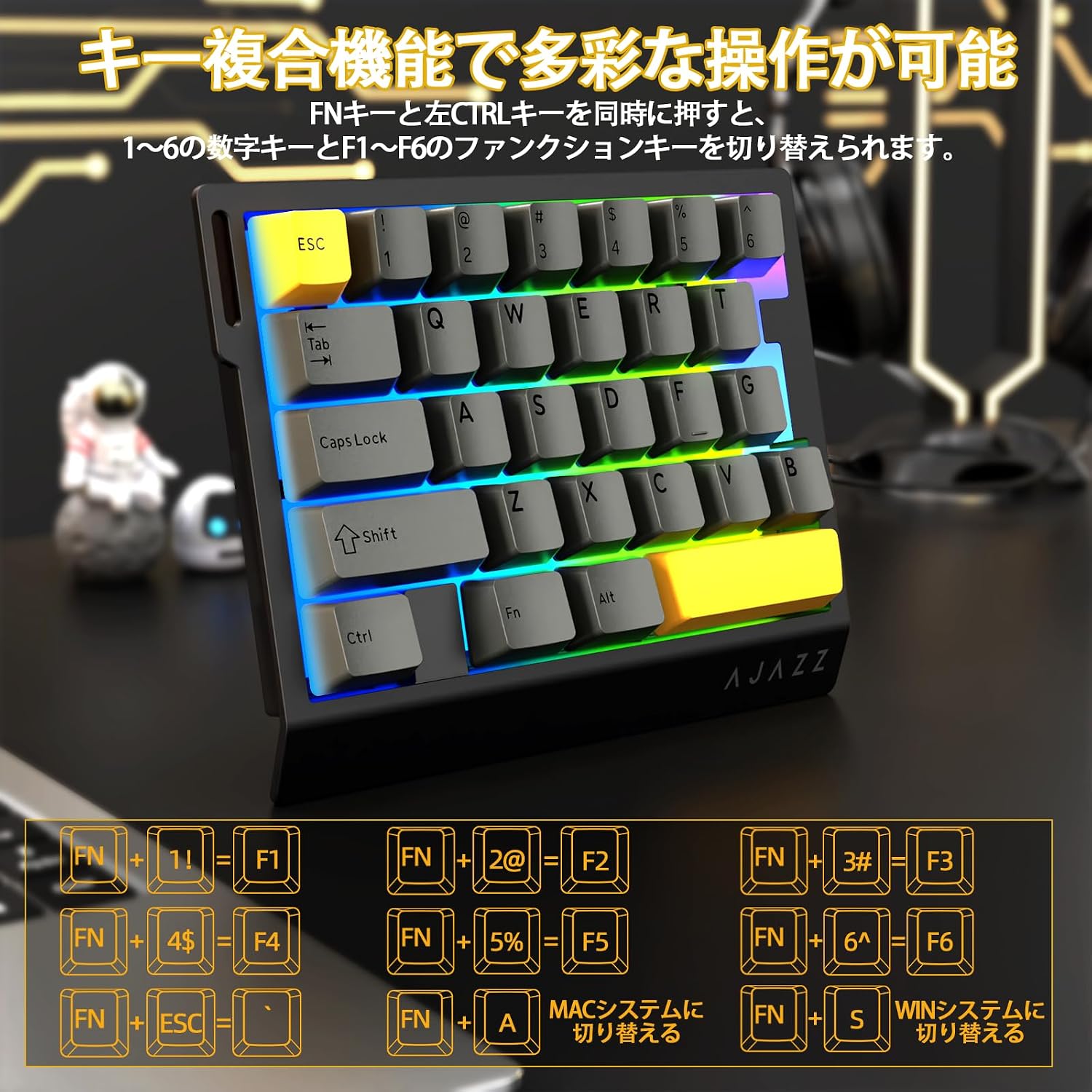
Image: Diagram illustrating the various FN key combinations for accessing secondary functions, such as F1-F6, tilde, and system switching.
- FN + 1-6: Switches between number keys (1-6) and function keys (F1-F6). Default is number keys.
- FN + Esc: Tilde (~)
- FN + A: Switches to Mac mode.
- FN + S: Switches to Windows mode.
Note: When using Mac mode on a Windows PC, the Windows key and Alt key functions may be reversed.
Modi tad-Dawl RGB
The keyboard features vibrant RGB backlighting with multiple customizable effects.

Image: The keyboard displaying its colorful RGB backlight, which can be customized with various effects.
- FN + Tab: Cycles through 20 different RGB lighting modes.
- FN + G: Increases backlight brightness (5 levels). Backlight flashes 3 times at maximum brightness.
- FN + F: Decreases backlight brightness (5 levels). Backlight flashes 3 times at minimum brightness.
- FN + V: Changes the direction of the lighting effect.
- FN + B: Changes the backlight color.
- FN + T: Increases the speed of the lighting effect (5 levels). Backlight flashes 3 times at maximum speed.
- FN + R: Decreases the speed of the lighting effect (5 levels). Backlight flashes 3 times at minimum speed.
- FN + C: Toggles side light mode (Streaming RGB constant light - Rainbow Breath - Off). Default is Streaming.
- FN + X: Toggles backlight on/off (side lights remain on).
- FN + Space (long press 3-5 seconds): Resets lighting settings to factory defaults. Keyboard lights flash 3 times.
Indikatur Lamps
- Indikatur Kaps Lock: Pressing the Caps Lock key illuminates a white LED (uppercase input ON). Pressing it again turns off the LED (lowercase input).
- Indikatur tas-Sistema: The main key area lights flash 3 times to indicate successful system switching.
Web Personalizzazzjoni tas-Sewwieq
The dedicated driver software allows for extensive customization of key functions, macros, and RGB lighting effects. This enables true personalization to match individual playstyles and preferences.

Image: Screenshot of the web driver interface, showing options for custom keys, lighting effects, macro management, and performance settings.
Sewwieq Websit: https://ajazz.driveall.cn/#/
4. Manutenzjoni
Tindif
- Uża drapp artab u niexef biex timsaħ il-wiċċ tat-tastiera.
- For dust between keycaps, use compressed air.
- Evita li tuża kimiċi ħarxa jew materjali li joborxu.
Hot-Swappable Switch Replacement
The AK029 supports hot-swappable magnetic switches, allowing for easy replacement and customization.

Immaġni: Close-up view of the hot-swappable magnetic switches, showing the mechanism and keycap removal tool.
- Uża l-puller tal-keycap biex tneħħi bil-mod il-keycap mixtieq.
- Use the switch puller to firmly grip the top and bottom tabs of the switch.
- Pull the switch straight upwards to remove it from the keyboard.
- Align the pins of the new switch with the holes on the keyboard.
- Gently push the new switch vertically until it clicks into place.
5 Issolvi l-problemi
It-Tastiera Mhux Tirrispondi
- Kun żgur li l-kejbil USB-C huwa konness sew kemm mat-tastiera kif ukoll mal-kompjuter.
- Ipprova qabbad it-tastiera ma' port USB differenti fuq il-kompjuter tiegħek.
- Ittestja t-tastiera fuq kompjuter ieħor biex teskludi problema speċifika tal-kompjuter.
- Ibda mill-ġdid il-kompjuter tiegħek.
RGB Backlight Not Working or Incorrect
- Ensure the backlight is not turned off (FN + X).
- Adjust brightness using FN + G (increase) and FN + F (decrease).
- Cycle through lighting modes using FN + Tab.
- Perform a factory reset for lighting settings by long-pressing FN + Space for 3-5 seconds.
Key Input Issues or Inaccurate Response
- Ensure the correct system mode (Windows/Mac) is selected using FN + A or FN + S.
- If a specific key is not responding, try replacing its switch using the hot-swap procedure.
- Update the keyboard firmware using the dedicated web softwer tas-sewwieq.
- Check for any physical obstructions under the keycap or switch.
6. Speċifikazzjonijiet
| Karatteristika | Deskrizzjoni |
|---|---|
| Brand | A.JAZZ |
| Mudell | AK029 |
| Konnettività | USB-C bil-wajer |
| Tqassim Ewlenin | 29 Keys (One-Handed) |
| Tip ta' Swiċċ | Magnetic Switches (Hot-Swappable) |
| Ir-Rata tal-Votazzjoni | 8000Hz |
| Latency | 0.125ms Latenza Ultra-Baxxa |
| RT Precision | 0.01mm (0.03mm detection increments) |
| Scan Rata | 130K |
| Dawl ta' wara | RGB (20 lighting modes) |
| Qlib taċ-ċavetta | Qlib sħiħ tal-N-Key |
| Materjal tal-Pjanċa | Liga tal-Aluminju |
| Ħoss Dampening | 5-Layer Structure (PO sandwich cotton, IXPE switch pad, PET sound sheet, EPDM cotton, silicone gel) |
| Ergonomija | Ergonomic design with stepped curved keycaps and wrist rest |
| OS kompatibbli | Twieqi, MAC |
| Dimensjonijiet | 155mm (L) x 122mm (W) x 33mm (H) |
| Piż | Appross. 300g |
| Tul tal-Cable | 1.6m |

Image: Detailed basic specifications of the AK029 keyboard, including brand, model, connectivity, dimensions, and lighting.

Immaġni: Splodiet view of the keyboard's internal structure, highlighting the 5-layer sound dampening system and aluminum alloy plate for enhanced stability and acoustics.

Image: Illustration of the ergonomic design of the AK029, featuring stepped keycaps and a wrist rest for comfortable long-term use.
7. Garanzija u Appoġġ
Informazzjoni dwar Garanzija
The AJAZZ AK029 keyboard comes with a 1-year manufacturer's warranty from the date of purchase. This warranty covers defects in materials and workmanship under normal use.
Appoġġ għall-Klijent
For technical assistance, warranty claims, or any other inquiries, please contact AJAZZ customer support through their official websit jew il-bejjiegħ bl-imnut minn fejn inxtara l-prodott.
Uffiċjali Websit: https://ajazz.driveall.cn/#/