
Introduzzjoni
The TITAN ARMY P326MV MAX is a 32-inch high-end gaming monitor featuring Mini LED and Quantum Dot technology. It supports 2304 local dimming zones, offering a 4K (3840x2160) resolution at 160Hz. The monitor provides a wide color gamut with 99% DCI-P3 and 99% Adobe RGB coverage. With a peak brightness of 1000 nits, it delivers HDR1000 equivalent performance, suppressing light leakage and reproducing deep blacks more effectively than traditional backlights. In addition to 4K@160Hz, a dual mode allows for ultra-high refresh rates of FHD@320Hz, enabling fast-paced gameplay. It includes two HDMI 2.1 ports, supporting 4K 120Hz output and Variable Refresh Rate (VRR) for modern gaming consoles. The monitor also features a proprietary DyDs (Dynamic Display) mode to reduce ghosting and blur at high refresh rates, ensuring clearer motion.

Setup
Kontenut tal-Pakkett
- TITAN ARMY P326MV MAX Monitor
- Stand tal-Monitor (Bażi u Driegħ)
- Adapter tal-Enerġija u Cable
- Cable HDMI
- DisplayPort Cable
- USB-C Cable
- Manwal għall-Utent
Stand Assemblea
- Oħroġ il-monitor u l-komponenti tal-istand mill-imballaġġ bir-reqqa.
- Attach the stand arm to the monitor panel using the provided screws. Ensure it is securely fastened.
- Connect the stand base to the stand arm, tightening any screws as necessary.
- Poġġi l-monitor immuntat fuq wiċċ stabbli u ċatt.

Konnessjoni tal-Monitor
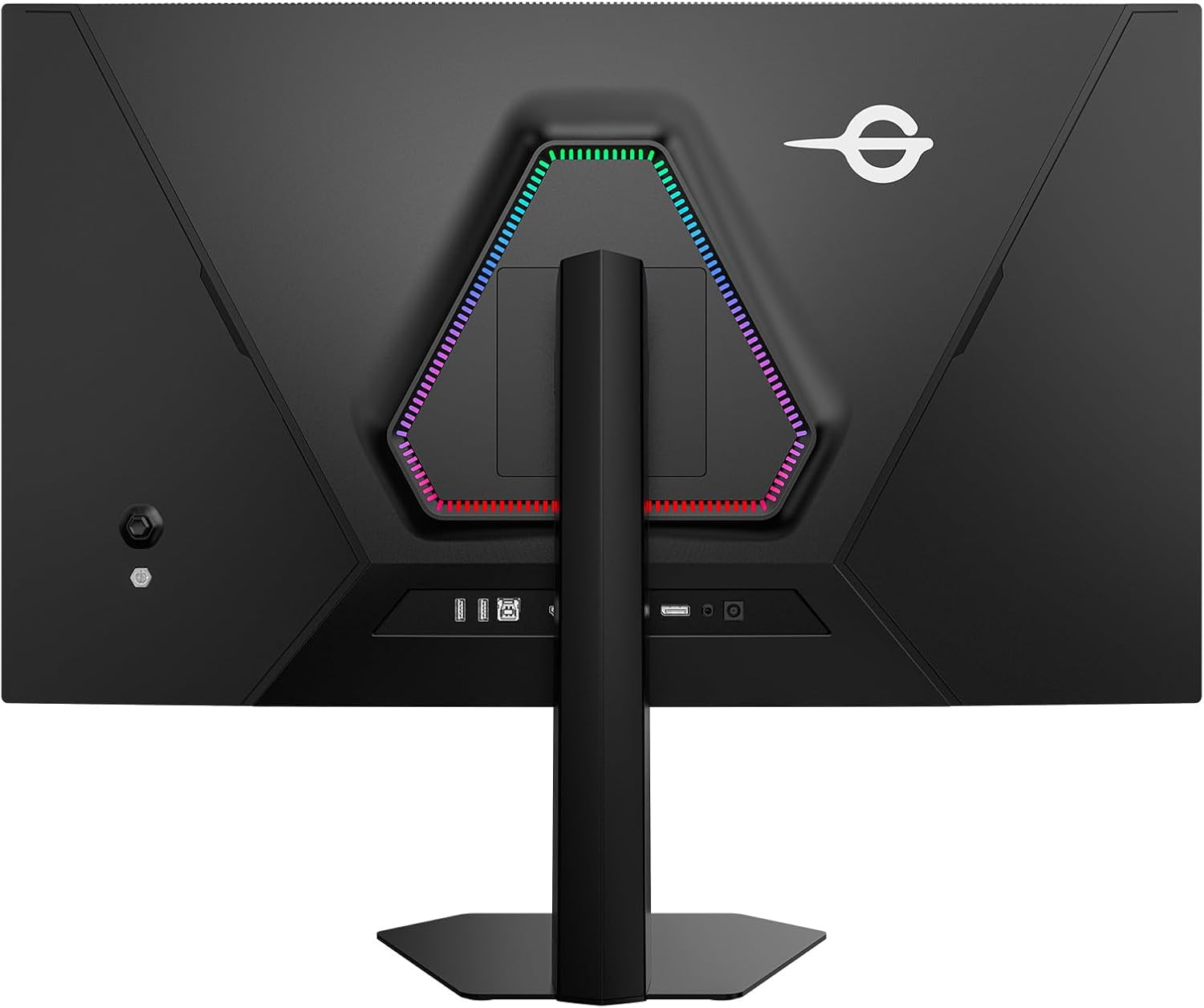
Connect the monitor to your computer or gaming console using the appropriate cables. Ensure all connections are firm.
- Qawwa: Qabbad l-adapter tal-enerġija mad-dħul tal-enerġija tal-monitor u mbagħad ma' sokit tal-enerġija.
- Video Input: Use either an HDMI 2.1 cable (for 4K@120Hz on consoles or PC), a DisplayPort 1.4 cable (for 4K@160Hz on PC), or a USB-C cable (for video, data, and power delivery, if supported by your device).
- Hub USB: Connect the USB-B upstream cable from the monitor to your computer to enable the monitor's USB-A ports.
Istruzzjonijiet Operattivi
Qawwa mixgħul/mitfi
Agħfas il-buttuna tal-qawwa li tinsab fuq il-monitor biex tixgħelu jew titfih. Id-dawl indikatur tal-qawwa jixgħel meta l-monitor ikun attiv.
Menu tal-Wiri fuq l-Iskrin (OSD).
The OSD menu allows you to adjust various monitor settings. Use the joystick or buttons on the monitor to navigate the menu and select options.
- Sors tad-dħul: Select between HDMI 1, HDMI 2, DisplayPort, or USB-C.
- Settings tal-Istampa: Aġġusta l-luminożità, il-kuntrast, in-nitidezza, it-temperatura tal-kulur, u l-gamma.
- Modalità tal-Kulur: Choose from various preset color modes (e.g., Standard, Game, Movie, sRGB, DCI-P3).
- Awdjo: Adjust volume or mute the monitor's internal speakers or headphone output.
- Settings OSD: Ikkonfigura l-lingwa tal-OSD, it-trasparenza, u t-timeout.
Karatteristiċi u Modi Ewlenin
- 4K Dual Mode: Supports 4K (3840x2160) resolution at 160Hz and FHD (1920x1080) resolution at 320Hz. This allows users to switch between high-resolution detail and ultra-high refresh rate for different gaming scenarios.
- MiniLED & Quantum Dot: Provides superior contrast, brightness, and color accuracy with 2304 local dimming zones and Quantum Dot technology.
- HDR1000: Delivers a wide dynamic range with peak brightness up to 1000 nits, enhancing details in both bright and dark scenes.
- FAST IPS Panel: Offers rapid response times and wide viewing angles, reducing motion blur and ghosting for clear, fluid visuals.
- Adaptive Sync (VRR): Synchronizes the monitor's refresh rate with the GPU's frame rate to eliminate screen tearing and stuttering, providing a smoother gaming experience.
- DyDs (Dynamic Display) Mode: A proprietary mode designed to further reduce motion blur and ghosting during high refresh rate operation, resulting in clearer moving images.
- PIP/PBP Display: Picture-in-Picture (PIP) and Picture-by-Picture (PBP) modes allow simultaneous display of content from two different input sources.
- Stand ergonomiku: The stand offers height adjustment, pivot (90-degree rotation), tilt, and swivel functionality for optimal viewing comfort. It also supports VESA mounting.

Game+ Features
The monitor includes a suite of Game+ features designed to enhance your gaming experience:
- HDR: Dynamic range enhancement for vivid details.
- Titjib tal-Kulur: Adjusts screen colors in 10 levels for richer, more detailed visuals.
- Titjib tal-kuntrast: Fine-tunes screen contrast to preserve details in dark areas.
- Dimming Lokali: Controls backlight in small zones for high contrast and deep blacks.
- Sinkronizzazzjoni Adattiva: Eliminates screen tearing and stuttering.
- Modalità Viżjoni bil-lejl: Enhances visibility in dark areas of the screen.
- Shadow Bilanċ: Adjusts brightness in dark areas to reveal details.
- Super Resolution Mode: Improves image clarity and detail.
- Kontroll tal-Halo: Reduces halo effects around bright objects.
- Extreme Game Mode: Minimizes input lag for faster response times.
- Dynamic OD (Overdrive): Adjustable overdrive settings to reduce ghosting.
- Crosshair logħba: Displays an on-screen crosshair for improved aiming.
- Refresh Rate Display: Shows the current refresh rate on screen.
- Timer u Stopwatch: On-screen timers for various gaming needs.
- Hawkeye Zoom & Hawkeye Vision: Magnifies specific areas of the screen for better visibility.
- All Gaming Mode: Provides various display modes optimized for different game genres.

Manutenzjoni
Tindif tal-Monitor
To maintain optimal performance and appearance, clean your monitor regularly.
- Skrin: Imsaħ l-iskrin bil-mod b'ċarruta ratba u mingħajr suf. Għal marki persistenti, nixxef bil-modampLaħlaħ id-drapp bl-ilma jew b'soluzzjoni għat-tindif tal-iskrin. Tisprejjax likwidu direttament fuq l-iskrin.
- Casing: Uża drapp artab u niexef biex timsaħ il-monitor casing. Evita prodotti tat-tindif jew solventi li joborxu.
Kura Ġenerali
- Evita li tpoġġi oġġetti tqal fuq il-monitor jew il-kejbils tiegħu.
- Do not expose the monitor to direct sunlight, high temperatures, or excessive humidity.
- Kun żgur li jkun hemm ventilazzjoni adegwata madwar il-monitor biex tevita li jisħon iżżejjed.
Issolvi l-problemi
Jekk tiltaqa' ma' problemi bil-monitor tiegħek, irreferi għall-passi komuni li ġejjin għas-soluzzjoni tal-problemi:
- Ebda Qawwa: Kun żgur li l-kejbil tal-enerġija huwa konness sew kemm mal-monitor kif ukoll mas-sokit tal-enerġija. Iċċekkja jekk l-adapter tal-enerġija hux qed jaħdem sew.
- Ebda Sinjal: Verify that the video cable (HDMI, DisplayPort, or USB-C) is properly connected to both the monitor and your source device. Select the correct input source via the OSD menu.
- Immaġni li Tteptep jew Distorta: Check the video cable for damage. Ensure your graphics card drivers are up to date. Try a different refresh rate or resolution setting.
- Kuluri Mhux Korretti: Reset the monitor's color settings to default via the OSD menu. Adjust color temperature or select a different color mode.
- OSD Not Appearing: Ensure the monitor is powered on. Press the OSD button or joystick to activate the menu.
Jekk il-problema tippersisti wara li tipprova dawn il-passi, jekk jogħġbok ikkuntattja l-appoġġ għall-klijenti.
Speċifikazzjonijiet
| Karatteristika | Speċifikazzjoni |
|---|---|
| Brand | ARMATA TITAN |
| Manifattur | ARMATA TITAN |
| Numru tal-Mudell | P326MV MAX |
| Dimensjonijiet tal-Prodott | 24.2 x 71.4 x 55.9 ċm |
| Piż tal-oġġett | 8.6 Kilogrammi |
| Kulur | Iswed |
| Daqs tal-Iskrin | 32 Pulzier |
| Riżoluzzjoni | 3840 x 2160 Pixel (4K UHD 2160p) |
| Proporzjon ta' l-aspett | 16:9 |
| Wiċċ tal-Iskrin | Mhux dija |
| Riffriskar Rata | 160Hz (4K), 320Hz (FHD Dual Mode) |
| Inputs tal-Vidjo | 2x HDMI 2.1, 1x DisplayPort 1.4, 1x USB-C |
| Portijiet USB | 2x USB-A, 1x USB-B (upstream) |
Garanzija u Appoġġ
Informazzjoni dwar Garanzija
This product is covered by a manufacturer's warranty. Please refer to the warranty card included in your package or visit the official TITAN ARMY websit għal termini u kundizzjonijiet dettaljati tal-garanzija.
Appoġġ għall-Klijent
For technical assistance, troubleshooting, or warranty claims, please contact TITAN ARMY customer support through their official webis-sit jew l-informazzjoni ta' kuntatt ipprovduta fid-dokumentazzjoni tal-prodott tiegħek.