
1. Introduzzjoni
Welcome to the world of Robosen's Buzz Lightyear Robot. This manual provides essential information for the setup, operation, and maintenance of your interactive collectible. Designed for ages 15 and up, this robot brings the beloved character to life with advanced robotics and authentic features.
2. Karatteristiċi tal-prodott
The Robosen Buzz Lightyear Robot is engineered with precision and attention to detail, offering a highly interactive experience:
- Highly Lifelike: Features movable eyes, mouth, and realistic walking motion.
- Smart Joints: Equipped with 23 smart joints for natural movement and high playability.
- Interazzjoni bil-vuċi: Responds to 34 commands and includes over 200 original audio clips.
- Programmazzjoni Avvanzata: Supports programming via a dedicated app and web pjattaforma.
- Komponenti Interni: Integrates 75 intelligent microchips and over 3000 components, including ultra-micro servo motors made from precision timepiece-grade metals, ensuring robust performance.
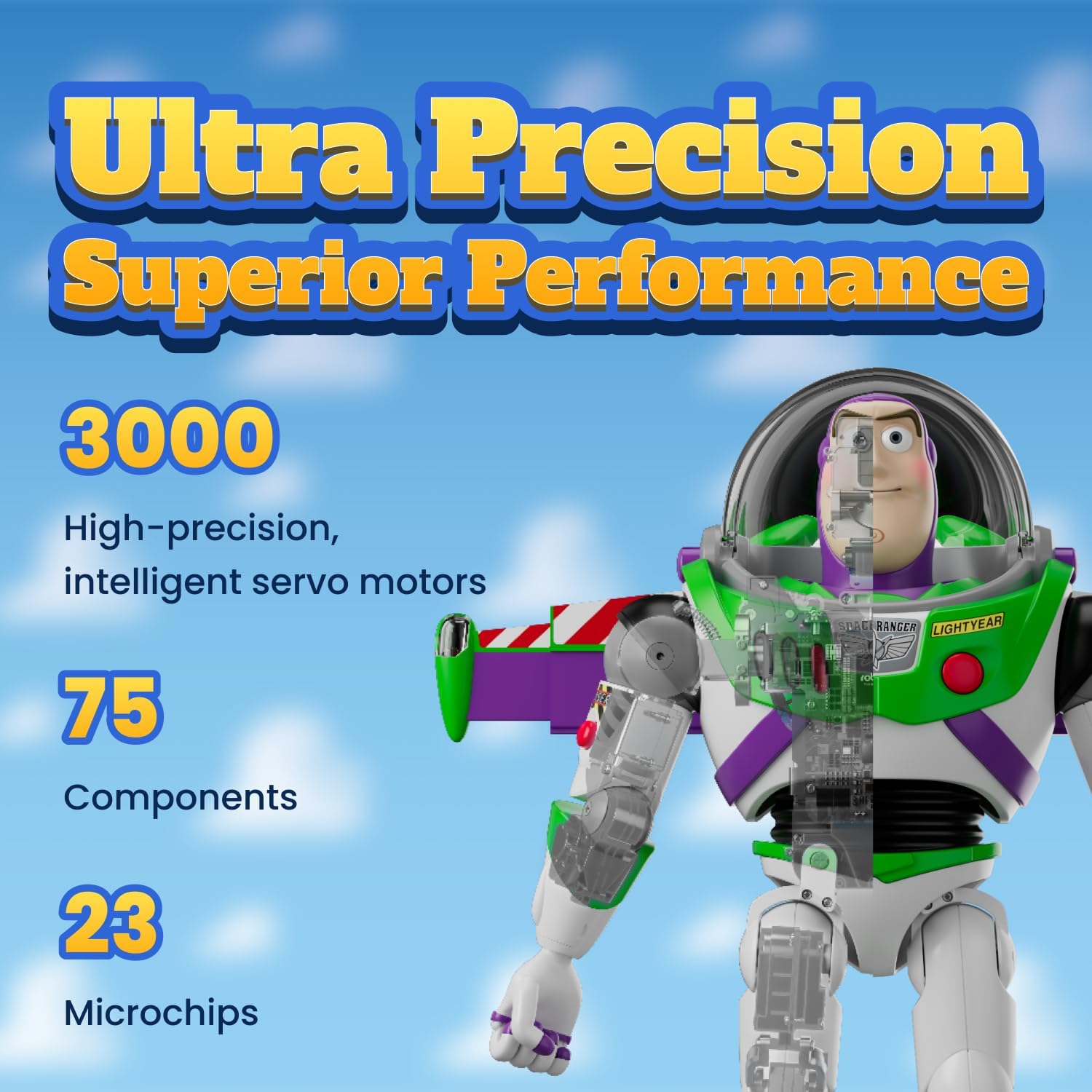
Image: The Robosen Buzz Lightyear Robot standing upright, showcasinid-disinn dettaljat u l-artikolazzjoni tiegħu.

Immaġni: Close-up view of Buzz Lightyear's face and chest, highlighting the movable eyes, mouth, and chest buttons.
3. Setup
Follow these steps to set up your Robosen Buzz Lightyear Robot:
- Unboxing: Carefully remove the robot and all accessories from the packaging. The box typically includes the robot and a charger.
- Ħlas Inizjali: Connect the robot to the provided charger. Ensure the robot is fully charged before its first use. The battery is a Lithium Ion type and is included.
- Niżżel l-App: Download the official Robosen Buzz Lightyear app from your device's app store.
- Qabbad mal-App: Follow the in-app instructions to pair your robot with your mobile device via Bluetooth.
- Familjarizzazzjoni: Note the inscription 'ANDY' on the bottom of Buzz's foot, a classic detail from the Toy Story films.

Image: The Robosen Buzz Lightyear Robot displayed with its included charger and additional interchangeable hands.
4. Istruzzjonijiet Operattivi
Your Buzz Lightyear Robot offers multiple ways to interact:
4.1 Kmandi tal-Vuċi
Engage with Buzz using spoken commands. Some examples jinkludu:
- 'Buzz Lightyear to the rescue!'
- 'To infinity and beyond!'
- 'I am not a toy!'
- 'Record mission log'
- 'Hello'
- 'Introduce yourself'
- 'Scan the terrain'
- 'Star command'
- 'Open fire'
- 'Attack'
- 'Dance'
For a comprehensive list of commands, refer to the product's official app or web pjattaforma.

Image: Buzz Lightyear Robot in a pointing stance, ready for action.
4.2 App Control & Programming
The dedicated mobile app and Robosen Studio web platform provide extensive control and customization options:
- Three Core Modules: Tap Actions, Control, or Create to unlock enhanced interactivity.
- Mini Theater: Relive classic Toy Story scenes.
- Ċentru tat-tniżżil: Access updates and share creations with other users.
- Easy Creation: Pose Buzz by hand to record and save movements, recreating scenes or creating new ones.
- Advanced Creation (Robosen Studio): Uża l- web-based platform to customize actions, sounds, and choreograph unique Buzz adventures.

Image: A visual representation of the Robosen app interface, showing options for creating actions and controlling the robot.
4.3 Buttuni Fiżiċi
Buzz's chest features buttons that activate different personalities and modes:
- Buttuna Blu: Activates Demo Mode.
- Buttuna Ħamra: Activates Inner Voice.
- Buttuna ħadra: Activates Spanish Mode.
Pressing the red button on his arm will deploy his wings.

Image: Buzz Lightyear Robot with his wings extended, ready for flight.
4.4 Vidjo Uffiċjali tal-Prodott
Video: An official product video from Robosen showcasing the features and capabilities of the Buzz Lightyear Smart Robot, including its movements, voice interactions, and app control.
5. Manutenzjoni
To ensure the longevity and optimal performance of your robot:
- Tindif: Use a soft, dry cloth to gently wipe the robot's surface. Avoid using harsh chemicals or abrasive materials.
- Ħażna: Store the robot in a cool, dry place away from direct sunlight and extreme temperatures.
- Kura tal-batterija: Recharge the Lithium Ion battery as needed. Do not attempt to replace the battery yourself.
6 Issolvi l-problemi
If you encounter issues with your Robosen Buzz Lightyear Robot, consider the following:
- Ebda Tweġiba: Ensure the robot is powered on and fully charged. Check the app connection if using app control.
- Kwistjonijiet ta' Moviment: Verify that no obstructions are hindering the robot's joints. If using manual programming, ensure movements are recorded correctly.
- Voice Command Issues: Speak clearly and ensure the environment is not too noisy. Refer to the app for a full list of recognized commands.
- Konnettività tal-App: Restart both the robot and your mobile device. Ensure Bluetooth is enabled and the app is up to date.
If problems persist, contact Robosen customer support for further assistance.
7. Speċifikazzjonijiet
| Karatteristika | Dettall |
|---|---|
| Dimensjonijiet tal-Prodott | 13.8 x 5.9 x 14.7 pulzieri |
| Piż tal-oġġett | 10.7 uqija |
| Numru tal-Mudell | Edizzjoni Standard |
| Batteriji | 1 batterija tal-jone tal-litju (inkluża) |
| Età Rakkomandata | 15+ Years (Manufacturer recommended age: 5-5 years, but product is designed for collectors 15+) |
| X'hemm fil-Kaxxa | Robot, Charger |
8. Informazzjoni dwar is-Sigurtà
Jekk jogħġbok osserva l-linji gwida tas-sigurtà li ġejjin:
- TWISSIJA: PARTIJIET ŻGĦAR. MHUX ADATT GĦAL TFAL TAĦT it-3 SNIN.
- This product is a collectible and not intended for rough play.
- Żomm 'il bogħod mill-ilma u temperaturi estremi.
- Do not attempt to disassemble or modify the robot, as this may cause damage or injury and void the warranty.
9. Garanzija u Appoġġ
Robosen provides a limited warranty for its products. For detailed warranty information, product registration, or technical support, please visit the official Robosen webis-sit jew ikkuntattja lid-dipartiment tas-servizz tal-konsumatur tagħhom. Żomm il-prova tax-xiri tiegħek għal talbiet ta’ garanzija.
Manufacturer: Robosen