
Introduzzjoni
This manual provides essential information for the safe and efficient use of your new Lenovo Slim 7 14ILL10 laptop. Please read it thoroughly before operating your device and retain it for future reference.
Setup
Spakkjar u Spezzjoni Inizjali
Neħħi bir-reqqa l-komponenti kollha mill-imballaġġ. Ivverifika li l-oġġetti kollha huma preżenti:
- Lenovo Slim 7 14ILL10 Laptop
- Adapter AC 65W
- 1 x 32GB USB Drive
- Dokumentazzjoni (dan il-manwal)
Spezzjona l-laptop għal xi ħsara fiżika. Jekk tinstab xi ħsara jew jekk ikun hemm komponenti neqsin, ikkuntattja lill-bejjiegħ tiegħek immedjatament.
Konnessjoni tal-Adapter tal-Enerġija
Connect the 65W AC adapter to the laptop's USB-C Thunderbolt 4 port (Power Delivery compatible) and then to a power outlet. It is recommended to fully charge the battery before first use.

Immaġni: Minn fuq għal isfel view of the Lenovo Slim 7 14ILL10 laptop with the lid partially open, revealing the keyboard and trackpad. This view highlights the sleek design and port locations on the sides.
L-Inizjali Tixgħel u s-Setup tal-Windows
Press the power button to turn on the laptop. Follow the on-screen instructions to complete the Windows 11 Pro setup process. This includes selecting your region, connecting to a Wi-Fi network, and creating a user account.
It-Tħaddim tal-Laptop Tiegħek
Tastiera u Touchpad
The laptop features a backlit keyboard for comfortable typing in various lighting conditions. The touchpad supports multi-touch gestures for navigation.

Immaġni: Wara view of the Lenovo Slim 7 14ILL10 laptop with the screen open, showcasing the hinge mechanism and the Lenovo branding on the lid.
Display touchscreen
The 14-inch WUXGA (1920 x 1200) OLED touchscreen supports touch input for intuitive interaction with Windows 11 Pro. It features 600 nits brightness, 100% DCI-P3 color gamut, Eyesafe certification, Dolby Vision, and DisplayHDR True Black 500 for a high-quality visual experience.
Portijiet u Konnettività
Il-laptop tiegħek huwa mgħammar b'diversi portijiet għall-konnessjoni ta' apparati esterni:
- 2x USB-C Thunderbolt 4 / USB4 40Gbps: Supports Power Delivery and DisplayPort 1.4.
- 1x USB 3.2 Gen 1 (Always On and 5Gbps): Għall-konnessjoni ta' apparati USB standard.
- 1x HDMI v2.1: Għall-konnessjoni ma' displays esterni.
- 1x Jack Kombinat għall-Headphones/Mikrofonu: Għad-dħul u l-ħruġ tal-awdjo.
Wireless connectivity includes Intel Wi-Fi 7 BE201 (2x2) and Bluetooth 5.3 for high-speed network access and peripheral connections.

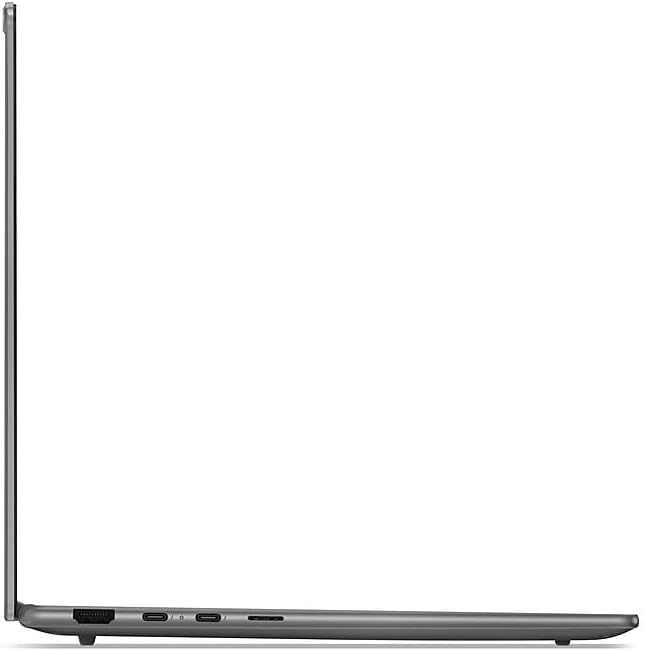
Immaġni: In-naħa tax-xellug view of the Lenovo Slim 7 14ILL10 laptop, illustrating the placement of ports such as USB-C and the headphone jack.

Immaġni: Naħa tal-lemin view of the Lenovo Slim 7 14ILL10 laptop, showing additional ports like USB-A and HDMI.
Webcam
The integrated 5.0MP + IR Camera supports video conferencing and Windows Hello facial recognition for secure login.
Manutenzjoni
Kura tal-batterija
Il-laptop huwa mgħammar b'batterija tal-jone tal-litju ta' 70Wh. Biex timmassimizza l-ħajja tal-batterija:
- Evita temperaturi estremi.
- Tneħħix il-batterija kompletament ta' spiss.
- Aħżen il-laptop b'ċarġ parzjali (madwar 50%) jekk ma tużahx għal perjodi twal.
Tindif tal-Laptop Tiegħek
Uża drapp ratba u mingħajr ħelu ftit dampened with water or a screen cleaner specifically designed for electronics. Avoid harsh chemicals or abrasive materials. Ensure the laptop is powered off and unplugged before cleaning.
Immaġni: Taħt view of the Lenovo Slim 7 14ILL10 laptop, displaying the ventilation grilles for cooling and rubber feet for stability.
Aġġornamenti tas-Software
Regularly check for and install operating system updates (Windows Update) and driver updates from the Lenovo support websit biex tiżgura l-aħjar prestazzjoni u sigurtà.
Issolvi l-problemi
Din it-taqsima tindirizza kwistjonijiet komuni li tista' tiltaqa' magħhom. Għal problemi aktar kumplessi, irreferi għas-servizz ta' appoġġ ta' Lenovo. websit jew ikkuntattja lis-servizz tal-konsumatur.
Bla Enerġija / Ma Jixgħelx
- Kun żgur li l-adapter tal-AC huwa konness sew kemm mal-laptop kif ukoll ma' sokit tal-enerġija li jaħdem.
- Ivverifika li s-sokit tal-enerġija jaħdem billi tqabbad apparat ieħor.
- Ipprova żbokk tad-dawl differenti.
- Jekk il-batterija tkun ixxotta kompletament, ħalliha tiċċarġja għal mill-inqas 30 minuta qabel ma tipprova tixgħelha.
Kwistjonijiet tal-Wiri
- If the screen is blank, try pressing the function key to adjust brightness or toggle the display output (e.g., F7 or F8, refer to keyboard legends).
- Kun żgur li l-moniters esterni huma konnessi u mixgħula sew.
- Ibda mill-ġdid il-laptop.
Problemi ta' Konnettività (Wi-Fi/Bluetooth)
- Iċċekkja jekk il-Wi-Fi jew il-Bluetooth humiex attivati fis-settings tal-Windows.
- Erġa' ibda r-router/modem tiegħek għal problemi bil-Wi-Fi.
- Ensure you are within range of the Wi-Fi network or Bluetooth device.
- Aġġorna s-sewwieqa tan-netwerk mill-appoġġ ta' Lenovo websit.
Speċifikazzjonijiet
| Karatteristika | Dettall |
|---|---|
| Isem tal-Mudell | Slim 7 14ILL10 |
| Numru tal-Mudell | 83MC0005US |
| Proċessur | Intel Core Ultra 7 258V (8-Core, up to 4.8 GHz) |
| Grafika | Intel Arc Graphics 140V |
| Memorja (RAM) | 32GB LPDDR5 8533 MHz |
| Ħażna | SSD ta' 1TB NVMe M.2 |
| Wiri | 14" WUXGA (1920 x 1200) OLED Touchscreen, 60Hz, 600 nits, 100% DCI-P3, Eyesafe, Dolby Vision, DisplayHDR True Black 500 |
| Sistema Operattiva | Windows 11 Pro |
| Tastiera | Tastiera backlit |
| Webcam | 5.0MP + IR Camera |
| Konnettività bla fili | Intel Wi-Fi 7 BE201 (2x2), Bluetooth 5.3 |
| Portijiet | 2x USB-C Thunderbolt 4 / USB4 40Gbps, 1x USB 3.2 Gen 1 (Always On), 1x HDMI v2.1, 1x Headphone/Microphone Combo Jack |
| Batterija | 70Wh Lithium-Ion (sa 6 sigħat) |
| Dimensjonijiet (L x W x H) | 12.28 x 8.63 x 0.55 pulzieri (31.19 x 21.92 x 1.4 ċm) |
| Piż | 2.82 lbs (1.28 kg) |
| Kulur | Luna Griża |
Informazzjoni dwar Garanzija
Your Lenovo Slim 7 14ILL10 laptop comes with a Garanzija Limitata. The product description indicates a 12-month warranty period. For detailed terms and conditions, please refer to the official Lenovo warranty documentation included with your purchase or visit the Lenovo support websit.
If you require support within the warranty period, please contact the retailer or Lenovo customer service with your proof of purchase.
Appoġġ
For technical assistance, driver downloads, and additional resources, please visit the official Lenovo support websit. Tista' ssib FAQs, gwidi għas-soluzzjoni tal-problemi, u informazzjoni ta' kuntatt għas-servizz tal-konsumatur.
Appoġġ onlajn: support.lenovo.com
When contacting support, please have your laptop's model number (83MC0005US) and serial number ready.