
Introduzzjoni
This manual provides instructions for the setup, operation, and maintenance of your replacement remote control for Casio Projectors. Please read this manual thoroughly before use to ensure proper functionality and to maximize the lifespan of your device.
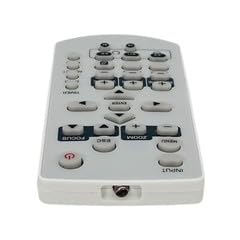
Immaġni 1: Fuqview tal-kontroll remot ta' sostituzzjoni.
Kontenut tal-Pakkett
- 1 x Kontroll mill-Bogħod ta' Sostituzzjoni
Nota: Batteries are not included and must be purchased separately. This is a replacement remote control and may not offer all functions of the original remote. Minor scratches may be present due to bulk item storage.
Setup
1. Installazzjoni tal-batterija
- Sib il-kompartiment tal-batterija fuq wara tal-kontroll remot.
- Żerżaq tiftaħ il-qoxra tal-batterija.
- Daħħal żewġ batteriji AAA (mhux inklużi), waqt li tiżgura l-polarità korretta (+ u -) kif indikat ġewwa l-kompartiment.
- Agħlaq l-għatu tal-batterija sew.
Image 2: Battery compartment for AAA batteries.
2. Pairing (Not Required)
This remote control operates via infrared (IR) technology and typically does not require pairing. It is designed to work directly with compatible Casio projector models upon battery installation.
Istruzzjonijiet Operattivi
Point the remote control directly at the infrared receiver on your Casio projector. Ensure there are no obstructions between the remote and the projector.
Funzjonijiet Bażiċi:
- Power On/Off: Agħfas il- QAWWA buttuna biex tixgħel jew titfi l-proġekter.
- Għażla tal-Input: Uża l- INPUT or source buttons to cycle through available input sources (e.g., HDMI, VGA).
- Navigazzjoni: Uża l-buttuni tal-vleġeġ direzzjonali (LUP, L isfel, Xellug, Lemin) u l- DĦUL or OK buttuna biex tinnaviga l-menus.
- Kontroll tal-Volum: If your projector has audio output, use the VOLUM +/- buttuni biex taġġusta l-livell tal-ħoss.
- Aċċess għall-Menu: Agħfas il- MENU button to access the projector's on-screen display (OSD) menu.
- Ħruġ/Lura: Uża l- ĦRUĠ or LURA button to close menus or return to the previous screen.
Refer to your Casio projector's original manual for specific functions and button layouts, as this replacement remote aims to replicate common controls.
Manutenzjoni
- Tindif: Imsaħ il-kontroll remot b'ċarruta ratba u niexfa. Tużax prodotti tat-tindif likwidi jew materjali li joborxu.
- Sostituzzjoni tal-batterija: Ibdel il-batteriji meta r-rispons tar-remote isir kajman jew jieqaf jaħdem. Dejjem ibdel iż-żewġ batteriji fl-istess ħin b'oħrajn ġodda tal-istess tip (AAA).
- Ħażna: Jekk il-kontroll remot mhux se jintuża għal perjodu twil ta' żmien, neħħi l-batteriji biex tevita t-tnixxija u ħsara potenzjali. Aħżen f'post frisk u niexef.
- Evita l-Ħsara: Do not drop the remote control or expose it to extreme temperatures, humidity, or direct sunlight.
Issolvi l-problemi
- Remote mhux jaħdem:
- Kun żgur li l-batteriji huma mdaħħla sew bil-polarità korretta.
- Ibdel il-batteriji qodma b'batteriji AAA ġodda.
- Check for any obstructions between the remote control and the projector's IR receiver.
- Ensure you are within the maximum operating range (approximately 5 meters).
- Xi funzjonijiet mhux qed jaħdmu:
- This is a replacement remote. Some advanced or specific functions of your original projector remote may not be supported.
- Verify the function exists on your projector model.
Speċifikazzjonijiet
| Numru tal-Mudell | ATFO-RPL-RMT-070925-22182 |
| Proġetturi Kompatibbli | Casio XJ-FC330XN, XJ-F210WN, XJ-UT310WN |
| Teknoloġija tal-Konnettività | Infra-aħmar (IR) |
| Medda Massimu | Madwar 5 metri (16 pied) |
| Tip ta 'batterija | 2 x AAA (mhux inklużi) |
| Kulur | White/Light Grey |
| Karatteristika Speċjali | Disinn ergonomiku |
| Manifattur | VieRemote |
Garanzija u Appoġġ
This product is a replacement remote control. For specific warranty information, please refer to the seller's policy at the time of purchase. For technical support or inquiries, please contact the seller directly through the platform where the purchase was made.


