
Introduzzjoni
This manual provides detailed instructions for the Lenovo IdeaPad Slim 3 15IRH10 Laptop. It covers initial setup, operational guidance, maintenance procedures, troubleshooting common issues, and a comprehensive list of technical specifications. Please read this manual thoroughly to ensure optimal use and longevity of your device.
Prodott Overview
The Lenovo IdeaPad Slim 3 15IRH10 is a high-performance laptop designed for productivity and everyday computing. Familiarize yourself with its components and layout.
Quddiem View
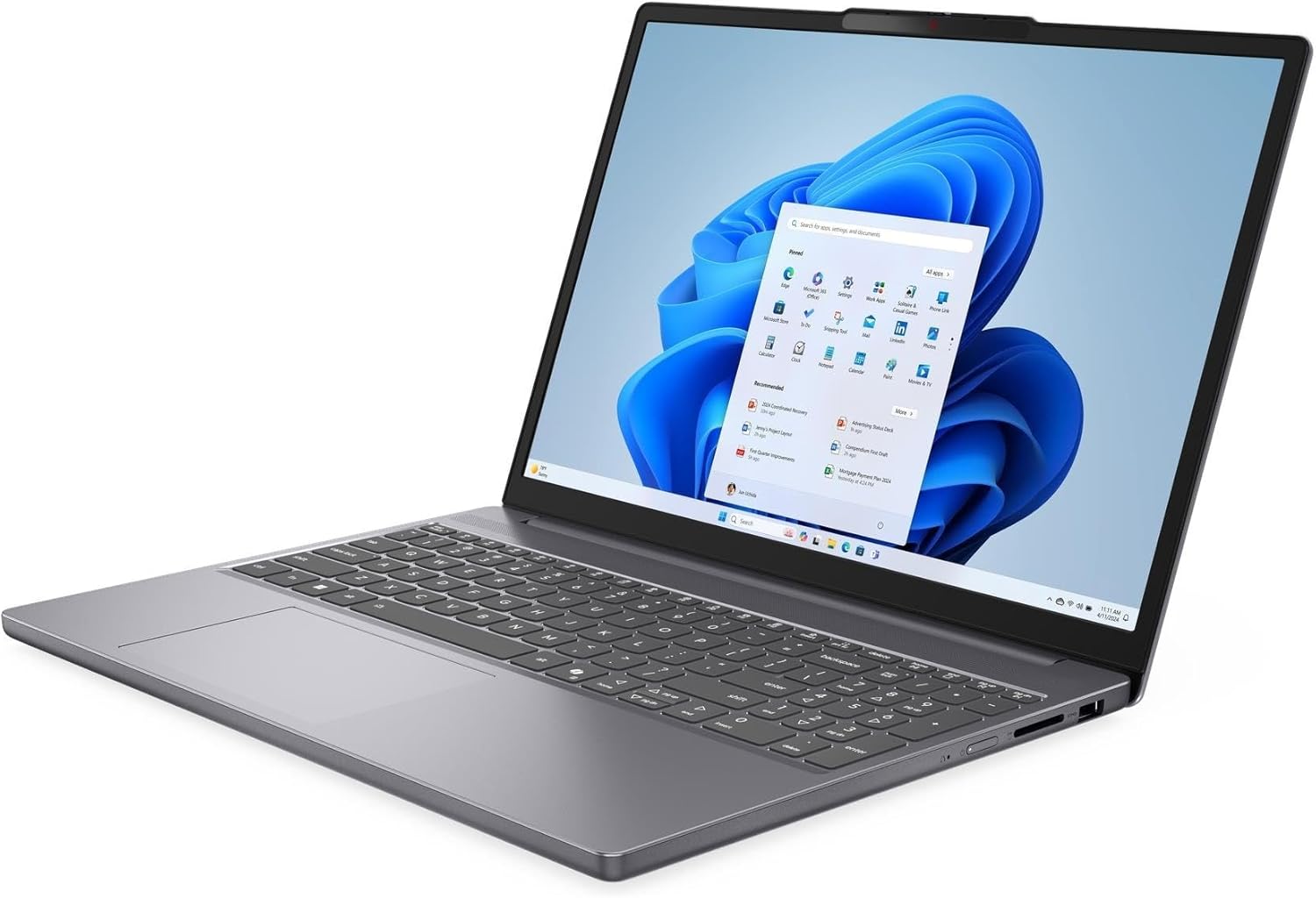
This image displays the laptop from the front, showcasing the 15.3-inch WUXGA display, keyboard with Numpad, and touchpad. The integrated 720p HD camera with a privacy shutter is visible at the top bezel of the screen.
Ġenb Views (Ports and Connectors)

The sides of the laptop house various ports for connectivity. These include one USB-C 3.2 Gen 1 port (supporting Power Delivery and DisplayPort 1.4), two USB 3.2 Gen 1 ports, one HDMI v1.4 port, and a headphone/microphone combo jack. The power input port is also located on one of the sides.
Magħluq View

This image shows the laptop in its closed state, highlighting its slim profile and the Lenovo branding on the lid.
Setup
Spakkjar
Carefully remove the laptop and all accessories from the packaging. Ensure all components listed in the packing slip are present, including the laptop, power adapter, and any documentation.
Qawwa Inizjali Mixgħula
- Connect the power adapter to the laptop's power input port and then to an electrical outlet.
- Open the laptop lid and press the power button, typically located on the top-right side of the keyboard or on the side chassis.
- Follow the on-screen instructions to complete the initial setup of Windows 10 Pro, including language selection, network connection, and user account creation.
Konnessjoni Periferali
- Apparat USB: Connect external mice, keyboards, or storage devices to the available USB 3.2 Gen 1 ports or the USB-C 3.2 Gen 1 port.
- Display Estern: Use an HDMI cable to connect an external monitor or projector to the HDMI v1.4 port. The USB-C port also supports DisplayPort 1.4 for compatible displays.
- Apparat Awdjo: Ipplaggja l-headphones jew l-ispikers esterni fil-jack combo tal-headphones/mikrofonu.
Istruzzjonijiet Operattivi
Ġestjoni tal-Enerġija
- Tixgħel/Jitfi: Agħfas il-buttuna tal-qawwa biex tixgħel. Biex titfi, ikklikkja l-buttuna Start fil-Windows, imbagħad agħżel Power > Shut down.
- Modalità Sleep: Close the lid or select Power > Sleep from the Start menu to put the laptop into sleep mode.
- Ibda mill-ġdid: Select Power > Restart from the Start menu to restart the system.
Tastiera u Touchpad

The laptop features a full-size keyboard with a Numpad for efficient data entry. The touchpad supports multi-touch gestures for navigation. Refer to Windows settings for customizing touchpad sensitivity and gestures.
- Ċwievet tal-Funzjoni (Fn): Use the Fn key in combination with the F1-F12 keys to access special functions like adjusting brightness, volume, or enabling/disabling Wi-Fi.
- Tastiera numerika: The dedicated Numpad on the right side of the keyboard allows for quick numerical input.
Display Settings
Adjust display settings to suit your preferences:
- Luminożità: Use the dedicated function keys (e.g., Fn + F5/F6) or Windows display settings to adjust screen brightness.
- Riżoluzzjoni: The native resolution is 1920 x 1200 (WUXGA). You can change display scaling and resolution through Windows Display Settings.
Konnessjoni ma 'Wi-Fi u Bluetooth
- Wi-Fi: Click the Wi-Fi icon in the taskbar, select your desired network, enter the password if prompted, and click Connect. The laptop supports Intel Wi-Fi 6 AX203 (2x2).
- Bluetooth: Go to Windows Settings > Devices > Bluetooth & other devices to pair with Bluetooth 5.2 compatible devices like headphones or speakers.
Uża l-Kamera
The laptop is equipped with a 720p HD camera. To use it, open the Camera app in Windows or any video conferencing application. The camera features a physical privacy shutter; slide it to cover the lens when not in use to ensure privacy.
Manutenzjoni
Tindif tal-Laptop
- Skrin: Uża drapp ratba u mingħajr ħelu ftit dampImlaħlaħ bl-ilma jew b'soluzzjoni għat-tindif tal-iskrin. Tisprejjax likwidu direttament fuq l-iskrin.
- Tastiera u Chassis: Uża drapp artab u niexef. Għal ħmieġ iebes, neħħi ftit drapp.amp jista' jintuża drapp. Evita kimiċi ħarxa jew materjali li joborxu.
- Ventijiet: Periodically clean the ventilation openings with compressed air to prevent dust buildup, which can affect cooling performance.
Kura tal-batterija
- Għal ħajja ottimali tal-batterija, evita li tiċċarġja l-batterija kompletament ta' spiss.
- Store the laptop in a cool, dry place and avoid exposing it to extreme temperatures.
- Jekk se taħżen il-laptop għal perjodu estiż, kun żgur li l-batterija tkun iċċarġjata għal madwar 50-60%.
Aġġornamenti tas-Software
Aġġorna s-sistema operattiva u d-drivers tiegħek regolarment biex tiżgura prestazzjoni, sigurtà u kompatibilità ottimali.
- Aġġornamenti tal-Windows: Go to Windows Settings > Update & Security > Windows Update and check for available updates.
- Aġġornamenti tas-sewwieq: Żur l-appoġġ uffiċjali ta' Lenovo website for your specific model to download and install the latest drivers for components like graphics, Wi-Fi, and chipset.
Issolvi l-problemi
Din it-taqsima tindirizza kwistjonijiet komuni li tista’ tiltaqa’ magħhom bil-laptop tiegħek.
Kwistjonijiet Komuni u Soluzzjonijiet
- Ebda Qawwa:
- Kun żgur li l-adapter tal-enerġija huwa konness sew kemm mal-laptop kif ukoll ma' sokit elettriku li jaħdem.
- Iċċekkja jekk il-batterija għandhiex biżżejjed ċarġ.
- Ipprova żbokk tad-dawl differenti.
- Display Problems (No image, flickering):
- Aġġusta l-luminożità tal-iskrin billi tuża ċwievet tal-funzjoni.
- If using an external monitor, ensure the cable is properly connected and the correct display output is selected (Fn + F7 or Windows Display Settings).
- Ibda mill-ġdid il-laptop.
- Kwistjonijiet ta' Konnettività Wi-Fi:
- Ensure Wi-Fi is enabled (check function keys or Windows settings).
- Erġa' ibda r-router u l-modem tiegħek.
- Insieh in-netwerk u erġa' qabbad.
- Update Wi-Fi drivers from the Lenovo support websit.
- Prestazzjoni bil-mod:
- Agħlaq l-applikazzjonijiet bla bżonn li jkunu qed jaħdmu fl-isfond.
- Iċċekkja u installa kwalunkwe aġġornament pendenti tal-Windows.
- Mexxi tindif tad-diska u deframmentazzjoni (għall-HDDs, mhux neċessarju għall-SSDs).
- Skennja għal malware jew viruses.
Speċifikazzjonijiet
| Karatteristika | Speċifikazzjoni |
|---|---|
| Isem tal-Mudell | IdeaPad Slim 3 15IRH10 |
| Proċessur | Intel Core i7-13620H tal-13 Ġenerazzjoni (10 qlub, sa 4.9 GHz) |
| Grafika | Grafika Intel Iris Xe (Integrata) |
| Wiri | 15.3-inch WUXGA (1920 x 1200) LED-backlit Anti-glare 300 nits 45% NTSC, 60Hz |
| RAM | 24GB DDR5 SDRAM 4800 MHz |
| Ħażna | SSD NVMe M.2 ta' 2TB |
| Sistema Operattiva | Windows 10 Pro |
| Tastiera | Daqs sħiħ b'Numpad |
| Webcam | 720p HD Camera with Privacy Shutter |
| Konnettività bla fili | Intel Wi-Fi 6 AX203 (2x2), Bluetooth 5.2 |
| Portijiet | 1x USB-C 3.2 Gen 1 (PD, DP 1.4, 5Gbps), 2x USB 3.2 Gen 1 (5Gbps), 1x HDMI v1.4, 1x Headphone/Microphone Combo Jack |
| Batterija | 50Wh Lithium-Ion (sa 6 sigħat) |
| Dimensjonijiet (LxWxH) | 13.54 x 9.54 x 0.71 pulzieri |
| Piż | 6.97 pounds (Note: Product description states 3.51 lbs, using specification data for consistency) |
| Kulur | Luna Griża |
Garanzija u Appoġġ
The Lenovo IdeaPad Slim 3 15IRH10 Laptop comes with a 12-month warranty, as specified by the manufacturer. For technical support, warranty claims, or service inquiries, please visit the official Lenovo support website or contact their customer service. It is recommended to keep your purchase receipt and the laptop's model number (83K100R3IN) readily available when contacting support.
Tista' ssib riżorsi ta' appoġġ addizzjonali u informazzjoni ta' kuntatt fuq Appoġġ Lenovo Websit.