
1. Introduzzjoni
Thank you for choosing the MERCUSYS MC510 2K 3MP Outdoor WiFi Camera. This manual provides detailed instructions for the installation, operation, and maintenance of your security camera. Please read this manual carefully before use to ensure proper functionality and safety. The MC510 offers 2K 3MP resolution, 360-degree panoramic view, color night vision, two-way audio, smart motion detection, and IP65 weather resistance for reliable outdoor surveillance.

Image: MERCUSYS MC510 2K Pan/Tilt Wi-Fi Camera mounted on a wall, highlighting its 2K resolution and IP65 weather resistance.
2. Informazzjoni dwar is-Sigurtà
- Ensure the power adapter is suitable for your local power supply.
- Tesponix il-kamera għal temperaturi estremi, umdità, jew ambjenti korrużivi.
- Evita li tpoġġi l-kamera ħdejn kampi elettromanjetiċi qawwija.
- Żomm il-kamera u l-aċċessorji tagħha fejn ma jintlaħqux mit-tfal.
- Uża biss aċċessorji speċifikati mill-manifattur.
- Skonnettja l-enerġija qabel ma tnaddaf jew tagħmel manutenzjoni.
- The camera is IP65 rated for outdoor use, but avoid submerging it in water.
3. Kontenut tal-Pakkett
Ivverifika li l-oġġetti kollha huma preżenti fil-pakkett tiegħek:
- MC510 Camera × 1
- Adapter tal-Enerġija × 1
- Mounting Sticker × 1
- Bracket tal-Immuntar × 1
- Mounting Screws × 4 + Bracket Screws × 2
- Ankri tal-Immuntar × 4
- Waterproof Gasket × 1
- Gwida Quick Start
4. Prodott Aktarview
The MERCUSYS MC510 is a versatile outdoor security camera designed to provide comprehensive surveillance with advanced features.
Karatteristiċi ewlenin:
- 2K QHD with 360° View: Provides clear 2K 3MP video and full 360° horizontal coverage to see every corner and detail.
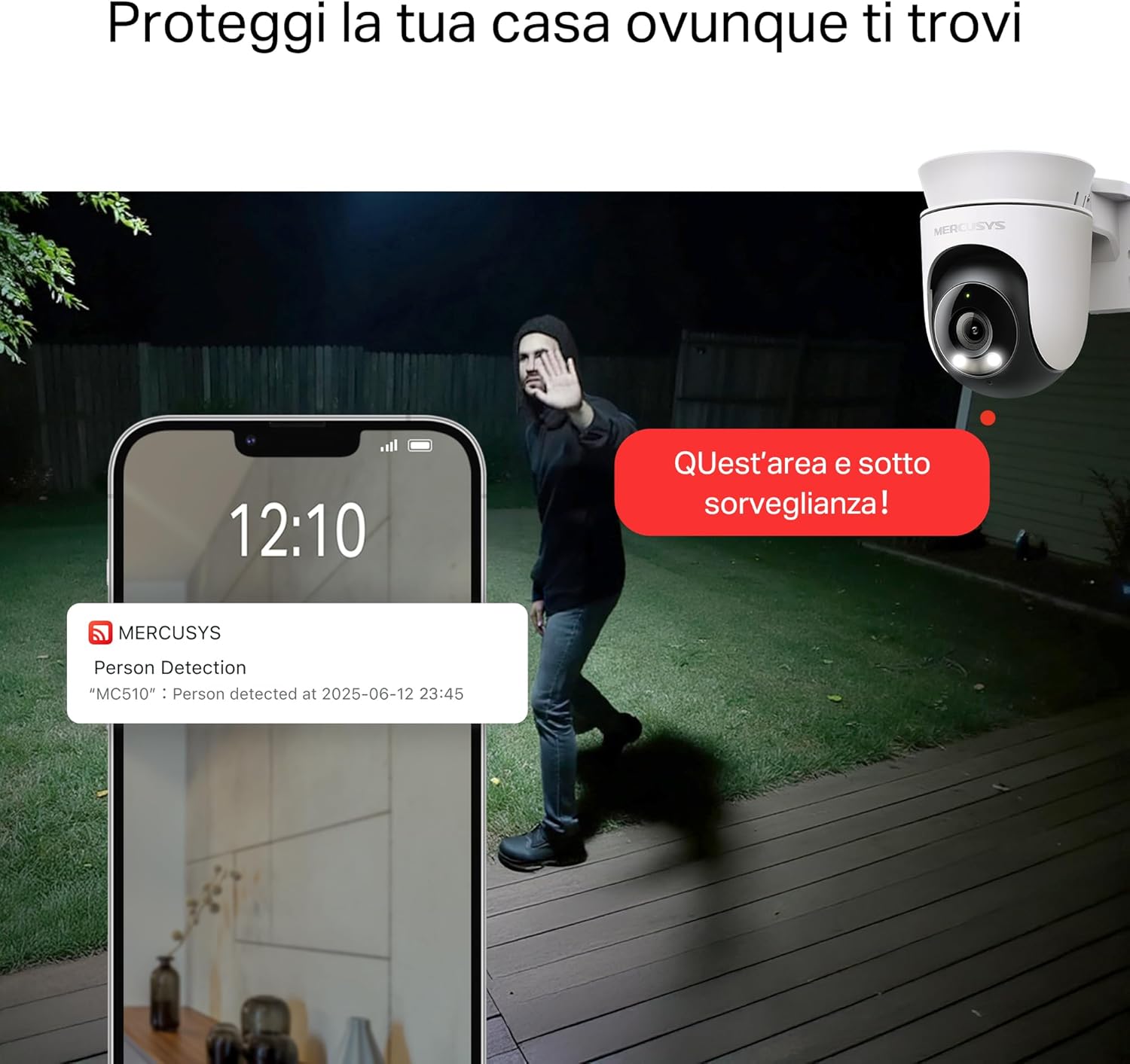
- Smart Motion Detection and Person Tracking: Automatically detects and tracks motion or people, ensuring key activities remain in focus.
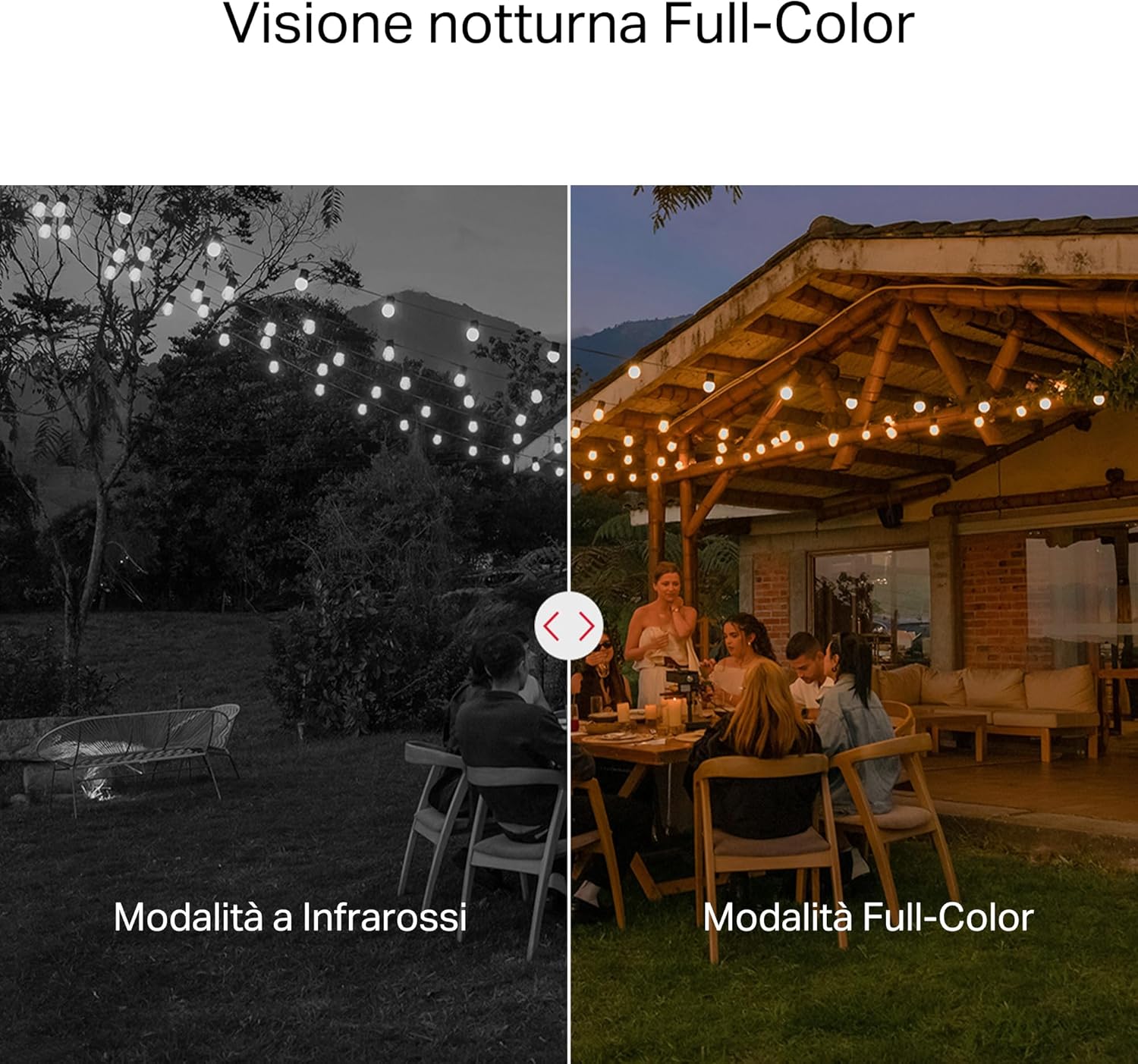
- Viżjoni bil-lejl bil-kulur: Provides vivid and detailed images even at night for 24/7 protection.
- Customizable Activity Zones: Helps filter out irrelevant events and sends alerts only when necessary.
- Ħażna Lokali u Cloud: Supports microSD cards up to 512GB and cloud storage for secure and flexible video backup.
- Reżistenti għat-temp għal Użu fil-beraħ: IP65 certified for reliable performance in rain, dust, or snow. Easily mounts on walls, ceilings, or poles.
- Privacy Protection with Lens Shield: Activate the physical lens cover when surveillance is not needed for greater peace of mind at home.
- Awdjo f'żewġ direzzjonijiet: Ikkomunika direttament permezz tal-kamera.
Visual Features:

High-resolution 2K 3MP video capture.
360-degree panoramic rotation for full coverage.
Full-Color Night Vision for clear images in low light.

Physical lens shield for enhanced privacy.
5. Setup
5.1 Installazzjoni Fiżika
The MC510 camera is designed for outdoor use and can be mounted on walls, ceilings, or poles. Its IP65 rating ensures protection against dust and water jets.
- Agħżel Post: Agħżel post adattat fil-beraħ li jipprovdi l-aspett mixtieq viewing angle and has a stable Wi-Fi signal.
- Immuntar: Use the provided mounting sticker to mark drill holes. Drill holes, insert anchors, and secure the mounting bracket with screws. Attach the camera to the bracket.
- Konnessjoni tal-Enerġija: Connect the power adapter to the camera and plug it into a power outlet. Ensure the waterproof gasket is properly installed for outdoor power connections.

Image: The camera is shown mounted outdoors, demonstrating its weather-resistant design.
5.2 Installazzjoni u Konnessjoni tal-App
The MC510 connects exclusively via Wi-Fi. An Ethernet port is not available.
- Niżżel l-App: Download the official MERCUSYS app from your smartphone's app store (iOS or Android).
- Oħloq Kont: Iftaħ l-app u oħloq kont ġdid jew idħol jekk diġà għandek wieħed.
- Żid Kamera: Follow the in-app instructions to add your MC510 camera. This typically involves scanning a QR code on the camera and connecting it to your home Wi-Fi network.
5.3 Installazzjoni tal-Kard MicroSD
For local storage, install a microSD card (up to 512GB, not included).
- Itfi: Disconnect the camera from power before inserting or removing the microSD card.
- Sib is-Slott: Refer to the camera's physical design to locate the microSD card slot, often protected by a cover.
- Daħħal il-Karta: Daħħal bil-mod il-karta microSD fl-islott sakemm tikklikkja f'postha.
- Karta tal-Format: After powering on the camera and connecting it to the app, navigate to the camera settings to format the microSD card.

Image: Close-up of the camera showing the microSD card slot, indicating flexible storage options.
6. Istruzzjonijiet Operattivi
6.1 Ħaj View & Daqq
- Live View: Open the MERCUSYS app and select your MC510 camera to view l-għalf ħaj.
- Kontroll tal-Pan/Tilt: Use the controls in the app to remotely rotate the camera horizontally (pan) and vertically (tilt) to adjust the viewangolu tal-ing.
- Daqq: Aċċess irreġistrat footage from the app's playback section. You can filter by date and event.

Image: Illustration of 360-degree rotation with motion tracking.
6.2 Motion Detection & Tracking
- Ippermetti d-Detezzjoni: In the app settings, enable motion detection and person tracking.
- Customize Activity Zones: Iddefinixxi żoni speċifiċi fil-kamera view where you want motion to be detected. This helps reduce false alarms.
- Irċievi Twissijiet: The camera will send notifications to your smartphone when motion or a person is detected in the monitored zones.

Image: A person running in a yard, with detection boxes, demonstrating motion detection and tracking.
6.3 Awdjo b'żewġ direzzjonijiet
Il-mikrofonu u l-ispiker integrati jippermettu komunikazzjoni f'żewġ direzzjonijiet.
- Activate Audio: Fil-live view interface of the app, tap the microphone icon to speak through the camera.
- Isma': The speaker icon allows you to hear audio from the camera's vicinity.

Image: A person detected by the camera, with a phone notification and an on-screen alert, demonstrating customizable alarms and two-way audio.
6.4 Viżjoni bil-Lejl bil-Kulur
The MC510 provides full-color night vision for enhanced clarity in low-light conditions.
- Attivazzjoni Awtomatika: Color night vision activates automatically in low-light conditions.
- Modalità infra-aħmar: The camera also supports traditional infrared night vision (black and white) if preferred or in extremely dark environments.

Image: Comparison of infrared (monochrome) and full-color night vision modes.
6.5 Privacy Zone & Lens Shield
Protect your privacy by defining privacy zones or activating the physical lens shield.
- Żoni ta' Privatezza: In the app, you can set up specific areas within the camera's view to be excluded from recording.
- Lens Shield: For complete privacy, use the app to activate the physical lens shield, which covers the camera lens.
7. Manutenzjoni
7.1 Tindif
- Kun żgur li l-kamera tkun mitfija qabel ma tnaddafha.
- Uża drapp artab u niexef biex timsaħ il-korp tal-kamera.
- For the lens, use a lens cleaning cloth to avoid scratches. Do not use harsh chemicals or abrasive cleaners.
7.2 Aġġornamenti tal-Firmware
Regularly check for firmware updates through the MERCUSYS app. Updates provide new features, performance improvements, and security enhancements. Follow the in-app instructions to perform updates.
8 Issolvi l-problemi
If you encounter issues with your MERCUSYS MC510 camera, refer to the following common problems and solutions:
| Problema | Soluzzjoni Possibbli |
|---|---|
| Il-kamera ma tikkonnettjax mal-Wi-Fi | Ensure the camera is within range of your Wi-Fi router. Check Wi-Fi password. Restart the camera and router. The MC510 only supports Wi-Fi connection, no Ethernet. |
| Kwalità fqira tal-vidjo | Check your Wi-Fi signal strength. Ensure the camera lens is clean. Adjust camera placement to avoid glare or obstructions. |
| Motion detection issues | Verify motion detection is enabled in the app. Adjust sensitivity settings. Ensure activity zones are correctly configured. |
| MicroSD card not working | Ensure the card is inserted correctly. Format the microSD card via the app. Try a different compatible microSD card. Power cycle the camera after inserting the card. |
| No two-way audio | Check microphone and speaker settings in the app. Ensure your phone's volume is up. |
9. Speċifikazzjonijiet
| Karatteristika | Dettall |
|---|---|
| Brand | MERCUSYS |
| Isem tal-Mudell | MC510 |
| Użu fuq ġewwa/barra | Barra |
| Protokoll tal-Konnessjoni | Wi-Fi |
| Tip ta 'Immuntar | Saqaf, Arblu, Ħajt |
| Riżoluzzjoni tal-Immaġni Ftit | 3 MP |
| Klassifikazzjoni tal-Protezzjoni Internazzjonali | IP65 |
| Teknoloġija bla fili | Wi-Fi |
| Batteriji Meħtieġa | Nru |
| Riżoluzzjoni tal-Qbid tal-Vidjo | 2K 3MP |
| Format tal-Qbid tal-Vidjo | MPEG-4 |
| Numru ta' Oġġetti | 1 |
| Komponenti Inklużi | MC510 Camera, Power Adapter, Mounting Sticker, Mounting Bracket, Mounting Screws, Mounting Anchors, Waterproof Gasket, Quick Start Guide |
| Pajjiż ta' Oriġini | Iċ-Ċina |
| Manifattur | TP-Link |
| Dimensjonijiet tal-oġġett | 14.1 x 9.3 x 12.2 ċm |
10. Garanzija u Appoġġ
Għal informazzjoni dwar il-garanzija u appoġġ tekniku, jekk jogħġbok irreferi għall-websajt uffiċjali ta' MERCUSYS. website or contact their customer service. Details can typically be found in the Quick Start Guide included with your product or on the manufacturer's websit.
Appoġġ onlajn: Żur www.mercusys.com for FAQs, user manuals, and support resources.