
Introduzzjoni
This manual provides essential information for the setup, operation, maintenance, and troubleshooting of your AWOW Mini PC, Model BA7. Please read these instructions carefully before using the device.

Immaġni: Fuqview of the AWOW BA7 Mini PC, highlighting its compact design and key features.
Kontenut tal-Pakkett
Ivverifika li l-oġġetti kollha huma preżenti fil-pakkett:
- AWOW BA7 Mini PC
- Adapter tal-Enerġija
- Viti tal-Immuntar
- VESA Mount Bracket
- Cable HDMI
- Manwal għall-Utent (dan id-dokument)

Image: Illustration of the AWOW BA7 Mini PC and its included accessories: power adapter, screws, VESA mount, HDMI cable, and user manual.
Setup Istruzzjonijiet
- Ikkonnettja l-Periferali: Connect your keyboard, mouse, and monitor(s) to the appropriate ports on the Mini PC.
Immaġni: Quddiem view of the Mini PC showing the Power Button, Type-C port, USB 3.2 ports, and 3.5mm Audio Jack.

Immaġni: Wara view of the Mini PC showing the DC IN, DP1.2, HDMI2.0, USB 2.0 ports, and RJ45 LAN port.
- Konnessjoni tal-Enerġija: Connect the power adapter to the DC IN port on the Mini PC, then plug the adapter into a power outlet.
- Qawwa Mixgħul: Agħfas il-buttuna tal-qawwa li tinsab fuq quddiem tal-Mini PC. Is-sistema tibda.
- Setup Inizjali: Segwi l-istruzzjonijiet fuq l-iskrin biex tlesti s-setup inizjali tal-Windows 11 Pro, inkluż il-lingwa, ir-reġjun, il-konnessjoni tan-netwerk, u l-ħolqien tal-kont tal-utent.
- Konnessjoni tan-Netwerk:
- Wajer: Connect an Ethernet cable to the RJ45 LAN port for a stable wired connection.
- Wireless: During Windows setup or via Windows settings, connect to your Wi-Fi network using the built-in WiFi 6.
Istruzzjonijiet Operattivi
Operazzjoni Bażika
- Power On/Off: Press the power button to turn on the PC. To shut down, use the Windows Start menu options (Shut down, Restart, Sleep). A short press on the power button can put the PC to sleep. A long press (approx. 5 seconds) will force a shutdown.
- Output tal-Wiri: The Mini PC supports up to three 4K displays simultaneously via DP, HDMI, and USB-C. Connect your monitors and configure display settings in Windows.

Image: A user working with a triple monitor setup, demonstrating the Mini PC's multi-display capability.
- Konnettività USB: Utilize the USB 2.0 and USB 3.0 ports for connecting external devices such as external hard drives, USB flash drives, printers, and other peripherals. The Type-C port also supports data transfer and display output.
- Awdjo: Qabbad il-headphones jew l-ispikers mal-jack tal-awdjo ta' 3.5mm.
Użu Avvanzat
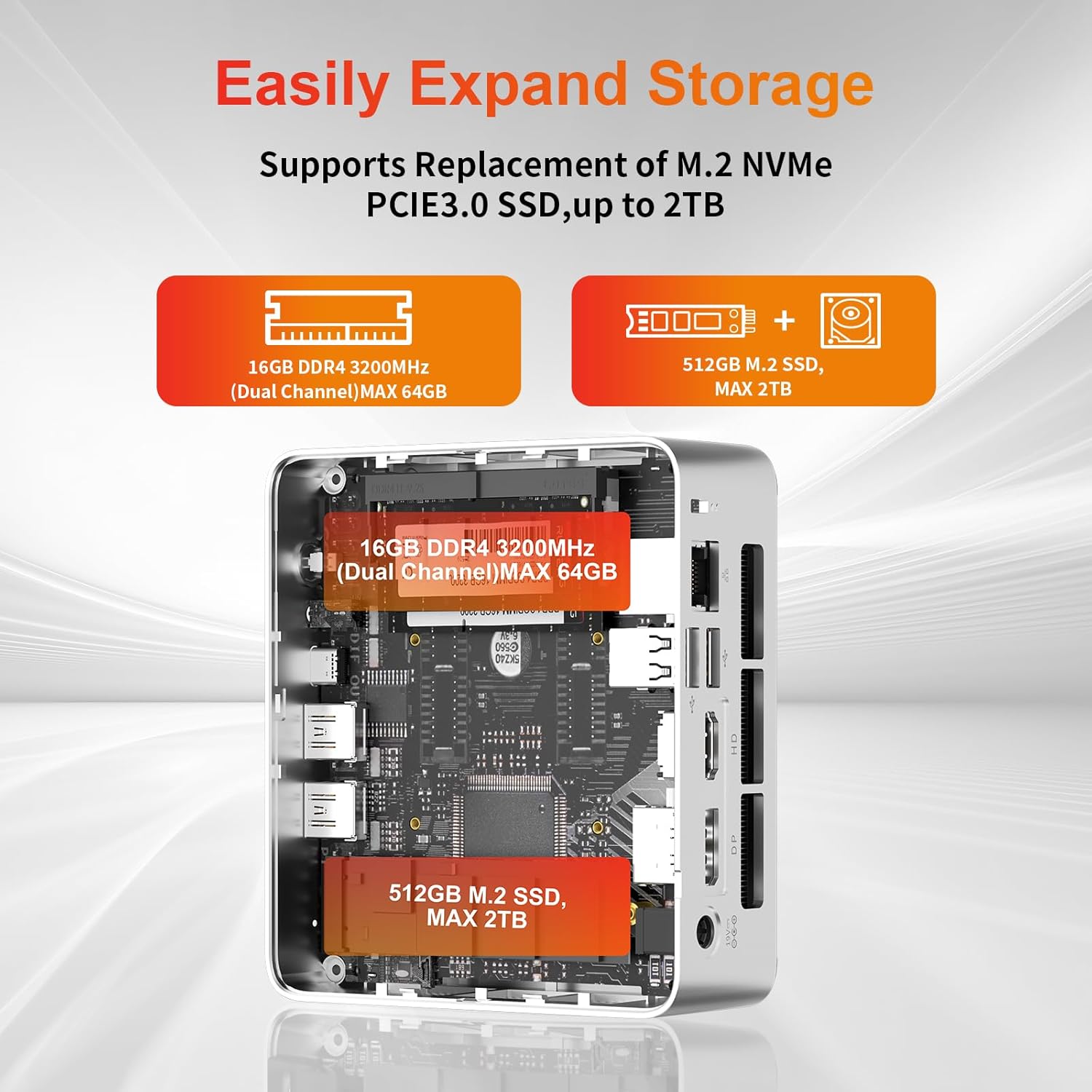
- Espansjoni tal-Ħażna: The Mini PC supports replacement of the M.2 NVMe PCIe 3.0 SSD up to 2TB. It also supports memory expansion up to 64GB DDR4.

Image: Diagram illustrating the internal components and options for expanding storage (M.2 SSD up to 2TB) and RAM (DDR4 up to 64GB).
- Immuntar VESA: Use the included VESA mount bracket to attach the Mini PC to the back of a compatible monitor or to a wall mount, saving desk space.
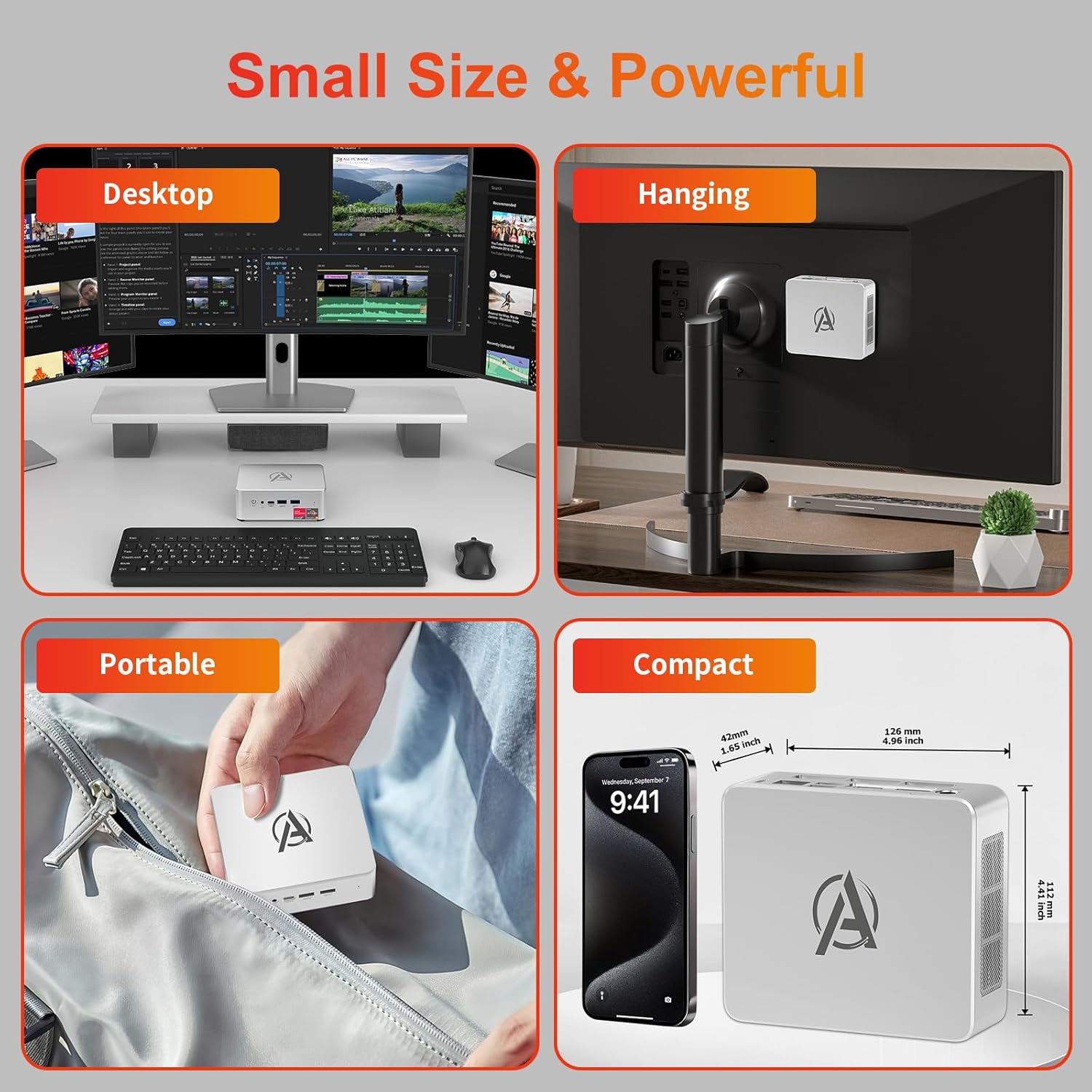
Image: Various usage scenarios for the Mini PC, including desktop, VESA-mounted behind a monitor, portable, and compact size comparison.
Manutenzjoni
- Tindif: Use a soft, dry cloth to clean the exterior of the Mini PC. Do not use liquid cleaners or aerosols. Ensure ventilation openings are free from dust.
- Aġġornamenti tas-Software: Iċċekkja u installa regolarment aġġornamenti tal-Windows u aġġornamenti tad-drajver biex tiżgura prestazzjoni u sigurtà ottimali.
- Ġestjoni tas-Sħana: Ensure the Mini PC is placed in a well-ventilated area. Avoid blocking the air vents. The intelligent cooling system is designed for low noise and efficient heat dissipation.

Image: Diagram illustrating the internal cooling fan and heat sink, showing airflow for efficient heat dissipation.
- Ġestjoni tal-Ħażna: Naddaf perjodikament dak li mhux meħtieġ files and applications to maintain system performance.
Issolvi l-problemi
- Ebda Qawwa:
- Iċċekkja jekk l-adapter tal-enerġija huwiex imqabbad sew kemm mal-Mini PC kif ukoll mas-sokit tal-enerġija.
- Kun żgur li l-iżbokk tad-dawl huwa funzjonali.
- Ipprova żbokk tad-dawl differenti.
- Ebda Display:
- Verify that the HDMI/DP/USB-C cable is securely connected to both the Mini PC and the monitor.
- Kun żgur li l-monitor ikun mixgħul u ssettjat għas-sors tad-dħul korrett.
- Ipprova kejbil tad-displej jew monitor differenti jekk disponibbli.
- Prestazzjoni bil-mod:
- Agħlaq l-applikazzjonijiet bla bżonn li jkunu qed jaħdmu fl-isfond.
- Iċċekkja u installa kwalunkwe aġġornament pendenti tal-Windows jew aġġornamenti tas-sewwieqa.
- Kun żgur li hemm biżżejjed spazju ħieles fuq l-SSD.
- Immonitorja l-użu tas-CPU u r-RAM fit-Task Manager biex tidentifika proċessi li jużaw ħafna riżorsi.
- Kwistjonijiet ta' Konnettività tan-Netwerk:
- For wired connections, ensure the Ethernet cable is properly connected and the router is working.
- For Wi-Fi, check if the Wi-Fi adapter is enabled and connected to the correct network. Restart your router/modem.
- Is-Sistema Tiffriża/Tħabbat:
- Erġa' ibda l-Mini PC.
- Ensure the system is not overheating (check ventilation).
- Run a system diagnostic or check Windows Event Viewer for error messages.
Speċifikazzjonijiet
| Mudell | AWOW BA7 Mini PC |
| Proċessur | AMD Ryzen 5 7430U (6 Qlub, 12-il Ħjut, sa 4.3 GHz) |
| Grafika | Grafika AMD Radeon Integrata |
| RAM | 16GB DDR4 (Espansibbli sa 64GB) |
| Ħażna | 512GB PCIe 3.0 M.2 SSD (Expandable up to 2TB) |
| Sistema Operattiva | Windows 11 Pro |
| Output tal-vidjo | DP1.2 (4K@60Hz), HDMI2.0 (4K@60Hz), USB-C (4K@60Hz) - Supports Triple Display |
| Konnettività | WiFi 6, Bluetooth 5.2, 1000Mbps RJ45 LAN |
| Portijiet | 2x USB 3.2, 2x USB 2.0, 1x Type-C (Full Function), 1x DP1.2, 1x HDMI2.0, 1x RJ45 LAN, 1x 3.5mm Audio Jack, 1x DC IN |
| Dimensjonijiet | 126mm x 112mm x 42mm (madwar 4.96 x 4.41 x 1.65 pulzieri) |
| Piż | 398g (apparat biss) Image: The Mini PC with its dimensions (126mm x 112mm x 42mm) and weight (398g) labeled. |
Garanzija u Appoġġ
AWOW provides comprehensive support for its products.
- Garanzija: This product includes a 12-month service period from the date of purchase, covering manufacturing defects.
- Appoġġ Tekniku: Lifetime technical support is available for all AWOW products.
- Kuntatt: For technical assistance, warranty claims, or any product-related inquiries, please visit the official AWOW websit jew ikkuntattja lis-servizz tal-konsumatur tagħhom.

Image: AWOW brand message emphasizing fulfillment, lifetime technical support, and 12-month service.