
1. Introduzzjoni
Welcome to the Thunderobot Zero 16 Pro Gaming Laptop user manual. This guide provides essential information for setting up, operating, maintaining, and troubleshooting your new high-performance gaming laptop. The Thunderobot Zero 16 Pro is engineered for an immersive gaming experience, featuring an Intel Core Ultra 9 275HX processor, NVIDIA GeForce RTX 5080 graphics, a 16-inch QHD+ 360Hz display, 64GB DDR5 RAM, and a 2TB PCIe M.2 SSD.
Please read this manual thoroughly to ensure proper usage and to maximize the potential of your device.
2. Setup
2.1 Tneħħija tal-kaxxa u Spezzjoni Inizjali
Carefully remove all components from the packaging. Verify that all items are present and undamaged. The package should include the Thunderobot Zero 16 Pro laptop, power adapter, and this user manual.
2.2 Konnessjoni tal-Adapter tal-Enerġija
Qabbad l-adapter tal-enerġija mal-port tad-dħul tal-enerġija tal-laptop u mbagħad daħħalha f'sokit tal-ħajt. Huwa rakkomandat li tiċċarġja l-batterija kompletament qabel l-ewwel użu.

Image: The Thunderobot Zero 16 Pro Gaming Laptop in a closed position, displaying its sleek design and the brand logo on the lid.
2.3 L-Ewwel Mixgħul
Press the power button located on the keyboard to turn on the laptop. Follow the on-screen instructions to complete the initial Windows 11 Home setup.
2.4 Konnessjoni tal-Periferali
The laptop offers various ports for connecting external devices. Refer to the 'Ports and Slots' section for detailed port identification.
Immaġni: Dettaljata view of the laptop's rear and side ports, including USB-A, USB-C, HDMI, and RJ-45, with labels for easy identification.
3. Operazzjoni
3.1 Tastiera u Touchpad
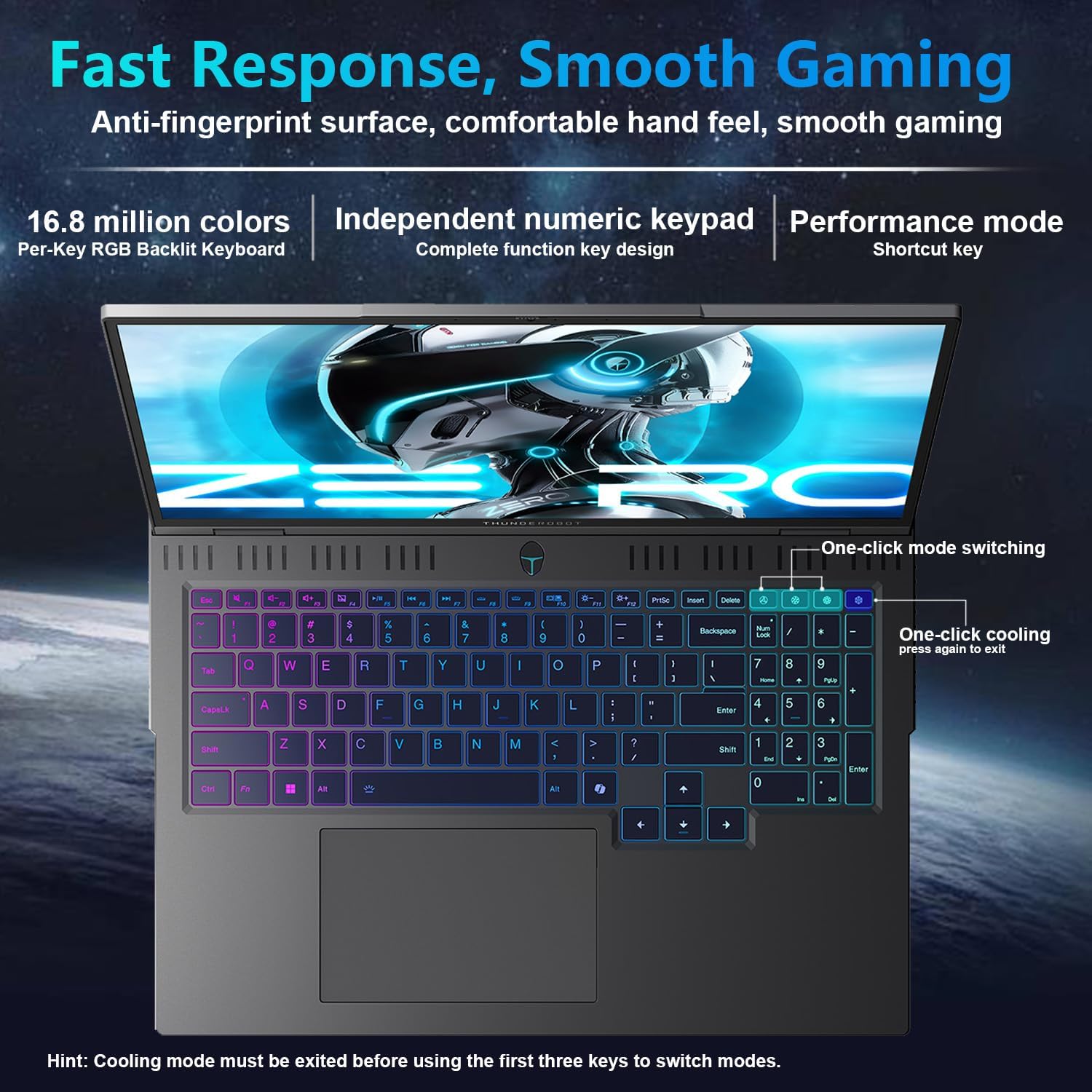
The Thunderobot Zero 16 Pro features a full-size keyboard with per-key customizable RGB lighting and an independent numeric keypad. The touchpad supports multi-touch gestures for intuitive navigation.
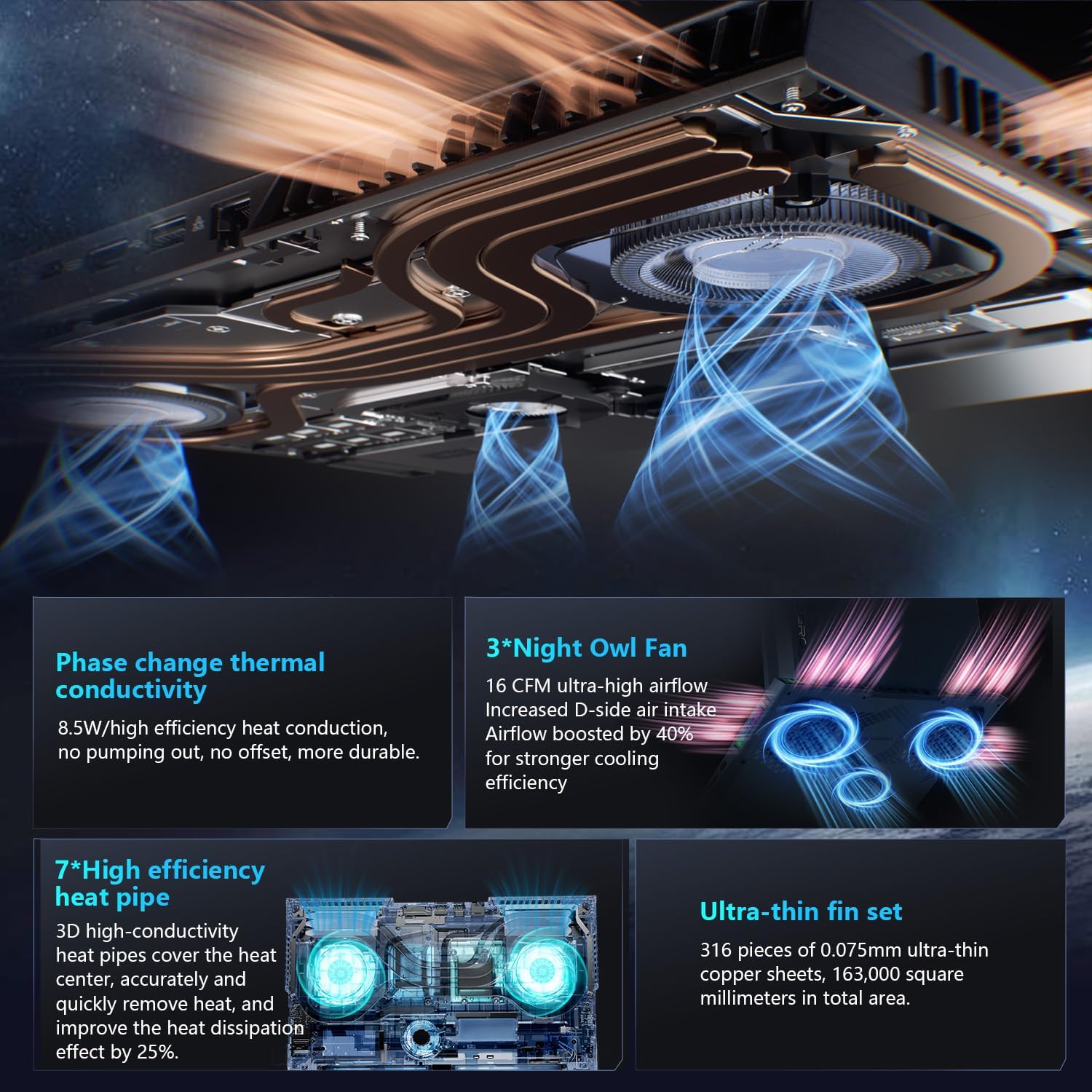
Image: A top-down perspective of the laptop's keyboard, showcasing its per-key RGB backlighting and the layout of the keys, including the numeric keypad.
3.2 Settings tal-wiri
The 16-inch QHD+ (2560x1600) display offers a 360Hz refresh rate. To utilize the highest refresh rate, ensure the dedicated graphics direct connection mode is enabled in the control center. The display also incorporates advanced eye-care technology for comfortable viewing.
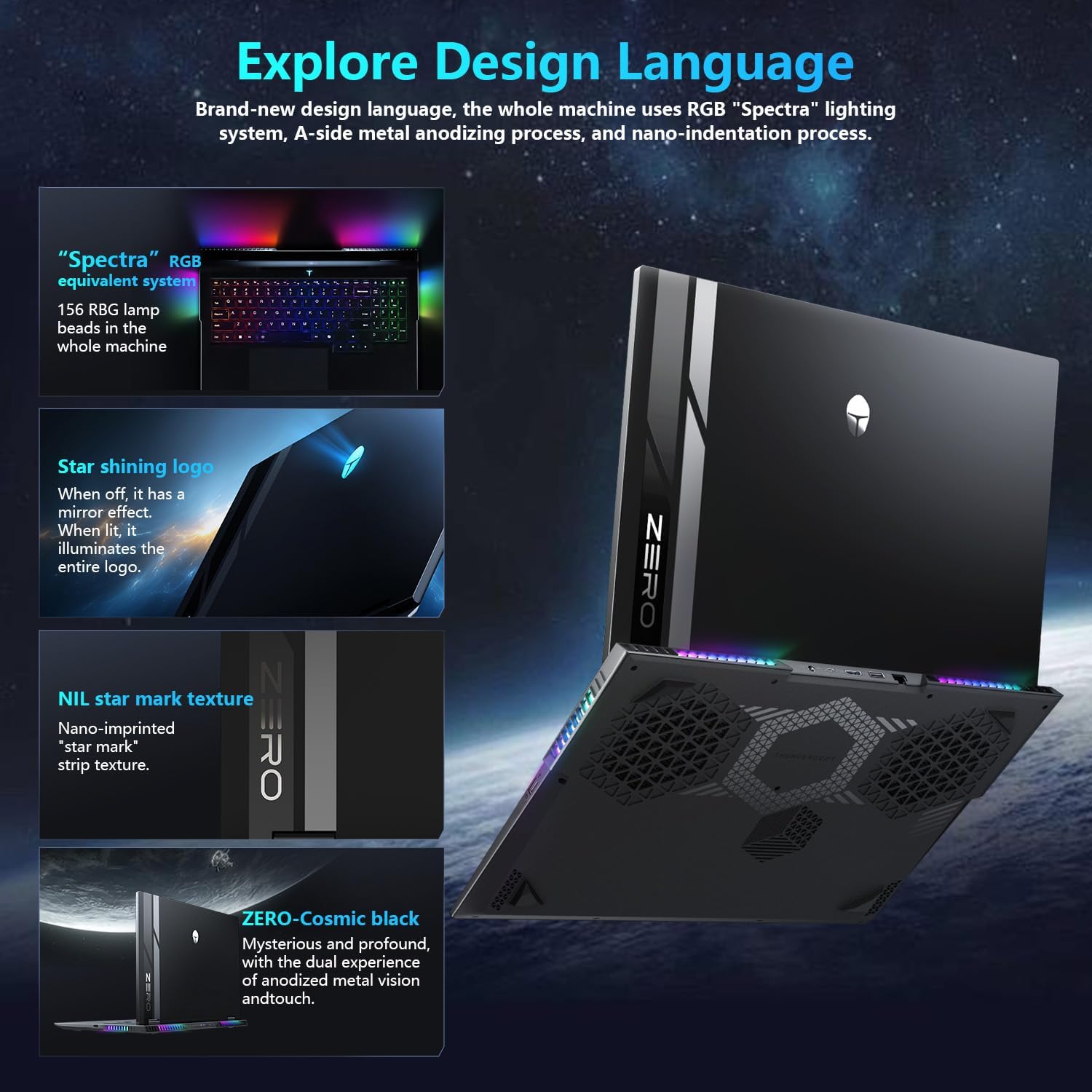
Image: A close-up of the laptop's 16-inch QHD+ display, showcasing its vibrant colors and high resolution, emphasizing its eye-care features.
3.3 AI Intelligent Control Center
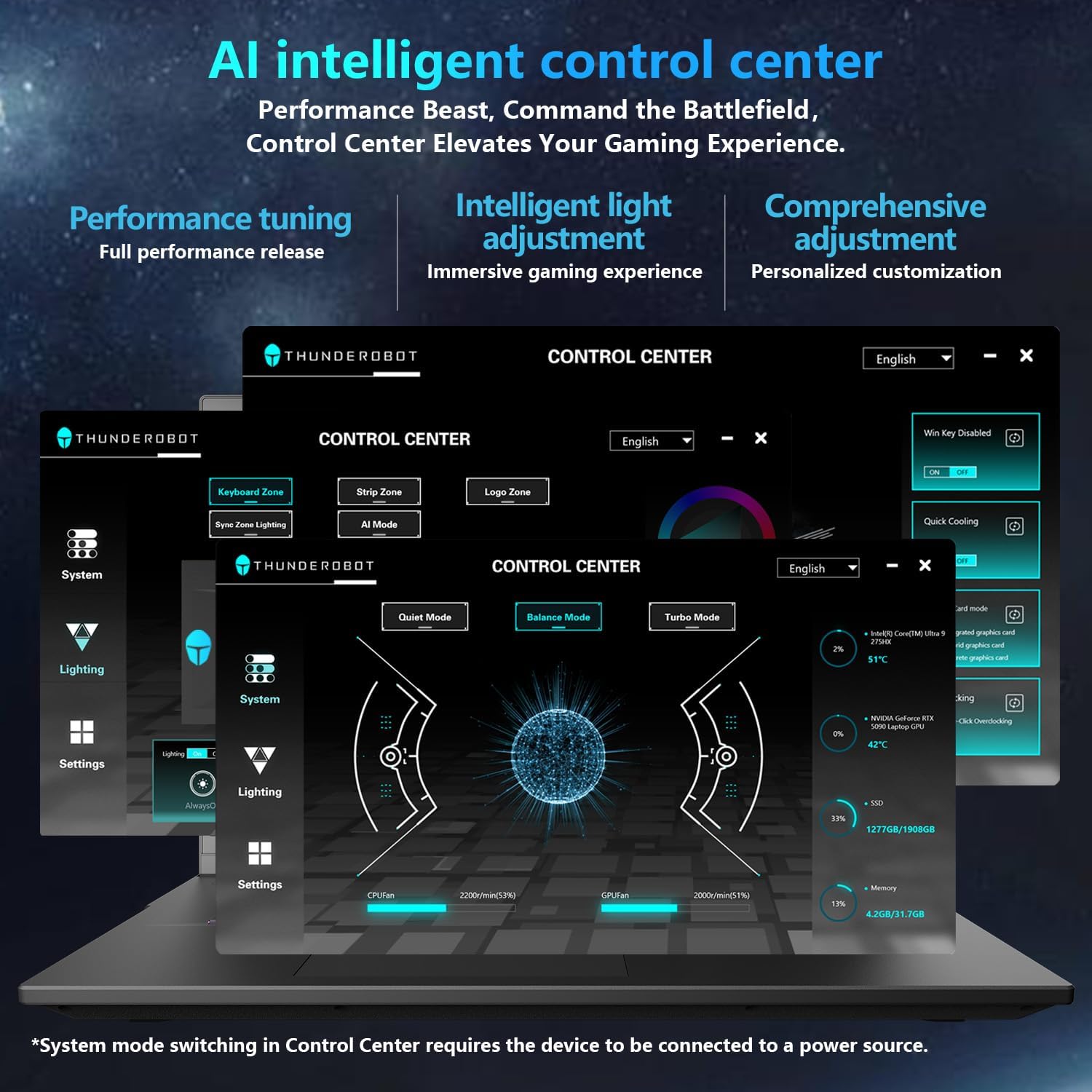
The AI Intelligent Control Center allows for performance tuning, intelligent light adjustment, and comprehensive customization. You can switch between Quiet Mode, Balance Mode, and Turbo Mode, and control the RGB lighting for the keyboard and chassis.
Video: An official video demonstrating the features and capabilities of the Thunderobot Zero 16 Pro Gaming Laptop, including its design and performance.
4. Karatteristiċi ewlenin
4.1 AI-Driven Performance
Harness the power of the Intel Core Ultra 9 275HX processor with 24 cores and turbo speeds up to 5.40GHz, combined with NVIDIA GeForce RTX 5080 graphics. This configuration ensures seamless multitasking and immersive visuals for demanding applications and games.

Image: A visual representation detailing the Intel Core Ultra 9 275HX processor and the NVIDIA GeForce RTX 5080 graphics card, highlighting their advanced architecture.
4.2 High-Speed Memory & Storage
Equipped with 64GB DDR5 RAM and a 2TB PCIe M.2 SSD, the Zero 16 Pro delivers ultra-fast responsiveness and vast storage capacity, ensuring instant access and smooth performance.
4.3 Sistema Avvanzata ta' Tkessiħ
The laptop features a next-gen cooling design with dual Night Owl fans, 7 extended heat pipes, and 316 ultra-thin copper fins, creating a massive 163,000mm² thermal surface. This system ensures lightning-fast heat dissipation and uninterrupted performance during intense gaming sessions.

Image: An internal diagram showcasing the laptop's advanced cooling system, featuring dual fans and multiple heat pipes designed for efficient thermal management.
4.4 Next-Level Connectivity
The Zero 16 Pro is equipped with multiple ports including USB-A ×3, USB-C, HDMI, RJ-45, and an audio port. It also supports Wi-Fi 6E and Bluetooth for high-speed wireless connectivity.
Immaġni: Pro tal-ġenbfile of the laptop, highlighting the array of connectivity ports available for external devices and networks.
4.5 Spectra RGB Lighting System
The laptop features a 'Spectra' RGB lighting system equipped with 156 RGB light beads throughout the machine, offering customizable lighting effects.
4.6 Engineered for Reliability
Built to endure rigorous conditions, the laptop has passed tests for 180G impacts, 74cm drops, 10kg palm stress, 20kg screen pressure, and operates reliably in temperatures from -20°C to 60°C with 20–90% humidity.
Vidjo: Wirja uffiċjali tal-vidjoasing the display features of the Thunderobot series, emphasizing its visual quality and eye-care technology.
5. Manutenzjoni
5.1 Tindif tal-Laptop Tiegħek
Regularly clean the screen with a soft, lint-free cloth and a screen-safe cleaning solution. Use compressed air to clear dust from the keyboard and ventilation grilles. Avoid harsh chemicals or abrasive materials.
5.2 Aġġornamenti tas-Software
Keep your operating system and drivers updated to ensure optimal performance and security. Check the Thunderobot support websit għall-aħħar rilaxxi tas-sewwieqa għall-mudell tiegħek.
5.3 Kura tal-Batterija
To prolong battery life, avoid fully discharging the battery frequently. If you primarily use the laptop while plugged in, consider enabling a battery care mode (if available in the control center) to limit charging to a certain percentage.
5.4 Ġestjoni tal-Ħażna
Naddaf perjodikament dak li mhux meħtieġ files and applications to maintain optimal SSD performance. Consider external storage for large files to free up internal space.
6 Issolvi l-problemi
6.1 Il-Laptop Mhux Qed Jixgħel
- Kun żgur li l-adapter tal-enerġija huwa konness sew kemm mal-laptop kif ukoll ma' sokit tal-enerġija li jaħdem.
- Ivverifika li s-sokit tal-enerġija jaħdem billi tqabbad apparat ieħor.
- Jekk il-batterija tkun ixxotta kompletament, ħalliha tiċċarġja għal mill-inqas 30-il minuta qabel ma tipprova tixgħelha mill-ġdid.
6.2 Kwistjonijiet tal-Wiri
- If the screen is black, try connecting an external monitor to check if the issue is with the laptop's display or the graphics output.
- Kun żgur li s-sewwieqa tal-grafika huma aġġornati.
- If experiencing crashes or a black screen during gaming, especially with the RTX 5080, try turning off 'hardware acceleration' in relevant application settings. This can sometimes resolve compatibility issues.
6.3 Degradazzjoni tal-Prestazzjoni
- Check the AI Intelligent Control Center to ensure the laptop is in 'Turbo Mode' or 'Balance Mode' for demanding tasks.
- Monitor CPU and GPU temperatures using the Control Center. Excessive heat can lead to performance throttling. Ensure ventilation grilles are clear of obstructions.
- Agħlaq applikazzjonijiet fl-isfond mhux meħtieġa.
6.4 Problemi ta' Konnettività
- For Wi-Fi issues, restart your router and the laptop. Check Wi-Fi driver status in Device Manager.
- For wired network (RJ-45) issues, ensure the cable is properly connected and check network adapter settings.
7. Speċifikazzjonijiet
| Karatteristika | Dettall |
|---|---|
| Isem tal-Mudell | ZERO 16 Pro |
| Proċessur | Intel Core Ultra 9 275HX (24 Cores, up to 5.4 GHz) |
| RAM | 64 GB DDR5 (4800 MHz) |
| Ħażna | SSD ta' 2 TB (PCIe x4) |
| Koproċessur tal-Grafika | NVIDIA GeForce RTX 5080 (Dedikata) |
| Wiri | 16 Inches QHD+ (2560 x 1600 pixels), 360Hz Refresh Rate |
| Sistema Operattiva | Windows 11 Home |
| Konnettività bla fili | Wi-Fi 6E, Bluetooth |
| Portijiet | 3x USB 3.0, 1x USB-C, HDMI 2.1, RJ-45, Audio Port |
| Piż tal-oġġett | 12 liri |
| Dimensjonijiet tal-Prodott | 14.09 x 10.52 x 1.03 pulzieri |
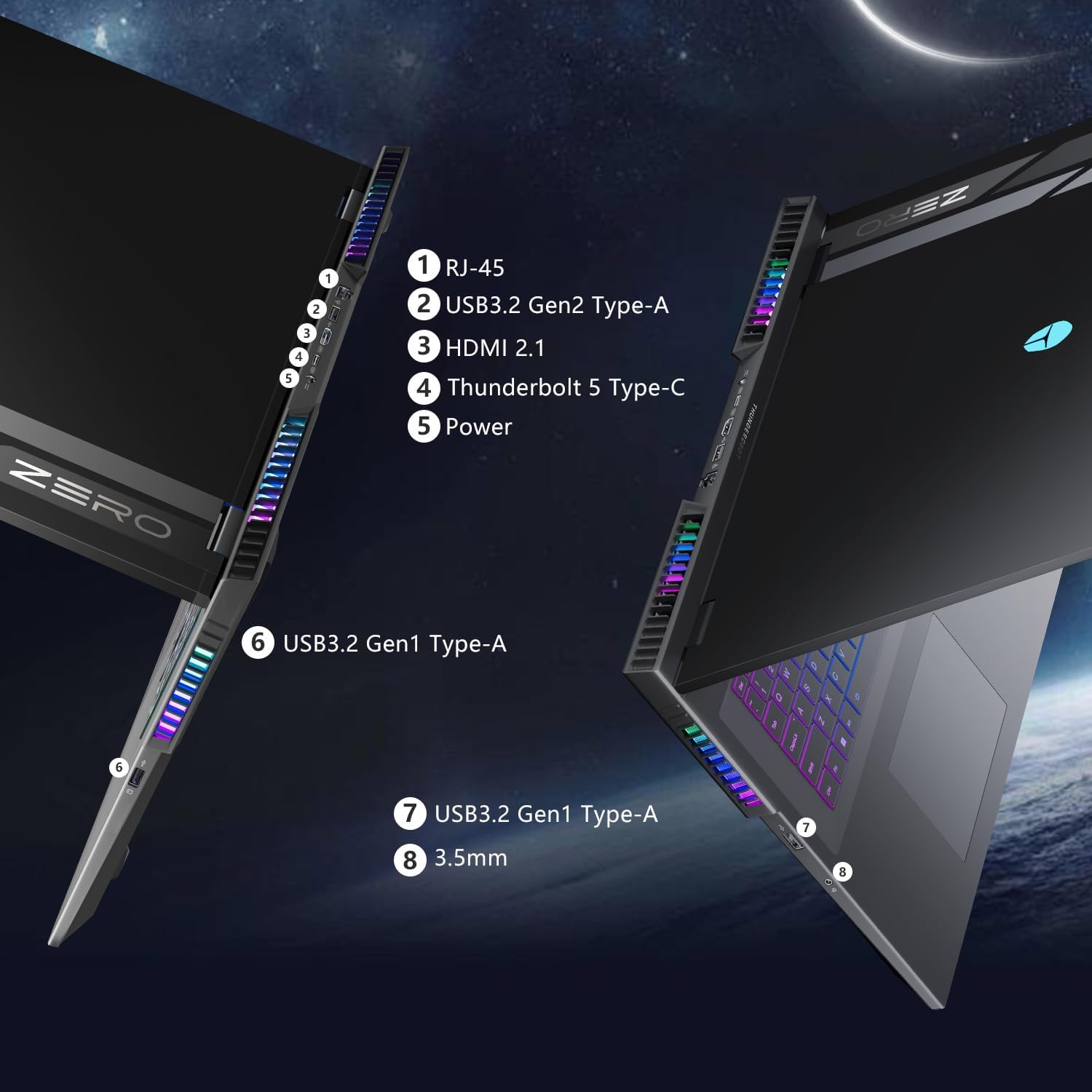
Immaġni: Close-up view of the laptop's side, showing the various ports and the integrated RGB lighting strip.
8. Garanzija u Appoġġ
8.1 Informazzjoni dwar Garanzija
Every Thunderobot laptop includes a 12-month warranty, covering manufacturing defects and ensuring expert support. Additionally, a 90-day warranty is provided on all warranty replacement parts, ensuring hassle-free repairs and genuine components.
8.2 Appoġġ għall-Klijent
For technical assistance, troubleshooting, or warranty claims, please visit the official Thunderobot support webis-sit jew ikkuntattja s-servizz tal-konsumatur tagħhom. Żomm l-irċevuta tax-xiri tiegħek u n-numru tas-serje tal-prodott fil-qrib għal servizz aktar mgħaġġel.