
Introduzzjoni
This manual provides essential information for the safe and efficient use of your Getac B300 G7 Fully Rugged Notebook. Please read this manual thoroughly before operating the device and retain it for future reference.
The Getac B300 G7 is designed for demanding environments, featuring MIL-STD-810G and IP65 certifications for resistance against shock, vibration, dust, and water.
Setup
1. Spakkjar u Spezzjoni Inizjali
Carefully remove the notebook and all accessories from the packaging. Inspect the device for any signs of damage. If any damage is found, contact your vendor immediately.
2. Qawwa tal-Konnessjoni
Before initial use, ensure the battery is fully charged. Connect the AC adapter to the notebook's DC-in jack and then to a power outlet.
- Adapter tal-AC: 90W
- Batterija: Li-on 10.8V

Figure 1: Left side of the Getac B300 G7, showing various ports including the power input.
3. First Boot-up
Press the power button to turn on the notebook. The device will boot into Windows 11 Pro. Follow the on-screen instructions to complete the initial setup of the operating system.
4. Konnessjoni Periferali
The Getac B300 G7 offers multiple ports for connecting external devices:
- USB 3.0: 3 ports for connecting USB devices like external drives, keyboards, or mice.
- LAN (RJ45): Għal konnessjoni ta' netwerk bil-fili.
- HDMI: Għall-konnessjoni ma' displays esterni.
- External VGA: Għall-konnessjoni ma' displays esterni eqdem.
- Port tas-Serje: 2 ports for legacy device connectivity.
- Microphone (Mini-jack): For external microphone input.
- Audio Output (Mini-jack): Għal headphones jew kelliema esterni.
- Konnettur tad-Docking: For connecting to a compatible docking station.
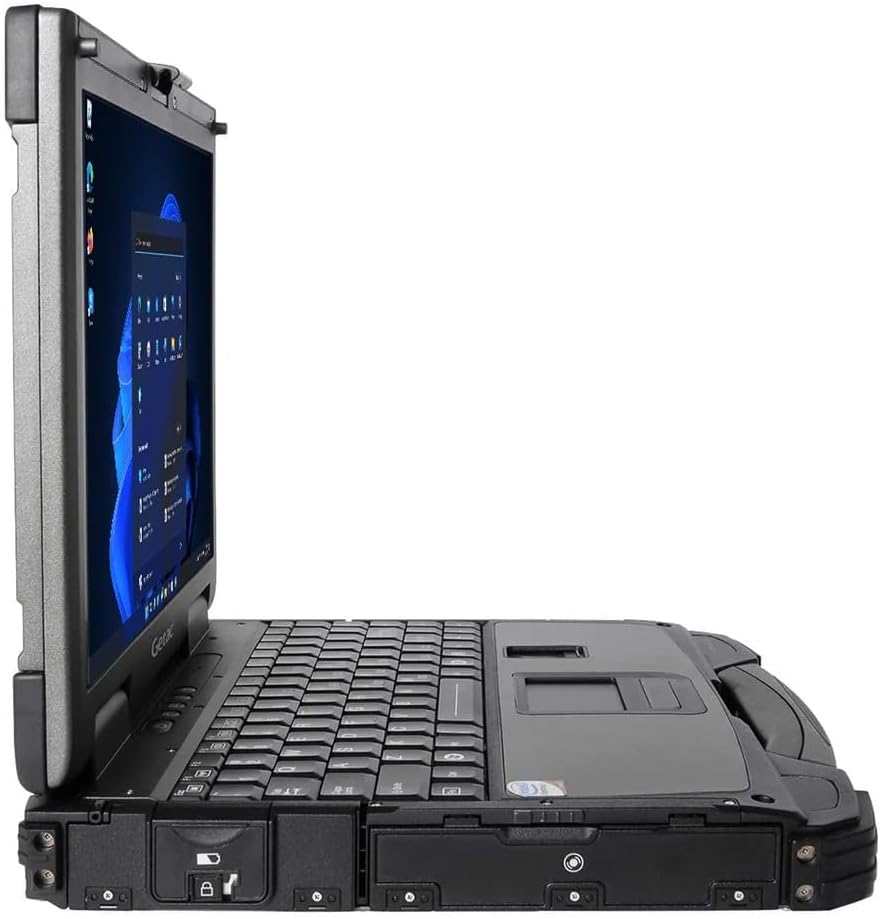
Figure 2: Right side of the Getac B300 G7, showing additional ports.
Operating the Notebook
1. Power On/Off
- Biex Tixgħel: Agħfas il-buttuna tal-qawwa li tinsab fuq l-apparat.
- Biex Tifi: Use the Windows Start menu to select 'Shut down'. Avoid forced shutdowns unless necessary to prevent data loss.
2. Display and Touchscreen
The notebook features a 13.3-inch TFT LCD XGA (1024 x 768) touchscreen display with 700 nits brightness. You can interact with the display using your finger or a compatible stylus (not included).
- Ġesti mess: Standard Windows 11 touch gestures are supported.
- Aġġustament tal-luminożità: Adjust display brightness through Windows settings or dedicated function keys (if available).
3. Tastiera u Apparati ta' Input
The Getac B300 G7 includes a backlit keyboard for use in low-light conditions. The integrated touchpad can be used for cursor control. An Insertable Smartcard Reader is also available for secure access applications.
- Kontroll tad-dawl ta' wara: Use the appropriate function key combination to toggle or adjust keyboard backlight.
- Smartcard Reader: Insert your smartcard into the designated slot for authentication or data access.
4. Optical Drive
The notebook is equipped with a DVD Super Multi Drive. This allows you to read and write various CD and DVD formats.
- Daħħal Diska: Gently push the disc into the drive until it clicks into place.
- Tkeċċija ta' Diska: Use the eject button on the drive or the eject option in Windows File Explorer.
5. Sistema Operattiva
Your Getac B300 G7 comes with Windows 11 Pro pre-installed. Refer to Microsoft's documentation for detailed information on using Windows 11 Pro features and functionalities.
Manutenzjoni
1. Cleaning the Notebook
- Barra: Uża artab, damp cloth with a mild cleaning solution. Avoid harsh chemicals or abrasive materials.
- Wiri: Use a microfiber cloth specifically designed for screens. Do not spray cleaners directly onto the screen.
- Portijiet: Ensure ports are free of dust and debris. Use compressed air if necessary, holding the can upright.
2. Kura tal-batterija
Biex timmassimizza l-ħajja u l-prestazzjoni tal-batterija:
- Evita temperaturi estremi.
- Tneħħix il-batterija kompletament ta' spiss.
- If storing the notebook for an extended period, charge the battery to approximately 50-60% before storage.
3. Karatteristiċi robusti
While the B300 G7 is designed to be rugged, proper care is still essential:
- Ensure all port covers are securely closed to maintain IP65 dust and water resistance.
- Avoid unnecessary drops or impacts, even though the device is MIL-STD-810G certified.
- Clean any mud or dirt from the casing promptly.

Figura 3: Fuq view of the Getac B300 G7, showcasing id-disinn robust tiegħu.
Issolvi l-problemi
This section addresses common issues you might encounter with your Getac B300 G7 notebook.
1. Notebook Does Not Power On
- Ensure the AC adapter is securely connected to both the notebook and a working power outlet.
- Verify the battery is charged. If the battery is completely drained, it may take a few minutes of charging before the notebook can power on.
- Try removing and reinserting the battery (if user-removable) to reset it.
2. Kwistjonijiet tal-Wiri
- Ebda Display: Connect an external monitor to the HDMI or VGA port to check if the issue is with the internal display.
- Dim Display: Adjust the brightness settings in Windows or using the keyboard function keys.
- L-iskrin tat-touchscreen ma jirrispondix: Restart the notebook. If the issue persists, check for driver updates in Windows Device Manager.
3. Peripheral Devices Not Working
- Kun żgur li l-apparat huwa konness sew mal-port korrett.
- Try connecting the device to a different port or another computer to rule out device malfunction.
- Check Windows Device Manager for any driver issues related to the peripheral.
4. System Performance Issues
- Agħlaq l-applikazzjonijiet bla bżonn li jkunu qed jaħdmu fl-isfond.
- Kun żgur li l-Windows u s-sewwieqa huma aġġornati.
- Mexxi tindif tad-diska u deframmentazzjoni (għall-HDDs, mhux neċessarju għall-SSDs).
- Iċċekkja għal malware jew viruses.
Speċifikazzjonijiet
| Karatteristika | Deskrizzjoni |
|---|---|
| Isem tal-Mudell | B300 G7 |
| Proċessur | Intel Core i5-8350U (1.7 GHz, up to 3.6 GHz with Turbo Boost, 6MB Cache) |
| RAM | 16GB DDR4 (2400 MHz), Max 32GB |
| Ħażna | 512GB SSD |
| Wiri | 13.3-inch TFT LCD XGA (1024 x 768), 700 nits, Touchscreen |
| Grafika | Grafika Intel UHD 620 integrata |
| Sistema Operattiva | Windows 11 Pro |
| Drive ottiku | DVD Super Multi Drive |
| Portijiet | USB 3.0 x 3, LAN (RJ45), HDMI, External VGA, Serial Port x 2, Microphone (Mini-jack), Audio Output (Mini-jack), DC-in Jack, Docking Connector |
| Karatteristiċi Speċjali | Backlit Keyboard, Insertable Smartcard Reader |
| Rugged Certification | MIL-STD-810G, IP65 |
| Dimensjonijiet (L x W x H) | 11.9" x 10.35" x 2.36" |
| Piż | 7.7 lbs |
| Konnettività | Ethernet (No Wi-Fi, No Bluetooth) |
| Oġġetti Inklużi | Li-on battery 10.8V, AC Adapter 90W |

Figura 4: Fuq view of the Getac B300 G7, highlighting its robust casing and integrated handle for portability.
Informazzjoni dwar Garanzija
This Getac B300 G7 notebook comes with a Garanzija limitata ta '90 jumDin il-garanzija tkopri difetti fil-materjali u fix-xogħol taħt użu normali matul il-perjodu tal-garanzija.
Il-garanzija ma tkoprix:
- Ħsara kkawżata minn inċident, abbuż, użu ħażin, għargħar, nar, terremot, jew kawżi esterni oħra.
- Damage caused by operating the product outside the permitted or intended uses described by Getac.
- Damage caused by service performed by anyone who is not an authorized service provider.
- Products or parts that have been modified to alter functionality or capability without the written permission of Getac.
For specific terms and conditions, please refer to the warranty documentation provided with your purchase or contact your vendor.
Appoġġ
If you encounter issues that cannot be resolved using the troubleshooting guide in this manual, please contact your vendor or an authorized service center for assistance. When contacting support, please have your model number (B300 G7) and serial number ready.
For the latest drivers, software updates, and additional support resources, please visit the official Getac support websit.