
1. Prodott Aktarview
The Verbatim Pocket SSD is a compact and portable external solid-state drive designed for high-speed data transfer and storage. Its lightweight design and robust features make it suitable for various applications, including high-resolution video editing, large data management, and enhancing gaming performance.
Karatteristiċi ewlenin:
- Kompatt u portabbli: Ultra-lightweight at 58g and small dimensions (96.1 x 45.1 x 10mm) for easy transport.
- Prestazzjoni ta' Veloċità Għolja: USB 3.2 Gen 2 interface provides data transfer speeds up to 10Gbps.
- Disinn Durabbli: Includes two colorful rubber protective sleeves for enhanced shock resistance.
- Kompatibilità Wiesgħa: Connects to Windows PCs, Mac, TV, smartphones, and iPads via USB-C.
- Aċċessorji inklużi: USB-C to USB-C cable with a convenient cable holder, two rubber cases (white and light blue), and a fabric bag.
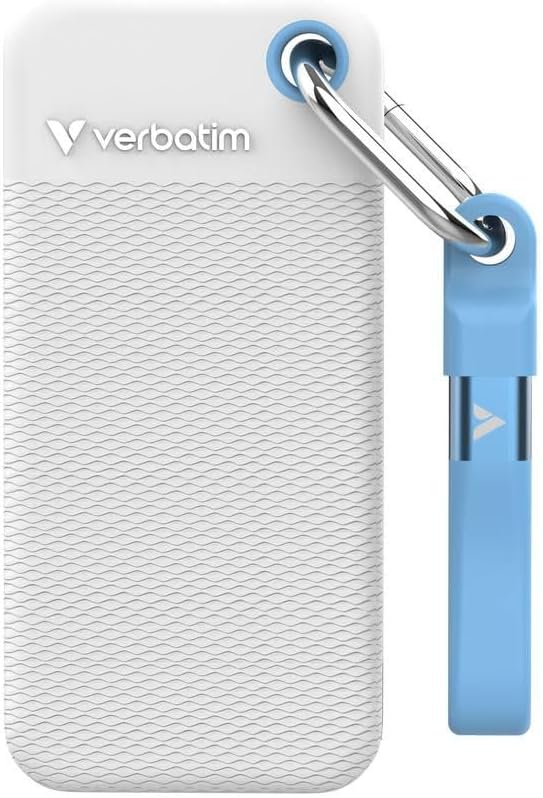
Image 1.1: Verbatim Pocket SSD with its white protective rubber sleeve. This image showcases the compact size and the included protective accessory.
2. X'hemm fil-Kaxxa
Malli tiftaħ il-pakkett, kun żgur li l-oġġetti kollha li ġejjin huma preżenti:
- 1 x Verbatim Pocket SSD (1TB Capacity)
- 1 x USB-C għal USB-C Cable
- 2 x Rubber Protective Cases (1 x White, 1 x Light Blue)
- 1 x Borża tad-Drapp
3. Istruzzjonijiet ta' Setup
3.1 Konnessjoni tal-SSD
- Attach Rubber Sleeve (Optional): For added protection, slide one of the provided rubber cases onto the SSD.
- Qabbad Kejbil: Insert one end of the included USB-C to USB-C cable into the USB-C port on the Verbatim Pocket SSD.
- Qabbad mal-Apparat: Insert the other end of the USB-C cable into an available USB-C port on your computer, laptop, smartphone, tablet, or gaming console.
- Qawwa Mixgħul: The SSD is bus-powered and does not require an external power supply. It will power on automatically upon connection.

Image 3.1: Verbatim Pocket SSD shown with the light blue protective rubber sleeve. The USB-C port is visible for connection.
3.2 Użu Inizjali u Formattjar
The Verbatim Pocket SSD is typically pre-formatted for broad compatibility. However, depending on your operating system (Windows, macOS, Linux) and intended use, you may need to reformat the drive for optimal performance or specific file rekwiżiti tas-sistema.
- Windows: Use Disk Management to initialize and format the drive if it doesn't appear automatically. Common file systems include NTFS or exFAT.
- macOS: Use Disk Utility to erase and format the drive. Common file systems include APFS or HFS+ (Mac OS Extended). For cross-platform compatibility, exFAT is recommended.
- Mezzi Oħrajn: For use with gaming consoles, smart TVs, or other devices, refer to their respective manuals for specific formatting requirements.
Twissija: Formatting a drive will erase all data on it. Ensure any important data is backed up before proceeding with formatting.
4. Tħaddim tal-SSD
4.1 Trasferiment tad-Data
Once connected and recognized by your device, the Verbatim Pocket SSD will appear as an external storage device. You can transfer files to and from the SSD using standard operating system functions:
- Iddreggja u Waqqa': Ikklikkja u drag files or folders from your computer to the SSD icon, or vice versa.
- Ikkopja u Waħħal: Ikklikkja bil-lemin fuq files/folders, select "Copy," then navigate to the desired destination on the SSD, right-click, and select "Paste."
The USB 3.2 Gen 2 interface allows for rapid data transfer, making it efficient for large files and high-volume data operations.
4.2 Tneħħija Sikura
Biex tevita l-korruzzjoni jew it-telf tad-dejta, dejjem oħroġ l-SSD b'mod sigur qabel ma tiskonnettjah mit-tagħmir tiegħek.
- Windows: Click the "Safely Remove Hardware and Eject Media" icon in the system tray, then select the Verbatim Pocket SSD.
- macOS: Drag the SSD icon from your desktop to the Trash, or right-click the SSD icon and select "Eject."
5. Manutenzjoni u Kura
- Protezzjoni Fiżika: Always use the provided rubber protective sleeves to guard against accidental drops and impacts. When not in use, store the SSD in the fabric bag to prevent scratches and dust accumulation.
- Tindif: Use a soft, dry, lint-free cloth to clean the exterior of the SSD. Avoid using liquid cleaners or solvents.
- Temperatura: Operate and store the SSD within recommended temperature ranges (typically 0°C to 70°C operating, -40°C to 85°C storage). Avoid extreme heat or cold.
- Backup tad-Data: Regularly back up important data stored on the SSD to another storage device. While SSDs are reliable, no storage device is immune to failure.
- Aġġornamenti tal-Firmware: Periodically check the Verbatim websit għal kwalunkwe aġġornamenti tal-firmware disponibbli għall-mudell SSD tiegħek. L-aġġornamenti tal-firmware jistgħu jtejbu l-prestazzjoni u l-istabbiltà.
6 Issolvi l-problemi
6.1 SSD Mhux Rikonoxxut
- Iċċekkja l-Konnessjonijiet: Ensure the USB-C cable is securely connected to both the SSD and your device. Try a different USB-C port on your device.
- Try Another Cable: If available, test with a different USB-C to USB-C cable to rule out a faulty cable.
- Irristartja l-Apparat: Sometimes a simple restart of your computer or device can resolve recognition issues.
- Check Disk Management (Windows) / Disk Utility (macOS): Verify if the drive appears in your operating system's disk management tools. It might need to be initialized or formatted (see Section 3.2).
- Kwistjonijiet tas-sewwieq: Ensure your operating system has the latest USB drivers installed.
6.2 Veloċitajiet ta' Trasferiment Baxxi
- Tip ta 'Port USB: Ensure you are connecting the SSD to a USB 3.2 Gen 2 (or compatible USB 3.1 Gen 2) port on your device. Older USB 2.0 or 3.0 ports will result in significantly slower speeds.
- Kwalità tal-Kejbil: Use the included high-quality USB-C cable. Lower quality or longer cables can impact performance.
- File Tip: Trasferiment ta' ħafna intrapriżi żgħar files is generally slower than transferring a single large file tal-istess daqs totali.
- Prestazzjoni tal-Apparat: The speed of your computer's internal drive and CPU can also affect transfer rates.
6.3 Data Corruption
- Tkeċċija Sikura: Always safely eject the SSD before disconnecting it (see Section 4.2). Abrupt removal can lead to data corruption.
- Fluttwazzjonijiet tal-Enerġija: Avoid disconnecting the SSD during power outages or system crashes.
- Backups regolari: Maintain regular backups of critical data to mitigate the impact of any data corruption.
7. Speċifikazzjonijiet tal-Prodott
| Numru tal-Mudell | 32320 |
| Kapaċità tal-Ħażna Diġitali | 1 TB |
| Interface Hard Disk | USB 3.2 Ġen 2 |
| Teknoloġija tal-Konnettività | USB |
| Karatteristiċi Speċjali | Portable, Shock Resistant |
| Fattur tal-Formola tad-Disk Ribd | 2.5 Pulzier |
| Deskrizzjoni Hard Disk | Drive Stat solidu |
| Apparati Kompatibbli | Computer, Gaming Console, Laptop, Smartphone, Tablet |
| Tip ta' Installazzjoni | Hard Drive Estern |
| Kulur | White (main variant) |
| Aqra Veloċità | Sa 1000 MB/s |
| Rata ta' Trasferiment tad-Data | Up to 1000 MB/s (10 Gbps) |
| Piż tal-oġġett | 58 Gramm |
| Dimensions (L x W x Thickness) | 3.78"T x 0.39"W x 1.78"Ħ (madwar 96.1 x 10 x 45.1 mm) |
| Materjal tal-għeluq | Plastik, Lastiku |
| Manifattur | Verbatim |
8. Garanzija u Appoġġ
8.1 Garanzija tal-Prodott
Verbatim products are covered by a limited warranty. For specific warranty terms and conditions applicable to your region and product, please refer to the official Verbatim webis-sit jew il-karta tal-garanzija inkluża max-xiri tiegħek. Żomm il-prova tax-xiri tiegħek għal talbiet ta' garanzija.
8.2 Pjanijiet ta' Rkupru tad-Data
Optional data recovery plans may be available for purchase separately to protect against data loss. These plans typically offer services to recover data from damaged or failed drives. For more information, please check with your retailer or the Verbatim websit.
- 2-Year Data Recovery Plan: Available for extended data protection.
- 3-Year Data Recovery Plan: Available for extended data protection.
8.3 Appoġġ Tekniku
For technical assistance, troubleshooting, or further inquiries, please visit the official Verbatim support website or contact their customer service. You can usually find contact information and FAQs on the Verbatim websit.
Verbatim Official Websit: www.verbatim.com