
1. Introduzzjoni
Grazzi tax-xiriasing the Ehaho EBS-616 7-inch UTV Sound Bar. This manual provides essential information for the safe and efficient operation of your device. Please read it thoroughly before use and retain it for future reference.
2. Informazzjoni dwar is-Sigurtà
- Do not expose the sound bar to extreme temperatures, direct sunlight, or high humidity.
- Żgura ventilazzjoni xierqa madwar l-unità.
- Use only the power adapter and cables provided or specified by the manufacturer.
- Tippruvax tiżżarma jew timmodifika l-unità. Irreferi kull servizz lil persunal kwalifikat.
- Żomm l-unità 'l bogħod mill-ilma u likwidi oħra.
- Evita smigħ għal żmien twil b'volum għoli biex tevita ħsara fis-smigħ.
3. Kontenut tal-Pakkett
Ivverifika li l-oġġetti kollha huma preżenti fil-pakkett:
- Ehaho EBS-616 UTV Sound Bar
- Kontroll mill-bogħod
- Brazzi u Hardware tal-Immuntar
- Kejbil tal-Enerġija
- Kejbil Awżiljarju tal-Awdjo
- Manwal għall-Utent (dan id-dokument)
4. Prodott Aktarview
The Ehaho EBS-616 is a compact 7-inch UTV sound bar designed for outdoor environments, featuring dual subwoofers, Bluetooth 5.0 connectivity, and a Party Sync function for enhanced audio experience.
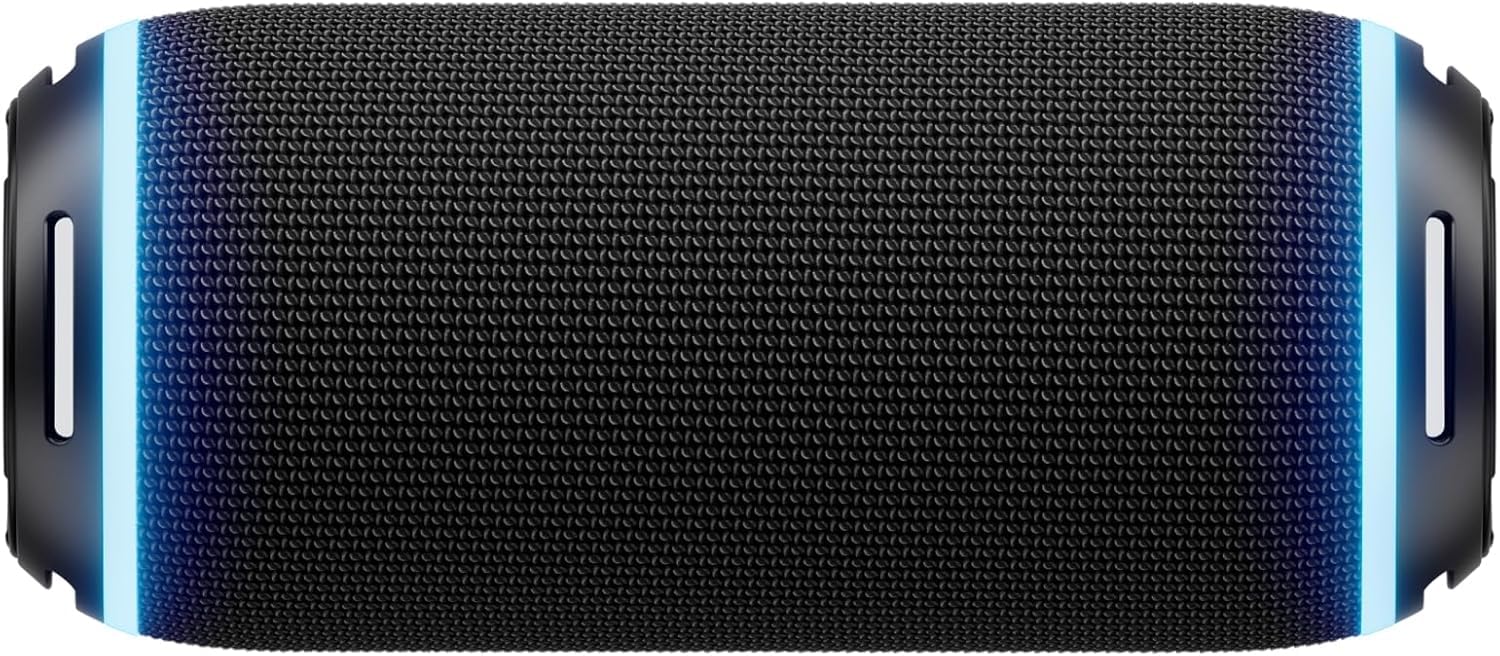
Figura 4.1: Quddiem view of the Ehaho EBS-616 UTV Sound Bar, showing the speaker grille and control panel.
4.1. Kontrolli u Portijiet
- Buttuna tal-Qawwa: Ixgħel jew jitfi l-unità.
- Volum 'il fuq/Niżżel: Jaġġusta l-volum tal-awdjo.
- Buttuna tal-Modalità: Switches between Bluetooth, USB, and AUX input modes.
- Buttuna Play/Pause: Jikkontrolla l-plejbek tal-midja.
- Buttuni tal-Qbiż tat-Traċċa: Jaqbeż għat-trakka li jmiss jew ta’ qabel.
- Party Sync Button: Activates or deactivates Party Sync mode.
- Port USB: For USB media playback.
- Input AUX: Jack ta' 3.5mm għal apparati awdjo esterni.
- Input ta' Enerġija: Konnessjoni tal-enerġija DC.
5. Setup
5.1. Mounting the Sound Bar
- Select a suitable mounting location on your UTV that provides clear sound projection and does not obstruct your view jew kontrolli.
- Attach the mounting brackets to the sound bar using the provided screws.
- Securely fasten the sound bar with the attached brackets to the UTV frame using the appropriate hardware. Ensure all connections are tight to prevent vibration.

Figura 5.1: Illustration of mounting brackets and hardware for securing the sound bar.
5.2. Konnessjoni tal-Enerġija
- Connect the provided power cable to the DC power input port on the sound bar.
- Connect the other end of the power cable to a suitable 12V DC power source on your UTV. Ensure the connection is secure and properly fused.
5.3. It-tqabbil inizjali tal-Bluetooth
- Kun żgur li s-sound bar hija mixgħula.
- The sound bar will automatically enter Bluetooth pairing mode, indicated by a flashing LED light.
- Fuq it-tagħmir mobbli tiegħek, ippermetti l-Bluetooth u fittex tagħmir disponibbli.
- Select "Ehaho EBS-616" from the list.
- Once paired, the LED indicator will become solid, and you will hear a confirmation tone.
6. Istruzzjonijiet Operattivi
6.1. Power On/Off
Agħfas u żomm il- Buttuna tal-Qawwa on the sound bar or the remote control to turn the unit on or off.
6.2. Għażla tal-Mod
Agħfas il- Buttuna tal-Modalità repeatedly to cycle through available input sources: Bluetooth, USB, and AUX.
6.3. Konnettività Bluetooth
After initial pairing, the sound bar will automatically attempt to reconnect to the last paired device when powered on and in Bluetooth mode. If reconnection fails, manually select "Ehaho EBS-616" from your device's Bluetooth settings.
6.4. Daqq USB
Daħħal flash drive USB li fiha awdjo MP3/WMA files into the USB port. The sound bar will automatically switch to USB mode and begin playback. Use the Play/Pawsa u Aqbeż Track buttuni biex jikkontrollaw daqq.
6.5. Input Awżiljarju
Connect an external audio device (e.g., MP3 player, smartphone) to the AUX input port using the provided 3.5mm audio cable. Switch the sound bar to AUX mode using the Buttuna tal-Modalità. Audio will be played from the connected device.
6.6. Kontroll tal-Volum
Agħfas il- Volum Up or Volum 'l isfel buttons on the sound bar or remote control to adjust the listening volume.
6.7. Party Sync Function
The Party Sync feature allows multiple compatible Ehaho sound bars to connect and play audio simultaneously. To activate:
- Ensure all sound bars are powered on and in Bluetooth mode.
- On the primary sound bar (the one connected to your device), press the Party Sync Button. It will enter pairing mode.
- On the secondary sound bars, also press the Party Sync Button. They will search for the primary unit.
- Once connected, all sound bars will play the same audio.
6.8. Użu tal-Kontroll mill-Bogħod
The included remote control provides convenient access to all functions. Point the remote control directly at the front of the sound bar for optimal response.

Figura 6.1: Layout of the Ehaho EBS-616 remote control, showing various function buttons.
7. Manutenzjoni
7.1. Tindif
Wipe the exterior of the sound bar with a soft, dry cloth. Do not use abrasive cleaners, waxes, or solvents. Ensure no liquids enter the ports or speaker grilles.
7.2. Ħażna
When not in use for extended periods, store the sound bar in a cool, dry place, away from direct sunlight and extreme temperatures. Disconnect it from the power source.
8 Issolvi l-problemi
| Problema | Kawża Possibbli | Soluzzjoni |
|---|---|---|
| Ebda qawwa | Power cable not connected; Power source issue | Check power cable connection; Verify power source is active. |
| L-ebda ħoss | Volume too low; Incorrect input mode; Device not playing | Increase volume; Select correct input mode (Bluetooth/USB/AUX); Ensure connected device is playing audio. |
| Il-konnessjoni Bluetooth tfalli | Sound bar not in pairing mode; Device too far; Interference | Ensure sound bar is in pairing mode; Move device closer; Restart both devices. |
| Il-kontroll mill-bogħod ma jaħdimx | Battery depleted; Obstruction; Remote not pointed correctly | Replace remote battery; Remove obstructions; Point remote directly at sound bar. |
9. Speċifikazzjonijiet
| Karatteristika | Speċifikazzjoni |
|---|---|
| Mudell | EBS-616 |
| Dimensjonijiet (L x W x H) | 8.5D x 8.5W x 20H ċentimetri (madwar 8.48 x 8.48 x 19.99 ċm) |
| Teknoloġija tal-Konnettività | Bluetooth, USB, 3.5mm Auxiliary |
| Speaker AmpTip ta' lifikazzjoni | Attiva |
| Rispons ta' Frekwenza | 40 Hz |
| Modalità tal-Ħruġ tal-Awdjo | Jdawru |
| Tip ta 'Immuntar | Immuntar tal-Bracket |
| Komponenti Inklużi | Remote, UTV Sound Bar |
10. Garanzija u Appoġġ
Ehaho products are designed for reliability and performance. For warranty information, please refer to the warranty card included with your purchase or contact Ehaho customer support. For technical assistance or inquiries, please visit the official Ehaho websit jew ikkuntattja lid-dipartiment tas-servizz tal-konsumatur tagħhom.