
Camcamp DL02
CAMCAMP DL02 WiFi Video Smart Lock Instruction Manual
Mudell: DL02
1. Introduzzjoni
The CAMCAMP DL02 WiFi Video Smart Lock provides advanced security and convenient access for your home. This smart lock integrates a camera and doorbell, offering multiple unlocking methods including fingerprint, PIN code, IC card, mobile app, and traditional physical keys. This manual provides detailed instructions for installation, setup, operation, maintenance, and troubleshooting to ensure optimal performance and security.

Image 1.1: CAMCAMP DL02 WiFi Video Smart Lock Overview
2. Karatteristiċi ewlenin
- Integrated Camera & Doorbell: Monitor your front door with a built-in camera and receive real-time alerts on your smartphone when the doorbell is pressed.
- Metodi multipli tal-ftuħ: Access your home using fingerprint recognition, PIN codes, IC cards, the mobile app, or traditional physical keys.
- Qfil awtomatiku: The deadbolt automatically engages within seconds after the door closes, providing peace of mind.
- Aċċess Temporanju: Generate expiring passcodes for guests, housekeepers, or service technicians, revocable instantly via the app.
- Digital Access Logs: Track all entry records, including fingerprint scans, PIN uses, and timed entries, directly from your smartphone.
- Qawwa ta 'Emerġenza: Equipped with a USB-C emergency power port for access during battery depletion.
- Installazzjoni faċli: Designed for straightforward installation without the need for drilling or complex wiring.
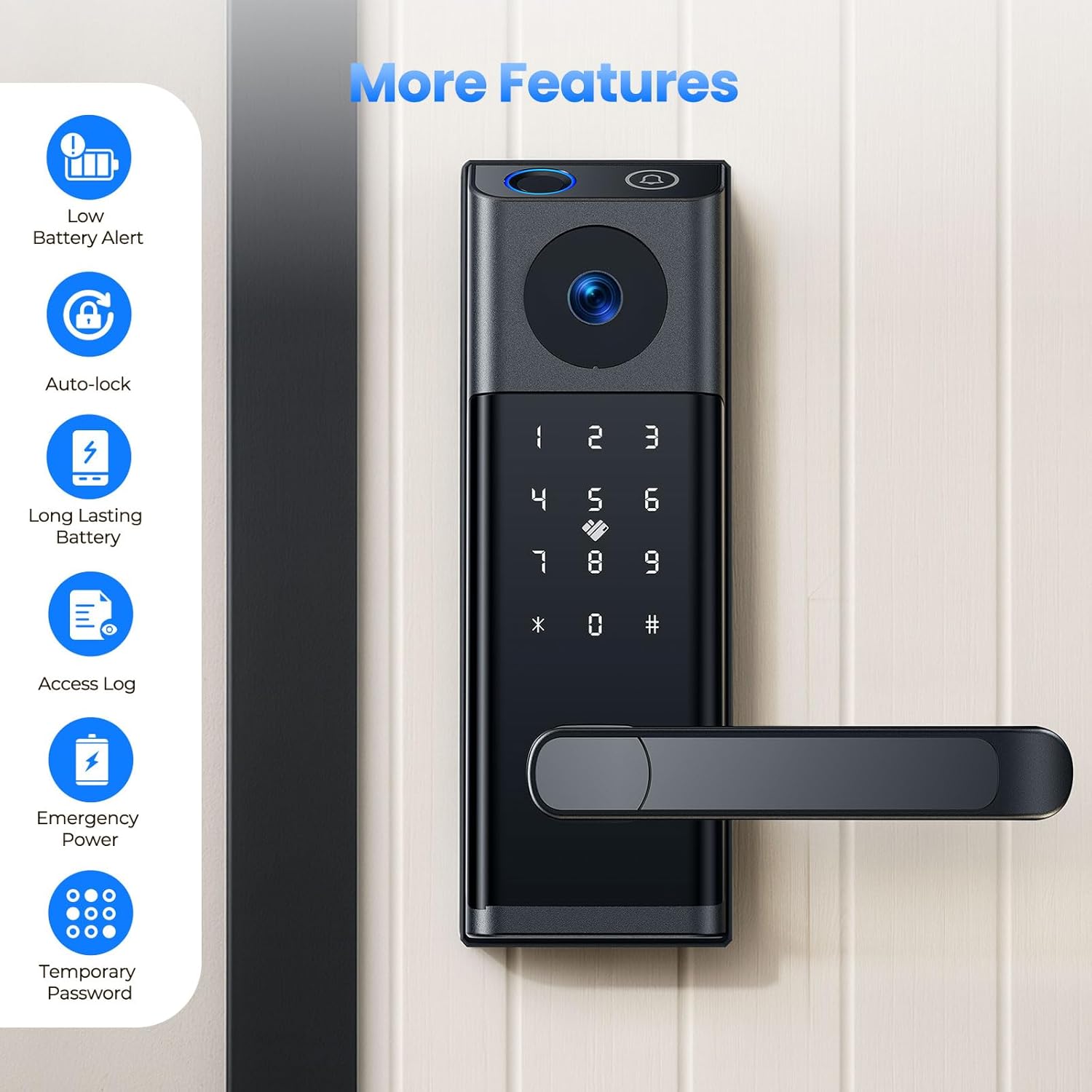
Immaġni 2.1: Fuqview of CAMCAMP DL02 Smart Lock Features
3. Kontenut tal-Pakkett
Ivverifika li l-komponenti kollha huma preżenti fil-pakkett:
- Smart Lock (Inside and Outside Lock + Handle) x 1
- Manwal ta' Istruzzjoni x 1
- Latch and Strike Set x 1
- Screws (6 types)
- Hexagonal Screwdriver x 1
- Spare Key x 2
- Access Card x 2
4. Installazzjoni
The CAMCAMP DL02 Smart Lock is designed for easy installation on standard left and right door handle locks. No drilling or complex wiring is typically required.
4.1. Door Compatibility and Size Requirements
Kun żgur li l-bieb tiegħek jissodisfa l-ispeċifikazzjonijiet li ġejjin għal installazzjoni xierqa:
- Backset: 2.36"-2.75" (60mm-70mm)
- Door Thickness: 1.49"-1.89" (38mm-48mm)
- Cross Bore Diameter: 2.13" (54mm)
- Edge Bore Diameter: 0.4" (12mm)
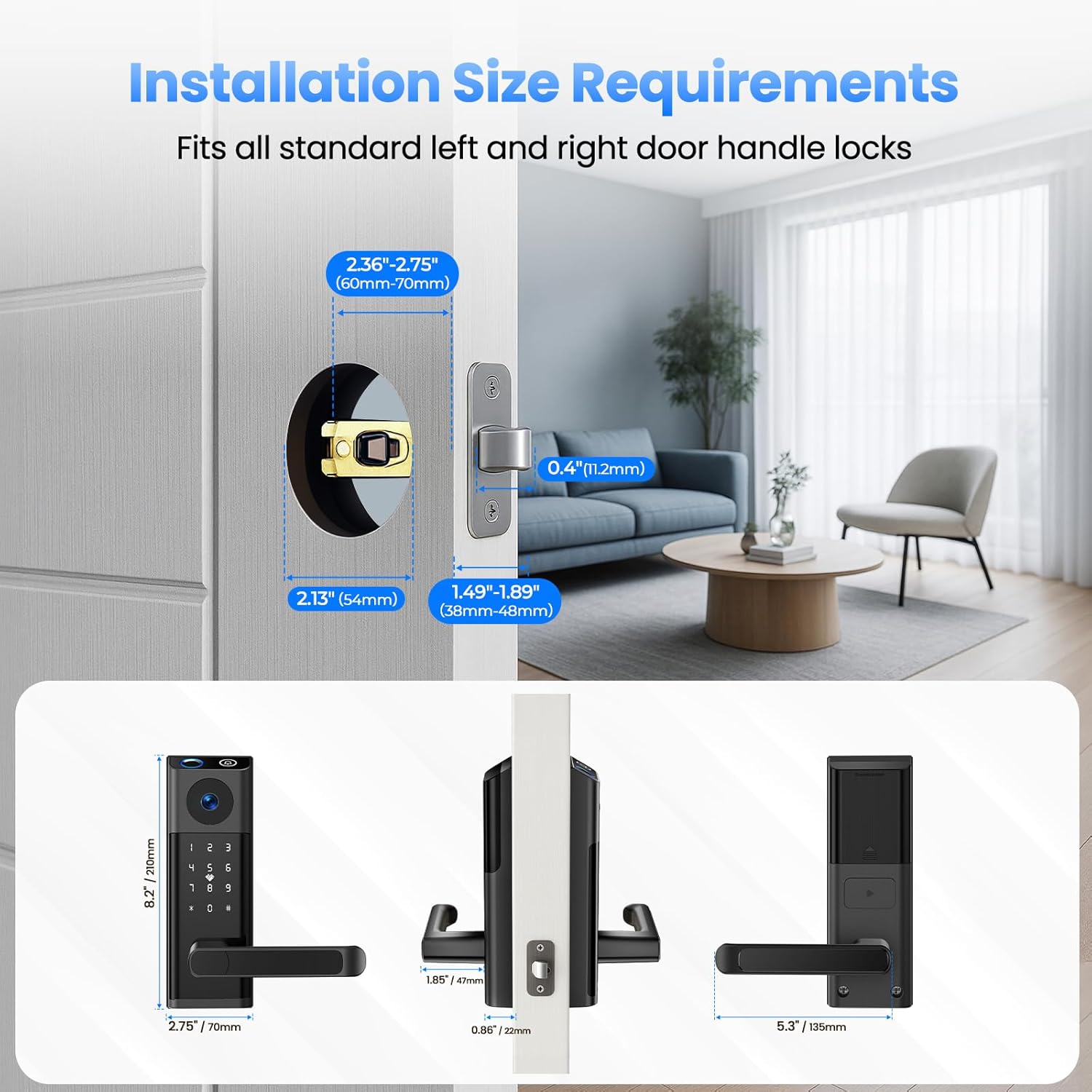
Image 4.1: Installation Size Requirements

Image 4.2: Compatibility with Left and Right Handed Doors
4.2. Passi ta 'installazzjoni
Refer to the included instruction manual for detailed, step-by-step installation guidance. Generally, the process involves:
- Prepare the door by ensuring it meets the size requirements.
- Install the latch and strike plate into the door frame.
- Mount the exterior and interior lock assemblies, connecting the necessary cables.
- Secure the lock with the provided screws using the hexagonal screwdriver.
- Test the mechanical operation of the handle and deadbolt.

Image 4.3: Simple Installation Process
5. Setup
After physical installation, proceed with the electronic setup of your smart lock.
5.1. Tniżżil tal-App u Konnessjoni
- Download the recommended mobile application (e.g., Tuya Smart app) from your device's app store (Google Play or Apple App Store).
- Oħloq kont u illoggja.
- Follow the in-app instructions to add your CAMCAMP DL02 Smart Lock. This typically involves putting the lock into pairing mode and connecting it to your home Wi-Fi network.
5.2. User Registration and Access Management
Once connected to the app, you can register users and manage access methods:
- Marki tas-swaba': Register up to 50 unique fingerprints for quick access.
- PIN Codes: Create and manage multiple PIN codes for different users.
- Karti IC: Pair the included IC cards with specific users.
- Kodiċijiet Temporanji: Generate time-limited or single-use passcodes for visitors or service providers.
6. Istruzzjonijiet Operattivi
The CAMCAMP DL02 Smart Lock offers various methods for unlocking and managing access.
6.1. Metodi ta 'ftuħ

Image 6.1: Multiple Unlocking Options
- Marka tas-swaba ': Place your registered finger on the fingerprint sensor. The lock will unlock upon successful recognition (typically within 0.5 seconds).

Image 6.2: Fingerprint Recognition
- Kodiċi PIN: Enter your registered PIN code on the keypad. The lock supports an anti-peeping password feature, allowing you to enter random digits before or after your actual code to prevent others from guessing it.

Image 6.3: Anti-Peeping Password Feature
- Karta IC: Present a registered IC card to the designated sensor area on the lock. The lock will unlock upon successful card recognition.

Image 6.4: IC Card Unlocking
- App mobbli: Use the connected mobile app to remotely unlock the door. The app also allows for two-way audio communication with visitors at your door.

Image 6.5: Video Door Lock Functionality

Image 6.6: Two-Way Audio Communication

Image 6.7: Remote Unlocking and Two-Way Audio
- Ċavetta Fiżika: In case of electronic malfunction or battery depletion, use the provided physical keys to manually unlock the door. The keyhole is discreetly integrated into the design.

Image 6.8: Hidden Physical Keyhole
6.2. Doorbell Functionality
When a visitor presses the doorbell button on the smart lock, you will receive a notification on your smartphone. You can then view the live video feed and engage in two-way audio communication.
6.3. Karatteristika ta' Serratura Awtomatika
The smart lock is equipped with an auto-lock function that automatically secures the door a few seconds after it closes. This feature can typically be configured or disabled via the mobile app.
6.4. Access Log
The mobile app provides a comprehensive access log, detailing every entry and interaction with the lock. This includes timestamps, unlocking methods used (fingerprint, PIN, IC card), and visitor records from the doorbell.
Image 6.9: Digital Access Log
7. Manutenzjoni
Proper maintenance ensures the longevity and reliable operation of your CAMCAMP DL02 Smart Lock.
7.1. Sostituzzjoni tal-batterija
The smart lock operates on standard AA batteries (not included). The system provides early low-power alerts to notify you when batteries need replacement. Replace all batteries simultaneously with new, high-quality alkaline AA batteries for optimal performance.

Image 7.1: Low Battery Warning

Image 7.2: Battery Compartment and Life
7.2. Provvista tal-Enerġija ta' Emerġenza
If the batteries completely deplete before replacement, the lock can be temporarily powered using a USB-C cable connected to an external power source (e.g., power bank). This allows you to unlock the door and replace the batteries.

Image 7.3: USB-C Emergency Power
8 Issolvi l-problemi
Din it-taqsima tindirizza kwistjonijiet komuni li tista' tiltaqa' magħhom bis-serratura intelliġenti tiegħek.
- Is-serratura ma tirrispondix: Check battery levels. If low, replace batteries or use the USB-C emergency power. Ensure the physical key is not engaged.
- Marka tas-swaba' mhux rikonoxxuta: Kun żgur li subgħajk ikun nadif u niexef. Ipprova erġa' rreġistra l-marka tas-swaba' tiegħek fl-app.
- Il-kodiċi PIN mhux qed jaħdem: Verify the correct PIN is entered. Ensure the anti-peeping feature is used correctly if enabled.
- Problemi ta' konnettività tal-app: Ensure your home Wi-Fi network is stable and the lock is within range. Restart the lock and your router. Re-pair the lock with the app if necessary.
- Doorbell not notifying: Check app notification settings on your smartphone. Ensure the lock is connected to Wi-Fi.
- Mechanical issues: If the handle or deadbolt feels stiff, check for obstructions in the door frame or ensure the lock is installed correctly and aligned.
For persistent issues, refer to the full instruction manual or contact CAMCAMP appoġġ għall-klijent.
9. Speċifikazzjonijiet
| Karatteristika | Speċifikazzjoni |
|---|---|
| Brand | Camcamp |
| Isem tal-Mudell | DL02 |
| Tip Lock | Deadbolts |
| Materjal | Aluminju |
| Kulur | Iswed |
| Dimensjonijiet tal-oġġett (L x W x H) | 11.4 x 8.7 x 3.5 pulzieri |
| Piż tal-oġġett | 4.17 liri |
| Sors tal-Enerġija | Imħaddem bil-batterija (4 batteriji AA, mhux inklużi) |
| Protokoll tal-Konnettività | Wi-Fi |
| Metodu ta' Kontroll | App, Touch |
| Karatteristiċi Speċjali | 180° Wide Angle Camera, Built-in Doorbell, Anti-Peeping Password, Built-in Wi-Fi, Auto-Lock, Anti-crash Handle, Back-Lit Keypad, Fingerprint, APP Remote Control |
10. Garanzija u Appoġġ
For warranty information and customer support, please refer to the official CAMCAMP website or contact their customer service directly. Details regarding product protection plans may also be available from your retailer.
Ask a question about this manual
Ask about setup, troubleshooting, compatibility, parts, safety, or missing instructions. Manuals+ will review the question and use this page’s manual context to help answer it.