
Kinglucky A20
Kinglucky ClipFree A20 Open-Ear Earbuds Instruction Manual
Mudell: A20
Introduzzjoni
Welcome to the Kinglucky ClipFree A20 Open-Ear Earbuds. These earbuds are designed for comfort and style, featuring an open-ear design and detachable crystal earrings. This manual provides essential information for setting up, operating, maintaining, and troubleshooting your new earbuds.
X'hemm fil-Kaxxa
Upon opening your Kinglucky ClipFree A20 package, you should find the following items:
- Kinglucky ClipFree A20 Open-Ear Earbuds
- Kawża tal-Iċċarġjar
- Detachable Crystal Butterfly Earrings (if included with your model)
- Cable tal-Iċċarġjar tal-USB-C
- Manwal għall-Utent (dan id-dokument)

Image: The Kinglucky A20 earbuds, charging case, detachable butterfly earrings, and USB-C charging cable as packaged.
Setup
1. Iċċarġjar tal-Earbuds u l-Kaxxa
Before first use, fully charge your Kinglucky A20 earbuds and charging case. Connect the provided USB-C cable to the charging port on the case and a power source. The digital display on the case will show the battery level. A full charge provides up to 8 hours of playtime for the earbuds, with the case extending total playtime to approximately 50 hours.

Image: The Kinglucky A20 earbuds resting in their charging case, displaying the battery percentage on the front.
2. Tqabbil tal-Bluetooth
- Iftaħ il-kaxxa tal-iċċarġjar. Il-earbuds jidħlu awtomatikament fil-modalità ta' tqabbil.
- Fuq l-apparat tiegħek (smartphone, tablet, eċċ.), mur fis-settings tal-Bluetooth.
- Agħżel "Kinglucky A20" mil-lista ta' apparati disponibbli.
- Ladarba tkun konness, tisma' sinjal awdjo, u d-dawl indikatur fuq il-earbuds jinbidel.
The Kinglucky A20 supports Bluetooth 5.4 for a stable connection and multipoint pairing, allowing connection to two devices simultaneously.
3. L-ilbies tal-Earbuds
The A20 earbuds feature an open-ear clip design for comfort and stability. They do not enter the ear canal, resting gently on the ear.
- Gently open the ear cuff of the earbud.
- Position the earbud over your ear, ensuring the speaker is aligned with your ear canal for optimal sound.
- Adjust for a secure and comfortable fit.
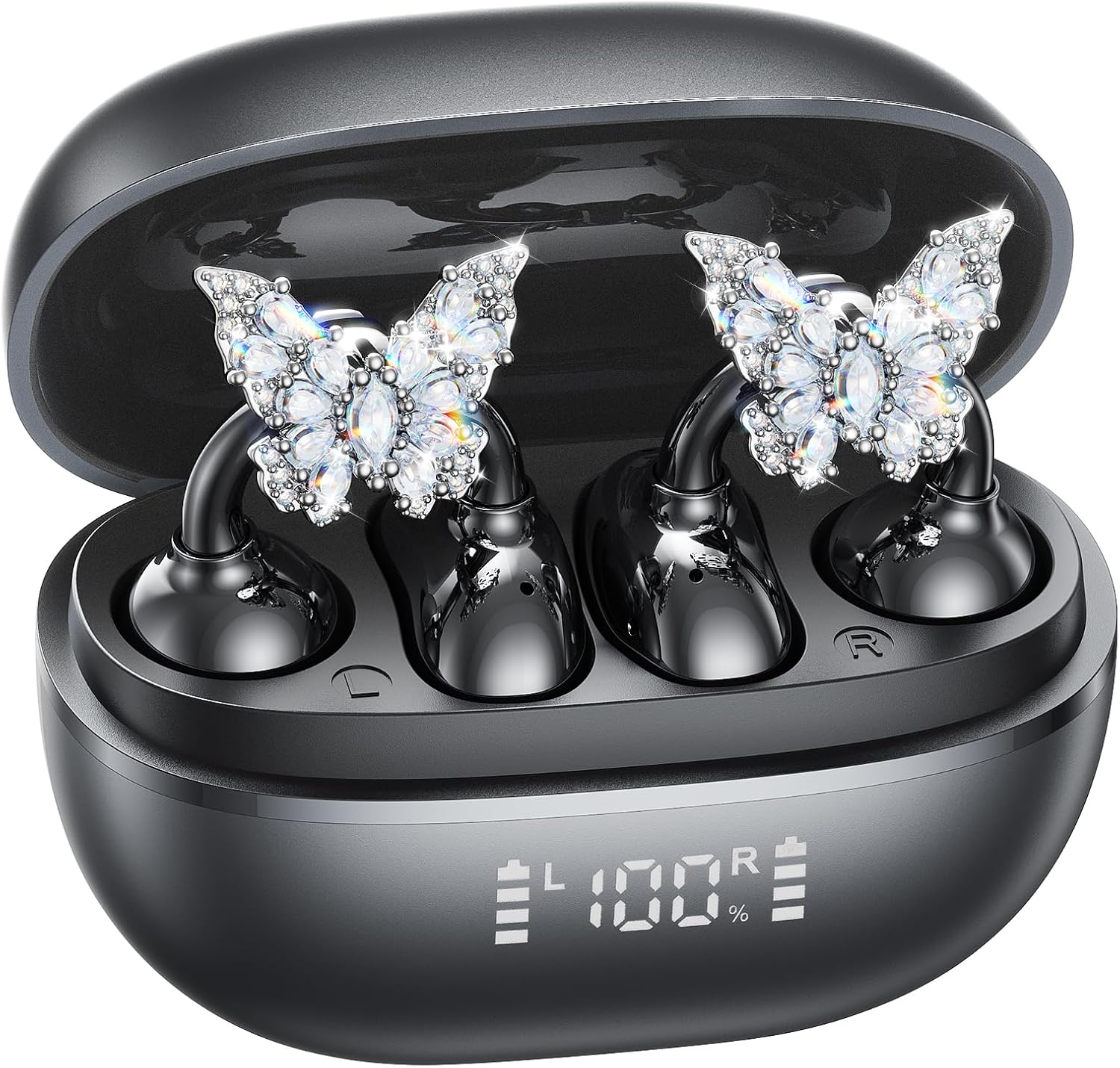
Image: A woman wearing the Kinglucky A20 earbuds with the detachable butterfly earrings, demonstrating the clip-on fit.
4. Attaching/Detaching Crystal Earrings
The crystal butterfly earrings are detachable. To attach, gently clip them onto the earphone stem. To detach, carefully unclip them. Remove the decorative earrings before storing the earbuds in the charging case to prevent damage.

Image: A visual guide illustrating the process of attaching the crystal butterfly accessory to the earbud stem.
Istruzzjonijiet Operattivi
Touch Kontrolli
The Kinglucky A20 earbuds feature intuitive touch controls on the outer surface of each earbud.
- Ilgħab/Pawża Mużika: Tektek darbtejn jew earbud.
- Tweġiba/Tmiem Sejħa: Tektek darbtejn fuq kwalunkwe earbud waqt telefonata li tkun dieħla jew telefonata attiva.
- Irrifjuta Sejħa: Agħfas u żomm kwalunkwe earbud għal żewġ sekondi waqt telefonata li tkun dieħla.
- Attiva l-Assistent tal-Vuċi: Agħfas u żomm kwalunkwe earbud għal 3 sekondi.

Image: A visual representation of the touch control functions for music playback and call management on the earbuds.
Kwalità tal-Ħoss u Ċarezza tas-Sejħiet
The A20 earbuds are engineered to deliver clear and balanced sound for various audio content, from podcasts to music. They feature AI-powered call clarity with 2 beamforming microphones and advanced noise-canceling technology for crisp conversations.

Image: An exploded diagram showing the internal components of the Kinglucky A20 earbud, highlighting its sound engineering.
Manutenzjoni
- Tindif: Use a soft, dry cloth to wipe the earbuds and charging case. Avoid using harsh chemicals or abrasive materials.
- Ħażna: Meta ma tkunx qed tużahom, aħżen il-earbuds fil-kaxxa tal-iċċarġjar tagħhom biex tipproteġihom u tiżgura li jibqgħu ċċarġjati.
- Reżistenza għall-Ilma: The earbuds are IP56 water-resistant, meaning they can withstand sweat and light rain. Do not submerge them in water.
Issolvi l-problemi
| Problema | Soluzzjoni |
|---|---|
| Earbuds ma jingħaqdux | Ensure earbuds are charged. Turn off and on Bluetooth on your device. Forget "Kinglucky A20" in your device's Bluetooth settings and re-pair. |
| L-ebda ħoss minn earbud wieħed | Place both earbuds back in the charging case, close the lid, wait a few seconds, then open and try again. Check device audio balance settings. |
| Każ tal-iċċarġjar mhux iċċarġjar | Verify the USB-C cable is securely connected to both the case and the power source. Try a different cable or power adapter. |
| Kwalità fqira tas-sejħiet | Ensure earbuds are properly seated on your ears. Move closer to your connected device to avoid interference. |
Speċifikazzjonijiet
- Isem tal-Mudell: A20
- Konnettività: Wireless, Bluetooth 5.4
- Tqegħid tal-widnejn: Widna Miftuħa
- Ħajja tal-batterija: Sa 8 sigħat (earbuds), sa 50 siegħa totali bil-kaxxa tal-iċċarġjar
- Reżistenza għall-Ilma: IP56
- Piż: Madwar 4.0g għal kull earbud
- Komponenti Inklużi: Earbuds, Charging Case, USB-C Cable, User Manual, Detachable Crystal Earrings
Garanzija u Appoġġ
Kinglucky products are manufactured to high standards and undergo rigorous quality checks. For warranty information, technical support, or customer service inquiries, please refer to the contact details provided on the Kinglucky official webis-sit jew id-dokumentazzjoni tax-xiri tiegħek. Żomm il-prova tax-xiri tiegħek għal talbiet ta' garanzija.
Għal aktar għajnuna, tista' żżur il- Ħanut Kinglucky fuq Amazon.
Ask a question about this manual
Ask about setup, troubleshooting, compatibility, parts, safety, or missing instructions. Manuals+ will review the question and use this page’s manual context to help answer it.