
1. Prodott Aktarview
The blafili 6dot35 is a versatile 1/4" Jack TRS Bluetooth v5.1 Music Receiver designed to integrate wireless audio streaming into professional and home audio setups. It supports high-quality audio codecs including aptX HD, aptX Low Latency, AAC, and SBC, ensuring superior sound. With a built-in rechargeable battery offering over 10 hours of playtime and USB-C DAC functionality, it provides flexible connectivity for mixing consoles, PA systems, DJ equipment, and computers. Its True Wireless Stereo (TWS) feature allows two units to be paired for immersive stereo sound.

Image: The blafili 6dot35 Bluetooth Receiver shown with its 1/4 inch TRS plug, connecting wirelessly to a laptop, smartphone, and tablet, and wired to a live sound mixer and active loudspeaker.
2. X'hemm fil-Kaxxa
- blafili 6dot35 Bluetooth Music Receiver
- Gwida Quick Start
- Power Cable (USB-C to USB-A)

Image: The blafili 6dot35 receiver, a USB-C charging cable, and the quick start guide are displayed as the package contents.
3. Karatteristiċi ewlenin
- Kwalità Awdjo Superjuri: Utilizes Qualcomm QCC3034 Bluetooth chipset with aptX HD, aptX Low Latency, aptX, AAC, and SBC codecs.
- Konnettività faċli: 1/4" TRS output for direct connection to audio mixing consoles, PA systems, and active DJ speakers.
- Mono and Stereo Modes: Supports mono audio with one unit, or True Wireless Stereo (TWS) playback by connecting two blafili 6dot35 receivers.
- Funzjonalità tal-USB DAC: Plug-and-play USB DAC supports up to 16bit / 48kHz audio input from a computer via USB-C.
- Ħajja twila tal-batterija: Built-in rechargeable battery provides 10+ hours of runtime. USB Type-C port for charging or continuous DC power.
- Operazzjoni Siekta: No beeps produced during pairing or unpairing.
- Customizable Bluetooth Name: Option to customize the Bluetooth broadcast name.
- Kompatibilità: Compatible with mixers, PA systems, and active speakers. Not compatible with Bluetooth headphones, speakers, or microphones.
4. Kontrolli u Indikaturi
The blafili 6dot35 features intuitive controls and clear LED indicators for easy operation.
- Buttuna PAIR: Power ON/OFF, Play/Pause, Reconnect.
- Buttuna TWS: True Wireless Stereo pairing mode.
- CHG (Charge) Button: Indikatur tal-istat tal-batterija.
- Port USB-C: For charging and USB DAC audio input.
- 1/4" TRS Plug: Konnettur tal-ħruġ tal-awdjo.

Image: A detailed diagram of the blafili 6dot35 highlighting its 1/4 inch TRS output, USB-C charging port/audio input, PAIR button, TWS button, and CHG button with corresponding LED indicators.
5. Gwida ta' Setup
5.1 Iċċarġjar inizjali
- Connect the provided USB-C cable to the blafili 6dot35's USB-C port.
- Plug the other end of the USB-C cable into a compatible USB power source (e.g., computer USB port, wall adapter).
- The CHG LED will illuminate solid red during charging. It will turn off when fully charged.
- A full charge takes approximately 2 hours and provides over 10 hours of runtime.
5.2 Powering On/Off & Bluetooth Pairing
- Qawwa mixgħula: Agħfas u żomm il- PAR button for approximately 3 seconds until the PAIR LED flashes blue and red alternately, indicating pairing mode.
- Tqabbil: On your Bluetooth-enabled device (smartphone, tablet, laptop), search for available Bluetooth devices and select "blafili 6dot35".
- Konferma tal-Konnessjoni: Once successfully paired, the PAIR LED will become a solid color (blue for SBC, cyan for aptX, pink for AAC, green for aptX HD, white for aptX LL).
- Itfi: Agħfas u żomm il- PAR buttuna għal madwar 3 sekondi.
5.3 Konnessjoni ma 'Tagħmir Awdjo
- Insert the 1/4" TRS plug of the blafili 6dot35 directly into an available 1/4" input on your audio mixer, PA system, or active DJ speaker.
- Ensure the input level on your audio equipment is set appropriately to avoid distortion.
- Nota Importanti: The blafili 6dot35 is not designed to operate with 48V phantom power. Use with standard line-level or non-phantom-powered 1/4" TRS inputs for optimal performance.
5.4 True Wireless Stereo (TWS) Pairing (Requires two blafili 6dot35 units)
- Ensure both blafili 6dot35 units are powered on and not connected to any Bluetooth device.
- On the first unit, press and hold the TWS button for approximately 3 seconds to enter TWS pairing mode. The TWS LED will flash blue.
- Repeat the previous step for the second unit.
- Once successfully paired in TWS mode, the TWS LEDs on both units will illuminate solid blue. One unit will act as the primary (left channel) and the other as the secondary (right channel).
- Connect your Bluetooth device to the primary blafili 6dot35 unit as described in section 5.2.
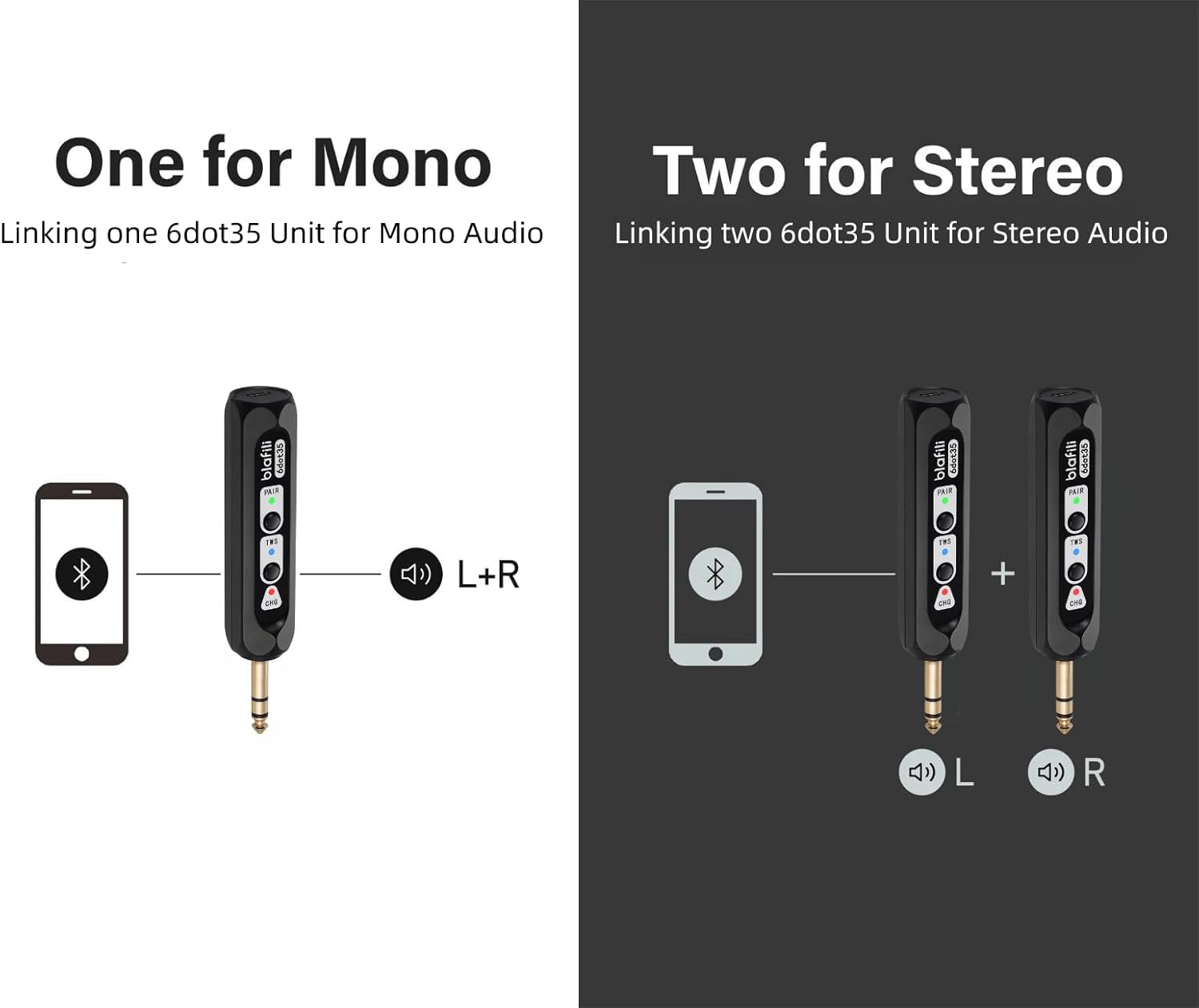
Image: Illustration of single blafili 6dot35 for mono output (L+R) and two blafili 6dot35 units paired for True Wireless Stereo (L and R channels).
5.5 USB DAC Audio Input
- Connect a computer to the blafili 6dot35 using a USB-C to USB-A cable.
- The blafili 6dot35 will be recognized as an audio output device by your computer.
- Select the blafili 6dot35 as your audio output device in your computer's sound settings to stream audio.
6. Istruzzjonijiet Operattivi
6.1 Kontrolli Bażiċi tad-Daqq
- Play/Pawsa: Agħfas qasir il- PAR button when music is playing.
- Ikkonnettja mill-ġdid: Agħfas qasir il- PAR button when out of connection to re-establish the last paired device.
6.2 Customizing Bluetooth Broadcast Name
The blafili 6dot35 allows you to customize its Bluetooth broadcast name. Refer to the detailed instructions in the full user manual or contact blafili support for guidance on this advanced feature.
7. Manutenzjoni
7.1 Iċċarġjar
- Charge the device using the provided USB-C cable and a 5V USB power source.
- The CHG LED indicates charging status (solid red for charging, off for fully charged).
- The CHG LED will flash 5 times every minute when the battery is low and needs recharging.
- For continuous use, the device can remain plugged into a USB power source.
7.2 Kura u Immaniġġjar
- Żomm l-apparat niexef u 'l bogħod minn temperaturi estremi.
- Clean with a soft, dry cloth. Do not use harsh chemicals.
- Evita li twaqqa’ jew tissuġġetta l-apparat għal impatti qawwija.
8 Issolvi l-problemi
- Diffikultà fit-Tqabbil:
Ensure the blafili 6dot35 is in pairing mode (PAIR LED flashing blue/red). Turn off Bluetooth on other devices to prevent interference. The blafili 6dot35 is a receiver, not a transmitter, so it cannot pair with Bluetooth headphones, speakers, or microphones. - Ebda Output Awdjo:
Check if the blafili 6dot35 is correctly plugged into a line-level or non-phantom-powered 1/4" TRS input on your audio equipment. Verify that the volume levels on both the receiver and your audio equipment are adjusted correctly. Ensure your Bluetooth device is successfully connected to the blafili 6dot35. - Kwistjonijiet ta' Konnessjoni TWS:
Ensure both blafili 6dot35 units are powered on and not connected to any other Bluetooth device before initiating TWS pairing. Follow the TWS pairing steps carefully. - USB DAC Not Working:
Confirm the USB-C cable is securely connected to both the blafili 6dot35 and your computer. Ensure the blafili 6dot35 is selected as the audio output device in your computer's sound settings. The blafili 6dot35 supports USB-C audio input from a computer, not USB-C output. - Unexpected Beeps/Tones:
The blafili 6dot35 is designed for silent operation during pairing and unpairing. If you hear unexpected tones, check for external interference or consult the full manual.
9. Speċifikazzjonijiet
| Dimensjonijiet tal-Prodott | 1 x 1 x 1 pulzieri (2.54 x 2.54 x 2.54 ċm) |
| Piż tal-oġġett | 2.39 uqija (67.75 gramma) |
| Numru tal-Mudell tal-Oġġett | blafili 6dot35 |
| Batteriji | 1 batteriji tal-jone tal-litju meħtieġa (inklużi) |
| Brand | blafili |
| Teknoloġija tal-Konnettività | 1/4" TRS plug, Bluetooth v5.1, USB-C |
| Tip ta' Kontrollur | Imbotta Buttuna |
| Karatteristiċi Speċjali | Hi-Res Audio, LED Light, Portable, Stereo Pairing (TWS), USB Port |
| Apparati Kompatibbli | Home Theater, Karaoke Machine, Smartphone, Streaming Device, Tablet |
| Tip ta' Konnettur | 1/4" TRS |
| Modalità tal-Ħruġ tal-Awdjo | Stereo |
| Surround Sound Channel Konfigurazzjoni | 2.0 |
| Kulur | Iswed |
10. Garanzija u Appoġġ
10.1 Politika ta' Ritorn
This product is eligible for a 30-day refund/replacement return policy when purchased from Amazon.
10.2 Pjanijiet ta' Protezzjoni Estiża
Optional extended protection plans are available for purchase:
- Pjan ta' Protezzjoni ta' Sentejn
- Pjan ta' Protezzjoni ta' Sentejn
- Complete Protect (kontijiet ta' kull xahar)
Please refer to the product listing or contact your retailer for details on purchasing these plans.
10.3 Appoġġ tal-Manifattur
For further assistance, technical support, or warranty claims, please contact blafili inc. directly. Contact information can typically be found in the full user manual or on the manufacturer's official websit.
11. Vidjo Uffiċjali tal-Prodott
Video: An official product video from BLAFILI demonstrating the blafili 1/4" Bluetooth Audio Receiver for Mixers, showcasinil-karatteristiċi u l-konnettività tiegħu.