
1. Introduzzjoni
This manual provides essential information for the safe and efficient use of your XIAOMI Redmi 15 5G Smartphone. Please read it carefully before using the device and keep it for future reference.
2. Kontenut tal-Pakkett
Ivverifika li l-pakkett tiegħek fih l-oġġetti li ġejjin:
- XIAOMI Redmi 15 5G Smartphone
- Kawża Protettiva
- USB-C Cable
- Għodda Ejector SIM
Nota: A power adapter is not included in the package. Please use a compatible 33W fast charger for optimal charging performance.
3. Layout tal-Apparat
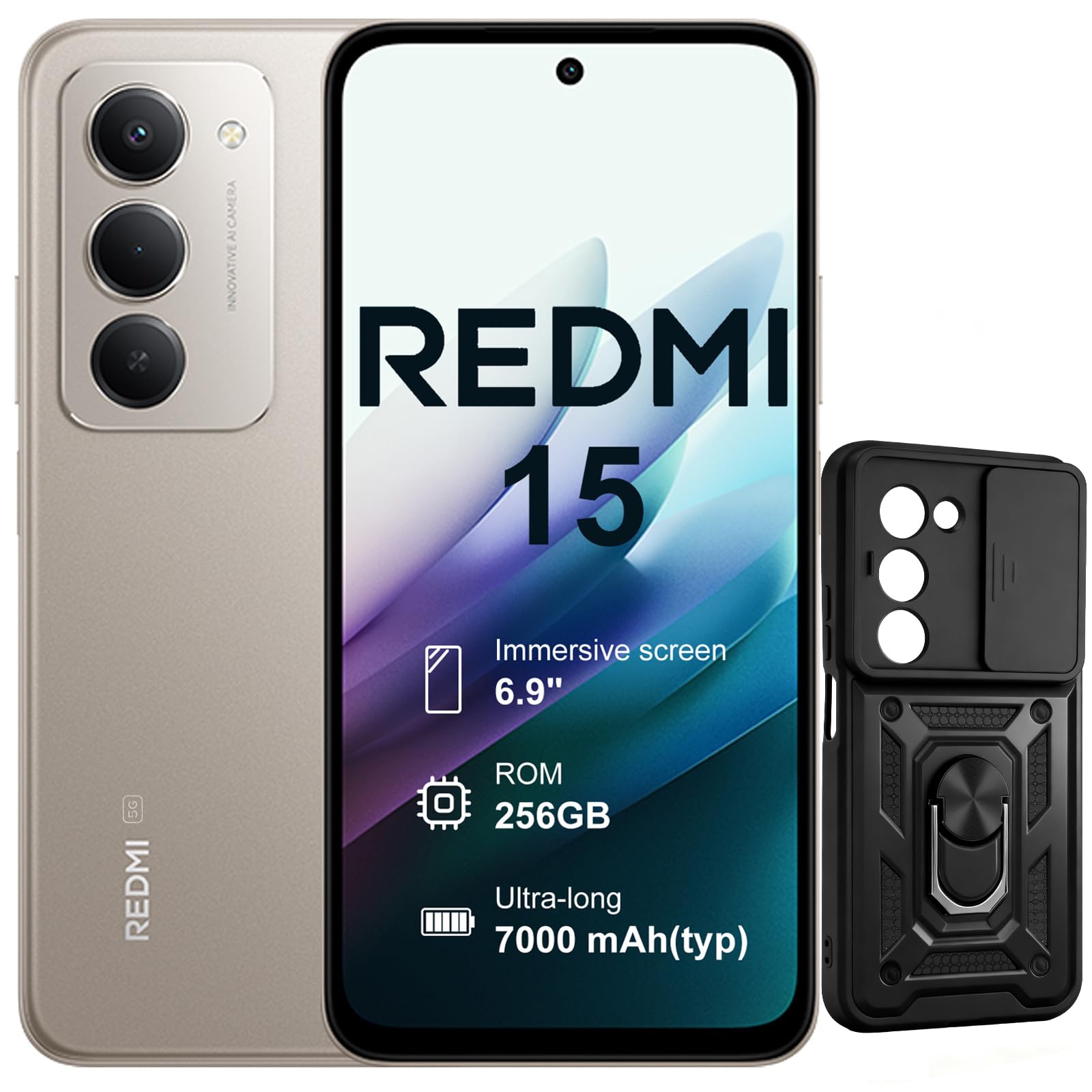
Immaġni: Quddiem u wara view of the XIAOMI Redmi 15 5G Smartphone. The device features a large display on the front and a triple camera setup on the rear.
Familiarize yourself with the physical components of your smartphone:
- Buttuna tal-Qawwa: Located on the side, used to power on/off or wake/sleep the device. Also integrates the fingerprint sensor.
- Buttuni tal-Volum: Jinsab fuq il-ġenb, jintuża biex jaġġusta l-volum tal-midja u tas-sejħiet.
- Port USB-C: Jinsab fil-qiegħ, għall-iċċarġjar u t-trasferiment tad-dejta.
- Jack tal-headphones ta' 3.5mm: Located on the top/bottom, for connecting wired headphones.
- Trej tal-SIM Card: Located on the side, for inserting Nano SIM cards.
- Kamera ta' quddiem: Located on the display, for selfies and video calls.
- Kameras ta' wara: Multiple lenses on the back for high-quality photography and video recording.
4. Setup
4.1. Daħħal SIM Cards
- Sib it-trej tal-kard SIM fuq il-ġenb tat-tagħmir tiegħek.
- Daħħal l-għodda tal-ejecter tas-SIM fit-toqba ż-żgħira ħdejn it-trej u agħfas sew sakemm it-trej joħroġ 'il barra.
- Place your Nano SIM card(s) into the designated slots on the tray. This device supports Dual SIM.
- Erġa' daħħal it-trej fit-telefon bir-reqqa.
4.2. L-Ewwel Tixgħel u l-Konfigurazzjoni
- Agħfas u żomm il-buttuna tal-Power sakemm jidher il-logo XIAOMI.
- Segwi l-istruzzjonijiet fuq l-iskrin biex tagħżel il-lingwa tiegħek, tikkonnettja ma' netwerk Wi-Fi, u tissettja l-kont Google tiegħek.
- Configure security features such as fingerprint recognition (integrated into the power button) and screen lock.
5. It-Tħaddim tal-Ismartphone Tiegħek
5.1. Wirja u Interazzjoni
The Redmi 15 features an immersive 6.9-inch FHD+ display with a 144Hz refresh rate for smooth visuals. It also includes an all-day eye-care display for comfortable viewing.

Immaġni: Persuna viewing the smartphone screen in a dimly lit room, demonstrating the all-day eye-care display feature for reduced eye strain.
The device incorporates Wet Touch Technology 2.0, ensuring accurate touch response even when your fingers are wet or covered with oil or foam.

Image: A person interacting with the smartphone while at the beach, illustrating the Wet Touch Technology 2.0 which allows for accurate touch input even with wet fingers.
5.2. Karatteristiċi tal-Kamera
The Redmi 15 5G is equipped with a 50MP AI dual camera system, offering features like Super Resolution mode and dynamic shots. Video recording is stabilized in 4K.
5.3. Konnettività u Prestazzjoni
Powered by the Snapdragon 6 Gen 3 processor with integrated 5G modem, the device provides ultra-fast downloads and smooth gaming. It ensures powerful and fluid multitasking even with demanding applications.

Image: A graphic representation of the Snapdragon 6s Gen 3 processor, highlighting its 5G capabilities and support for up to 16GB RAM with memory extension.
5.4. Karatteristiċi Speċjali
Ċirku biex Tfittex bil-Google: This feature allows you to instantly search for anything you see on your phone by circling, scribbling, or tapping to pinpoint items without needing screenshots.

Image: A smartphone screen demonstrating the "Circle to Search with Google" feature, where a user circles an item in an image to perform a search and view related results.
6. Maintenance and Battery Management
6.1. Battery Charging and Longevity
The device is equipped with a 7000mAh battery, providing up to 2 days of typical use. It supports 33W turbo charging for quick power-ups.

Image: A smartphone screen displaying a charging animation with "86.11%" and "MI TURBO CHARGE", alongside text highlighting the benefits of 33W turbo charging.
The battery is designed for durability, maintaining at least 80% of its original capacity after 1600 full charging cycles. Even at 1% battery level, the phone can remain in standby mode for up to 7.5 hours or allow up to 59 minutes of calls.

Image: A graphic illustrating "1% power endurance" with call and standby times, and "1600 charge cycles, capacity still ≥80%", emphasizing battery longevity.
The device also supports 18W reverse charging, allowing it to function as a portable power bank for other devices.

Image: Two smartphones connected via a cable, demonstrating the 18W reverse charging feature where one phone charges another, effectively acting as a power bank.
6.2. Environmental Resilience
The Redmi 15 5G is designed for reliable performance even in low temperatures, with enhanced battery performance at -20°C. It is also water-resistant.

Image: A smartphone with frost on its edges, illustrating its reliable performance and battery endurance at -20°C, with specific video playback and call times.
7 Issolvi l-problemi
Jekk tiltaqa' ma' problemi bit-tagħmir tiegħek, ipprova l-passi bażiċi li ġejjin għas-soluzzjoni tal-problemi:
- L-apparat ma jirrispondix: Agħfas u żomm il-buttuna tal-Qawwa għal madwar 10-15-il sekonda biex terġa' tibda.
- Kwistjonijiet tan-Netwerk: Check if your SIM card is properly inserted. Try toggling Airplane Mode on and off. Verify your mobile data settings.
- Problemi tal-iċċarġjar: Ensure the USB-C cable is securely connected to both the phone and the power adapter (not included). Try a different cable or power source.
- Ħsara fl-App: Agħlaq u erġa' iftaħ l-app. Jekk il-problema tippersisti, neħħi l-cache tal-app jew erġa' installaha.
- Sensur tal-Marki tas-Swaba' Mhux Jaħdem: Ensure your finger is clean and dry. Re-register your fingerprints if necessary.
For more advanced troubleshooting, please refer to the official XIAOMI support resources.
8. Speċifikazzjonijiet
| Karatteristika | Speċifikazzjoni |
|---|---|
| Brand | XIAOMI |
| Isem tal-Mudell | Redmi 15 |
| Sistema Operattiva | Android 15 |
| RAM | 8 GB |
| Kapaċità tal-Ħżin | 256 GB |
| Daqs tal-Iskrin | 6.9 Pulzier |
| Riżoluzzjoni | 2460 x 1080 |
| Riffriskar Rata | 144 Hz |
| Teknoloġija Ċellulari | 5G |
| Slots tal-Kard SIM | SIM doppju |
| Identifikazzjoni bijometrika | Rikonoxximent tal-marki tas-swaba' |
| Livell ta 'Reżistenza għall-Ilma | Reżistenti għall-Ilma |
| Jack tal-headphone | 3.5 mm |
| Riżoluzzjoni tal-Kamera ta 'quddiem | 8 MP |
| Riżoluzzjoni tal-Kamera ta 'wara | 50 MP |
| Kapaċità tal-batterija | 7000 mAh |
| Ħajja Medja tal-Batterija | 2 Jiem |
| Dimensjonijiet | 16.9 x 8 x 0.8 ċm |
| Port tal-Iċċarġjar | USB-C |
9. Informazzjoni dwar Garanzija
Your XIAOMI Redmi 15 5G Smartphone comes with a Garanzija ta' 2 snin mill-manifatturDin il-garanzija tkopri difetti fil-materjali u fix-xogħol taħt użu normali. Jekk jogħġbok żomm il-prova tax-xiri tiegħek għal talbiet ta' garanzija.
For detailed warranty terms and conditions, please visit the official XIAOMI websit jew ikkuntattja l-appoġġ tal-klijent.
10. Appoġġ
For further assistance, technical support, or service inquiries, please contact XIAOMI customer support through their official channels. You can also visit the official XIAOMI store for more information and resources:


