
1. Introduzzjoni
Welcome to the user manual for your RebotAi A9 8.7-inch Android 15 Tablet. This guide provides essential information on setting up, operating, maintaining, and troubleshooting your device to ensure a smooth and enjoyable user experience. Please read this manual carefully before using your tablet.
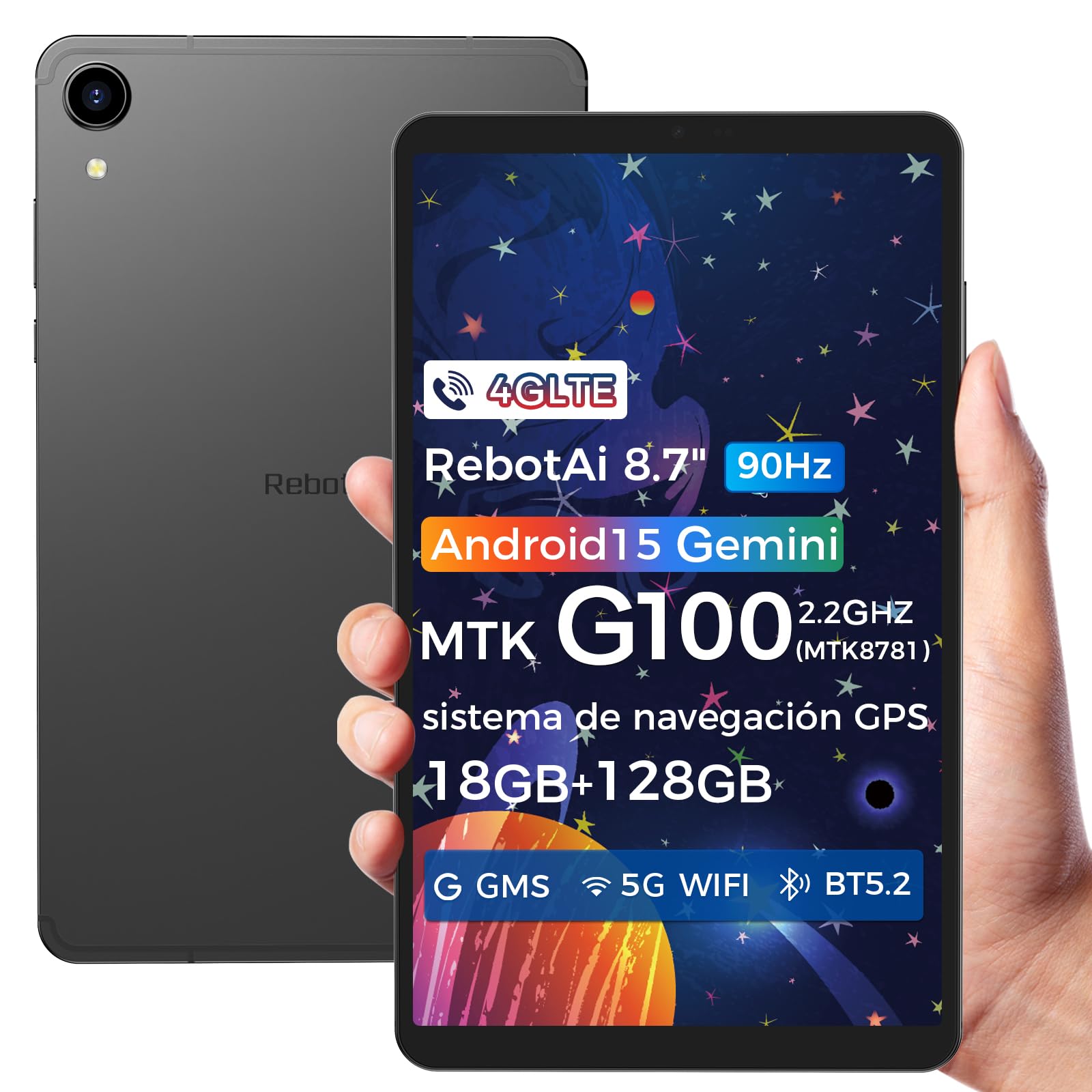
Image: General view of the RebotAi A9 tablet, showcasing id-disinn eleganti tiegħu.
2. Kontenut tal-Pakkett
Meta tiftaħ il-kaxxa, jekk jogħġbok ivverifika li l-oġġetti kollha huma preżenti:
- Pillola RebotAi A9
- Cable tal-Iċċarġjar tal-USB-C
- Għodda Ejector SIM
- Gwida Quick Start
- Karta ta' Garanzija
Nota: In accordance with global environmental guidelines, the RebotAi A9 tablet does not include a power adapter. Please use a compatible USB-C power adapter (not included) for charging.
3. Device Overview
Familiarize yourself with the physical components of your RebotAi A9 tablet.

Immaġni: Aktar minnview of the RebotAi A9 tablet's key features, including its 8.68-inch display, Android 15 OS, 1340x800 IPS resolution with 90Hz refresh rate, MediaTek Helio G100 processor, slim design, 6GB RAM, 5000mAh battery, 128GB ROM, dual-band Wi-Fi, GPS, Bluetooth 5.2, and Widevine L1 support.
Disinn Fiżiku
- Wiri: 8.7-inch IPS screen with 1340 x 800 resolution and 90Hz refresh rate for vibrant colors and smooth visuals.
- Casing: Metallic casing with nano-coating process, offering a smooth feel and elegant appearance, designed for water and impact resistance.
- Dimensjonijiet: Approximately 7.8 mm thin.
- Piż: Madwar 360 gramma.

Image: This image highlights the tablet's durable construction, featuring nano-injection molding technology for advanced water and impact resistance. It shows details of the impermeability specifications and antenna slots designed with nanotechnology.
Audio and Sensors
- Kelliema: Dual-BOX speakers for enhanced audio experience.
- Jack tal-headphone: Jack standard tal-headphones ta' 3.5mm.
- Sensers: High-precision gyroscope, light sensor, and gravity sensor for accurate orientation, automatic screen rotation, and improved navigation.

Image: This image details the tablet's advanced features, including dual-band Wi-Fi (2.4GHz/5GHz), Bluetooth 5.2, dual-box speakers, and a 3.5mm headphone jack. It also highlights fast connectivity and precise positioning with A-GPS and 4-mode GPS, along with a 450 nits bright display.
4. Setup
4.1 Qawwa Inizjali
- Press and hold the Power button located on the side of the tablet until the RebotAi logo appears.
- Segwi l-istruzzjonijiet fuq l-iskrin biex tagħżel il-lingwa tiegħek, tikkonnettja ma' netwerk Wi-Fi, u tissettja l-kont Google tiegħek.
4.2 Installazzjoni tal-Karta SIM u l-Karta MicroSD
The tablet supports two nano-SIM cards for 4G LTE connectivity and a microSD card for storage expansion.
- Sib it-trej tal-kard SIM/MicroSD fuq il-ġenb tat-tablet.
- Daħħal l-għodda tal-ejecter tas-SIM fit-toqba ż-żgħira ħdejn it-trej biex tiftaħha.
- Carefully place your nano-SIM card(s) and/or microSD card into the designated slots on the tray. Ensure the gold contacts are facing down.
- Imbotta t-trej bil-mod lura fit-tablet sakemm tikklikkja f'postu.

Image: This image illustrates the tablet's connectivity options, highlighting 4G LTE support, Bluetooth 5.2, dual-band Wi-Fi (2.4GHz and 5GHz), and multi-system GPS (GPS/Galileo/Glonass). A close-up of the dual SIM card slot is also visible, indicating support for mobile data and calls.
5. Joperaw
5.1 Wirja u Viżwali
The 8.7-inch IPS display with 1340 x 800 resolution and 90Hz refresh rate provides a clear and fluid visual experience. With 450 nits brightness, content remains visible even in bright environments. Widevine L1 support ensures high-definition video streaming from compatible services.

Image: An image showing the tablet being used for gaming, emphasizing its smooth performance for games and videos. It highlights the 8.68-inch screen, G100 chip, and 90Hz refresh rate for an uninterrupted and comfortable visual experience.
5.2 Prestazzjoni
Powered by the MediaTek Helio G100 octa-core processor (MT8781), the RebotAi A9 delivers enhanced performance for multitasking, gaming, and media consumption. It features two high-performance Cortex-A76 cores and six low-power Cortex-A55 cores, along with a Mali-G57 MC2 GPU.

Image: An image detailing the MediaTek Helio G100 processor, showing its octa-core CPU architecture (Cortex-A76 and Cortex-A55 cores), Mali-G57 MC2 GPU, and 2.2 GHz frequency. A benchmark comparison chart is included, demonstrating its performance relative to other chipsets.
5.3 Kamera
The tablet is equipped with a 13MP rear camera and a 5MP front camera, suitable for online meetings, video calls, and capturing daily moments with clear and natural images.

Image: This image focuses on the tablet's camera system, showing the 5MP front camera and 13MP rear camera. The accompanying text indicates these cameras provide clear and natural images suitable for online meetings and daily recordings.
5.4 Android 15 and AI Features
Running on Android 15 and GMS certified, the RebotAi A9 provides access to a wide range of Google services and applications. Its high-performance hardware and A9 chip are optimized for comfortable use of various AI tools, enhancing user interaction and productivity.

Image: An image depicting the tablet's interface with various app icons, emphasizing its Android 15 operating system and GMS certification. It highlights the high-performance hardware and A9 chip, enabling comfortable use of various AI tools.
6. Konnettività
The RebotAi A9 tablet offers comprehensive connectivity options:
- 4G LTE: Dual nano-SIM support for mobile data and calls, ensuring connectivity on the go.
- 5G WiFi: Dual-band Wi-Fi (2.4GHz and 5GHz) for fast and stable internet connections, ideal for streaming and downloads.
- Bluetooth 5.2: For connecting wireless accessories such as headphones, speakers, and keyboards with lower power consumption.
- GPS: Multi-system GPS (GPS/Galileo/Glonass) for precise positioning and navigation.
7. Ħażna u Prestazzjoni
- RAM: 6GB of installed RAM, expandable virtually by an additional 12GB for a total of 18GB, ensuring smooth multitasking.
- Ħażna Interna: 128GB of internal storage for your apps, photos, and files.
- Ħażna espansibbli: Supports microSD card expansion up to 1TB, providing ample space for large media files u dokumenti.
8. Batterija u Iċċarġjar
The RebotAi A9 is equipped with a 5000mAh high-capacity battery, offering extended usage times.
- Ħajja tal-batterija: Up to 12 hours of general use on a single charge.
- Iċċarġjar veloċi: Supports 20W PD fast charging, allowing the tablet to be fully charged quickly.
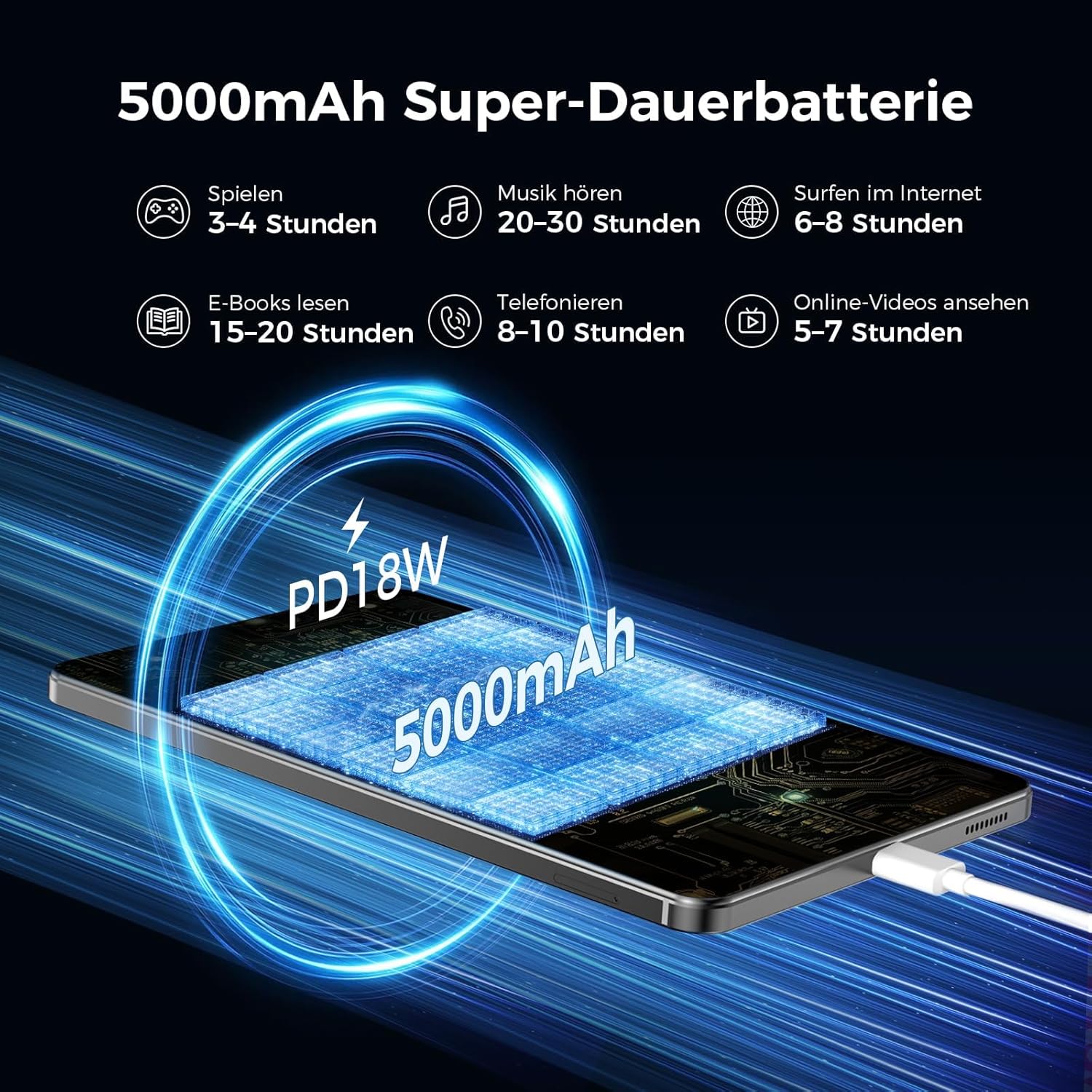
Image: An image illustrating the 5000mAh battery capacity and its estimated usage times for various activities: 3-4 hours gaming, 20-30 hours music, 6-8 hours internet browsing, 15-20 hours e-reading, 8-10 hours calls, and 5-7 hours online videos. It also shows the tablet being charged via PD18W fast charging.
9. Manutenzjoni
To ensure the longevity and optimal performance of your RebotAi A9 tablet, follow these maintenance guidelines:
- Tindif: Uża drapp artab u mingħajr suf biex tnaddaf l-iskrin u l-qafas. Evita materjali li joborxu jew kimiċi ħarxa.
- Kura tal-batterija: Evita temperaturi estremi. Tħallix il-batterija tiċċarġja kompletament ta' spiss. Għal ħażna fit-tul, iċċarġja l-batterija sa madwar 50%.
- Aġġornamenti tas-Software: Regularly check for and install system updates to ensure security and performance improvements.
- Ġestjoni tal-Ħażna: Neħħi perjodikament bla bżonn files and apps to free up storage space and maintain performance.
10 Issolvi l-problemi
If you encounter issues with your tablet, try the following common troubleshooting steps:
- It-tablet mhux qed jixgħel: Ensure the battery is charged. Connect the tablet to a power source and try again.
- L-iskrin ma jirrispondix: Restart the tablet by holding the power button. If unresponsive, force restart by holding the power button for an extended period (usually 10-15 seconds).
- Problemi ta' konnettività Wi-Fi/4G: Toggle Wi-Fi/Mobile Data off and on. Restart your router or contact your service provider.
- L-apps jiġġarraf: Clear the cache of the problematic app or reinstall it. Ensure your tablet's software is up to date.
- Prestazzjoni bil-mod: Close unused apps, clear cache, and ensure sufficient storage space. Consider a factory reset as a last resort (back up your data first).
11. Speċifikazzjonijiet
| Karatteristika | Dettall |
|---|---|
| Brand | RebotAi |
| Isem tal-Mudell | A9 |
| Sistema Operattiva | Android 15 |
| Proċessur | MediaTek Helio G100 (MT8781) Octa-Core |
| RAM | 6 GB (espandibbli għal 18 GB) |
| Kapaċità tal-Ħżin tal-Memorja | 128 GB |
| Ħażna espansibbli | Sa 1 TB permezz ta' karta microSD |
| Daqs tal-Iskrin | 8.7 Inches (8.68 Inches) |
| Riżoluzzjoni tal-Iskrin | 1340 x 800 IPS, 90Hz Refresh Rate |
| Riżoluzzjoni Massima Appoġġjata | 2560 Pixels (for content playback) |
| Luminożità | 450 nits |
| Kamera ta' wara | 13 MP |
| Kamera ta' Quddiem | 5 MP |
| Kapaċità tal-batterija | 5000 mAh |
| Ħajja tal-batterija | Sa 12-il Siegħa |
| Iċċarġjar | 20W PD Fast Charging (cable included, adapter not included) |
| Konnettività | 4G LTE (Dual Nano-SIM), 5G WiFi (2.4GHz/5GHz), Bluetooth 5.2, GPS (GPS/Galileo/Glonass) |
| Kulur | Griż |
12. Garanzija u Appoġġ
RebotAi offers a garanzija ta 'sena for your A9 tablet. For any technical issues or support inquiries, please contact RebotAi customer service. We guarantee a quick response within 24 hours.
Jekk jogħġbok irreferi għall-karta tal-garanzija inkluża fil-pakkett tiegħek għal termini u kundizzjonijiet dettaljati.