
1. Introduzzjoni
This manual provides detailed instructions for the installation, operation, and maintenance of your STUDIOFINIX Marine Bluetooth Receiver, Model ST-BT01-US. This device is designed to provide wireless Bluetooth audio connectivity in various marine and outdoor vehicle environments, including boats, UTVs, ATVs, motorcycles, and golf carts. Please read this manual thoroughly before use to ensure proper installation and optimal performance.
2. Kontenut tal-Pakkett
Iċċekkja li l-oġġetti kollha elenkati hawn taħt huma inklużi fil-pakkett tiegħek:
- Riċevitur x 1
- Manwal ta' Istruzzjoni x 1
- 3M Adhesive Backing x 1
- Viti ta 'installazzjoni x 2

Figure 2.1: Package Contents. This image displays the STUDIOFINIX Marine Bluetooth Receiver, its user manual, 3M adhesive backing, and two installation screws, all included in the product box.
3. Karatteristiċi tal-prodott
- Konnettività Bluetooth 5.3: Equipped with the latest Bluetooth 5.3 technology for a stable, fast, and remote wireless connection, ensuring seamless audio streaming.
- IP67-Rated Waterproof Design: Built to withstand harsh marine and outdoor conditions, resistant to water, dust, and other elements.
- Versatile Vehicle Compatibility: Ideal for yachts, motorcycles, golf carts, UTVs, ATVs, and other vehicles requiring wireless audio integration.
- Output RCA: Features male RCA outputs for easy connection to an amplifier or existing audio system.

Figure 3.1: IP67 Waterproof Feature. The image shows the receiver unit with water droplets, illustrating its IP67 waterproof capability, designed to withstand seawater and rainwater.

Figure 3.2: Versatile Application. This image demonstrates the receiver's compatibility with various vehicles, including ships, cars, motorcycles, and speedboats, highlighting its broad utility.

Figure 3.3: Upgraded Bluetooth 5.3. This graphic emphasizes the stable and low-latency connection provided by Bluetooth 5.3, ensuring a smooth and high-quality audio experience.
4. Setup u Installazzjoni
Follow these steps for proper installation of your Marine Bluetooth Receiver:
- Konnessjoni tal-Enerġija:
- Qabbad il- wajer aħmar to the vehicle's positive power supply (B+).
- Qabbad il- wajer iswed to the vehicle's negative power supply (GND).
- Qabbad il- wajer blu (power switch control line) to the ACC (Accessory) power source. This line acts as an accessory power switch.
- AmpKonnessjoni lifier:
- Connect the red and white RCA male outputs from the receiver to the corresponding RCA inputs on your ampaktar ħaj.
- Jekk tiegħek amplifier does not have direct RCA inputs, an AUX adapter may be required.
- Immuntar: Use the provided 3M adhesive backing or installation screws to securely mount the receiver in a suitable location, ensuring it is protected from direct impact and excessive heat.
Noti Importanti:
- Ensure all connections comply with local electrical safety standards.
- Verify polarity to avoid reverse connection damage.
- The blue wire functions as an ACC power switch, not a remote trigger for an ampaktar ħaj.

Figure 4.1: Product Connections. This diagram illustrates the wiring connections for the receiver, including power (B+, GND, ACC) and RCA outputs to an ampaktar ħaj.
5. Istruzzjonijiet Operattivi
Once installed, follow these steps to operate your Bluetooth receiver:
- Qawwa Mixgħul: Ensure the vehicle's ignition or accessory power is on to activate the receiver. The receiver will automatically enter pairing mode.
- Tqabbil: Fuq l-apparat mobbli tiegħek, mur fis-settings tal-Bluetooth. Fittex għal available devices and select "STUDIOFINIX BT" (or similar name) to pair. A confirmation sound may indicate successful pairing.
- Daqq tal-awdjo: Once paired, you can stream audio from your device to the connected amplifier and speakers. Control playback (play/pause, skip tracks, volume) directly from your mobile device.
- Konnessjoni mill-ġdid Awtomatika: The receiver will attempt to automatically reconnect to the last paired device when powered on and within range.
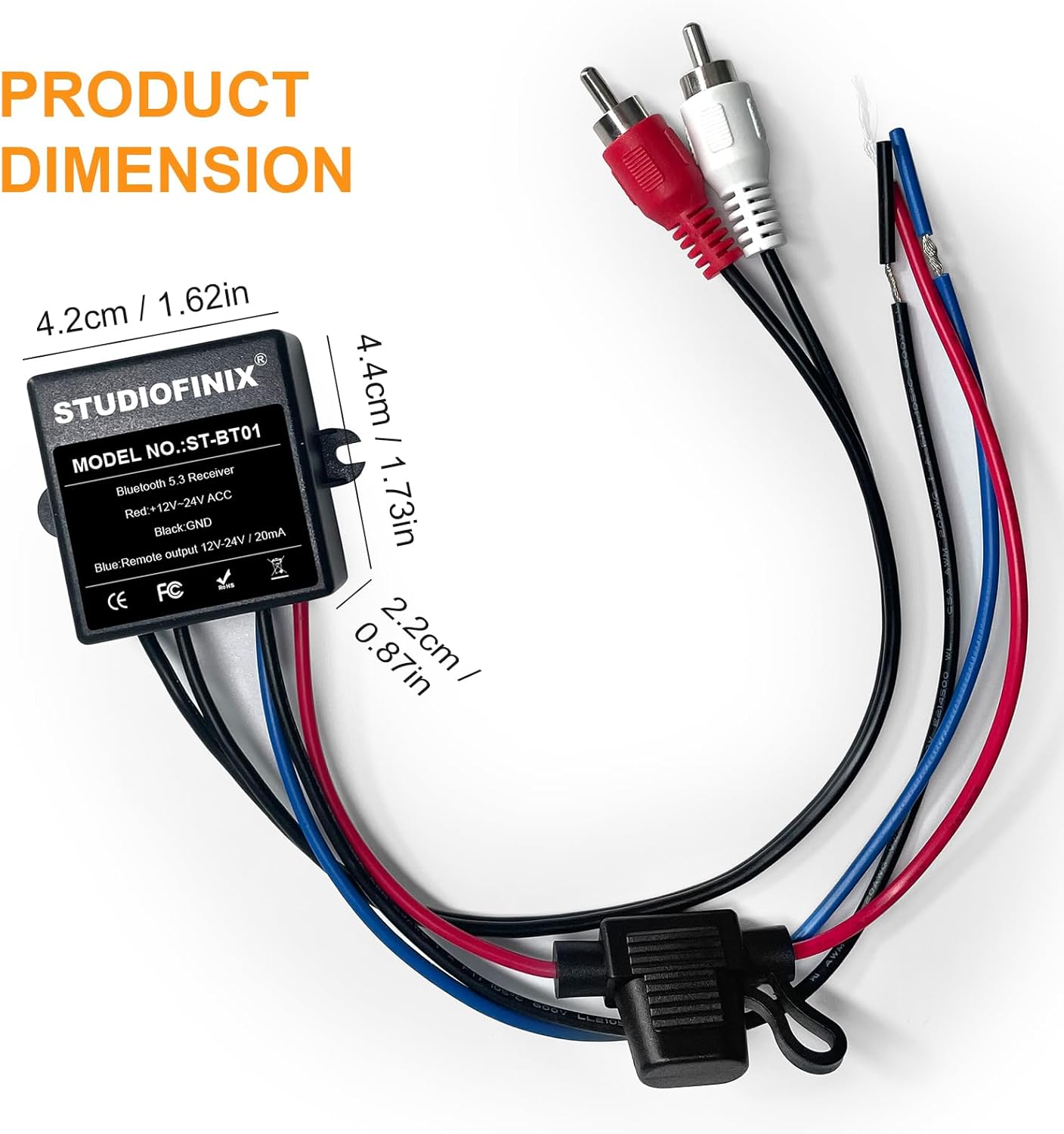
Figure 5.1: Bluetooth Connection. This image shows a smartphone wirelessly connected to the receiver, demonstrating how to stream music in a vehicle.
6. Manutenzjoni
To ensure the longevity and optimal performance of your STUDIOFINIX Marine Bluetooth Receiver, follow these maintenance guidelines:
- Tindif: Wipe the receiver with a soft, damp cloth. Avoid using harsh chemicals or abrasive cleaners, as these can damage the waterproof seal or finish.
- Spezzjoni: Periodically check all wiring connections for corrosion or damage, especially in marine environments. Ensure connections are secure.
- Protezzjoni: Although IP67 rated, avoid prolonged submersion or high-pressure water jets directly on the unit to prevent potential damage over time.
- Ħażna: If the vehicle or vessel is stored for an extended period, ensure the receiver is powered off.
7 Issolvi l-problemi
Jekk tiltaqa' ma' problemi bir-riċevitur tiegħek, irreferi għall-problemi u s-soluzzjonijiet komuni li ġejjin:
| Problema | Kawża Possibbli | Soluzzjoni |
|---|---|---|
| Receiver does not power on. | Ebda provvista tal-enerġija; wajers mhux korretti; fjus maħruq. | Check power connections (red to B+, black to GND, blue to ACC). Verify the vehicle's power is on. Inspect for a blown fuse in the power line and replace if necessary. |
| Ma nistax nikkonnettja permezz tal-Bluetooth. | Receiver not in pairing mode; device Bluetooth off; interference; already connected to another device. | Ensure receiver is powered on. Turn Bluetooth off and on again on your mobile device. Move closer to the receiver. Disconnect from other Bluetooth devices. |
| Ebda output awdjo. | Incorrect RCA connection; amplifier off; volume too low; incorrect input selected on ampaktar ħaj. | Verify RCA cables are securely connected to the ampl-input tal-lifer. Kun żgur li amplifier is powered on and its volume is up. Select the correct input source on your ampaktar ħaj. |
| Il-kwalità tal-awdjo hija fqira jew intermittenti. | Weak Bluetooth signal; interference; damaged cables. | Move your mobile device closer to the receiver. Avoid sources of strong electromagnetic interference. Check RCA cables for damage. |
8. Speċifikazzjonijiet
| Karatteristika | Dettall |
|---|---|
| Brand | STUDIOFINIX |
| Numru tal-Mudell | ST-BT01-US |
| Teknoloġija tal-Konnettività | Bluetooth 5.3 |
| Klassifikazzjoni li ma jgħaddix ilma minnha | IP67 |
| Modalità tal-Ħruġ tal-Awdjo | Stereo |
| Tip ta' Konnettur | RCA Male |
| Apparati Kompatibbli | Kelliema, Ampliifikaturi |
| Piż tal-oġġett | 0.2 Kilogrammi |
| Numru ta 'Kanali | 2 |

Figure 8.1: Product Dimensions. This image provides the physical measurements of the receiver unit for installation planning.
9. Garanzija u Appoġġ
Informazzjoni dwar il-garanzija:
This STUDIOFINIX product comes with a garanzija ta 'sena from the date of purchase, covering manufacturing defects. This warranty does not cover damage caused by improper installation, misuse, accidents, or unauthorized modifications.
Politika ta' Ritorn:
Eligible for return or replacement within 30-il jum of receipt. Please refer to the retailer's return policy for detailed instructions.
Appoġġ għall-Klijent:
For technical assistance, warranty claims, or further inquiries, please contact STUDIOFINIX customer support through the retailer's platform or visit the official STUDIOFINIX websit.