
1. Introduzzjoni
Grazzi tax-xiriasing the Kaiser One Body KSB-4010 Portable Speaker. This manual provides essential information for the safe and efficient operation of your device. Please read it thoroughly before use and retain it for future reference.
Informazzjoni dwar is-Sigurtà
- Tesponix l-ispiker għall-ilma, umdità, jew temperaturi estremi.
- Evita li tpoġġi l-ispiker ħdejn sorsi ta’ sħana jew fid-dawl tax-xemx dirett.
- Tippruvax tiżżarma jew timmodifika l-ispiker. Irreferi kull servizz lil persunal kwalifikat.
- Uża biss il-kejbil tal-iċċarġjar u l-adapter tal-enerġija speċifikati.
- Żomm il-kelliem 'il bogħod mit-tfal u l-annimali domestiċi.
2. Kontenut tal-Pakkett
Jekk jogħġbok iċċekkja l-pakkett għall-oġġetti li ġejjin:
- Kaiser KSB-4010 Portable Speaker
- Mikrofonu bla fili
- Cable tal-Iċċarġjar tal-USB
- Manwal għall-Utent (dan id-dokument)

Image: Wireless microphone and USB charging cable included with the speaker.
3. Prodott Aktarview
Familiarize yourself with the main components and controls of your KSB-4010 speaker.
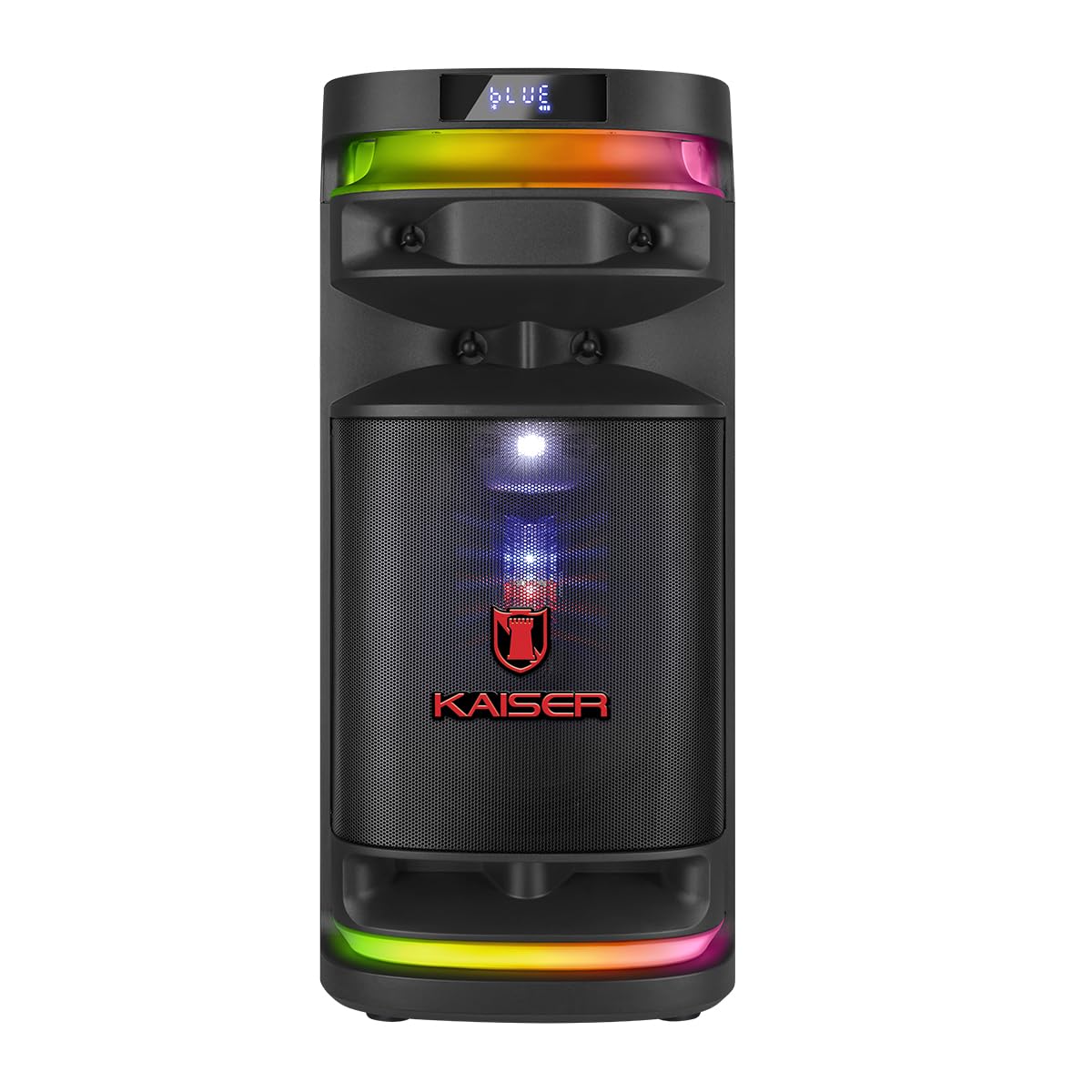
Immaġni: Quddiem view of the Kaiser KSB-4010 portable speaker, showcasing the 10-inch woofer, tweeter, midrange, and RGB LED lighting.
Panel tal-Kontroll

Immaġni: Fuq view of the speaker's control panel, showing various input ports, volume knobs, and function buttons.
The control panel located on the top of the speaker includes:
- Swiċċ tal-Enerġija (ON/OFF): To turn the speaker on or off.
- Charging Indicator (CARGA): Lights up when charging.
- Power Input (ALIMENTACIÓN): Għall-konnessjoni tal-adapter tal-enerġija.
- Slott Mikro SD: Għad-daqq tal-mużika minn kard Micro SD.
- Port USB: Għad-daqq tal-mużika minn USB drive.
- Input AUX: Għall-konnessjoni ta' apparati awdjo esterni permezz ta' kejbil ta' 3.5mm.
- GUIT Input: Għall-konnessjoni ta' kitarra.
- Inputs tal-MIC 1 / MIC 2: Għall-konnessjoni ta' mikrofoni bil-fili.
- VOL MIC: Microphone volume control knob.
- VOLUMEN: Pum tal-kontroll tal-volum prinċipali.
- Buttuna LED: To cycle through or turn off LED light modes.
- GRAB Button: For recording audio (e.g., microphone input).
- MIC PRIO Button: Microphone priority function.
- REPETIR Button: Irrepeti l-mod ta' daqq.
- Buttuni tal-Track ta' Preċedenti/Li jmiss: For navigation during media playback.
- Buttuna Play/Pause: Għall-kontroll tal-plejbek tal-midja.
- KSR-LINK Button: For connecting two KSR-Link compatible speakers.
- MODO BT Button: To switch between input modes (Bluetooth, USB, Micro SD, AUX).
4. Setup
Iċċarġjar Inizjali
- Connect the USB charging cable to the speaker's ALIMENTACIÓN port.
- Connect the other end of the USB cable to a compatible power adapter (not included) and plug it into a power outlet.
- The CARGA indicator light will illuminate, indicating that the speaker is charging.
- Allow the speaker to charge fully before first use (approximately 4-6 hours). The indicator light may change or turn off when fully charged.
Tixgħel/Jitfi
- To turn on the speaker, slide the POWER switch to the ON pożizzjoni.
- To turn off the speaker, slide the POWER switch to the OFF pożizzjoni.
5. Istruzzjonijiet Operattivi
Tqabbil tal-Bluetooth
- Turn on the KSB-4010 speaker.
- Agħfas il- MODO BT button repeatedly until the display shows "BLUE" or "BT" and a pairing indicator flashes.
- Ippermetti l-Bluetooth fuq l-apparat mobbli tiegħek (smartphone, tablet, eċċ.).
- Fittex għal available Bluetooth devices and select "KSB-4010" from the list.
- Once connected, the speaker will emit a confirmation sound, and the Bluetooth indicator will stop flashing.
Daqq USB/Micro SD
- Insert a USB drive or Micro SD card (pre-loaded with MP3 audio files) fil-port rispettiv.
- The speaker will automatically switch to USB or Micro SD mode and begin playback. If not, press the MODO BT buttuna biex tagħżel l-input korrett.
- Uża l-buttuni Play/Pause, Preċedenti, u Li jmiss biex tikkontrolla l-plejbek.
Input AUX
- Qabbad tarf wieħed ta' kejbil awdjo ta' 3.5mm (mhux inkluż) mal-port tad-dħul AUX fuq l-ispiker.
- Qabbad it-tarf l-ieħor mal-output tal-awdjo tat-tagħmir estern tiegħek (eż. MP3 player, laptop).
- Agħfas il- MODO BT button to select AUX input mode.
- Ikkontrolla d-daqq u l-volum mit-tagħmir estern tiegħek.
Microphone and Guitar Use
- For the wireless microphone, ensure it is charged and powered on. It should automatically connect to the speaker.
- For wired microphones, connect them to the MIC 1 or MIC 2 portijiet tad-dħul.
- Qabbad kitarra mal- GUIT port tad-dħul.
- Aġġusta l-volum tal-mikrofonu billi tuża l- VOL MIC pum.
- Uża l- MIC PRIO button to enable microphone priority, which lowers music volume when the microphone is in use.
KSR-Link Function (True Wireless Stereo)
To connect two KSB-4010 speakers for a stereo sound experience:
- Ensure both KSB-4010 speakers are powered on and in Bluetooth mode, but not connected to any device.
- Fuq kelliem wieħed (dan se jkun il-kelliem primarju), agħfas u żomm il-buttuna KSR-LINK button. It will emit a sound indicating it's searching.
- Fuq it-tieni kelliem, agħfas il-buttuna KSR-LINK buttuna fil-qosor.
- The two speakers will connect automatically. A confirmation sound will indicate successful pairing.
- Issa, qabbad l-apparat mobbli tiegħek mal-ispiker primarju permezz tal-Bluetooth kif deskritt hawn fuq. L-awdjo se jindaqq miż-żewġ kelliema b'mod stereo.
Kontroll tad-Dawl LED
Agħfas il- LED button on the control panel to cycle through different RGB lighting modes or to turn the lights off.
6. Manutenzjoni
Tindif
- Always turn off and unplug the speaker before cleaning.
- Uża drapp artab u niexef biex timsaħ l-uċuħ ta’ barra.
- Tużax prodotti tat-tindif li joborxu, xama', jew solventi.
Ħażna
- Aħżen l-ispiker f'post frisk u niexef 'il bogħod mix-xemx diretta u minn temperaturi estremi.
- Jekk se taħżinha għal perjodu estiż, iċċarġja l-batterija perjodikament (eż. kull 3 xhur) biex iżżommha f'saħħitha.
7 Issolvi l-problemi
| Problema | Kawża Possibbli | Soluzzjoni |
|---|---|---|
| L-ispiker ma jixgħelx | Low battery; Power switch off; Faulty power adapter/cable | Charge the speaker; Ensure power switch is ON; Try a different power source or cable. |
| L-ebda ħoss | Volume too low; Incorrect input mode; Device not connected; Muted source device | Increase speaker and source device volume; Press MODO BT to select correct input; Re-pair Bluetooth or re-connect cable; Unmute source device. |
| Il-konnessjoni Bluetooth tfalli | Speaker not in pairing mode; Device too far; Interference; Already connected to another device | Ensure speaker is in Bluetooth pairing mode; Move device closer; Avoid obstacles; Disconnect from other devices and try again. |
| Mikrofonu mhux qed jaħdem | Microphone off; Low microphone volume; Incorrect input | Ensure microphone is powered on; Adjust VOL MIC knob; Check if wired microphone is fully inserted. |
| KSR-Link not connecting | Speakers not in pairing mode; Too far apart; Already connected to a device | Ensure both speakers are in KSR-Link pairing mode (not connected to phone); Place speakers closer; Disconnect any Bluetooth devices before KSR-Link pairing. |
8. Speċifikazzjonijiet
Technical specifications for the Kaiser KSB-4010 Portable Speaker:
| Karatteristika | Speċifikazzjoni |
|---|---|
| Isem tal-Mudell | KSB-4010 |
| Tip ta' Kelliem | Portable One Body Speaker |
| Konfigurazzjoni tal-Ispeaker | 10" Woofer, 2" Tweeter, 3" Midrange |
| Ħruġ ta 'Qawwa RMS | 70W |
| Teknoloġija tal-Konnettività | Bluetooth, USB, Micro SD, AUX, Guitar, Mic |
| Komunikazzjoni bla fili | Bluetooth |
| Karatteristiċi Speċjali | RGB LED Lights, KSR-Link (TWS), Rechargeable Battery |
| Metodu ta' Kontroll | Tactile Buttons |
| Komponenti Inklużi | Mikrofonu bla fili |
| Sors tal-Enerġija | Batterija |
| Dimensjonijiet (H x W x D) | 71.5 ċm x 32 ċm x 33.5 ċm |

Image: Diagram showing the approximate dimensions of the Kaiser KSB-4010 speaker.
9. Garanzija u Appoġġ
Garanzija Limitata
This Kaiser KSB-4010 speaker comes with a limited warranty. Please refer to the warranty card included in your package or contact Kaiser customer support for specific terms and conditions.
Appoġġ għall-Klijent
For technical assistance, troubleshooting beyond this manual, or warranty inquiries, please contact Kaiser customer support through their official webis-sit jew l-informazzjoni ta' kuntatt ipprovduta mad-dokumentazzjoni tal-prodott tiegħek.