
1. Matulview
The Kaiser KSB-4226 Professional Speaker System is designed to deliver powerful and high-quality sound for various events, presentations, and parties. This system features three 12-inch speakers and a 2-inch tweeter, providing deep bass and clear audio with a maximum output of 40,000 W PMPO (170W RMS). Its robust construction and professional design make it suitable for both indoor and outdoor use, ensuring durability and consistent performance.
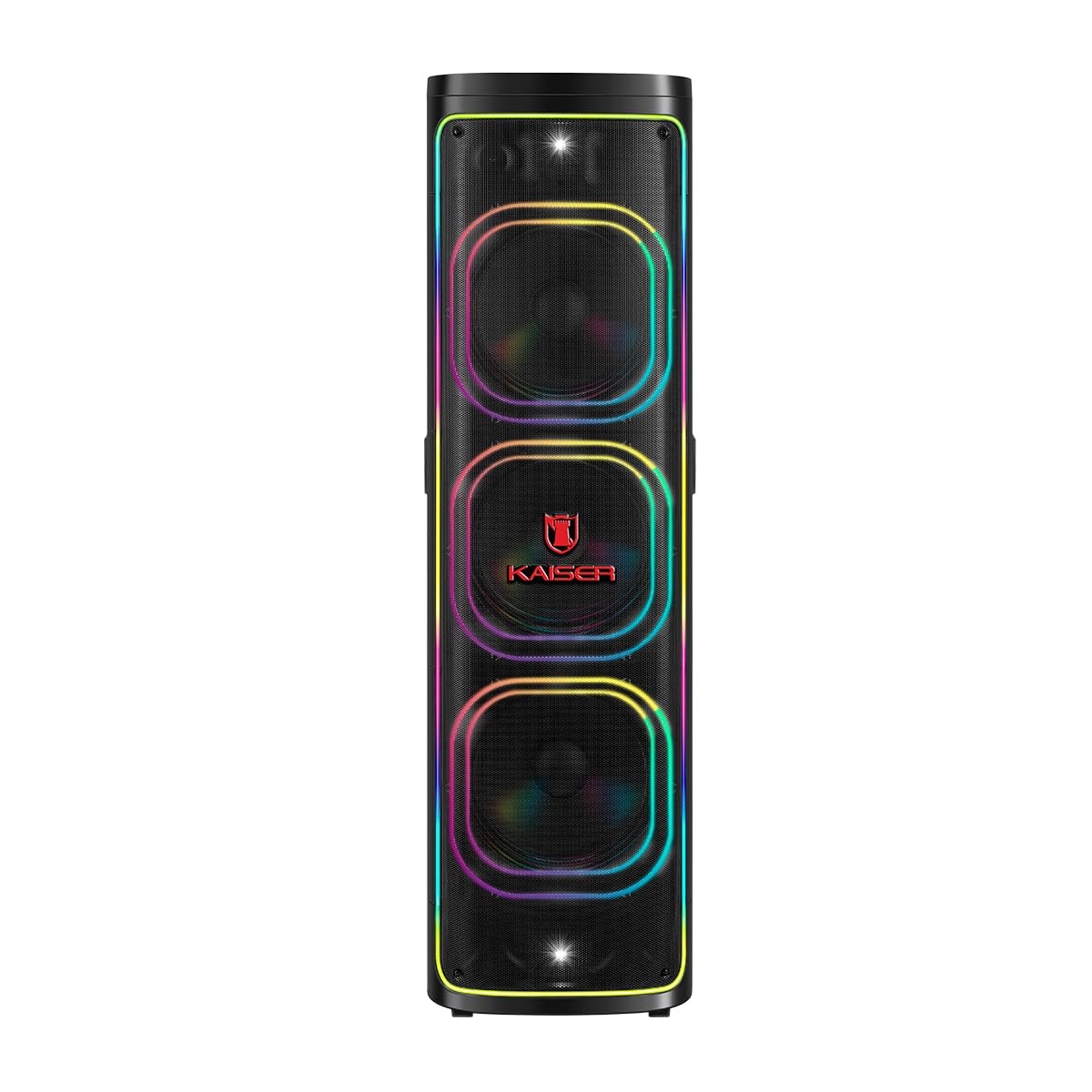
Figura 1: Quddiem view of the Kaiser KSB-4226 Professional Speaker System.
2. Informazzjoni dwar is-Sigurtà
- Sors tal-Enerġija: Ensure the speaker is connected to a power source that matches the voltagSpeċifikat fuq l-apparat.
- Ventilazzjoni: Do not block ventilation openings. Allow adequate space around the speaker for proper airflow.
- Ilma u Umdità: Keep the speaker away from water, rain, and excessive moisture. This unit is IPX4 splashproof, but not waterproof.
- Sħana: Do not place the speaker near heat sources such as radiators, heat registers, stoves, or other heat-producing appliances.
- Tindif: Unplug the speaker from the power outlet before cleaning. Use a dry cloth for cleaning.
- Servizzi: Tippruvax isservi dan il-prodott int stess. Irreferi l-manutenzjoni kollha lil persunal tas-servizz kwalifikat.
- Pjazzament: Poġġi l-ispiker fuq wiċċ stabbli u ċatt biex tevita li jaqa'.
3. Kontenut tal-Pakkett
Ivverifika li l-oġġetti kollha huma preżenti fil-pakkett:
- Kaiser KSB-4226 Professional Speaker System
- Mikrofonu bla fili
- Kejbil tal-Enerġija
- Kontroll mill-bogħod
- Manwal għall-Utent (dan id-dokument)

Figure 2: Included accessories: remote control and power cable.
4. Karatteristiċi tal-prodott
- High-Performance Sound: Equipped with three 12-inch speakers and a 2-inch tweeter for powerful bass and clear, crisp audio.
- Ħruġ ta' Enerġija Għolja: 40,000 W PMPO (170W RMS) ideal for large events, presentations, meetings, and parties.
- Effetti tal-Ħsejjes Integrati: Customize your musical experience with various ambient and style effects.
- Disinn Robust u Durabbli: High-quality construction for long-lasting and reliable use.
- Użu versatili: Perfect for indoor and outdoor settings, from family gatherings to professional events.
- Powerful and Clear Audio: Capable of filling large spaces with uniform, high-quality sound.
- Integrazzjoni faċli: Compatible with various audio sources for enhanced practicality.
- Konnettività Bluetooth: Seamless wireless audio streaming.
- KSR-Link Technology: For connecting multiple compatible Kaiser speakers.
- Square Light: Integrated LED lighting for dynamic visual effects.
5. Setup
- Ippakkja: Carefully remove the speaker system and all accessories from the packaging.
- Pjazzament: Position the speaker on a stable, flat surface. Ensure there is enough space around the unit for proper ventilation.
- Konnessjoni tal-Enerġija: Connect the power cable to the speaker's power input and then to a suitable electrical outlet.
- Qawwa Mixgħul: Locate the power switch on the control panel (refer to Figure 3) and turn the unit ON. The display should light up.
6. Istruzzjonijiet Operattivi
6.1. Konnessjoni Bluetooth
- Ixgħel is-sistema tal-kelliem.
- Agħfas il- MODALITÀ button on the control panel until "BLUE" appears on the display, indicating Bluetooth mode.
- Fuq l-apparat mobbli tiegħek (smartphone, tablet, eċċ.), attiva l-Bluetooth u fittex apparati disponibbli.
- Select "KSB-4226" (or similar model name) from the list of devices to pair.
- Once connected, you will hear a confirmation tone, and the display will show "Connected".
- You can now play audio from your device through the speaker system.
6.2. Daqq tal-Karta USB/TF
- Insert a USB flash drive or TF (Micro SD) card into the corresponding port on the control panel.
- The speaker system should automatically switch to USB/TF mode and begin playing audio files. Jekk le, agħfas il-buttuna MODALITÀ buttuna biex tagħżel l-input korrett.
- Use the playback controls (Play/Pause, Previous, Next) on the control panel or remote control to manage your music.
6.3. Input AUX
- Qabbad apparat awdjo estern (eż., MP3 player, laptop) mal-port AUX IN billi tuża kejbil awdjo ta' 3.5mm.
- Agħfas il- MODALITÀ Agħfas il-buttuna sakemm jidher "AUX" fuq id-displej.
- Daqq l-awdjo mit-tagħmir konness tiegħek.
6.4. Użu tal-mikrofonu
- Connect the wireless microphone (or a wired microphone to MIC 1/MIC 2 input).
- Adjust the microphone volume using the dedicated VOL MIC knob on the control panel.
- Adjust echo effects using the ECHO knob for karaoke or vocal performances.
6.5. KSR-Link (True Wireless Stereo)
To connect two KSB-4226 units for a stereo experience:
- Ensure both KSB-4226 speakers are powered on and in Bluetooth mode, but not yet paired with any device.
- On one speaker (this will be the master unit), press and hold the KSR-LINK button. You will hear a tone.
- The master unit will search for the second speaker. Once connected, you will hear another confirmation tone, and the display will indicate TWS mode.
- Now, connect your mobile device to the master KSB-4226 via Bluetooth as described in section 6.1.
- Audio will now play in true stereo across both speakers.
7. Kontrolli u Konnessjonijiet
7.1. Top Control Panel

Figure 3: Top Control Panel.
- Swiċċ POWER: Dawwar l-unità ON / OFF.
- Buttuna tal-VOLUM: Jaġġusta l-livell tal-volum prinċipali.
- Buttuna MODE: Switches between input sources (Bluetooth, USB, TF Card, AUX).
- Buttuna PLAY/PAUSE: Jdoqq jew iwaqqaf id-daqq tal-awdjo.
- Buttuni PREĊEDENTI/LI JMISS: Jaqbeż għat-trakka ta' qabel jew li jmiss.
- Buttuna LED: Jikkontrolla l-effetti tad-dawl LED.
- Buttuna EQ: Jagħżel il-presets tal-ekwalizzatur.
- Buttuna MUTE: Ijattiva l-output tal-awdjo.
- X-BASS Button: Ittejjeb il-ħruġ tal-bass.
- VOL MIC Knob: Jaġġusta l-volum tal-mikrofonu.
- Pum ECHO: Adjusts microphone echo effect.
- GRAVES (Bass) Knob: Jaġġusta l-livelli tal-bass.
- AGUDOS (Treble) Knob: Jaġġusta l-livelli tat-treble.
- MIC 1.IN / MIC 2.IN: 6.3mm inputs for wired microphones.
- AUX IN: Input ta' 3.5mm għal apparati awdjo esterni.
- TF CARD Slot: Għall-plejbek ta' kard Micro SD.
- Port USB: Għall-plejbek ta' flash drive tal-USB.
- DC IN: Power input for charging/operation.
7.2. Konnessjonijiet tal-Panew ta 'wara

Figura 4: Il-Panel ta' Wara.
- Input tal-Enerġija AC: Jikkonnettja mal-provvista ewlenija tal-enerġija.
- Ħruġ tal-Awdjo (RCA): For connecting to other audio systems or recording devices.
- Riżultat tal-Kelliem: For connecting passive speakers (if applicable, refer to specific model details).
8. Manutenzjoni
- Tindif: Uża drapp artab u niexef biex tnaddaf il-barra tal-ispiker. Tużax prodotti tat-tindif jew solventi li joborxu.
- Ħażna: Meta ma tkunx qed tużah għal perjodi twal, aħżen l-ispiker f'post frisk u niexef, 'il bogħod mix-xemx diretta u minn temperaturi estremi.
- Kura tal-batterija: If the speaker has an internal rechargeable battery, ensure it is fully charged before long-term storage to maintain battery health.
9 Issolvi l-problemi
| Problema | Kawża Possibbli | Soluzzjoni |
|---|---|---|
| Ebda qawwa | Power cable not connected; Power switch OFF; No power from outlet. | Check power cable connection; Turn power switch ON; Test outlet with another device. |
| L-ebda ħoss | Volum baxx wisq; Modalità ta' input mhux korretta; Apparat mhux imqabbad sew. | Increase volume; Press MODE to select correct input; Reconnect audio source. |
| Il-Bluetooth mhux qed jgħaqqad | Speaker not in Bluetooth mode; Device Bluetooth OFF; Too far from speaker. | Press MODE to select Bluetooth; Enable Bluetooth on device; Move device closer (within 10m). |
| Mikrofonu mhux qed jaħdem | Microphone volume too low; Microphone OFF; Incorrect input. | Increase VOL MIC; Ensure microphone is ON; Check if wired mic is in MIC 1/2. |
10. Speċifikazzjonijiet
- Ditta: Kaiser
- Mudell: KSB-4226
- Konfigurazzjoni tal-Ispeaker: 3 x 12-inch speakers + 2-inch tweeter
- Qawwa RMS: 170W
- Peak Music Power Output (PMPO): 40,000 Watts
- Teknoloġija tal-Konnettività: Bluetooth (2.4 GHz frequency response)
- Modalità tal-Ħruġ tal-Awdjo: Jdawru
- Tip ta' Kelliem: Atmosferiku
- Metodu ta' Kontroll: Mess
- Sors tal-Enerġija: Kejbil Elettriku
- Dimensjonijiet (DxWxH): 45 x 45 x 151.6 ċm (madwar 17.7 x 17.7 x 59.7 pulzieri)
- Aċċessorji inklużi: Wireless microphone, remote control, power cable.

Figure 5: Kaiser KSB-4226 dimensions.
11. Garanzija u Appoġġ
This Kaiser KSB-4226 Professional Speaker System comes with a Garanzija ta' 90 jum mill-manifattur mid-data tax-xiri. Din il-garanzija tkopri difetti fil-manifattura taħt użu normali. Ma tkoprix ħsara kkawżata minn użu ħażin, inċidenti, modifiki mhux awtorizzati, jew xedd u kedd normali.
For technical support, warranty claims, or service inquiries, please contact your retailer or visit the official Kaiser websit għal informazzjoni dwar is-servizz tal-konsumatur.
12. Product Demonstration (Related Model)
The following video demonstrates features and lighting effects of a similar Kaiser speaker model (KDS-1202). While the model number differs, many operational aspects and visual features are comparable to the KSB-4226.
Video: Demonstration of a Kaiser speaker system (KDS-1202) showcasing features like LED lighting and controls.