
1. Prodott Aktarview
The Kaiser KSB-4008 is a versatile portable Bluetooth speaker designed for powerful audio output and dynamic lighting effects. It features an 8-inch woofer, 2.5-inch tweeter, and mid-range drivers, delivering 40W RMS of balanced sound. Integrated RGB LED lighting enhances the atmosphere for various events. With KSR-Link technology, you can wirelessly connect another compatible speaker for an expanded sound experience. The speaker includes a rechargeable battery, Bluetooth connectivity, and supports USB and Micro SD inputs for diverse music playback options. Its robust and portable design makes it suitable for both indoor and outdoor use.
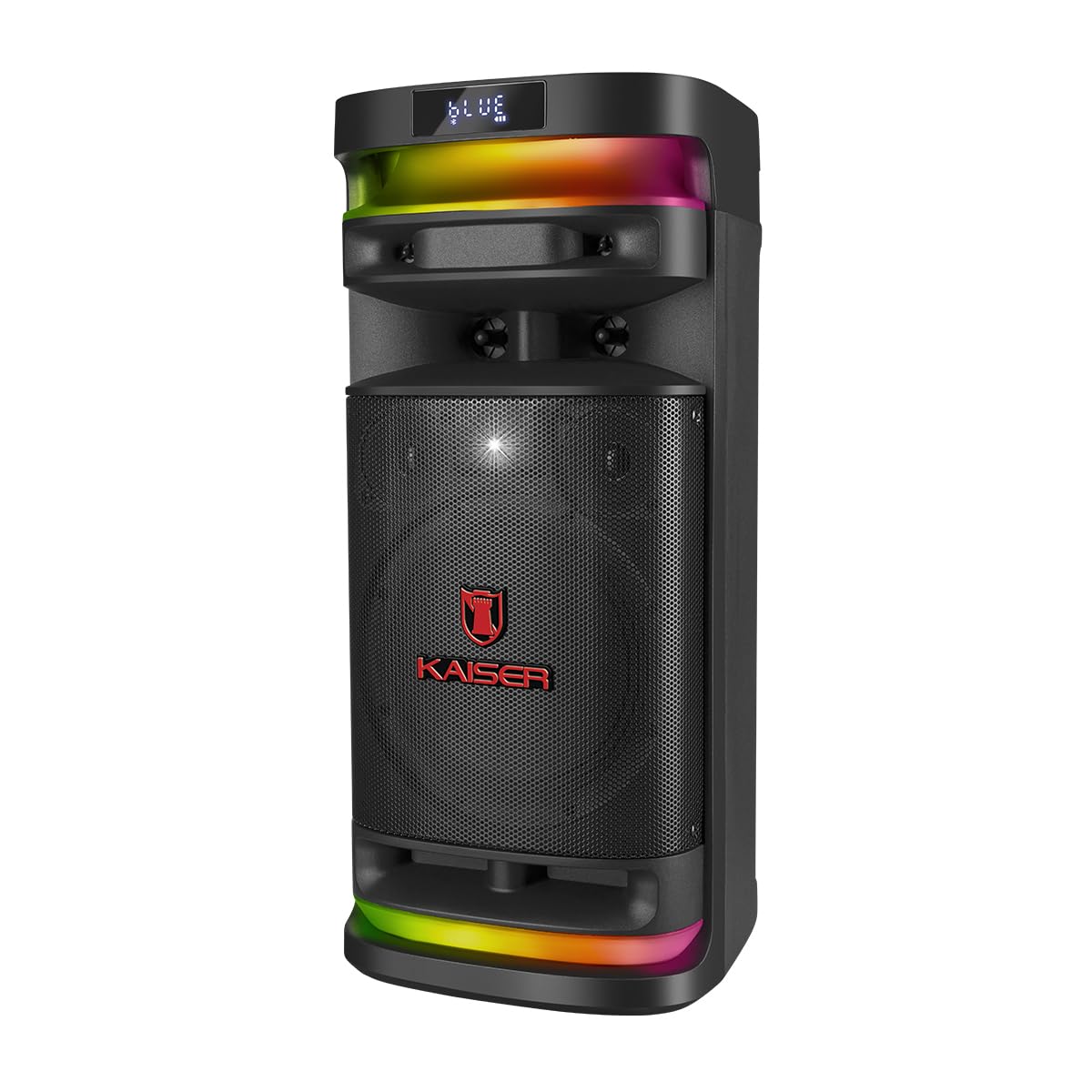
Figura 1.1: Quddiem view of the Kaiser KSB-4008 Portable Bluetooth Speaker, showcasing its speaker grille and RGB LED light strips.
Karatteristiċi ewlenin:
- 40W RMS Power: Provides powerful and balanced audio output.
- Full Speaker Configuration: Includes an 8-inch woofer, 2.5-inch tweeter, and mid-range for comprehensive sound reproduction.
- RGB LED Light Effect: Multi-color lighting creates a vibrant atmosphere.
- KSR-Link Technology: Allows wireless connection to another compatible speaker for ampħoss lifikat.
- Konnettività versatili: Supports Bluetooth, USB, and Micro SD for various audio sources.
- Batterija rikarikabbli: Enables extended use without constant power connection.
- Portable and Sturdy Design: Easy to transport for indoor or outdoor events.
2. Kontenut tal-Pakkett
Jekk jogħġbok immarka l-kaxxa għall-oġġetti li ġejjin:
- Kaiser KSB-4008 Portable Bluetooth Speaker
- Mikrofonu bla fili
- Charging Cable (for microphone)
- Manwal għall-Utent (dan id-dokument)

Figura 2.1: Included wireless microphone and its USB charging cable.
3. Istruzzjonijiet tas-Sigurtà
Biex tiżgura tħaddim sikur u tevita ħsara, jekk jogħġbok aqra u segwi dawn il-linji gwida tas-sigurtà:
- Tesponix l-ispiker għall-ilma, umdità, jew temperaturi estremi.
- Avoid placing the speaker near heat sources or in direct sunlight for extended periods.
- Aċċerta ruħek li jkun hemm ventilazzjoni xierqa; timblokkax xi fetħiet tal-ventilazzjoni.
- Use only the specified charging cables and power adapters.
- Do not attempt to open, modify, or repair the speaker yourself. Refer all servicing to qualified personnel.
- Żomm il-kelliem 'il bogħod mit-tfal u l-annimali domestiċi.
- Operate the speaker within its specified voltage u limiti kurrenti.
- Evita li tisma' f'volumi għoljin wisq għal perjodi twal biex tevita ħsara fis-smigħ.
4. Komponenti u Kontrolli tal-Prodott
Familiarize yourself with the various parts and controls of your KSB-4008 speaker.
Figura 4.1: Top Control Panel Layout.
Funzjonijiet tal-Panew tal-Kontroll:
- Swiċċ POWER: Jixgħel/Jitfi l-ispiker.
- CARGA (Charge) Indicator: Lights up when charging.
- Input AUX: Jack ta' 3.5mm għal apparati awdjo esterni.
- Port USB: Għal flash drives tal-USB.
- Slott Mikro SD: For Micro SD cards.
- Input MIC: 6.35mm jack for wired microphone (if used).
- GUIT Input: 6.35mm jack for guitar (if used).
- VOL MIC (Microphone Volume): Adjusts the volume of the microphone.
- VOLUMEN (Master Volume): Jaġġusta l-volum ġenerali tal-ispiker.
- Buttuna LED: Controls the RGB LED light effects.
- GRAB Button: For recording audio (functionality may vary).
- MIC PRIO (Microphone Priority): Jagħti prijorità lill-awdjo tal-mikrofonu fuq il-mużika.
- REPETIR (Repeat) Button: Jirrepeti t-trakka jew il-playlist kurrenti.
- Previous Track / Rewind Button: Skips to previous track or rewinds.
- Buttuna Play/Pause: Jdoqq jew iwaqqaf id-daqq tal-awdjo.
- Next Track / Fast Forward Button: Skips to next track or fast forwards.
- MODO BT (Mode/Bluetooth) Button: Switches between input modes (Bluetooth, USB, Micro SD, AUX) and initiates Bluetooth pairing.
5. Twaqqif u Użu Inizjali
5.1 Iċċarġjar tal-Ispeaker
- Connect the speaker to a power outlet using a compatible charging cable (not explicitly listed but implied).
- The 'CARGA' indicator light on the control panel will illuminate during charging.
- Once fully charged, the indicator light may change color or turn off. Disconnect the speaker from the power source.
5.2 Tixgħel/Jitfi
- To turn ON the speaker, toggle the QAWWA is-swiċċ għall-pożizzjoni 'ON'.
- To turn OFF the speaker, toggle the QAWWA is-swiċċ għall-pożizzjoni 'MITFI'.
5.3 Wireless Microphone Setup
- Ensure the wireless microphone is charged. Use the provided USB charging cable if necessary.
- Turn on the microphone using its power button.
- The microphone should automatically pair with the speaker. If not, refer to the microphone's specific instructions for pairing.
- Aġġusta l-volum tal-mikrofonu billi tuża l- VOL MIC il-pum fuq il-pannell tal-kontroll tal-ispiker.
6. Istruzzjonijiet Operattivi
6.1 Konnessjoni Bluetooth
- Ixgħel il-kelliem.
- Agħfas il- MODO BT button repeatedly until 'BLUE' or 'BT' appears on the display, indicating Bluetooth mode. The speaker will enter pairing mode.
- Fuq it-tagħmir mobbli tiegħek, ippermetti l-Bluetooth u fittex tagħmir disponibbli.
- Select 'Kaiser KSB-4008' (or similar name) from the list.
- Once connected, the speaker will confirm with an audible prompt, and the display will show a stable Bluetooth icon.
6.2 Daqq tal-USB / Mikro SD
- Insert a USB flash drive or Micro SD card into the respective port/slot.
- The speaker should automatically switch to USB or Micro SD mode and begin playing audio files. Jekk le, agħfas il-buttuna MODO BT button to select the correct input mode.
- Uża l-buttuni Play/Pause, Preċedenti Track, u Li Jmiss Track biex tikkontrolla l-plejbek.
6.3 Input AUX
- Qabbad apparat awdjo estern (eż., smartphone, MP3 player) mal- AUX input bl-użu ta' kejbil awdjo ta' 3.5mm.
- Agħfas il- MODO BT button to select AUX input mode.
- Ikkontrolla l-plejbek mit-tagħmir konness tiegħek.
6.4 KSR-Link Technology (True Wireless Stereo)
KSR-Link allows you to connect two KSB-4008 speakers wirelessly for a stereo sound experience.
- Ensure both KSB-4008 speakers are powered on and in Bluetooth mode, but not connected to any device.
- Fuq wieħed mill-ispikers (dan se jkun l-ispiker primarju), agħfas u żomm il-buttuna MODO BT button for a few seconds until you hear a confirmation tone, indicating KSR-Link pairing mode.
- The two speakers will automatically connect to each other. Once connected, you will hear another confirmation tone.
- Issa, qabbad l-apparat mobbli tiegħek mal-ispiker primarju permezz tal-Bluetooth kif deskritt fit-taqsima 6.1.
- L-awdjo issa se jindaqq b'mod stereo miż-żewġ kelliema.
6.5 RGB LED Light Control
- Agħfas il- LED button on the control panel to cycle through different light modes or to turn the lights off.
6.6 Aġġustament tal-Volum
- Adjust the overall speaker volume using the VOLUMEN pum.
- Adjust the wireless microphone volume using the VOL MIC pum.
7. Manutenzjoni
7.1 Tindif
- Always turn off the speaker and disconnect it from power before cleaning.
- Uża drapp artab u niexef biex timsaħ l-uċuħ ta’ barra.
- Tużax prodotti tat-tindif, xama', jew solventi li joborxu għax jistgħu jagħmlu ħsara lill-finitura.
- Evita li tidħol l-umdità fi kwalunkwe fetħiet.
7.2 Ħażna
- Aħżen l-ispiker f'post frisk u niexef 'il bogħod mix-xemx diretta u minn temperaturi estremi.
- Jekk taħżinha għal perjodu estiż, iċċarġja l-batterija sa madwar 50% kull ftit xhur biex iżżommha f'saħħitha.
8 Issolvi l-problemi
If you encounter issues with your KSB-4008 speaker, refer to the following common problems and solutions:
| Problema | Kawża Possibbli | Soluzzjoni |
|---|---|---|
| L-ispiker ma jixgħelx. | Il-batterija hija eżawrita. Is-swiċċ tal-enerġija huwa mitfi. | Charge the speaker. Ensure the POWER switch is in the 'ON' position. |
| Ebda output tal-ħoss. | Il-volum huwa baxx wisq. Modalità ta' input mhux korretta. L-apparat mhux imqabbad sew. | Żid il- VOLUMEN knob. Press MODO BT to select the correct input. Reconnect your audio source. |
| L-apparat Bluetooth ma jistax jingħaqad. | L-ispiker mhux fil-modalità ta' tqabbil. L-apparat wisq 'il bogħod. Interferenza. | Ensure speaker is in Bluetooth pairing mode (display shows 'BLUE' or 'BT'). Move device closer to speaker. Turn off other Bluetooth devices. |
| Wireless microphone not working. | Microphone battery low. Microphone not turned on. VOL MIC is low. | Charge the microphone. Turn on the microphone. Increase the VOL MIC pum. |
| KSR-Link connection fails. | Speakers already connected to a device. Incorrect pairing procedure. | Ensure both speakers are not connected to any Bluetooth device. Follow KSR-Link pairing steps carefully. |
9. Speċifikazzjonijiet
Technical specifications for the Kaiser KSB-4008 Portable Bluetooth Speaker:

Figura 9.1: Kaiser KSB-4008 Speaker Dimensions.
| Karatteristika | Speċifikazzjoni |
|---|---|
| Brand | Kaiser |
| Mudell | KSB-4008 |
| Tip ta' Kelliem | Atmosferiku |
| Peak Power Handling (RMS) | 40 Watts |
| Daqs tal-Woofer | 8 pulzieri |
| Daqs tat-Tweeter | 2.5 pulzieri |
| Konnettività | Bluetooth, USB, Mikro SD, AUX |
| Karatteristiċi Speċjali | RGB LED Light, KSR-Link Technology, Rechargeable Battery |
| Dimensjonijiet tal-Prodott (LxWxH) | 37.4 x 36.2 x 80 cm (Note: Image shows 56.7 x 26.5 x 25 cm, please verify actual dimensions) |
| Piż tal-oġġett | 500 g |
| Komponenti Inklużi | Mikrofonu bla fili |
Note: Product dimensions from specifications (37.4 x 36.2 x 80 cm) differ from the provided image (56.7 x 26.5 x 25 cm). Please refer to the product packaging for the most accurate dimensions.
10. Garanzija u Appoġġ
For warranty information and technical support, please refer to the warranty card included with your product or visit the official Kaiser websit. Żomm l-irċevuta tax-xiri tiegħek bħala prova tax-xiri għal kwalunkwe talba ta' garanzija.